🎉NEWCapSolver for AI agents-MCP, agent tools, and SDK integrations

Lucas Mitchell
Automation Engineer
Published Feb 05, 2026
Updated Feb 05, 2026 · min read
TL;Dr:
Web scraping is crucial for the $1.17 billion data extraction market in 2026. However, increasing sophistication in data collection meets growing barriers. Developers often face status codes, with the 429 error meaning a persistent hurdle. This guide explores identifying, troubleshooting, and resolving common web scraper error types. Learn to achieve high success rates with professional strategies. Our aim is to build resilient data pipelines for the complex security landscape of 2026.
Beyond the frequent 429 error meaning, a spectrum of HTTP status codes can derail scraping operations. Each code signals a different underlying issue, requiring a tailored approach for resolution. Understanding these signals is fundamental to building robust scraping infrastructure.
This web scraper error indicates the server cannot process the request due to client-side issues, such as malformed syntax, invalid request message framing, or deceptive request routing. Common causes include incorrect URL parameters, invalid JSON payloads, or non-standard HTTP methods. To resolve a 400 error, meticulously validate your request structure against the target API or website's expected format. Ensure all required fields are present and correctly formatted. Debugging tools can help pinpoint the exact malformation.
A 401 error signifies that the request lacks valid authentication credentials for the target resource. This often occurs when scraping protected content that requires login tokens, API keys, or session cookies. If your scraper encounters a 401, it means your authentication mechanism is either missing, expired, or incorrect. Solutions involve correctly managing session cookies, refreshing authentication tokens, or integrating with OAuth flows. For complex authentication scenarios, tools that handle session persistence can be invaluable.
While less common in general web scraping, a 402 error can appear in specific contexts, particularly with paid APIs or services. It indicates that the client needs to make a payment to access the requested resource. In a scraping context, this might mean you've hit a free tier limit or are attempting to access premium data without the necessary subscription. This web scraper error typically requires reviewing the service's pricing model or adjusting your data acquisition strategy to public, free-tier data.
The 403 Forbidden error is a strong signal that the server understands your request but refuses to fulfill it. This is often due to IP blacklisting, User-Agent filtering, or other advanced security measures. Unlike a 401, authentication won't help; the server simply denies access. To counter this web scraper error, strategies include rotating IP addresses, optimizing User-Agent strings, and managing browser fingerprints.
The HTTP 429 status code signals excessive requests within a timeframe. Per IETF RFC 6585, it includes a "Retry-After" header. A web scraper error of this type often means predictable or aggressive scraping. Understanding rate limiting is key to resilience. Servers use algorithms like Token Bucket to manage traffic, blocking scrapers that exceed limits.
In 2026, the 429 error meaning extends beyond simple requests per minute. Modern systems use "sliding window" logs for longer-term request density. High volume over an hour can trigger blocks, even if short-term limits are met. Some servers use 429 as a precursor to permanent IP bans. Early recognition allows strategy adjustment before permanent flagging. Treating 429 as feedback optimizes your scraper for long-term stability.
These server-side errors indicate problems on the website's end, not directly with your scraper's request. A 500 error means the server encountered an unexpected condition. A 502 error often signifies a proxy server received an invalid response from an upstream server. While you can't directly fix these, your scraper should be designed to handle them gracefully with retries and logging. If these errors persist, it might indicate an issue with the target website itself, or that your requests are inadvertently triggering server-side exceptions due to unexpected data or behavior.
Security providers often introduce their own error codes. Cloudflare, a widely used service, can present various challenges. A 1001 error, for instance, typically points to DNS resolution issues or problems connecting to Cloudflare's network. Other Cloudflare challenges might involve JavaScript redirects or CAPTCHA pages. Overcoming these requires specialized techniques, such as dynamically adjusting user-agents or using headless browsers. CapSolver offers solutions for these scenarios; learn how to change user agent to solve Cloudflare challenges effectively. For more general Cloudflare integration, see Cloudflare PHP.
| Error Code | Primary Cause | Severity | Recommended Fix |
|---|---|---|---|
| 400 Bad Request | Malformed request syntax | Low | Request validation |
| 401 Unauthorized | Missing/invalid authentication | Medium | Session/token management |
| 402 Payment Required | Exceeded free tier/subscription needed | Low | Review service plan |
| 403 Forbidden | IP blacklisting, User-Agent filtering | High | IP rotation, Header optimization |
| 429 Too Many Requests | Rate limiting based on IP or session | Medium | Throttling & IP Rotation |
| 500 Internal Server Error | Server-side issue | Low | Graceful retries, logging |
| 502 Bad Gateway | Proxy/upstream server issue | Low | Graceful retries, logging |
| 1001 Cloudflare Error | DNS/network issues, security challenges | High | User-Agent, headless browser, CapSolver |
The landscape of data collection has shifted. Recent data from the Imperva 2025 Bad Bot Report shows that automated traffic now accounts for 37% of all internet activity. Consequently, websites have implemented advanced behavioral analysis. If your scraper lacks the ability to handle interactive elements or fails to maintain a consistent digital fingerprint, it will likely fail.
A common web scraper error occurs when a script does not account for the "unverified" nature of its traffic. A WP Engine 2025 Report highlights that 76% of bot traffic is unverified, making it a prime target for rate limiting. To stay operational, your infrastructure must prove its legitimacy through proper header management and realistic interaction patterns.
Fixing web scraping errors requires a multi-layered approach. You cannot simply "power through" rate limits; you must adapt to them.
Instead of immediate retries, your script should wait for increasing durations after failures, showing respect for server resources. A sequence like 1, 2, then 4 seconds can reduce 429 error frequency. For advanced use, add "jitter"—randomness to wait times—to prevent multiple scrapers from retrying simultaneously, avoiding accidental DDoS and IP blacklisting.
In 2026, "decorrelated jitter" is also used, calculating wait times with a random factor for unpredictable retry patterns. Combining exponential backoff with smart jitter creates human-like request patterns, crucial for bypassing sensitive rate limiters on high-traffic websites.
Single IPs are easily rate-limited. A pool of residential or mobile proxies distributes request load, making coordinated crawls harder to detect. To avoid IP bans, a diverse proxy pool is vital. Datacenter proxies are often blocked due to known server ranges. Residential proxies, with home user IPs, blend in better.
By 2026, mobile proxies are preferred. They use cellular network IPs, shared by many legitimate users, making servers reluctant to block them due to potential customer impact. Rotating mobile IPs dramatically reduces web scraper error rates. Implement "sticky sessions" where one proxy IP handles a full user journey before rotation, maintaining consistency and preventing "teleporting" user behavior.
HTTP headers reveal your identity. Default library headers, like Axios, signal a bot. To fix this web scraper error, use best user agent strings matching current browser versions. User-Agent, Accept-Language, and Sec-CH-UA headers must align. Modern websites in 2026 use "Client Hints" (Sec-CH headers) for device details. Mismatched User-Agent and Client Hints (e.g., Windows vs. Linux) lead to immediate flagging.
Header order is also critical. Real browsers send headers in specific sequences. If your script deviates, security filters detect it. Use libraries for fixed header order or browser tools. "Referer" and "Origin" headers enhance legitimacy; for example, setting Referer to a search results page for a product page request mimics natural user progression. This detail distinguishes basic scripts from professional data extraction tools.
Websites deploy CAPTCHAs or interactive challenges upon detecting suspicious activity, a common web scraper error. CapSolver automates solving these, ensuring uninterrupted scraping. For reCAPTCHA, hCaptcha, or custom challenges, CapSolver efficiently integrates solutions into your workflow. Learn more about web automation failures on these challenges in Why Web Automation Keeps Failing on CAPTCHA.
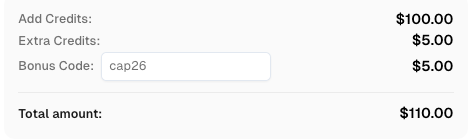
Use code
CAP26when signing up at CapSolver to receive bonus credits!
Websites vary in automation tolerance. Understanding these nuances is crucial for professional developers. In 2026, a "one size fits all" scraping approach is obsolete; tailor your logic to each target's specific defenses.
Large retail sites aggressively rate-limit during peak seasons. A 429 error meaning here typically signals excessive request frequency for a consumer profile. Tools to integrate Playwright can mimic real user journeys (clicks, scrolls), reducing flagging. Retailers also detect "scraping signatures" like API-only JSON requests. To avoid this web scraper error, your scraper should occasionally load images and CSS to simulate a full browser experience.
Highly protective of their valuable data, these sectors use "rate limiting by intent," monitoring visited page types. Visiting only high-value listings without exploring "About Us" or "Contact" pages signals non-human behavior. To fix this web scraper error, intersperse data collection with "noise requests" to low-value pages, diluting your footprint and mimicking a curious user. Ensure correct redirect handling, as many financial sites use temporary redirects to challenge suspicious clients.
Social media and video platforms are sensitive to data harvesting, often checking browser fingerprints. When using Axios in Node.js, manage cookies and session tokens correctly. For interactive challenges, CapSolver automates solutions, navigating complex verification steps without manual intervention, deterring automated collection.
In 2026, a "successful" scraper means efficient and ethical data acquisition, not just data retrieval.
Monitor server response times instead of using fixed delays. Proactively slow requests if latency increases, preventing 429 errors. This proactive approach is superior to reacting to blocks.
Modern security systems analyze more than IP and User-Agent. They check canvas rendering, WebGL capabilities, and battery status. Spoofing these attributes is mandatory for high-scale data collection.
Resolving a web scraper error requires continuous refinement. Understanding the 429 error meaning and implementing solutions like IP rotation, header optimization, and exponential backoff ensures high success. The goal is to blend with legitimate traffic. CapSolver, for complex interactive challenges, provides an edge in 2026's competitive data landscape. Stay adaptive, respect server limits, and build sustainable data pipelines.
1. What is the most common cause of a 429 error?
Exceeding the server's request limit is the most frequent cause, often due to insufficient throttling or too few IP addresses for data volume.
2. Can I fix a 403 Forbidden error just by changing my IP?
Changing your IP might offer temporary relief, but a 403 error often points to deeper browser fingerprint or header issues. Your entire request profile must appear genuinely human.
3. How does CapSolver help with web scraping errors?
CapSolver automates complex interactive challenge resolution, preventing scrapers from getting stuck or flagged, thus reducing errors.
4. Is it illegal to scrape websites in 2026?
Web scraping public data is generally legal, but adhere to terms of service, robots.txt, and data privacy laws like GDPR. Always prioritize ethical data collection.
5. How often should I rotate my User-Agent?
Rotate your User-Agent regularly, ensuring each is a modern, valid string. A pool of the top 50 common User-Agents is a good starting point.
Lucas Mitchell
Automation Engineer
Helping browser automation recover and continue.
ABOUT THE AUTHOR
Learn scalable Rust web scraping architecture with reqwest, scraper, async scraping, headless browser scraping, proxy rotation, and compliant CAPTCHA handling.
Learn the best techniques to scrape job listings without getting blocked. Master Indeed scraping, Google Jobs API, and web scraping API with CapSolver.