
🎉NEWCapSolver for AI agents-MCP, agent tools, and SDK integrations

Sora Fujimoto
AI Solutions Architect
Published Jun 26, 2026
Updated Jun 24, 2026 · min read
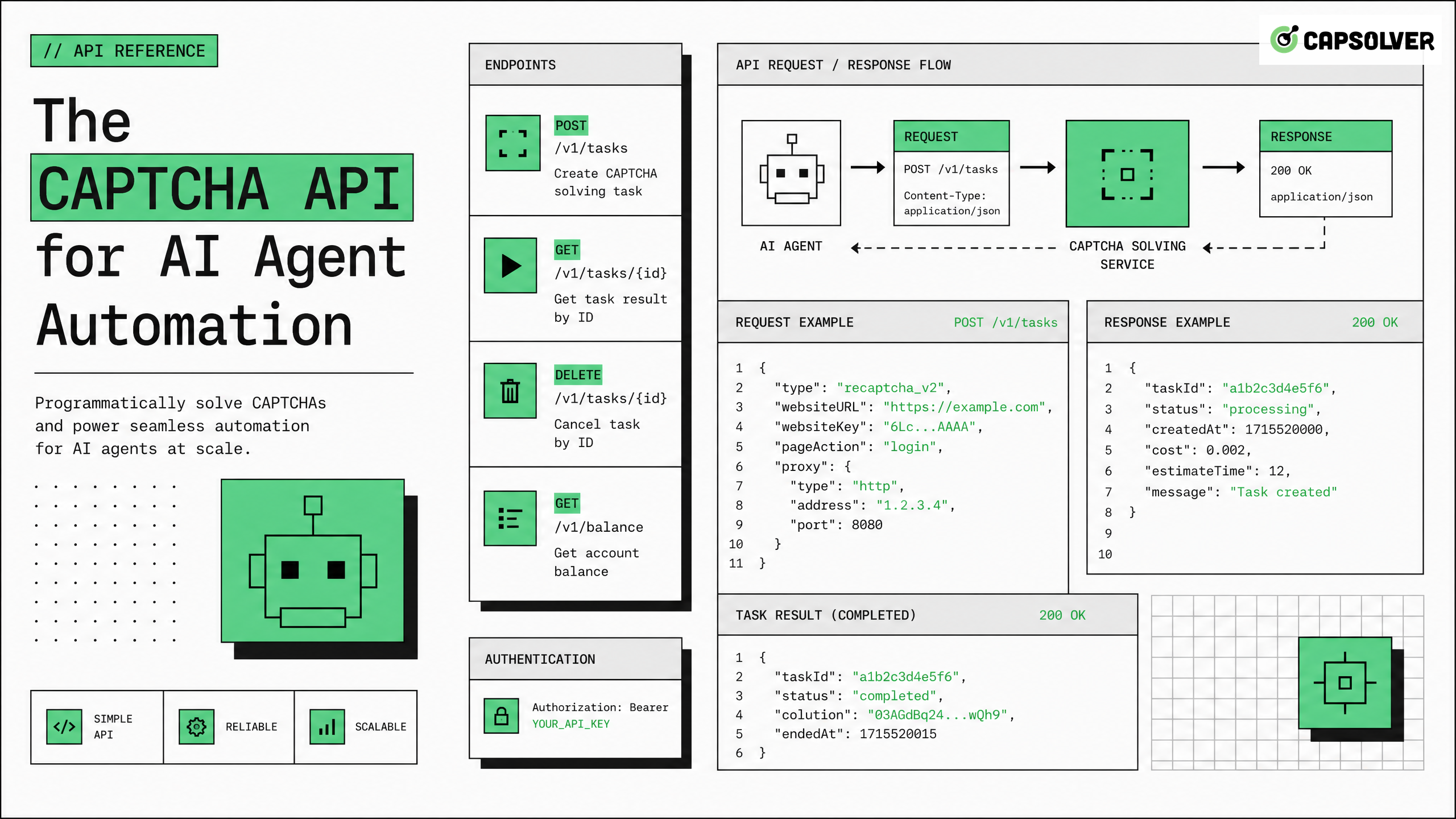
AI agents need uninterrupted access to web resources to complete tasks reliably. The moment a risk control system presents a CAPTCHA challenge, an unequipped agent stalls — losing data, missing deadlines, or failing the task entirely. A purpose-built CAPTCHA API solves this by handling challenge resolution in the background, returning a valid token your agent uses to continue. CapSolver is purpose-engineered for exactly this scenario, offering a high-throughput, agent-ready solving infrastructure that integrates in minutes. This article explains how CAPTCHA APIs work, what to look for in a production-grade solution, and how to integrate one into your AI agent stack responsibly.
Modern websites use layered traffic validation systems. These systems analyze browser fingerprints, mouse movement patterns, TLS handshakes, request timing, and dozens of other signals to distinguish human visitors from automated clients.
When an AI agent — running in a headless browser or making direct HTTP requests — triggers enough risk signals, the site's protection layer responds with a CAPTCHA challenge. This is not a bug in your agent. It is the expected behavior of any serious risk control system.
The challenge types vary widely:
Each type requires a different solving mechanism. An agent without a CAPTCHA API simply cannot handle this variety at scale.
Some teams attempt to route CAPTCHA challenges to human solvers embedded in their workflow. This creates latency spikes, inconsistent throughput, and significant operational cost. For AI agents automating web scraping tasks, even a 30-second delay per CAPTCHA can make entire pipelines economically unviable.
A CAPTCHA API removes the human bottleneck entirely. The agent submits the challenge parameters, the API resolves it, and returns a token — typically within 3–15 seconds depending on challenge type.
The integration pattern is consistent across challenge types:
createTask request to the CAPTCHA API with those parameterstaskIdgetTaskResult until the status is readysolution tokenThis cycle happens entirely in the background. The target site receives a valid, human-looking token and allows the request to proceed.
Token injection is where many integrations fail. The token must be placed in the correct location:
g-recaptcha-response before form submissiongrecaptcha.execute callback or inject it directlyh-captcha-response fieldcf-turnstile-responseIf your agent is operating in a headless browser environment, you can use page.evaluate() in Playwright or Puppeteer to set these values programmatically before triggering the form submission event.
Production-grade CAPTCHA API integration requires explicit error handling. Common failure modes include:
ERROR_CAPTCHA_UNSOLVABLE — the challenge image or parameters were invalidERROR_ZERO_BALANCE — account credit exhaustedERROR_TIMEOUT — the solver did not complete within the allowed windowYour agent should implement exponential backoff with a maximum retry count (typically 3 attempts) before raising an exception to the orchestrating layer. For autonomous agent infrastructure, this retry logic is as important as the initial integration.
Not every CAPTCHA API is built for automated pipelines. Consumer-grade solvers prioritize simplicity. Agent-grade solvers prioritize:
For a detailed evaluation of options in 2026, the best CAPTCHA API for AI agents comparison covers the major providers across these dimensions.
CapSolver is designed from the ground up for programmatic use. Its infrastructure supports:
The CapSolver agent-ready solver overview details how these features map to common agent architecture patterns.
Redeem Your CapSolver Bonus Code
Boost your automation budget instantly!
Use bonus code CAP26 when topping up your CapSolver account to get an extra 5% bonus on every recharge — with no limits.
Redeem it now in your CapSolver Dashboard
A well-designed agent stack separates concerns cleanly. The CAPTCHA API belongs in the HTTP/browser interaction layer — not in the reasoning or planning layer. Your agent's orchestrator should treat CAPTCHA resolution as a low-level utility call, similar to DNS resolution or TLS negotiation.
For a complete picture of how this fits into the broader stack, the web automation infrastructure stack for AI agents guide maps each layer from network to task planning.
The integration pattern in Python looks like this:
import requests
import time

API_KEY = "your_capsolver_api_key"

def solve_recaptcha_v2(site_key, page_url):
    # Create task
    task_payload = {
        "clientKey": API_KEY,
        "task": {
            "type": "ReCaptchaV2Task",
            "websiteURL": page_url,
            "websiteKey": site_key
        }
    }
    response = requests.post(
        "https://api.capsolver.com/createTask",
        json=task_payload
    ).json()

    task_id = response.get("taskId")
    if not task_id:
        raise Exception(f"Task creation failed: {response}")

    # Poll for result
    for _ in range(30):
        time.sleep(3)
        result = requests.post(
            "https://api.capsolver.com/getTaskResult",
            json={"clientKey": API_KEY, "taskId": task_id}
        ).json()

        if result.get("status") == "ready":
            return result["solution"]["gRecaptchaResponse"]

    raise Exception("CAPTCHA solving timed out")
This pattern works across challenge types — only the type field and solution key change.
Many risk control systems correlate CAPTCHA solving with the IP address making the subsequent request. If your agent sends the solved token from a different IP than the one that received the challenge, the token may be rejected.
CapSolver supports proxy passthrough at the task level. You include your proxy credentials in the task payload, and the solver uses that proxy to complete the challenge — ensuring the token is generated from the same IP your agent will use for the follow-up request.
This is a critical detail for agentic browser automation workflows that rely on session consistency.
For teams using RPA platforms like UiPath or Automation Anywhere, the CAPTCHA API integrates via HTTP activity blocks. The same request-response cycle applies — the RPA bot makes an HTTP POST to create the task, polls for the result, and injects the token using a browser activity.
CapSolver's RPA glossary entry covers the specific configuration patterns for common RPA platforms.
| Approach | Latency | Challenge Coverage | Proxy Support | Agent-Friendly API | Cost Model |
|---|---|---|---|---|---|
| CapSolver API | 3–10s avg | reCAPTCHA, hCaptcha, Turnstile, AWS WAF, GeeTest, FunCaptcha, 50+ types | Yes (task-level) | RESTful, async, webhooks | Per-task, pay-as-you-go |
| Manual human solving services | 30–120s avg | Most image-based types | No | Basic polling | Per-task, higher cost |
| In-house ML solver | Variable | Limited to trained types | Depends on impl | Custom | High upfront + maintenance |
| Browser extension solvers | N/A for headless | Consumer types only | No | Not programmatic | Subscription |
| No solver (retry loop) | Infinite | None | N/A | N/A | Free but blocks pipeline |
The data makes the case clearly. For AI agent pipelines requiring consistent throughput, a dedicated CAPTCHA API is the only viable production option. For a deeper evaluation framework, see the guide on choosing a CAPTCHA solver for agent infrastructure in 2026.
A CAPTCHA API is a powerful tool. Its use carries responsibility. Before integrating any automated solving solution, verify:
CapSolver's acceptable use policy explicitly prohibits use cases targeting systems without authorization. Responsible automation respects both the technical and legal boundaries of the systems it interacts with.
CAPTCHA systems exist to protect services from abuse — credential stuffing, scraping at harmful scale, automated fraud, and similar threats. A CAPTCHA API used for legitimate research, authorized data collection, or internal automation of systems you own or have permission to access is appropriate. Using it to circumvent protections on systems you do not have authorization to access is not.
For a full treatment of the CAPTCHA solving infrastructure considerations for AI agents, including compliance checkpoints, that resource covers the topic in depth.
AI agent automation is only as reliable as its ability to handle the obstacles real web environments present. A CAPTCHA API is not optional infrastructure for production agents — it is foundational. Without it, any pipeline touching protected web resources will fail unpredictably at scale.
CapSolver provides the CAPTCHA API purpose-built for this use case: broad challenge coverage, low latency, proxy passthrough, async task management, and the monitoring tools your team needs to maintain pipeline health. If your agents are hitting challenge walls today, CapSolver's infrastructure is ready to integrate — and the bonus code above gives you extra budget to get started.
Build responsibly, integrate cleanly, and keep your agents moving.
Q: What is a CAPTCHA API and how does it work for AI agents?
A: A CAPTCHA API is a programmatic service that accepts challenge parameters from your agent, resolves the challenge using automated or human-assisted methods, and returns a valid token. Your agent injects that token into the target request or form to satisfy the site's traffic validation requirement and continue its task.
Q: Which CAPTCHA types does CapSolver's API support?
A: CapSolver supports over 50 challenge types including reCAPTCHA v2, reCAPTCHA v3, hCaptcha, Cloudflare Turnstile, AWS WAF CAPTCHA, FunCaptcha, GeeTest v3/v4, ImageToText, and several provider-specific challenge formats. The full list is available in CapSolver's official documentation.
Q: How fast is a typical CAPTCHA API response?
A: For common challenge types like reCAPTCHA v2 and hCaptcha, average response times are 3–10 seconds. Invisible scoring challenges like reCAPTCHA v3 are typically faster. Response time varies based on challenge difficulty, current queue depth, and whether proxy passthrough is enabled.
Q: Do I need to use a proxy with the CAPTCHA API?
A: Not always, but it is strongly recommended for production pipelines. If the token generated by the solver is tied to a different IP than your agent's outbound IP, some risk control systems will reject it. Using proxy passthrough ensures the token and the subsequent request originate from the same IP, improving acceptance rates.
Q: Is using a CAPTCHA API legal?
A: Legality depends entirely on your use case and jurisdiction. Using a CAPTCHA API to automate systems you own, have explicit permission to access, or are authorized to test is generally permissible. Using it to access systems without authorization may violate computer fraud laws and the target site's terms of service. Always verify compliance before deploying automated workflows against any external system.
Sora Fujimoto
AI Solutions Architect
Connecting agents, browsers, and APIs into one workflow.
ABOUT THE AUTHOR
Fix CAPTCHA handling that works locally but fails in a cloud AI agent. Compare browser setup, dependencies, credentials, network access, and page state.

Estimate CAPTCHA solving costs in Browser Use by separating agent runs, challenge types, billable solves, retries, and verified outcomes from browser costs.

