How to Solve CAPTCHA in OpenBrowser Using CapSolver (AI Agent Automation Guide)

Ethan Collins
Pattern Recognition Specialist
AI-powered web browsing agents are transforming how we interact with the internet. They can navigate pages, fill forms, extract data, and complete multi-step workflows — all from a simple text instruction. But there's one obstacle that stops every agent in its tracks: CAPTCHAs.
OpenBrowser is an autonomous web browsing framework that gives AI models like GPT-4o, Claude, and Gemini direct control of a real browser. It's powerful, but the moment it hits a CAPTCHA-protected page, the agent stalls.
CapSolver eliminates this problem entirely. By loading the CapSolver Chrome extension into OpenBrowser's launch profile, CAPTCHAs are detected and solved automatically in the background — no API plumbing, no token injection code, no changes to your agent logic.
The best part? Your AI agent never needs to know CAPTCHAs exist. The extension handles detection, solving, and token injection at the browser level. By the time the agent clicks Submit, the CAPTCHA is already solved.
What is OpenBrowser?
OpenBrowser is an AI autonomous web browsing framework built on TypeScript and Playwright. It gives large language models direct, sandboxed control of a real Chromium browser — turning any LLM into a web-capable agent.
Key Features
- Multi-model support: Works with OpenAI GPT-4o, Anthropic Claude, and Google Gemini out of the box
- Interactive REPL: Chat with your browser agent in real time from the terminal
- Sandboxed execution: Each browsing session runs in an isolated Playwright context for safety
- Cost tracking: Built-in token and cost monitoring so you know exactly what each task costs
- LaunchProfile builder: Fluent API for configuring browser launch options, extensions, stealth mode, and more
- Stealth mode: Built-in fingerprint evasion to reduce bot detection
The Browser Gap
OpenBrowser gives AI models eyes and hands on the web. But CAPTCHAs remain a blind spot. The agent can see the page, read the form fields, and click buttons — but it cannot solve a reCAPTCHA challenge or a Turnstile widget. That's where CapSolver comes in.
What is CapSolver?
CapSolver is a leading CAPTCHA solving service that provides AI-powered solutions for bypassing various CAPTCHA challenges. With support for multiple CAPTCHA types and fast response times, CapSolver integrates seamlessly into automated workflows.
Supported CAPTCHA Types
- reCAPTCHA v2 (image-based & invisible)
- reCAPTCHA v3 & v3 Enterprise
- Cloudflare Turnstile
- Cloudflare 5-second Challenge
- AWS WAF CAPTCHA
- Other widely used CAPTCHA and anti-bot mechanisms
Why This Integration is Different
Most CAPTCHA-solving integrations require you to write code — create API calls, poll for results, inject tokens into hidden form fields. That's how it works with tools like Crawlee, Puppeteer, or Playwright.
OpenBrowser + CapSolver is fundamentally different:
| Traditional (Code-Based) | OpenBrowser (Extension-Based) |
|---|---|
Write a CapSolverService class |
Add the extension plus one explicit Chrome allowlist arg |
Call createTask() / getTaskResult() |
Extension handles the full lifecycle |
Inject tokens via page.$eval() |
Tokens injected automatically at browser level |
| Handle errors, retries, timeouts in code | Extension retries internally |
| Different code for each CAPTCHA type | Works for all types automatically |
| Tightly coupled to your agent logic | Zero coupling — agent is CAPTCHA-unaware |
The key insight: The CapSolver Chrome extension runs inside OpenBrowser's Playwright browser context. When the agent navigates to a page with a CAPTCHA, the extension detects it, solves it in the background, and injects the token — all before the agent tries to submit the form.
You just need to give it time. Instead of writing CAPTCHA-handling code, you add a short wait to your agent flow:
typescript
// The agent waits, then submits — CapSolver handles the rest
await page.waitForTimeout(30_000);
await page.click('button[type="submit"]');
That's it. No CAPTCHA logic. No API calls. No token injection.
Prerequisites
Before setting up the integration, make sure you have:
- OpenBrowser installed (
npm install openbrowseror cloned from GitHub) - A CapSolver account with API key (sign up here)
- Node.js 18+ and TypeScript configured
- Chromium or Chrome for Testing (see the important note below)
Important: You Need Chromium, Not Google Chrome
Google Chrome 137+ (released mid-2025) silently removed support for
--load-extensionin branded builds. This means Chrome extensions cannot be loaded in automated sessions using standard Google Chrome. There is no error — the flag is simply ignored.
This affects Google Chrome and Microsoft Edge. You must use one of these alternatives:
| Browser | Extension Loading | Recommended? |
|---|---|---|
| Google Chrome 137+ | Not supported | No |
| Microsoft Edge | Not supported | No |
| Chrome for Testing | Supported | Yes |
| Chromium (standalone) | Supported | Yes |
| Playwright's bundled Chromium | Supported | Yes |
How to install Chrome for Testing:
bash
# Option 1: Via Playwright (recommended — OpenBrowser already uses Playwright)
npx playwright install chromium

# The binary will be at a path like:
# ~/.cache/ms-playwright/chromium-XXXX/chrome-linux64/chrome  (Linux)
# ~/Library/Caches/ms-playwright/chromium-XXXX/chrome-mac/Chromium.app/Contents/MacOS/Chromium  (macOS)
bash
# Option 2: Via Chrome for Testing direct download
# Visit: https://googlechromelabs.github.io/chrome-for-testing/
# Download the version matching your OS
After installation, note the full path to the binary — you'll need it for the launch profile.
Step-by-Step Setup
Step 1: Install OpenBrowser
If you haven't already, install OpenBrowser:
bash
npm install openbrowserOr clone the repository for the latest features:
bash
git clone https://github.com/ntegrals/openbrowser.git
cd openbrowser
npm install
Step 2: Download the CapSolver Chrome Extension
Download the CapSolver Chrome extension and extract it to a known directory:
- Go to the CapSolver extension releases on GitHub
- Download the latest
CapSolver.Browser.Extension-chrome-vX.X.X.zip - Extract the zip:
bash
mkdir -p ~/.openbrowser/capsolver-extension
unzip CapSolver.Browser.Extension-chrome-v*.zip -d ~/.openbrowser/capsolver-extension/- Verify the extraction worked:
bash
ls ~/.openbrowser/capsolver-extension/manifest.jsonYou should see manifest.json — this confirms the extension is in the right place.
Step 3: Set Your CapSolver API Key
Open the extension's config file at ~/.openbrowser/capsolver-extension/assets/config.js and replace the apiKey value with your own:
js
export const defaultConfig = {
  apiKey: 'CAP-XXXXXXXXXXXXXXXXXXXXXXXXXXXXXXXX',  // your key here
  useCapsolver: true,
  // ... rest of config
};
You can get your API key from your CapSolver dashboard.
Step 4: Configure Your LaunchProfile
This is where OpenBrowser shines. Use the LaunchProfile builder to load the CapSolver extension into the browser:
typescript
import { LaunchProfile, OpenBrowser } from 'openbrowser';

const profile = new LaunchProfile()
  .addExtension('/home/user/.openbrowser/capsolver-extension')
  .extraArgs('--disable-extensions-except=/home/user/.openbrowser/capsolver-extension')
  .headless(false)    // Required — MV3 extensions need a headed browser
  .stealthMode();     // Reduces bot detection fingerprints
Why
headless(false)? Chrome's MV3 (Manifest V3) extensions, including CapSolver, require a headed browser context. The service worker that powers the extension does not load in headless mode. On a server without a display, use Xvfb (see Step 7).Important: If you pass custom Chrome flags anywhere else in your setup, do not include
--disable-background-networking. The CapSolver extension's service worker needs outbound network access.
Step 5: Launch the Browser and Run Your Agent
typescript
import { LaunchProfile, OpenBrowser } from 'openbrowser';

const profile = new LaunchProfile()
  .addExtension('/home/user/.openbrowser/capsolver-extension')
  .extraArgs('--disable-extensions-except=/home/user/.openbrowser/capsolver-extension')
  .headless(false)
  .stealthMode();

const browser = await OpenBrowser.launch(profile);

// Navigate to a CAPTCHA-protected page
await browser.goto('https://example.com/protected-form');

// Wait for CapSolver to detect and solve the CAPTCHA
await browser.page.waitForTimeout(30_000);

// Submit the form — the CAPTCHA token is already injected
await browser.page.click('button[type="submit"]');

// Read the destination page or confirmation element
const result = await browser.page.textContent('body');
console.log(result); // e.g. whatever confirmation text the site returns

await browser.close();
Step 6: Use with AI Agents
The real power of OpenBrowser is letting an AI model control the browser. Here's how to wire it up with CapSolver:
typescript
import { LaunchProfile, OpenBrowser, Agent } from 'openbrowser';

const profile = new LaunchProfile()
  .addExtension('/home/user/.openbrowser/capsolver-extension')
  .extraArgs('--disable-extensions-except=/home/user/.openbrowser/capsolver-extension')
  .headless(false)
  .stealthMode();

const browser = await OpenBrowser.launch(profile);

// Create an agent with your preferred model
const agent = new Agent({
  browser,
  model: 'gpt-4o',  // or 'claude-sonnet-4-20250514', 'gemini-pro', etc.
});

// Give the agent a task — no mention of CAPTCHAs needed
await agent.run(`
  Go to https://example.com/contact,
  fill in the contact form with:
    Name: "Jane Smith"
    Email: "jane@example.com"
    Message: "I'd like to learn more about your enterprise plan."
  Wait 30 seconds for the page to fully load,
  then click Submit.
  Tell me what confirmation message appears.
`);

await browser.close();
Notice that the agent instructions say "wait 30 seconds for the page to fully load" — a natural phrasing that gives CapSolver time to solve any CAPTCHA on the page without the AI ever knowing about it.
Step 7: Set Up Xvfb for Headless Servers
Since MV3 extensions require a headed browser, you need a virtual display on servers without a monitor:
bash
# Install Xvfb
sudo apt-get install -y xvfb

# Start a virtual display
Xvfb :99 -screen 0 1280x720x24 &

# Set DISPLAY before running your script
export DISPLAY=:99
Then run your OpenBrowser script normally. The browser will render to the virtual display, and extensions will load correctly.
How It Works Under the Hood
For the technically curious, here's the full flow when CapSolver is loaded into OpenBrowser:
  Your Script / AI Agent
  ──────────────────────────────────────────────────
  LaunchProfile                   OpenBrowser
    .addExtension(path)   ──►  Adds --load-extension flag
    .extraArgs(...)             Adds --disable-extensions-except
    .headless(false)            to Playwright launch args
    .stealthMode()               │
                                 ▼
                            Playwright launches Chromium
                            ┌───────────────────────────────┐
                            │  Chromium Process              │
                            │                                │
                            │  1. Extension service worker   │
                            │     activates (background.js)  │
                            │                                │
                            │  2. Content scripts injected   │
                            │     into every page            │
                            └───────────────────────────────┘
                                 │
                                 ▼
                            Agent navigates to target URL
                            ┌───────────────────────────────┐
                            │  Page with CAPTCHA widget      │
                            │                                │
                            │  CapSolver Extension:          │
                            │  1. Content script detects     │
                            │     CAPTCHA on the page        │
                            │  2. Service worker calls       │
                            │     CapSolver API              │
                            │  3. Token received             │
                            │  4. Token injected into        │
                            │     hidden form field          │
                            └───────────────────────────────┘
                                 │
                                 ▼
                            Agent waits (30-60 seconds)...
                                 │
                                 ▼
                            Agent clicks Submit
                                 │
                                 ▼
                            Form submits WITH valid token
                                 │
                                 ▼
                            Site-specific confirmation page
How addExtension() Works
.addExtension(path) generates --load-extension=/path/to/extension. For this integration, you also need to allowlist the unpacked extension explicitly with .extraArgs('--disable-extensions-except=/path/to/extension'). This is the same Chrome developer-extension mechanism OpenBrowser exposes through its launch profile.
- Playwright launches Chromium with
--load-extension=/path/to/capsolver-extension - Your extra args allow that extension with
--disable-extensions-except=/path/to/capsolver-extension - The extension activates — its MV3 service worker starts and content scripts are registered for injection
- On every page load — content scripts scan the DOM for known CAPTCHA widgets (reCAPTCHA, Turnstile, etc.)
- When a CAPTCHA is found — the content script messages the service worker, which calls the CapSolver API, receives a solution token, and injects it into the page's hidden form fields
Alternative: CapSolver API Approach
If Chrome extension loading is problematic — or you want explicit control over the CAPTCHA-solving flow — you can use the CapSolver REST API directly with OpenBrowser's Playwright instance.
Full Example
typescript
import { LaunchProfile, OpenBrowser } from 'openbrowser';

const CAPSOLVER_API_KEY = process.env.CAPSOLVER_API_KEY!;

async function solveCaptchaViaAPI(
  pageUrl: string,
  siteKey: string
): Promise<string> {
  const createRes = await fetch("https://api.capsolver.com/createTask", {
    method: "POST",
    headers: { "Content-Type": "application/json" },
    body: JSON.stringify({
      clientKey: CAPSOLVER_API_KEY,
      task: {
        type: "ReCaptchaV2TaskProxyLess",
        websiteURL: pageUrl,
        websiteKey: siteKey,
      },
    }),
  });
  const { taskId, errorDescription } = await createRes.json();
  if (!taskId) throw new Error(`createTask failed: ${errorDescription}`);

  for (let i = 0; i < 40; i++) {
    await new Promise((r) => setTimeout(r, 3000));
    const resultRes = await fetch("https://api.capsolver.com/getTaskResult", {
      method: "POST",
      headers: { "Content-Type": "application/json" },
      body: JSON.stringify({ clientKey: CAPSOLVER_API_KEY, taskId }),
    });
    const result = await resultRes.json();
    if (result.status === "ready") {
      return result.solution.gRecaptchaResponse;
    }
  }
  throw new Error("Solve timeout");
}

// Launch without extension — no special Chrome flags needed
const profile = new LaunchProfile()
  .headless(false)
  .stealthMode();

const browser = await OpenBrowser.launch(profile);
const page = browser.page;

await page.goto("https://example.com/protected-page");

// Detect sitekey
const siteKey = await page.evaluate(() => {
  const el = document.querySelector(".g-recaptcha[data-sitekey]");
  return el?.getAttribute("data-sitekey") ?? "";
});
console.log("Sitekey:", siteKey);

// Solve via API
const token = await solveCaptchaViaAPI(page.url(), siteKey);
console.log("Token received, length:", token.length);

// Inject token
await page.evaluate((t) => {
  const textarea = document.querySelector(
    'textarea[name="g-recaptcha-response"]'
  ) as HTMLTextAreaElement;
  if (textarea) textarea.value = t;
}, token);

// Submit
await page.click("#recaptcha-demo-submit");
await page.waitForLoadState("networkidle");

const body = await page.textContent("body");
console.log(
  body?.includes("Verification Success")
    ? "CAPTCHA solved via API!"
    : body?.slice(0, 200)
);

await browser.close();
When to Use API vs Extension
| Extension | API | |
|---|---|---|
| Setup | Configure extension + Chrome flags | Just an API key |
| Chrome version | Needs Chrome for Testing (137+ caveat) | Works with any Chrome |
| Detection | Automatic (content script) | Manual (query DOM) |
| Token injection | Automatic | Manual (evaluate JS) |
| Headless | Requires headed mode (MV3) | Works in headless too |
| Best for | Persistent automation | One-off solves, headless environments |
Troubleshooting
Extension Not Loading
Symptom: The browser launches but CAPTCHAs are not being solved. No extension-related entries appear in chrome://extensions.
Cause: You're using branded Google Chrome 137+ which silently ignores --load-extension.
Fix: Switch to Chrome for Testing or Playwright's bundled Chromium. If you need to specify a custom executable:
typescript
const profile = new LaunchProfile()
  .addExtension('/path/to/capsolver-extension')
  .extraArgs('--disable-extensions-except=/path/to/capsolver-extension')
  .executablePath('/path/to/chrome-for-testing/chrome')
  .headless(false)
  .stealthMode();
Verify your Chrome version:
bash
/path/to/your/chrome --version
# Chrome for Testing: "Chromium 143.0.7499.4"
# Branded Chrome: "Google Chrome 143.0.7499.109"
Extension Not Working in Headless Mode
Symptom: Extension loads in headed mode but not in headless mode.
Cause: Chrome's MV3 (Manifest V3) extensions require a headed browser context. The service worker does not initialize in --headless or --headless=new modes.
Fix: Always use .headless(false) in your LaunchProfile. On servers, use Xvfb to provide a virtual display:
bash
Xvfb :99 -screen 0 1280x720x24 &
export DISPLAY=:99
CAPTCHA Not Solved (Form Fails)
Possible causes:
- Not enough wait time — Increase to 60 seconds
- Invalid API key — Check
assets/config.jsin your extension directory - Insufficient balance — Top up your CapSolver account at capsolver.com
- Extension not loaded — See "Extension Not Loading" above
- Background networking blocked — If you've added
--disable-background-networkingto Chrome args, remove it. The extension needs network access to call the CapSolver API.
Stealth Mode Conflicts
Symptom: Pages detect the browser as automated even with .stealthMode() enabled.
Fix: Make sure you're using Playwright's bundled Chromium or Chrome for Testing. Some stealth patches are Chromium-version-specific. Also ensure you're not passing conflicting Chrome flags that override stealth settings.
Best Practices
1. Always Use Generous Wait Times
More wait time is always safer. The CAPTCHA is usually solved in 5-20 seconds, but network latency, complex challenges, or retries can add time. 30-60 seconds is the sweet spot.
| CAPTCHA Type | Typical Solve Time | Recommended Wait |
|---|---|---|
| reCAPTCHA v2 (checkbox) | 5-15 seconds | 30-60 seconds |
| reCAPTCHA v2 (invisible) | 5-15 seconds | 30 seconds |
| reCAPTCHA v3 | 3-10 seconds | 20-30 seconds |
| Cloudflare Turnstile | 3-10 seconds | 20-30 seconds |
2. Use Natural Language with AI Agents
When giving instructions to AI agents via OpenBrowser, keep your phrasing natural and avoid mentioning CAPTCHAs:
Good:
"Go to the page, wait about a minute for everything to load, then submit the form."
Avoid:
"Wait for the CAPTCHA to be solved, then submit."
Natural phrasing works better with LLMs and avoids triggering safety refusals. The AI doesn't need to know about CAPTCHAs — the extension handles everything invisibly.
3. Configure Token Mode for Invisible CAPTCHAs
For sites using reCAPTCHA v3 or invisible reCAPTCHA v2, make sure token mode is enabled in the extension config (assets/config.js). Token mode ensures the extension solves the challenge and injects the token without requiring any visible interaction.
4. Monitor Your CapSolver Balance
Each CAPTCHA solve costs credits. Check your balance at capsolver.com/dashboard regularly to avoid interruptions.
5. Use stealthMode() for Production
Always enable .stealthMode() in your LaunchProfile for production use. This applies fingerprint evasion techniques that reduce the chance of the browser being flagged as automated — which in turn reduces the likelihood of encountering aggressive CAPTCHAs.
typescript
const profile = new LaunchProfile()
  .addExtension('/path/to/capsolver-extension')
  .extraArgs('--disable-extensions-except=/path/to/capsolver-extension')
  .headless(false)
  .stealthMode();  // Always enable in production
6. Set DISPLAY for Headless Servers
Chrome extensions require a display, even on headless servers. Use Xvfb to create a virtual display:
bash
# Install Xvfb
sudo apt-get install -y xvfb

# Start a virtual display
Xvfb :99 -screen 0 1280x720x24 &

# Set DISPLAY for your OpenBrowser script
export DISPLAY=:99
Conclusion
The OpenBrowser + CapSolver integration represents the cleanest possible approach to CAPTCHA solving in AI browser automation. Instead of writing CAPTCHA detection logic, managing API calls, polling for results, and injecting tokens — you simply:
- Download the CapSolver extension and extract it to a directory
- Add the extension and allowlist it:
.addExtension('/path/to/capsolver-extension')plus.extraArgs('--disable-extensions-except=/path/to/capsolver-extension') - Set
headless(false)and use Xvfb on servers - Remove any
--disable-background-networkingoverride - Add a wait before form submissions to give the extension time to solve
No changes to your agent logic. No CAPTCHA-specific code. No coupling between your AI model and the solving service. The extension operates at the browser level, completely invisible to the agent.
This is what CAPTCHA solving looks like when it's truly automated: invisible, zero-code, and model-agnostic.
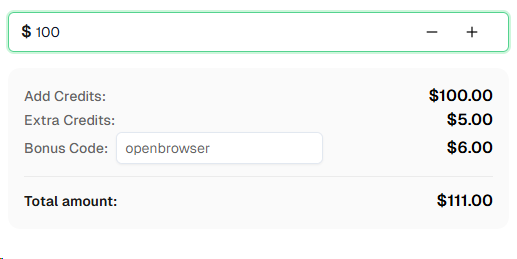
Ready to get started? Sign up for CapSolver and use bonus code OPENBROWSER for an extra 6% bonus on your first recharge!
FAQ
Do I need to modify my AI agent prompts to handle CAPTCHAs?
No. The CapSolver extension works entirely at the browser level — your AI agent (GPT-4o, Claude, Gemini, etc.) never needs to know about CAPTCHAs. Just include a reasonable wait time in your agent instructions (e.g., "wait 30 seconds for the page to fully load") to give the extension time to solve any challenges.
Why can't I use regular Google Chrome?
Google Chrome 137+ (released mid-2025) removed support for the --load-extension command-line flag in branded builds. This means Chrome extensions cannot be loaded in automated sessions. You need Chrome for Testing or standalone Chromium, which still support this flag. Since OpenBrowser uses Playwright under the hood, the simplest option is npx playwright install chromium.
Does this work in headless mode?
Not directly. Chrome's MV3 (Manifest V3) extensions require a headed browser context — the service worker does not initialize in headless mode. On servers without a display, use Xvfb to create a virtual display (Xvfb :99 & and export DISPLAY=:99). The browser renders to the virtual display, and extensions load normally.
What CAPTCHA types does CapSolver support?
CapSolver supports reCAPTCHA v2 (checkbox and invisible), reCAPTCHA v3, reCAPTCHA Enterprise, Cloudflare Turnstile, Cloudflare 5-second Challenge, AWS WAF CAPTCHA, and more. The Chrome extension automatically detects the CAPTCHA type and solves it accordingly.
How much does CapSolver cost?
CapSolver offers competitive pricing based on CAPTCHA type and volume. Visit capsolver.com for current pricing. Use bonus code OPENBROWSER for an extra 6% on your first recharge.
Does this work with all AI models supported by OpenBrowser?
Yes. Since CapSolver operates at the browser level via a Chrome extension, it works identically regardless of which AI model powers your OpenBrowser agent — GPT-4o, Claude, Gemini, or any other supported model. The model never interacts with the CAPTCHA-solving process.
More
AIApr 28, 2026
AI Agents in Web Scraping & Competitive Intelligence Guide
Discover how AI agents transform web scraping and competitive intelligence. Learn about automated data collection, anti-bot challenges, and CAPTCHA solutions for scalable workflows.

AIApr 24, 2026
AI Agent vs Chatbot: Key Differences in Automation Capabilities
Discover the key differences between AI agent vs chatbot. Learn how agentic AI outperforms traditional AI in automation, decision-making, and complex workflows.


