🎉NEWCapSolver for AI agents-MCP, agent tools, and SDK integrations

Lucas Mitchell
Automation Engineer
Published Jan 08, 2026
Updated Jan 09, 2026 · min read
Web crawling is an essential technique for security researchers, penetration testers, and data analysts. However, modern websites increasingly employ CAPTCHAs to protect against automated access. This guide demonstrates how to integrate Katana, ProjectDiscovery's powerful web crawler, with CapSolver, a leading CAPTCHA solving service, to create a robust crawling solution that handles CAPTCHA challenges automatically using Python and Playwright.
Katana is a next-generation web crawling framework developed by ProjectDiscovery. It's designed for speed and flexibility, making it ideal for security reconnaissance and automation pipelines.
# Requires Go 1.24+
go install github.com/projectdiscovery/katana/cmd/katana@latestkatana -u https://example.com -headlessCapSolver is an AI-powered CAPTCHA solving service that provides fast and reliable solutions for various CAPTCHA types.
CapSolver uses a task-based API model:
https://api.capsolver.comPOST /createTaskPOST /getTaskResultThe integration follows this workflow:
┌─────────────────────────┐
│   User Provides         │
│   Parameters (Manual)   │
│   • CAPTCHA type        │
│   • Site key            │
│   • Submit selector     │
└───────────┬─────────────┘
            │
            ▼
┌─────────────────────────┐
│   Playwright Browser    │
│   Navigate to Target    │
└───────────┬─────────────┘
            │
            ▼
┌─────────────────────────┐
│   CapSolver API         │
│   createTask()          │
└───────────┬─────────────┘
            │
            ▼
┌─────────────────────────┐
│   Poll for Result       │
│   getTaskResult()       │
└───────────┬─────────────┘
            │
            ▼
┌─────────────────────────┐
│   Inject Token          │
│   Click Submit Button   │
└───────────┬─────────────┘
            │
            ▼
┌─────────────────────────┐
│   Extract ALL Cookies   │
└───────────┬─────────────┘
            │
            ▼
┌─────────────────────────┐
│   Run Katana            │
│   with Cookies          │
└─────────────────────────┘Before running the CAPTCHA solver script, you MUST gather these parameters from the target website:
How to find:
<div class="g-recaptcha" data-sitekey="..."></div>grecaptcha.execute and find siteKey parameter<div class="cf-turnstile" data-sitekey="..."></div>Parameters you need:
--type: Choose from recaptcha-v2, recaptcha-v3, or turnstile--sitekey: Copy the value from data-sitekey attributeThe full URL where the CAPTCHA is located:
https://example.com/loginHow to find:
#login-btn.submit-buttonbutton[type="submit"]Parameter:
--submit-selector: The CSS selector for the button that triggers actionFor reCAPTCHA v3 only:
--action: The page action (default: 'verify')This helper code provides reusable functions to solve CAPTCHAs via CapSolver's API.
import time
import requests

CAPSOLVER_API_KEY = "YOUR_CAPSOLVER_API_KEY"
CAPSOLVER_BASE = "https://api.capsolver.com"

def create_task(task):
    """Create a CAPTCHA solving task"""
    payload = {"clientKey": CAPSOLVER_API_KEY, "task": task}
    r = requests.post(f"{CAPSOLVER_BASE}/createTask", json=payload)
    data = r.json()
    if data.get("errorId", 0) != 0:
        raise RuntimeError(data.get("errorDescription", "CapSolver error"))
    return data["taskId"]

def get_task_result(task_id, delay=2):
    """Poll for task result until ready"""
    while True:
        time.sleep(delay)
        r = requests.post(
            f"{CAPSOLVER_BASE}/getTaskResult",
            json={"clientKey": CAPSOLVER_API_KEY, "taskId": task_id}
        )
        data = r.json()
        if data.get("status") == "ready":
            return data["solution"]
        if data.get("status") == "failed":
            raise RuntimeError(data.get("errorDescription", "Task failed"))

def solve_recaptcha_v2(website_url, website_key):
    """Solve reCAPTCHA v2"""
    task = {
        "type": "ReCaptchaV2TaskProxyLess",
        "websiteURL": website_url,
        "websiteKey": website_key
    }
    task_id = create_task(task)
    solution = get_task_result(task_id)
    return solution.get("gRecaptchaResponse", "")

def solve_recaptcha_v3(website_url, website_key, page_action="verify"):
    """Solve reCAPTCHA v3"""
    task = {
        "type": "ReCaptchaV3TaskProxyLess",
        "websiteURL": website_url,
        "websiteKey": website_key,
        "pageAction": page_action
    }
    task_id = create_task(task)
    solution = get_task_result(task_id)
    return solution.get("gRecaptchaResponse", "")

def solve_turnstile(website_url, website_key, action=None, cdata=None):
    """Solve Cloudflare Turnstile"""
    task = {
        "type": "AntiTurnstileTaskProxyLess",
        "websiteURL": website_url,
        "websiteKey": website_key
    }
    # Add optional metadata if provided
    if action or cdata:
        task["metadata"] = {}
        if action:
            task["metadata"]["action"] = action
        if cdata:
            task["metadata"]["cdata"] = cdata

    task_id = create_task(task)
    solution = get_task_result(task_id)
    return solution.get("token", "")
Reference:
This proven approach integrates CapSolver with Katana by solving CAPTCHAs once, extracting the authenticated session cookie, and using it with Katana for crawling.
Best for: Login CAPTCHAs, simple authentication, one-time CAPTCHA challenges
How it works:
Benefits:
Perfect for:
# Step 1: Solve CAPTCHA and get session cookie
python solve-captcha-get-cookie.py https://example.com

# Step 2: Use Katana with the authenticated cookie
katana -u https://example.com \
  -headless \
  -H "Cookie: session=YOUR_SESSION_COOKIE" \
-d 5 -jc -o results.txtimport sys
import argparse
import subprocess
from playwright.sync_api import sync_playwright
from capsolver_helper import solve_recaptcha_v2, solve_recaptcha_v3, solve_turnstile
def get_authenticated_cookie(url, captcha_type, site_key, page_action=None, submit_selector=None, run_katana=False, katana_depth=5, katana_output='results.txt'):
"""
Solve CAPTCHA and extract session cookie
Args:
url: Target URL
captcha_type: 'recaptcha-v2', 'recaptcha-v3', or 'turnstile'
site_key: Website CAPTCHA site key
page_action: Optional page action for reCAPTCHA v3 (default: 'verify')
submit_selector: CSS selector for submit button (e.g., '#login-btn', '.submit-button')
run_katana: Whether to automatically run Katana with the cookie
katana_depth: Crawl depth for Katana (default: 5)
katana_output: Output file for Katana results (default: results.txt)
"""
with sync_playwright() as p:
# Launch browser
browser = p.chromium.launch(headless=False)
context = browser.new_context()
page = context.new_page()
try:
page.goto(url)
print(f"[*] Navigated to {url}")
print(f"[*] CAPTCHA Type: {captcha_type}")
print(f"[*] Site Key: {site_key}")
print("[*] Solving CAPTCHA with CapSolver...")
# Solve based on specified type
if captcha_type == 'recaptcha-v2':
token = solve_recaptcha_v2(page.url, site_key)
# Inject reCAPTCHA v2 token
page.evaluate(f"""
var el = document.getElementById('g-recaptcha-response');
if (el) {{
el.style.display = 'block';
el.value = '{token}';
el.dispatchEvent(new Event('input', {{ bubbles: true }}));
el.dispatchEvent(new Event('change', {{ bubbles: true }}));
}}
""")
print("[+] reCAPTCHA v2 token injected!")
elif captcha_type == 'recaptcha-v3':
action = page_action or 'verify'
token = solve_recaptcha_v3(page.url, site_key, action)
# For v3, execute callback if it exists
page.evaluate(f"""
if (typeof grecaptcha !== 'undefined' && grecaptcha.execute) {{
grecaptcha.ready(function() {{
// Token: {token}
}});
}}
""")
print(f"[+] reCAPTCHA v3 token obtained (action: {action})")
elif captcha_type == 'turnstile':
token = solve_turnstile(page.url, site_key)
# Inject Turnstile token
page.evaluate(f"""
var input = document.querySelector('input[name="cf-turnstile-response"]');
if (input) {{
input.value = '{token}';
input.dispatchEvent(new Event('change', {{ bubbles: true }}));
}}
""")
print("[+] Cloudflare Turnstile token injected!")
else:
print(f"[!] Unknown CAPTCHA type: {captcha_type}")
return None
# Submit form to get authenticated cookies
if submit_selector:
# Use custom selector provided by user
try:
print(f"[*] Looking for button with selector: {submit_selector}")
page.locator(submit_selector).click()
page.wait_for_url(lambda u: u != url, timeout=10000)
print("[+] Form submitted successfully!")
except Exception as e:
print(f"[!] Failed to click button with selector '{submit_selector}': {e}")
print("[*] You may need to manually click the submit button")
else:
# Try default submit button selectors
try:
page.locator('button[type="submit"], input[type="submit"]').first.click()
page.wait_for_url(lambda u: u != url, timeout=10000)
print("[+] Form submitted successfully!")
except:
print("[*] No submit button found or already submitted")
print("[*] If you need to click a specific button, use --submit-selector")
# Extract ALL cookies
cookies = context.cookies()
if cookies:
print(f"\n[SUCCESS] Extracted {len(cookies)} cookies:")
# Format all cookies for HTTP Cookie header
cookie_header = "; ".join([f"{c['name']}={c['value']}" for c in cookies])
# Show cookies (truncated for display)
for cookie in cookies:
value_preview = cookie['value'][:50] + "..." if len(cookie['value']) > 50 else cookie['value']
print(f" - {cookie['name']}={value_preview}")
if run_katana:
print(f"\n[*] Running Katana automatically...")
katana_cmd = [
'katana',
'-u', url,
'-headless',
'-H', f'Cookie: {cookie_header}',
'-d', str(katana_depth),
'-jc',
'-o', katana_output
]
print(f"[*] Command: {' '.join(katana_cmd)}")
try:
result = subprocess.run(katana_cmd, capture_output=True, text=True, timeout=300)
print(f"\n[+] Katana execution completed!")
print(f"[+] Results saved to: {katana_output}")
if result.stdout:
print(f"\n--- Katana Output ---")
print(result.stdout[:500]) # Show first 500 chars
except subprocess.TimeoutExpired:
print("[!] Katana execution timed out (5 minutes)")
except Exception as e:
print(f"[!] Katana execution failed: {e}")
else:
print(f"\nUse with Katana:")
print(f'katana -u {url} -headless -H "Cookie: {cookie_header}" -d {katana_depth} -jc -o {katana_output}')
return cookies
else:
print("[!] No cookies found")
return None
finally:
browser.close()
if __name__ == "__main__":
parser = argparse.ArgumentParser(
description='Solve CAPTCHA and extract session cookie for Katana',
formatter_class=argparse.RawDescriptionHelpFormatter,
epilog="""
Examples:
# reCAPTCHA v2
python solve-captcha-get-cookie.py https://example.com/login \\
--type recaptcha-v2 --sitekey 6Le-wvkSAAAAAPBMRTvw0Q4Muexq9bi0DJwx_mJ-
# reCAPTCHA v3
python solve-captcha-get-cookie.py https://example.com/login \\
--type recaptcha-v3 --sitekey 6LcR_okUAAAAAPYrPe-HK_0RULO1aZM15ENyM-Mf --action verify
# Cloudflare Turnstile
python solve-captcha-get-cookie.py https://example.com/login \\
--type turnstile --sitekey 0x4AAAAAAAC3CHX0RvPD_fKZ
"""
)
parser.add_argument('url', help='Target URL with CAPTCHA')
parser.add_argument('--type', '-t', required=True,
choices=['recaptcha-v2', 'recaptcha-v3', 'turnstile'],
help='CAPTCHA type')
parser.add_argument('--sitekey', '-k', required=True,
help='Website CAPTCHA site key')
parser.add_argument('--action', '-a', default='verify',
help='Page action for reCAPTCHA v3 (default: verify)')
args = parser.parse_args()
get_authenticated_cookie(args.url, args.type, args.sitekey, args.action)Scenario: You want to crawl https://example.com protected by reCAPTCHA v2
Step 1 - Gather required parameters:
# 1. Target URL: https://example.com/login
# 2. CAPTCHA type: reCAPTCHA v2 (found <div class="g-recaptcha">)
# 3. Site key: 6Le-wvkSAAAAAPBMRTvw0Q4Muexq9bi0DJwx_mJ- (from data-sitekey attribute)
# 4. Submit button: #login-button (found by inspecting button element)
Step 2 - Run the solver with ALL parameters:
python solve-captcha-get-cookie.py https://example.com/login \
  --type recaptcha-v2 \
  --sitekey 6Le-wvkSAAAAAPBMRTvw0Q4Muexq9bi0DJwx_mJ- \
  --submit-selector "#login-button"

# Output:
# [*] Navigated to https://example.com/login
# [*] CAPTCHA Type: recaptcha-v2
# [*] Site Key: 6Le-wvkSAAAAAPBMRTvw0Q4Muexq9bi0DJwx_mJ-
# [*] Solving CAPTCHA with CapSolver...
# [+] reCAPTCHA v2 token injected!
# [*] Looking for button with selector: #login-button
# [+] Form submitted successfully!
# [SUCCESS] Extracted 5 cookies:
#   - sessionid=abc123xyz789...
#   - csrftoken=def456...
Step 3 - Use cookies with Katana (automatic):
# If you used --run-katana flag, Katana runs automatically
# Otherwise, use the cookies manually:
katana -u https://example.com \
  -headless \
  -H "Cookie: sessionid=abc123; csrftoken=def456; ..." \
-d 5 -jc -o authenticated-results.txt# Step 1: Gather parameters (check Prerequisites section above)
# Target URL: https://example.com/login
# CAPTCHA type: reCAPTCHA v3 (found grecaptcha.execute in JS)
# Site key: 6LcR_okUAAAAAPYrPe-HK_0RULO1aZM15ENyM-Mf
# Action: login (found in page source)
# Submit button: button.btn-submit
# Step 2: Run the solver
python solve-captcha-get-cookie.py https://example.com/login \
--type recaptcha-v3 \
--sitekey 6LcR_okUAAAAAPYrPe-HK_0RULO1aZM15ENyM-Mf \
--action login \
--submit-selector "button.btn-submit"# Step 1: Gather parameters
# Target URL: https://example.com/login
# CAPTCHA type: Cloudflare Turnstile (found <div class="cf-turnstile">)
# Site key: 0x4AAAAAAAC3CHX0RvPD_fKZ
# Submit button: input[value='Sign In']
# Step 2: Run the solver
python solve-captcha-get-cookie.py https://example.com/login \
--type turnstile \
--sitekey 0x4AAAAAAAC3CHX0RvPD_fKZ \
--submit-selector "input[value='Sign In']"# Use --run-katana flag to automatically execute Katana with cookies
python solve-captcha-get-cookie.py https://example.com/login \
--type recaptcha-v2 \
--sitekey 6Le-wvkSAAAAAPBMRTvw0Q4Muexq9bi0DJwx_mJ- \
--submit-selector "#login-btn" \
--run-katana \
--katana-depth 3 \
--katana-output authenticated-crawl.txtThis method is recommended for most use cases - it's simple, reliable, and keeps Katana as your primary crawler.
#!/bin/bash

# Step 1: Use Katana for initial fast crawling
echo "[*] Starting initial crawl with Katana..."
katana -u https://example.com -d 2 -o initial-urls.txt

# Step 2: Check for CAPTCHA-protected endpoints
# (Manually or via script analyzing Katana output)

# Step 3: If CAPTCHAs detected, use Python/Playwright with CapSolver
echo "[*] Handling CAPTCHA-protected endpoints..."
python solve-captcha-get-cookie.py https://example.com/login \
  --type recaptcha-v2 \
  --sitekey YOUR_SITE_KEY \
  --submit-selector "#login-button"

# Step 4: Extract session cookies from authenticated browser
# (Cookies extracted automatically by the Python script)

# Step 5: Continue crawling with Katana using session cookies
echo "[*] Continuing crawl with authenticated session..."
katana -u https://example.com -headless \
  -H "Cookie: session=YOUR_SESSION_COOKIE" \
  -d 5 -jc -o authenticated-urls.txt

# Step 6: Combine and deduplicate results
cat initial-urls.txt authenticated-urls.txt | sort -u > all-urls.txt

echo "[+] Crawling complete! Found $(wc -l < all-urls.txt) unique URLs"What is Katana used for?
Katana is a next-generation web crawler by ProjectDiscovery designed for security reconnaissance, endpoint discovery, and bug bounty hunting. Learn more
Does Katana support JavaScript rendering?
Yes. Katana's headless mode (-headless or -hl) uses Chrome/Chromium for full JavaScript execution. Documentation
Can Katana solve CAPTCHAs automatically?
No, Katana itself cannot solve CAPTCHAs. You need to integrate with CapSolver using Playwright as shown in this guide.
What CAPTCHA types does CapSolver support?
CapSolver supports reCAPTCHA v2, reCAPTCHA v3, Cloudflare Turnstile, GeeTest, AWS WAF, and many more. View all types
How does CapSolver return reCAPTCHA v2 tokens?
Create a task with ReCaptchaV2TaskProxyLess and poll getTaskResult for gRecaptchaResponse. Documentation
How does reCAPTCHA v3 differ from v2?
reCAPTCHA v3 runs in the background without user interaction and returns a score (0.0-1.0). It requires the pageAction parameter, which can be found by searching for grecaptcha.execute in the page source. Documentation
How do I solve Cloudflare Turnstile?
Use task type AntiTurnstileTaskProxyLess with websiteURL and websiteKey. Optionally include metadata.action and metadata.cdata if present on the widget. Turnstile solves in 1-20 seconds. Documentation
How do I find the Turnstile site key?
Look for the data-sitekey attribute on the .cf-turnstile element. Turnstile site keys start with 0x4.
Do I need a proxy for CapSolver?
No, the *ProxyLess task types use CapSolver's built-in proxy infrastructure. Use the non-ProxyLess variants if you need to use your own proxies.
Can I use Katana with authenticated sessions?
Yes. Use Playwright to log in and solve CAPTCHAs, extract session cookies, then pass them to Katana via the -H "Cookie: session=..." flag.
How long does CAPTCHA solving take?
What's the recommended workflow for large-scale crawling?
Katana provides powerful web crawling capabilities for security reconnaissance, while CapSolver offers reliable CAPTCHA solving across multiple types. By combining Katana's speed with Playwright automation and CapSolver's API, you can build robust crawling workflows that handle CAPTCHAs seamlessly.
Ready to start? Sign up for Capsolver and supercharge your crawlers!
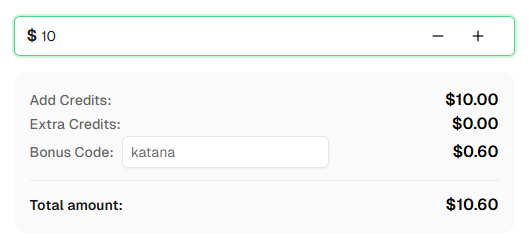
💡 Exclusive Bonus for Katana Integration Users:
To celebrate this integration, we're offering an exclusive 6% bonus code — Katana for all CapSolver users who register through this tutorial.
Simply enter the code during recharge in Dashboard to receive an extra 6% credit instantly.
Lucas Mitchell
Automation Engineer
Helping browser automation recover and continue.
ABOUT THE AUTHOR
Learn scalable Rust web scraping architecture with reqwest, scraper, async scraping, headless browser scraping, proxy rotation, and compliant CAPTCHA handling.
Learn the best techniques to scrape job listings without getting blocked. Master Indeed scraping, Google Jobs API, and web scraping API with CapSolver.