🎉NEWCapSolver for AI agents-MCP, agent tools, and SDK integrations

Ethan Collins
AI Agent Workflow Engineer
Published Apr 13, 2026
Updated Apr 14, 2026 · min read
Modern web security relies heavily on the AWS Web Application Firewall (WAF) to differentiate between human users and automated bots. For data analysts, web scrapers, and automation developers, encountering these hurdles often means dealing with complex CAPTCHAs or hidden background challenges that interrupt workflows. How to solve AWS WAF effectively is a common question for those managing high-volume data collection or price monitoring tasks.
CapSolver provides a professional, AI-driven solution through its versatile browser extension. This tool allows users to navigate AWS WAF protections by automating the recognition of image puzzles and the generation of valid session tokens. By conclusion forward, the CapSolver extension is the most efficient way to maintain access to AWS WAF resources while ensuring technical compliance and operational stability. This guide explores how to integrate this technology into your existing processes for maximum efficiency.
AWS WAF uses a combination of interactive and non-interactive methods to secure web resources. When a request matches certain inspection criteria, the firewall may trigger a CAPTCHA or a silent background challenge. These mechanisms are designed to detect signs of automation, such as unusual mouse movements or rapid request frequencies.
| Feature | AWS WAF CAPTCHA | AWS WAF Challenge |
|---|---|---|
| Interaction | User must solve a visual puzzle | Occurs silently in the background |
| Common Triggers | Suspicious IP behavior or high traffic | Session parameter verification |
| Typical Response | 405 Status Code with gokuProps | JavaScript execution requirement |
| Resolution Goal | Validates human presence | Verifies browser environment |
Understanding these layers is the first step in learning how to solve AWS WAF challenges effectively.
The CapSolver browser extension is specifically designed for users who need a reliable, no-code solution for captcha hurdles. Unlike traditional API-based solvers that require extensive programming knowledge, the extension integrates directly into Chrome and Firefox. It handles the detection and resolution of AWS WAF challenges automatically as you browse or run your automation scripts.
AI-powered algorithms drive the extension, ensuring high accuracy even for the most difficult image puzzles. Whether you are dealing with the aws:grid format or the newer aws:toycarcity challenges, the extension processes these requests in the background. This allows your browser-based automation tools to continue functioning without manual intervention.
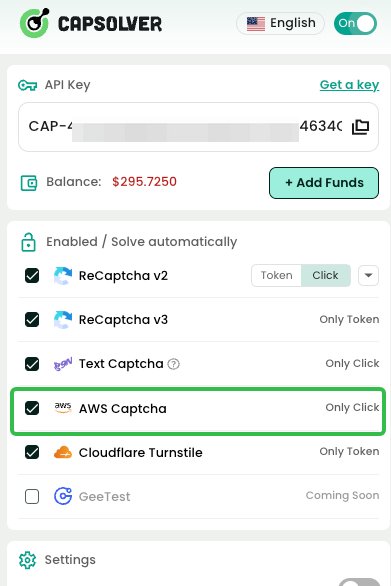
Getting started with the CapSolver extension is a straightforward process. First, visit the CapSolver dashboard to create an account and obtain your unique API key. This key is necessary for the extension to communicate with the AI solving backend.
Next, download the extension from the Chrome Web Store or the Firefox Add-ons site. Once installed, pin the extension to your toolbar for easy access. Open the extension settings and input your API key. You can also configure advanced settings, such as the "Solved Callback" function, which executes a specific JavaScript function after a challenge is successfully resolved. This is particularly useful for complex web applications that require immediate action after verification.
One of the most visible aspects of AWS WAF is the image-based CAPTCHA. These often appear as a grid of images where the user must select specific objects, such as a bag or a chair. Another common variation is the toy car puzzle, which requires placing a dot at the end of a car's path.
CapSolver handles these through the AwsWafClassification task type. The extension identifies the question—for example, aws:grid:umbrella or aws:toycarcity:carcity—and uses computer vision to determine the correct coordinates or image indices. This automated approach is much faster than manual solving and significantly reduces the error rate. For developers who prefer a programmatic approach, the CapSolver AWS WAF recognition documentation provides detailed API specifications and code examples for various languages.
In many cases, AWS WAF does not present a visual puzzle but instead requires a valid session token. This token is generated after the browser successfully completes a background challenge. If your automation tool cannot execute the necessary JavaScript or handle the complex session parameters, the request will be blocked.
CapSolver solves this by offering a token generation service. The extension can automatically extract the required parameters—such as awsKey, awsIv, and awsContext—from the target page. It then communicates with the CapSolver API to generate a valid aws-waf-token. This token is then injected into your browser session or passed back to your script, allowing you to bypass the block. This method is highly effective for high-frequency scraping where how to solve AWS WAF challenges quickly is critical for data freshness.
For enterprise users, automation often involves complex workflows that span multiple platforms. CapSolver’s integration with tools like n8n makes it possible to build sophisticated monitoring systems. A common use case is monitoring product prices on e-commerce sites protected by AWS WAF.
By using the n8n Workflow Library, you can set up a schedule to fetch product pages at regular intervals. The workflow includes a step to solve the AWS WAF challenge using CapSolver before making the actual request. This ensures that your scraper is never blocked by the firewall. Once the page is retrieved, n8n can extract the price data, compare it with previous records, and send an alert via Slack or email if a change is detected. This level of automation is essential for businesses that rely on real-time market data.
When evaluating different methods for how to solve AWS WAF, it is important to consider factors like speed, ease of use, and automation support. Traditional manual solving services are slow and difficult to scale, while simple script-based bypasses are often detected and blocked by AWS’s evolving security algorithms.
| Feature | CapSolver Extension | Manual Solving | Basic Scripting |
|---|---|---|---|
| Speed | Near-instant AI processing | 30-60 seconds | Variable, often fails |
| Ease of Use | No-code, browser-integrated | Requires manual input | High technical skill |
| Reliability | High accuracy with AI | Prone to human error | Low, easily detected |
| Automation | Full n8n/API support | None | Limited |
As noted in the Top AWS Solver Ranking, CapSolver consistently outperforms other tools in terms of success rates and integration flexibility. This makes it the preferred choice for professional teams managing large-scale web automation projects.
While CapSolver provides the tools to solve challenges, it is important to use them responsibly. AWS WAF is designed to protect websites from malicious activity, and maintaining a high level of compliance ensures that your automated tasks remain stable over time. Always use high-quality proxies to avoid IP-based blocks and ensure that your request headers match those of a real browser.
CapSolver supports various proxy formats, including HTTP, HTTPS, SOCKS4, and SOCKS5. By rotating your proxies and using the extension’s built-in proxy support, you can mimic human browsing behavior more effectively. This reduces the likelihood of triggering more aggressive security measures. For more insights on why automation sometimes fails, refer to the blog post on why web automation keeps failing on captcha.
Many AI agents and price monitoring tools struggle with AWS WAF when attempting to scrape competitive data. A recent study on solving captchas for price monitoring AI agents highlighted how CapSolver’s token mode allowed a retail monitoring firm to increase its data collection frequency by 400%.
The firm integrated CapSolver into their custom scraping scripts, using the extension to handle background challenges automatically. This eliminated the need for manual intervention and allowed their AI agents to operate 24/7 without interruption. The result was a more comprehensive dataset that provided a significant competitive advantage in a fast-moving market.
As AWS continues to update its WAF technology, staying ahead of the curve is essential. CapSolver’s team of researchers constantly monitors changes in captcha algorithms to update their AI models. This proactive approach ensures that users always have access to the latest solving techniques.
Whether you are a solo developer or part of a large enterprise, knowing how to solve AWS WAF challenges is a vital skill in the modern web landscape. By leveraging the power of the CapSolver extension and integrating it with automation platforms like n8n, you can build resilient, efficient systems that deliver high-quality data consistently.
Solving AWS WAF challenges no longer needs to be a bottleneck for your web automation projects. With the CapSolver browser extension, you can automate the resolution of both image-based CAPTCHAs and complex background challenges with ease. This professional tool provides the accuracy, speed, and integration support required for high-volume data collection and monitoring.
If you are ready to streamline your workflows and overcome AWS WAF hurdles, start by creating a CapSolver account today. Download the extension, add your API key, and experience the most efficient way to maintain access to the web resources you need. For more technical details, explore the CapSolver AWS WAF product page and join the community of developers who trust CapSolver for their captcha solving needs.
CapSolver offers a free download for its extension, but solving challenges requires an API key with a positive balance. You can top up your account through the dashboard using various payment methods.
Yes, the CapSolver extension supports both the visual CAPTCHA puzzles (Grid and ToyCarCity) and the background token-based challenges. It is updated regularly to support new variations.
Absolutely. CapSolver provides comprehensive documentation and sample code for integrating the extension or the API with popular automation frameworks like Puppeteer, Selenium, and Playwright.
The extension has a dedicated proxy section where you can enable proxy support and input your credentials in standard formats. This ensures that the solving process uses your designated IP address.
CapSolver maintains one of the highest success rates in the industry, often exceeding 99% for standard AWS WAF challenges, thanks to its advanced AI-driven recognition models.
Ethan Collins
AI Agent Workflow Engineer
Building clearer handoffs between AI agents and tools.
ABOUT THE AUTHOR
Use the official Go SDK for an AWS WAF CAPTCHA task, set HTTPS explicitly, supply documented parameters, and check the returned cookie before continuing.

Build an authorized AWS WAF LangChain workflow with CapSolver tools, response detection, policy gates, session handling, retries, and verification.