🎉NEWCapSolver for AI agents-MCP, agent tools, and SDK integrations

Ethan Collins
AI Agent Workflow Engineer
Published Jul 23, 2026
Updated Jul 23, 2026 · min read
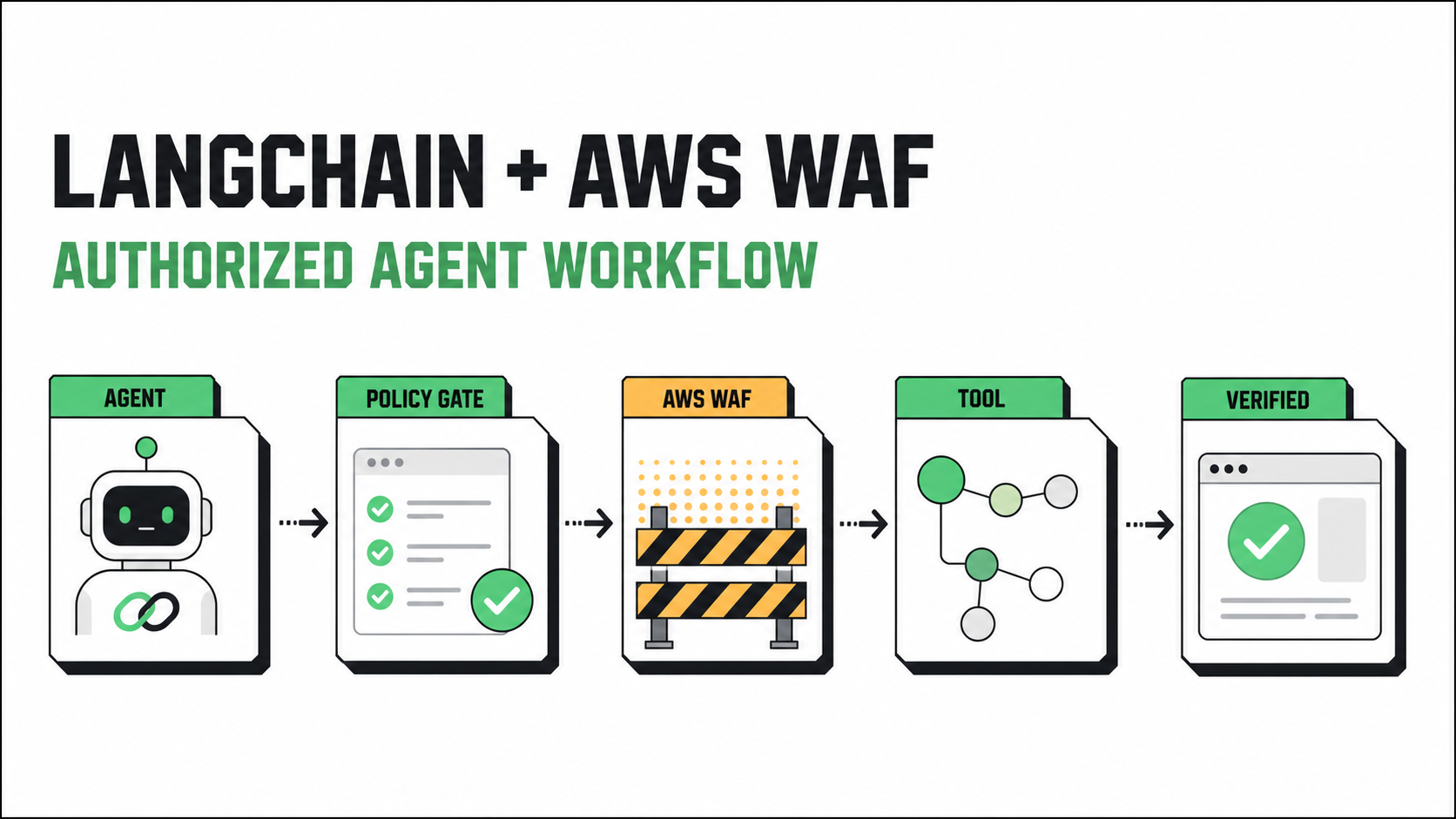
202 Challenge response or a 405 CAPTCHA response when a request does not carry a valid token; inspect both the status and x-amzn-waf-action header before routing an agent.capsolver-core, with ready-made LangChain tools and browser-oriented detection and fill-back methods.resolved, not_needed, review, or denied.AWS WAF Challenge and CAPTCHA actions change the normal request path. According to the AWS WAF action documentation, a request with a valid token continues to the next rule. A request without a valid token can instead receive a challenge response.
For Challenge, AWS documents an x-amzn-waf-action: challenge response header and HTTP status 202. For CAPTCHA, it documents x-amzn-waf-action: captcha and status 405. When the client expects HTML, AWS WAF can return a JavaScript interstitial. A successful interaction updates the token and resubmits the original request.
This behavior matters to agents because a generic HTTP client may interpret the response as a normal page, a transient server error, or an empty result. A language model should not guess which case occurred. The host application should classify the response, check authorization, and route the workflow through a controlled recovery step.
The goal is not to make challenge handling invisible. The goal is to make it explicit, bounded, observable, and limited to lawful automation on systems the operator owns or has permission to test.
A production design has five separate responsibilities:
CapSolver's official agent tools guide describes capsolver-agent as a thin adapter over capsolver-core. The core package performs operations such as solve, detect, and solve_on_page; the agent package supplies framework-friendly tool schemas. Its documented LangChain path provides ready-made tools through get_langchain_tools().
That boundary is useful. The model does not need a raw credential, token, browser object, or unrestricted network function. It receives a narrow tool contract while deterministic application code controls when the tool may run.
Before writing agent code, define the operating boundary:
CAPSOLVER_API_KEY and model credentials;Use an isolated Python environment. The installation commands below follow the current CapSolver agent guide:
python -m venv .venv
source .venv/bin/activate

pip install git+https://github.com/capsolver-ai/capsolver-core.git
pip install "capsolver-agent[langchain] @ git+https://github.com/capsolver-ai/capsolver-agent.git"
pip install langchain-openai langgraph playwright

playwright install chromium
Store credentials outside source control:
export CAPSOLVER_API_KEY="set-this-in-your-secret-manager"
export OPENAI_API_KEY="set-this-in-your-secret-manager"
Do not paste real secrets into a prompt, trace, notebook, issue, or checkpoint. Environment variables are convenient for local examples; a managed secret store is preferable in deployed systems.
The first deterministic component should classify the response. This example uses the status and header combination documented by AWS:
from dataclasses import dataclass
from typing import Mapping, Literal

WafAction = Literal["challenge", "captcha", "none", "unknown"]


@dataclass(frozen=True)
class WafSignal:
    action: WafAction
    status_code: int
    needs_review: bool = False


def classify_aws_waf_response(
    status_code: int,
    headers: Mapping[str, str],
) -> WafSignal:
    normalized = {key.lower(): value.lower() for key, value in headers.items()}
    action = normalized.get("x-amzn-waf-action", "")

    if action == "challenge" and status_code == 202:
        return WafSignal(action="challenge", status_code=status_code)
    if action == "captcha" and status_code == 405:
        return WafSignal(action="captcha", status_code=status_code)
    if action in {"challenge", "captcha"}:
        return WafSignal(
            action="unknown",
            status_code=status_code,
            needs_review=True,
        )
    return WafSignal(action="none", status_code=status_code)
Require both signals. A 202 alone can be a valid application response, and a 405 alone can mean the endpoint does not allow the HTTP method. An unexpected combination should go to review instead of triggering an automated recovery loop.
AWS also notes that browser JavaScript running across origins cannot read x-amzn-waf-action because that header is not available through CORS. In that situation, classify the network response in the browser automation layer or use an owned same-origin integration. Do not infer a challenge only from page text.
Redeem Your CapSolver Bonus Code
Boost your automation budget instantly!
Use bonus code CAP26 when topping up your CapSolver account to get an extra 5% bonus on every recharge — with no limits.
Redeem it now in your CapSolver Dashboard
Challenge handling should not be available for every URL the model can mention. Check the target before any agent tool executes:
from dataclasses import dataclass
from urllib.parse import urlparse


@dataclass(frozen=True)
class PolicyDecision:
    allowed: bool
    reason: str


ALLOWED_HOSTS = {"staging.example.com", "research.example.org"}
ALLOWED_PURPOSES = {"qa-validation", "authorized-research"}


def authorize_recovery(
    url: str,
    purpose: str,
    attempts: int,
) -> PolicyDecision:
    host = (urlparse(url).hostname or "").lower()

    if host not in ALLOWED_HOSTS:
        return PolicyDecision(False, "host-not-allowed")
    if purpose not in ALLOWED_PURPOSES:
        return PolicyDecision(False, "purpose-not-allowed")
    if attempts >= 2:
        return PolicyDecision(False, "retry-budget-exhausted")
    return PolicyDecision(True, "authorized")
Keep this function outside the language model. In production, load approved hosts and purposes from versioned configuration, reject redirects to a different host, and record only non-sensitive decision metadata.
The documented agent package can expose LangChain-compatible tools. A minimal setup looks like this:
import os
from capsolver_agent.langchain import get_langchain_tools


capsolver_tools = get_langchain_tools(
    api_key=os.environ["CAPSOLVER_API_KEY"],
)
The exact agent-construction API can change across LangChain and LangGraph releases. Keep the CapSolver tool acquisition in a small adapter module, pin tested dependency versions, and connect capsolver_tools through the agent builder supported by those versions.
Do not give every agent every tool. A safer pattern is to expose challenge tools only inside a recovery subgraph or a dedicated executor that runs after authorize_recovery() returns allowed=True.
CapSolver documents the agent-tool mapping at a high level:
solve_captcha calls the core solve capability;detect_captchas calls the core detect capability;solve_on_page calls the core solve_on_page capability;Use only the smallest tool required for the integration. For a live browser session, a browser-oriented detection and fill-back workflow generally preserves more context than asking the model to manipulate a raw solution.
AWS WAF tokens are part of the client session. The AWS WAF token documentation explains that Challenge and CAPTCHA actions use tokens to track successful interactions. Replacing the browser or losing its cookies between detection and retry can discard that state.
Do not serialize a Playwright Page into a LangChain message or graph checkpoint. Store it in an application-owned registry:
class BrowserRegistry:
    def __init__(self) -> None:
        self._pages: dict[str, object] = {}

    def register(self, page_id: str, page: object) -> None:
        self._pages[page_id] = page

    def get(self, page_id: str) -> object:
        if page_id not in self._pages:
            raise KeyError("browser page is not registered")
        return self._pages[page_id]

    async def close(self, page_id: str) -> None:
        page = self._pages.pop(page_id, None)
        if page is not None:
            await page.close()
Agent state should contain only the opaque page_id, current URL, purpose, attempt count, and status. Exclude cookies, local storage, solution tokens, API keys, and raw HTML.
Use a small result type so the model cannot reinterpret a low-level response:
from typing import Literal, TypedDict

RecoveryStatus = Literal[
    "not_needed",
    "authorized",
    "resolved",
    "retry",
    "review",
    "denied",
]


class RecoveryState(TypedDict, total=False):
    request_id: str
    purpose: str
    current_url: str
    page_id: str
    attempts: int
    waf_action: str
    recovery_status: RecoveryStatus
    error_code: str | None
    final_assertion_passed: bool


def route_after_detection(state: RecoveryState) -> str:
    if state.get("waf_action") not in {"challenge", "captcha"}:
        return "continue"
    if state.get("recovery_status") == "authorized":
        return "recover"
    if state.get("recovery_status") in {"denied", "review"}:
        return "human_review"
    return "authorize"


def route_after_recovery(state: RecoveryState) -> str:
    status = state.get("recovery_status")
    if status == "resolved":
        return "verify"
    if status == "retry":
        return "authorize"
    return "human_review"
The recovery node can call the approved CapSolver browser tool, but it should return only a status and a stable error code. Never place the raw tool response into the next model prompt.
Challenge completion does not prove that the original business operation succeeded. Repeat the intended navigation or request in the same session and verify an owned application signal:
async def verify_expected_page(page, expected_url_prefix: str) -> bool:
    await page.wait_for_load_state("domcontentloaded")

    if not page.url.startswith(expected_url_prefix):
        return False

    marker = page.get_by_test_id("authorized-content")
    try:
        await marker.wait_for(state="visible", timeout=15_000)
        return True
    except Exception:
        return False
Choose a stable marker controlled by your application: a test ID, a specific API response, or a known state transition. Avoid broad assertions such as “the page contains text” because an error page can contain similar words.
If verification fails, do not immediately call the solver again. Reclassify the current response, check whether the session changed, enforce the retry budget, and send ambiguous cases to a human.
A bounded workflow should distinguish at least these cases:
| Condition | Recommended route |
|---|---|
| No AWS WAF signal | Continue the normal workflow |
| Known signal on an approved host | Run the authorized recovery node |
| Unknown status/header combination | Human review |
| Redirect to an unapproved host | Deny |
| Challenge tool timeout | Retry once if the total budget allows |
| Recovery reports success but page assertion fails | Reclassify, then review |
| Retry limit reached | Stop and record a stable error code |
| Missing credential or browser session | Configuration error; do not ask the model to repair it |
Use exponential backoff for transient transport errors, but do not use an unbounded loop. The retry counter belongs to deterministic state, not model memory.
Log events such as waf_signal_detected, policy_allowed, recovery_started, recovery_finished, and page_verified. Include a request ID, host, duration, attempt number, and error code. Exclude credentials, cookies, tokens, raw challenge payloads, and sensitive page content.
Agent traces show what the workflow decided; AWS metrics show what the protection layer observed. AWS lists CloudWatch metrics for Challenge and CAPTCHA activity, including request, attempt, solved, and valid-token counts in its WAF metrics reference.
Useful operational questions include:
Correlate systems with an internal request ID, not a credential or token. A sudden increase in challenge traffic should trigger diagnosis, not a larger retry budget by default.
Text is ambiguous and easy to change. Prefer the documented response status and header, browser network events, or an application-owned signal.
A new browser can lose cookies and token state. Keep the same approved session through detection, recovery, retry, and verification.
The model does not need them. Keep sensitive values inside the deterministic adapter and return a typed status.
Always repeat the intended operation and check a domain-specific assertion.
Enforce a hostname allowlist, purpose check, redirect check, retry budget, and review route outside the model.
LangChain and LangGraph construction APIs evolve. Pin versions that pass your tests, isolate framework wiring in one module, and re-run integration tests before upgrading.
Use an owned staging page and cover these cases:
Mock the classifier, policy gate, and verifier in unit tests. Reserve credentialed end-to-end tests for an approved environment. Test logs as well: assert that credentials, cookies, and tokens are absent.
CapSolver's getting-started guide documents its task lifecycle and supported CAPTCHA categories. Use the current first-party documentation when selecting a task path; do not guess fields from an old snippet or a third-party post.
A reliable AWS WAF LangChain integration is a controlled state machine, not a single “solve” prompt. Detect the documented WAF signal, verify the target and purpose, invoke a narrowly scoped tool, retain the same client session, and confirm the original operation before the agent proceeds.
For authorized automation, CapSolver provides the agent and core layers needed to connect challenge handling to LangChain while keeping policy, secrets, and final verification in application code.
Use CapSolver's documentation to validate the current integration path, then try CapSolver on an owned or explicitly authorized test environment. Apply bonus code CAP26 when topping up to receive the configured 5% bonus.
Q: How does a LangChain agent detect an AWS WAF Challenge?
Check for the documented combination of HTTP 202 and x-amzn-waf-action: challenge in a deterministic HTTP or browser layer. Do not ask the language model to infer the condition from page text.
Q: What response indicates an AWS WAF CAPTCHA action?
AWS documents HTTP 405 with x-amzn-waf-action: captcha for a CAPTCHA response when the request does not have a valid token. Treat a mismatched status/header combination as unknown and route it to review.
Q: Should the CapSolver API key be passed to the LangChain model?
No. Load it inside the host application or tool adapter from an approved secret store. The model should never see the key, cookies, WAF tokens, or raw solution values.
Q: Can the agent use a new browser after a challenge is completed?
It should keep the same browser context when possible because AWS WAF token state is associated with the client session. Replacing the session can discard the state needed for the repeated request.
Q: Is a successful challenge tool result enough to continue?
No. Repeat the intended operation and verify an application-specific success assertion. A tool result is only an intermediate state.
Q: How many times should the agent retry?
Set a small explicit retry budget based on the workflow's risk and time limit. The examples use two attempts as an application policy, not a CapSolver or AWS guarantee.
Q: Can this workflow be used on any website?
No. Use it only on systems you own or are explicitly authorized to automate. Enforce target and purpose checks outside the model and route uncertain cases to human review.
Ethan Collins
AI Agent Workflow Engineer
Building clearer handoffs between AI agents and tools.
ABOUT THE AUTHOR
Use the official Go SDK for an AWS WAF CAPTCHA task, set HTTPS explicitly, supply documented parameters, and check the returned cookie before continuing.

AI agent blocked by AWS WAF CAPTCHA? Learn causes, log signals, token checks, browser fixes, and safe CapSolver integration for automation workflows.