
🎉NEWCapSolver for AI agents-MCP, agent tools, and SDK integrations

Lucas Mitchell
Automation Engineer
Published Mar 12, 2026
Updated Mar 13, 2026 · min read
AWS WAF (Web Application Firewall) is Amazon's enterprise-grade bot protection system used by some of the largest websites on the internet. Unlike traditional CAPTCHAs that show image puzzles or checkboxes, AWS WAF uses invisible challenges and token-based verification — making it particularly challenging for automation tools to handle.
What if you could solve AWS WAF challenges automatically inside your n8n workflows — whether you're building a reusable solver API, scraping a captcha-protected site, or automating a login form — all without writing a single line of traditional code?
In this guide, you'll learn how to combine n8n (a visual workflow automation tool) with CapSolver (an AI-powered captcha solving service) to solve AWS WAF challenges on demand — either as a standalone API endpoint or as a step inside any automation workflow.
What you'll build:
Solver API — a reusable endpoint your other tools can call:
Direct-use workflows — CapSolver embedded as a step inside larger automations:
AWS WAF (Web Application Firewall) is Amazon Web Services' bot mitigation and web security service. It protects websites from common web exploits, bot traffic, and automated abuse. Many high-traffic sites — especially e-commerce platforms, financial services, and enterprise applications — use AWS WAF to gate access behind invisible CAPTCHA challenges.
How AWS WAF differs from reCAPTCHA and Turnstile:
websiteURL to start solving.aws-waf-token cookie that must be sent with subsequent requests via the Cookie HTTP header.awsKey, awsIv, awsContext, awsChallengeJS, and other parameters depending on the site's configuration. These are optional and only needed for specific implementations.
Not the same as CloudFront. AWS WAF is the firewall layer that sits in front of web applications. CloudFront is Amazon's CDN. A site can use CloudFront without AWS WAF, or AWS WAF without CloudFront — they are separate services, though commonly used together.
Before getting started, make sure you have the following:
Important: Make sure you have sufficient balance in your CapSolver account. AWS WAF solving tasks consume credits based on usage.
CapSolver is available as an official integration in n8n — no community node installation required. You can find it directly in the node panel when building your workflows.
Since it's an official integration, you need to create a credential in n8n so that the CapSolver node can authenticate with your account.
Go to your n8n instance and navigate to Settings -> Credentials. You'll see all your configured credentials here.

All (default)n8n will automatically test the connection. You should see a green "Connection tested successfully" banner confirming your API key is valid.
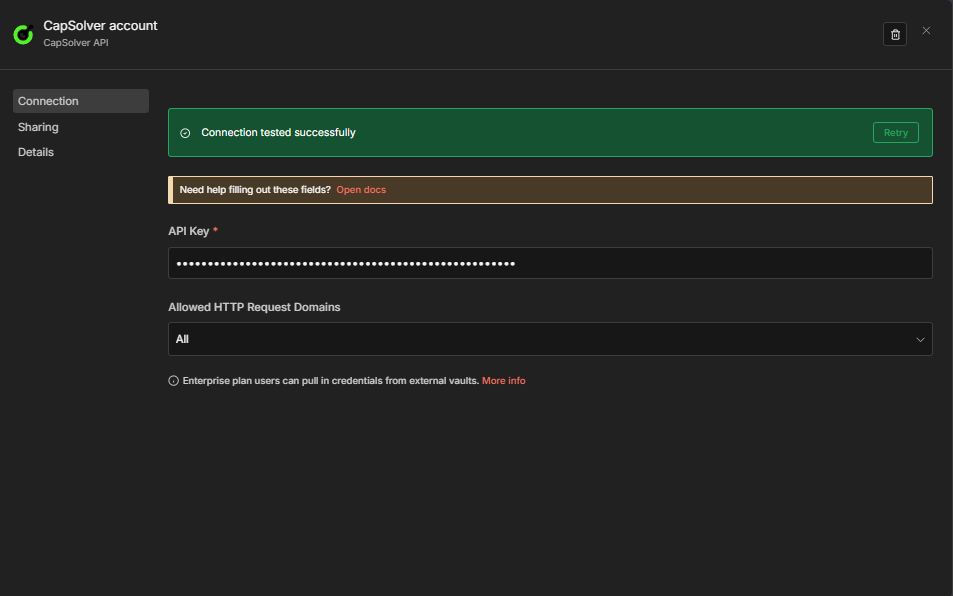
Important: Every CapSolver node in your workflows will reference this credential. You only need to create it once — all your solver workflows will share the same credential.
Now you're ready to build your AWS WAF solver workflow!
Before you can solve an AWS WAF challenge, you need to confirm the target site is using AWS WAF and gather any optional parameters. The easiest way is using the CapSolver Browser Extension combined with manual inspection.
Navigate to your target website and open DevTools (F12). Look for these telltale signs:
aws-waf-token cookie in the Application tabcaptcha.awswaf.com or URLs containing challenge.jsx-amzn-waf-* headersMost AWS WAF solves only require the websiteURL. However, some sites expose additional parameters that can improve solve accuracy:
| Parameter | Where to Find | Description |
|---|---|---|
awsKey |
Page source / JS variables | The key value returned by the captcha page |
awsIv |
Page source / JS variables | The iv value returned by the captcha page |
awsContext |
Page source / JS variables | The context value returned by the captcha page |
awsChallengeJS |
Network tab | The challenge.js URL (e.g., https://captcha.awswaf.com/.../challenge.js) |
awsApiJs |
Network tab | The jsapi.js URL |
awsProblemUrl |
Network tab | The problem endpoint URL |
awsApiKey |
Network tab | The api_key value from the problem endpoint |
awsExistingToken |
Cookies | A previous aws-waf-token if refreshing |
Tip: For most sites, you only need
websiteURL. Start with just that parameter and add optional ones only if the token isn't being accepted.
For a detailed guide on identifying captcha parameters, check out the official CapSolver documentation.
This workflow creates a POST API endpoint that accepts AWS WAF parameters and returns a solved cookie token.

The workflow consists of four nodes:
$json.error is not empty){"error": "..."} on failure| Setting | Value |
|---|---|
| HTTP Method | POST |
| Path | solver-aws-waf |
| Respond | Response Node |
This creates an endpoint at: https://your-n8n-instance.com/webhook/solver-aws-waf
| Parameter | Value | Description |
|---|---|---|
| Operation | AWS WAF |
Must be set to AWS WAF |
| Type | AntiAwsWafTaskProxyLess |
No proxy needed (default). Use AntiAwsWafTask with a proxy for stricter sites |
| Website URL | {{ $json.body.websiteURL }} |
The URL of the page with the AWS WAF challenge |
| awsKey | (Optional) | The key value returned by the captcha page |
| awsIv | (Optional) | The iv value returned by the captcha page |
| awsContext | (Optional) | The context value returned by the captcha page |
| awsChallengeJS | (Optional) | The challenge.js link |
| awsApiJs | (Optional) | The jsapi.js link |
Key difference from Turnstile/reCAPTCHA: AWS WAF does not require a
websiteKey. OnlywebsiteURLis mandatory. Also select your CapSolver credentials in this node.
| Setting | Value |
|---|---|
| Condition | ={{ $json.error }} is not empty |
| True branch | Routes to the Error Respond to Webhook node |
| False branch | Routes to the Success Respond to Webhook node |
This makes the error path explicit on the canvas. The CapSolver node continues on error (onError: continueRegularOutput), so failures arrive here as { "error": "..." } rather than crashing the workflow.
Success branch (false output of CapSolver Error?):
| Setting | Value |
|---|---|
| Respond With | JSON |
| Response Body | ={{ JSON.stringify($json.data) }} |
Error branch (true output of CapSolver Error?):
| Setting | Value |
|---|---|
| Respond With | JSON |
| Response Body | ={{ JSON.stringify({ error: $json.error }) }} |
Error messages follow one of two formats depending on where the failure occurred:
| Failure point | Format |
|---|---|
| Task creation rejected (wrong key, no balance, invalid data, etc.) | {"error": "Failed to create task: Request failed with status code 400"} |
| Task created but captcha could not be solved | {"error": "Solve failed: <reason>"} |
| Solve timed out after 120 s | {"error": "Get task result timeout: unable to solve within 120000 seconds"} |
Note: Task creation failures (wrong API key, zero balance, invalid task data) all surface as the same HTTP 400 message — the n8n node catches the HTTP exception before reading CapSolver's error body.
Common error examples:
{"error": "Failed to create task: Request failed with status code 400"}
{"error": "Solve failed: Invalid parameters"}
{"error": "Get task result timeout: unable to solve within 120000 seconds"}Send a POST request to your webhook endpoint:
curl -X POST https://your-n8n-instance.com/webhook/solver-aws-waf \
  -H "Content-Type: application/json" \
  -d '{
    "websiteURL": "https://example.com/protected-page"
  }'
You can also include optional parameters:
curl -X POST https://your-n8n-instance.com/webhook/solver-aws-waf \
  -H "Content-Type: application/json" \
  -d '{
    "websiteURL": "https://example.com/protected-page",
    "awsKey": "AQIDAHjc...",
    "awsIv": "CgAHAQABAA...",
    "awsContext": "gxPZ0w9O..."
  }'
Expected Response:
{
  "taskId": "abc123...",
  "solution": {
    "cookie": "aws-waf-token=76b8ee9e-fa6a-4c36-b8e9-0c1d97EXAMPLE..."
  },
  "status": "ready"
}
Important: The solution returns a
cookiefield (nottokenorgRecaptchaResponselike other captcha types). The value is a full cookie string likeaws-waf-token=LONG_VALUEthat you send via theCookieHTTP header.
Copy the JSON below and import it into n8n via Menu -> Import from JSON:
{
  "nodes": [
    {
      "parameters": {
        "content": "## AWS WAF \u2014 Solver API\n\n### How it works\n\n1. Receives requests via a webhook trigger.\n2. Solves AWS WAF challenges using CapSolver.\n3. Evaluates the result for potential errors.\n4. Sends an error response if CapSolver fails.\n5. Sends a success response if CapSolver succeeds.\n\n### Setup steps\n\n- [ ] Configure webhook node to receive requests.\n- [ ] Ensure CapSolver node is properly configured with necessary settings.\n- [ ] Set up the 'If' node conditions correctly.\n\n### Customization\n\nCustomize the webhook response messages in the 'Respond to Webhook' nodes for error and success cases.",
        "width": 480,
        "height": 608
      },
      "type": "n8n-nodes-base.stickyNote",
      "typeVersion": 1,
      "position": [
        -800,
        -240
      ],
      "id": "4d932006-48c5-42d6-90d8-5f5e5575f789",
      "name": "Sticky Note"
    },
    {
      "parameters": {
        "content": "## Handle Solver Request\n\nReceives incoming requests and solves AWS WAF challenges.",
        "width": 496,
        "height": 304,
        "color": 7
      },
      "type": "n8n-nodes-base.stickyNote",
      "typeVersion": 1,
      "position": [
        -240,
        -128
      ],
      "id": "25adfac1-3634-4356-bfdb-494c6a4671db",
      "name": "Sticky Note1"
    },
    {
      "parameters": {
        "content": "## Evaluate and Respond\n\nEvaluates the CapSolver results and sends appropriate responses.",
        "width": 496,
        "height": 496,
        "color": 7
      },
      "type": "n8n-nodes-base.stickyNote",
      "typeVersion": 1,
      "position": [
        352,
        -240
      ],
      "id": "4ad350dd-e339-482b-8565-be63f64061f4",
      "name": "Sticky Note2"
    },
    {
      "parameters": {
        "httpMethod": "POST",
        "path": "solver-aws-waf",
        "responseMode": "responseNode",
        "options": {}
      },
      "type": "n8n-nodes-base.webhook",
      "typeVersion": 2.1,
      "position": [
        -192,
        0
      ],
      "id": "aw111111-1111-1111-1111-aw1111111101",
      "name": "Receive Solver Request",
      "webhookId": "aw111111-aaaa-bbbb-cccc-aw1111111101",
      "onError": "continueRegularOutput"
    },
    {
      "parameters": {
        "operation": "AWS WAF",
        "websiteURL": "={{ $json.body.websiteURL }}",
        "optional": {}
      },
      "type": "n8n-nodes-capsolver.capSolver",
      "typeVersion": 1,
      "position": [
        112,
        0
      ],
      "id": "aw111111-1111-1111-1111-aw1111111102",
      "name": "Solve AWS WAF",
      "onError": "continueRegularOutput",
      "credentials": {
        "capSolverApi": {
          "id": "BeBFMAsySMsMGeE9",
          "name": "CapSolver account"
        }
      }
    },
    {
      "parameters": {
        "conditions": {
          "options": {
            "caseSensitive": true,
            "leftValue": "",
            "typeValidation": "loose",
            "version": 2
          },
          "conditions": [
            {
              "id": "capsolver-err-001",
              "leftValue": "={{ $json.error }}",
              "operator": {
                "type": "string",
                "operation": "isNotEmpty",
                "singleValue": true
              }
            }
          ],
          "combinator": "and"
        },
        "options": {}
      },
      "type": "n8n-nodes-base.if",
      "typeVersion": 2.3,
      "position": [
        400,
        0
      ],
      "id": "aw111111-1111-1111-1111-aw1111111103",
      "name": "CapSolver Error?"
    },
    {
      "parameters": {
        "respondWith": "json",
        "responseBody": "={{ JSON.stringify({ error: $json.error }) }}",
        "options": {}
      },
      "type": "n8n-nodes-base.respondToWebhook",
      "typeVersion": 1.5,
      "position": [
        700,
        -100
      ],
      "id": "aw111111-1111-1111-1111-aw1111111104",
      "name": "Respond to Webhook (Error)"
    },
    {
      "parameters": {
        "respondWith": "json",
        "responseBody": "={{ JSON.stringify($json.data) }}",
        "options": {}
      },
      "type": "n8n-nodes-base.respondToWebhook",
      "typeVersion": 1.5,
      "position": [
        700,
        100
      ],
      "id": "aw111111-1111-1111-1111-aw1111111105",
      "name": "Respond to Webhook (Success)"
    }
  ],
  "connections": {
    "Receive Solver Request": {
      "main": [
        [
          {
            "node": "Solve AWS WAF",
            "type": "main",
            "index": 0
          }
        ]
      ]
    },
    "Solve AWS WAF": {
      "main": [
        [
          {
            "node": "CapSolver Error?",
            "type": "main",
            "index": 0
          }
        ]
      ]
    },
    "CapSolver Error?": {
      "main": [
        [
          {
            "node": "Respond to Webhook (Error)",
            "type": "main",
            "index": 0
          }
        ],
        [
          {
            "node": "Respond to Webhook (Success)",
            "type": "main",
            "index": 0
          }
        ]
      ]
    }
  },
  "pinData": {},
  "meta": {
    "instanceId": "962ff0267b713be0344b866fa54daae28de8ed2144e2e6867da355dae193ea1f"
  }
}The AWS WAF solver API endpoint accepts the following parameters:
| Parameter | Required | Description |
|---|---|---|
websiteURL |
Yes | The URL of the page with the AWS WAF challenge |
awsKey |
No | The key value returned by the captcha page |
awsIv |
No | The iv value returned by the captcha page |
awsContext |
No | The context value returned by the captcha page |
awsChallengeJS |
No | The challenge.js link from the captcha page |
awsApiJs |
No | The jsapi.js link from the captcha page |
awsProblemUrl |
No | The problem endpoint URL |
awsApiKey |
No | The api_key value of the problem endpoint |
awsExistingToken |
No | A previous aws-waf-token used for last verification |
Tip: You can identify the
websiteURLby inspecting the page URL. Use DevTools to check foraws-waf-tokencookies and network requests tocaptcha.awswaf.com.
Compared to reCAPTCHA and Turnstile, AWS WAF is simpler in one way — you only need one required parameter (websiteURL), with no site key needed. However, it has more optional parameters for fine-tuning.
The API workflow above shows how to get a solved AWS WAF cookie. But what do you actually do with it?
In real-world automation, solving the challenge is only half the job. You need to submit the cookie to the target website — exactly as a browser would — to unlock the data or action behind the AWS WAF protection.
Here's the general pattern:
solution.cookie)Cookie HTTP headerExample: https://example.com/ — An AWS WAF-protected website
Manual Trigger -> CapSolver AWS WAF -> HTTP GET Request (with Cookie header) -> IF (check success) -> Valid / InvalidAWS WAFhttps://example.com/protected-pageAntiAwsWafTaskProxyLess</details>
---
## Workflow: Use-Case Examples
The solver API and submission example above show the core pattern: solve the AWS WAF challenge, submit the cookie, process the result. The following workflows extend this pattern to **production-ready use cases** — each with dual triggers (schedule + webhook), persistent state tracking, and structured output.
| Workflow | Purpose |
|---|---|
| `AWS WAF Scraping — Price & Product Details — CapSolver + Schedule + Webhook` | Scrapes price and product name every 6 hours, compares against previous values stored in `staticData`, alerts on changes |
| `AWS WAF Account Login — CapSolver + Schedule + Webhook` | Logs into your own account on an AWS WAF-protected site by solving first, then POSTing credentials with the cookie |
### Example 1: Scraping
This workflow scrapes a product page every 6 hours (schedule) or on demand (webhook), extracts the price using the HTML node, and compares it against the previously stored value.
**Schedule path:**Every 6 Hours -> Solve AWS WAF -> Fetch Product Page -> Extract Data
-> Compare Data -> Data Changed? -> Build Alert / No Change
Key behaviors:
- The cookie is sent as a `Cookie` header (this is the correct way to submit AWS WAF tokens — not as a form field)
- The **HTML node** extracts price and product name via CSS selectors (`.product-price`, `h1`)
- `$workflow.staticData.lastPrice` persists the previous price across executions
- Price comparison detects both **drops** (severity: `deal`) and **increases** (severity: `info`)
<details>
<summary>Click to expand full workflow JSON (17 nodes)</summary>
```json
{
"nodes": [
{
"parameters": {
"content": "## AWS WAF Scraping \u2014 Price & Product Details \u2014 CapSolver + Schedule + Webhook\n\n### How it works\n\n1. Triggers at a regular interval or via a webhook request.\n2. Solves AWS WAF challenge then makes a request to fetch the product page.\n3. Extracts product data from the retrieved HTML page.\n4. Compares the current and previously stored data to detect any changes.\n5. Sends an alert if data has changed; else logs no change.\n6. Returns results if triggered via webhook.\n\n### Setup steps\n\n- [ ] Configure schedule settings in 'Every 6 Hours' node.\n- [ ] Set up AWS WAF credentials in 'Solve AWS WAF' nodes.\n- [ ] Input target URL in 'Fetch Product Page' nodes.\n- [ ] Configure webhook URL in 'Receive Monitor Request' node.\n\n### Customization\n\nAdjust the target site URL in 'Fetch Product Page' and related nodes to match different sites or specific pages.",
"width": 480,
"height": 896
},
"type": "n8n-nodes-base.stickyNote",
"typeVersion": 1,
"position": [
-1008,
-368
],
"id": "721002ab-5623-44fd-bcd7-44de185ec24f",
"name": "Sticky Note"
},
{
"parameters": {
"content": "## Scheduled data scraping\n\nTriggers scraping every 6 hours and solves AWS WAF.",
"width": 496,
"height": 272,
"color": 7
},
"type": "n8n-nodes-base.stickyNote",
"typeVersion": 1,
"position": [
-432,
-192
],
"id": "565d31e9-26a6-412d-92a4-c7da5c7b6985",
"name": "Sticky Note1"
},
{
"parameters": {
"content": "## Scheduled fetch and extract\n\nFetches and processes product page data on schedule.",
"width": 480,
"height": 272,
"color": 7
},
"type": "n8n-nodes-base.stickyNote",
"typeVersion": 1,
"position": [
176,
-208
],
"id": "58d3a139-a733-46d6-9f17-574ba6ad7929",
"name": "Sticky Note2"
},
{
"parameters": {
"content": "## Scheduled data comparison\n\nCompares scraped data to previous entries and checks for changes.",
"width": 432,
"height": 320,
"color": 7
},
"type": "n8n-nodes-base.stickyNote",
"typeVersion": 1,
"position": [
736,
-240
],
"id": "fb4b9115-2b2f-49f1-b9be-4b44de4b37bf",
"name": "Sticky Note3"
},
{
"parameters": {
"content": "## Scheduled alert or log\n\nGenerates alert or logs no change if applicable.",
"width": 240,
"height": 512,
"color": 7
},
"type": "n8n-nodes-base.stickyNote",
"typeVersion": 1,
"position": [
1232,
-368
],
"id": "ec59cfa5-fe07-4b4a-a060-c3570e42a8a8",
"name": "Sticky Note4"
},
{
"parameters": {
"content": "## Webhook triggered scraping\n\nHandles requests from webhook to initiate scraping.",
"width": 496,
"height": 272,
"color": 7
},
"type": "n8n-nodes-base.stickyNote",
"typeVersion": 1,
"position": [
-448,
320
],
"id": "1324edf4-b4f8-4cab-aa18-401d71fb486b",
"name": "Sticky Note5"
},
{
"parameters": {
"content": "## Webhook fetch and extract\n\nFetches and processes product page data via webhook.",
"width": 496,
"height": 272,
"color": 7
},
"type": "n8n-nodes-base.stickyNote",
"typeVersion": 1,
"position": [
160,
320
],
"id": "e86f4191-e81c-417e-93e8-ab163ac3024d",
"name": "Sticky Note6"
},
{
"parameters": {
"content": "## Webhook data comparison\n\nCompares and evaluates changes in data from webhook requests.",
"width": 400,
"height": 304,
"color": 7
},
"type": "n8n-nodes-base.stickyNote",
"typeVersion": 1,
"position": [
704,
304
],
"id": "95c5ab10-e493-475a-9fe6-c39d0374a120",
"name": "Sticky Note7"
},
{
"parameters": {
"content": "## Webhook alert/log and return\n\nSends an alert or logs and returns data via webhook.",
"width": 384,
"height": 464,
"color": 7
},
"type": "n8n-nodes-base.stickyNote",
"typeVersion": 1,
"position": [
1136,
192
],
"id": "fc36e038-4f18-43c7-84de-c42a32c3177c",
"name": "Sticky Note8"
},
{
"parameters": {
"rule": {
"interval": [
{
"field": "hours",
"hoursInterval": 6
}
]
}
},
"type": "n8n-nodes-base.scheduleTrigger",
"typeVersion": 1.3,
"position": [
-384,
-80
],
"id": "aw333333-3333-3333-3333-aw3333333301",
"name": "Every 6 Hours"
},
{
"parameters": {
"operation": "AWS WAF",
"websiteURL": "https://YOUR-TARGET-SITE.com/product-page",
"optional": {}
},
"type": "n8n-nodes-capsolver.capSolver",
"typeVersion": 1,
"position": [
-80,
-80
],
"id": "aw333333-3333-3333-3333-aw3333333302",
"name": "Solve AWS WAF",
"credentials": {
"capSolverApi": {
"id": "BeBFMAsySMsMGeE9",
"name": "CapSolver account"
}
}
},
{
"parameters": {
"url": "https://YOUR-TARGET-SITE.com/product-page",
"sendHeaders": true,
"headerParameters": {
"parameters": [
{
"name": "user-agent",
"value": "Mozilla/5.0 (Windows NT 10.0; Win64; x64) AppleWebKit/537.36 (KHTML, like Gecko) Chrome/125.0.0.0 Safari/537.36"
},
{
"name": "Cookie",
"value": "={{ $json.data.solution.cookie }}"
}
]
},
"options": {
"response": {
"response": {}
}
}
},
"type": "n8n-nodes-base.httpRequest",
"typeVersion": 4.3,
"position": [
224,
-96
],
"id": "aw333333-3333-3333-3333-aw3333333303",
"name": "Fetch Product Page"
},
{
"parameters": {
"operation": "extractHtmlContent",
"extractionValues": {
"values": [
{
"key": "price",
"cssSelector": ".product-price, [data-price], .price",
"returnValue": "text",
"returnArray": false
},
{
"key": "productName",
"cssSelector": "h1, .product-title",
"returnValue": "text",
"returnArray": false
}
]
},
"options": {}
},
"type": "n8n-nodes-base.html",
"typeVersion": 1.2,
"position": [
512,
-96
],
"id": "aw333333-3333-3333-3333-aw3333333304",
"name": "Extract Data"
},
{
"parameters": {
"jsCode": "// Get current and previous price from workflow static data\nconst staticData = $workflow.staticData;\nconst currentPrice = $input.first().json.price;\nconst previousPrice = staticData.lastPrice;\nconst productName = $input.first().json.productName || 'Product';\n\n// Parse numeric values for comparison\nconst parsePrice = (str) => {\n if (!str) return null;\n const match = str.match(/[\\d]+\\.?\\d*/);\n return match ? parseFloat(match[0].replace(',', '')) : null;\n};\n\nconst currentNum = parsePrice(currentPrice);\nconst previousNum = parsePrice(previousPrice);\n\n// Update stored price\nstaticData.lastPrice = currentPrice;\nstaticData.lastChecked = new Date().toISOString();\n\nconst changed = previousNum !== null && currentNum !== null && currentNum !== previousNum;\nconst direction = changed ? (currentNum < previousNum ? 'dropped' : 'increased') : 'unchanged';\nconst diff = changed ? Math.abs(currentNum - previousNum).toFixed(2) : '0';\n\nreturn [{\n json: {\n productName,\n currentPrice,\n previousPrice: previousPrice || 'first check',\n changed,\n direction,\n diff: changed ? `$${diff}` : null,\n checkedAt: new Date().toISOString()\n }\n}];"
},
"type": "n8n-nodes-base.code",
"typeVersion": 2,
"position": [
784,
-96
],
"id": "aw333333-3333-3333-3333-aw3333333305",
"name": "Compare Data"
},
{
"parameters": {
"conditions": {
"options": {
"caseSensitive": true,
"leftValue": "",
"typeValidation": "strict",
"version": 2
},
"conditions": [
{
"id": "price-if-001",
"leftValue": "={{ $json.changed }}",
"operator": {
"type": "boolean",
"operation": "true",
"singleValue": true
}
}
],
"combinator": "and"
},
"options": {}
},
"type": "n8n-nodes-base.if",
"typeVersion": 2.3,
"position": [
1024,
-112
],
"id": "aw333333-3333-3333-3333-aw3333333306",
"name": "Data Changed?"
},
{
"parameters": {
"assignments": {
"assignments": [
{
"id": "alert-001",
"name": "alert",
"value": "=Price {{ $json.direction }} for {{ $json.productName }}: {{ $json.previousPrice }} \u2192 {{ $json.currentPrice }} ({{ $json.direction === 'dropped' ? '-' : '+' }}{{ $json.diff }})",
"type": "string"
},
{
"id": "alert-002",
"name": "severity",
"value": "={{ $json.direction === 'dropped' ? 'deal' : 'info' }}",
"type": "string"
},
{
"id": "alert-003",
"name": "checkedAt",
"value": "={{ $json.checkedAt }}",
"type": "string"
}
]
},
"options": {}
},
"type": "n8n-nodes-base.set",
"typeVersion": 3.4,
"position": [
1296,
-240
],
"id": "aw333333-3333-3333-3333-aw3333333307",
"name": "Build Alert"
},
{
"parameters": {
"assignments": {
"assignments": [
{
"id": "nc-001",
"name": "status",
"value": "no_change",
"type": "string"
},
{
"id": "nc-002",
"name": "currentPrice",
"value": "={{ $json.currentPrice }}",
"type": "string"
},
{
"id": "nc-003",
"name": "checkedAt",
"value": "={{ $json.checkedAt }}",
"type": "string"
}
]
},
"options": {}
},
"type": "n8n-nodes-base.set",
"typeVersion": 3.4,
"position": [
1280,
-32
],
"id": "aw333333-3333-3333-3333-aw3333333308",
"name": "No Change"
},
{
"parameters": {
"httpMethod": "POST",
"path": "price-monitor-aws-waf",
"responseMode": "responseNode",
"options": {}
},
"type": "n8n-nodes-base.webhook",
"typeVersion": 2.1,
"position": [
-400,
432
],
"id": "aw333333-3333-3333-3333-aw3333333309",
"name": "Receive Monitor Request",
"webhookId": "aw333333-aaaa-bbbb-cccc-aw3333333309",
"onError": "continueRegularOutput"
},
{
"parameters": {
"operation": "AWS WAF",
"websiteURL": "https://YOUR-TARGET-SITE.com/product-page",
"optional": {}
},
"type": "n8n-nodes-capsolver.capSolver",
"typeVersion": 1,
"position": [
-96,
432
],
"id": "aw333333-3333-3333-3333-aw3333333310",
"name": "Solve AWS WAF [Webhook]",
"credentials": {
"capSolverApi": {
"id": "BeBFMAsySMsMGeE9",
"name": "CapSolver account"
}
}
},
{
"parameters": {
"url": "https://YOUR-TARGET-SITE.com/product-page",
"sendHeaders": true,
"headerParameters": {
"parameters": [
{
"name": "user-agent",
"value": "Mozilla/5.0 (Windows NT 10.0; Win64; x64) AppleWebKit/537.36 (KHTML, like Gecko) Chrome/125.0.0.0 Safari/537.36"
},
{
"name": "Cookie",
"value": "={{ $json.data.solution.cookie }}"
}
]
},
"options": {
"response": {
"response": {}
}
}
},
"type": "n8n-nodes-base.httpRequest",
"typeVersion": 4.3,
"position": [
208,
432
],
"id": "aw333333-3333-3333-3333-aw3333333311",
"name": "Fetch Product Page [Webhook]"
},
{
"parameters": {
"operation": "extractHtmlContent",
"extractionValues": {
"values": [
{
"key": "price",
"cssSelector": ".product-price, [data-price], .price",
"returnValue": "text",
"returnArray": false
},
{
"key": "productName",
"cssSelector": "h1, .product-title",
"returnValue": "text",
"returnArray": false
}
]
},
"options": {}
},
"type": "n8n-nodes-base.html",
"typeVersion": 1.2,
"position": [
512,
432
],
"id": "aw333333-3333-3333-3333-aw3333333312",
"name": "Extract Data [Webhook]"
},
{
"parameters": {
"jsCode": "// Get current and previous price from workflow static data\nconst staticData = $workflow.staticData;\nconst currentPrice = $input.first().json.price;\nconst previousPrice = staticData.lastPrice;\nconst productName = $input.first().json.productName || 'Product';\n\n// Parse numeric values for comparison\nconst parsePrice = (str) => {\n if (!str) return null;\n const match = str.match(/[\\d]+\\.?\\d*/);\n return match ? parseFloat(match[0].replace(',', '')) : null;\n};\n\nconst currentNum = parsePrice(currentPrice);\nconst previousNum = parsePrice(previousPrice);\n\n// Update stored price\nstaticData.lastPrice = currentPrice;\nstaticData.lastChecked = new Date().toISOString();\n\nconst changed = previousNum !== null && currentNum !== null && currentNum !== previousNum;\nconst direction = changed ? (currentNum < previousNum ? 'dropped' : 'increased') : 'unchanged';\nconst diff = changed ? Math.abs(currentNum - previousNum).toFixed(2) : '0';\n\nreturn [{\n json: {\n productName,\n currentPrice,\n previousPrice: previousPrice || 'first check',\n changed,\n direction,\n diff: changed ? `$${diff}` : null,\n checkedAt: new Date().toISOString()\n }\n}];"
},
"type": "n8n-nodes-base.code",
"typeVersion": 2,
"position": [
752,
432
],
"id": "aw333333-3333-3333-3333-aw3333333313",
"name": "Compare Data [Webhook]"
},
{
"parameters": {
"conditions": {
"options": {
"caseSensitive": true,
"leftValue": "",
"typeValidation": "strict",
"version": 2
},
"conditions": [
{
"id": "price-if-002",
"leftValue": "={{ $json.changed }}",
"operator": {
"type": "boolean",
"operation": "true",
"singleValue": true
}
}
],
"combinator": "and"
},
"options": {}
},
"type": "n8n-nodes-base.if",
"typeVersion": 2.3,
"position": [
960,
432
],
"id": "aw333333-3333-3333-3333-aw3333333314",
"name": "Data Changed? [Webhook]"
},
{
"parameters": {
"assignments": {
"assignments": [
{
"id": "alert-004",
"name": "alert",
"value": "=Price {{ $json.direction }} for {{ $json.productName }}: {{ $json.previousPrice }} \u2192 {{ $json.currentPrice }} ({{ $json.direction === 'dropped' ? '-' : '+' }}{{ $json.diff }})",
"type": "string"
},
{
"id": "alert-005",
"name": "severity",
"value": "={{ $json.direction === 'dropped' ? 'deal' : 'info' }}",
"type": "string"
},
{
"id": "alert-006",
"name": "checkedAt",
"value": "={{ $json.checkedAt }}",
"type": "string"
}
]
},
"options": {}
},
"type": "n8n-nodes-base.set",
"typeVersion": 3.4,
"position": [
1184,
320
],
"id": "aw333333-3333-3333-3333-aw3333333315",
"name": "Build Alert [Webhook]"
},
{
"parameters": {
"assignments": {
"assignments": [
{
"id": "nc-004",
"name": "status",
"value": "no_change",
"type": "string"
},
{
"id": "nc-005",
"name": "currentPrice",
"value": "={{ $json.currentPrice }}",
"type": "string"
},
{
"id": "nc-006",
"name": "checkedAt",
"value": "={{ $json.checkedAt }}",
"type": "string"
}
]
},
"options": {}
},
"type": "n8n-nodes-base.set",
"typeVersion": 3.4,
"position": [
1184,
480
],
"id": "aw333333-3333-3333-3333-aw3333333316",
"name": "No Change [Webhook]"
},
{
"parameters": {
"respondWith": "json",
"responseBody": "={{ JSON.stringify($json) }}",
"options": {}
},
"type": "n8n-nodes-base.respondToWebhook",
"typeVersion": 1.5,
"position": [
1376,
400
],
"id": "aw333333-3333-3333-3333-aw3333333317",
"name": "Return Scraped Data"
}
],
"connections": {
"Every 6 Hours": {
"main": [
[
{
"node": "Solve AWS WAF",
"type": "main",
"index": 0
}
]
]
},
"Solve AWS WAF": {
"main": [
[
{
"node": "Fetch Product Page",
"type": "main",
"index": 0
}
]
]
},
"Fetch Product Page": {
"main": [
[
{
"node": "Extract Data",
"type": "main",
"index": 0
}
]
]
},
"Extract Data": {
"main": [
[
{
"node": "Compare Data",
"type": "main",
"index": 0
}
]
]
},
"Compare Data": {
"main": [
[
{
"node": "Data Changed?",
"type": "main",
"index": 0
}
]
]
},
"Data Changed?": {
"main": [
[
{
"node": "Build Alert",
"type": "main",
"index": 0
}
],
[
{
"node": "No Change",
"type": "main",
"index": 0
}
]
]
},
"Receive Monitor Request": {
"main": [
[
{
"node": "Solve AWS WAF [Webhook]",
"type": "main",
"index": 0
}
]
]
},
"Solve AWS WAF [Webhook]": {
"main": [
[
{
"node": "Fetch Product Page [Webhook]",
"type": "main",
"index": 0
}
]
]
},
"Fetch Product Page [Webhook]": {
"main": [
[
{
"node": "Extract Data [Webhook]",
"type": "main",
"index": 0
}
]
]
},
"Extract Data [Webhook]": {
"main": [
[
{
"node": "Compare Data [Webhook]",
"type": "main",
"index": 0
}
]
]
},
"Compare Data [Webhook]": {
"main": [
[
{
"node": "Data Changed? [Webhook]",
"type": "main",
"index": 0
}
]
]
},
"Data Changed? [Webhook]": {
"main": [
[
{
"node": "Build Alert [Webhook]",
"type": "main",
"index": 0
}
],
[
{
"node": "No Change [Webhook]",
"type": "main",
"index": 0
}
]
]
},
"Build Alert [Webhook]": {
"main": [
[
{
"node": "Return Scraped Data",
"type": "main",
"index": 0
}
]
]
},
"No Change [Webhook]": {
"main": [
[
{
"node": "Return Scraped Data",
"type": "main",
"index": 0
}
]
]
}
},
"pinData": {},
"meta": {
"instanceId": "962ff0267b713be0344b866fa54daae28de8ed2144e2e6867da355dae193ea1f"
}
}This workflow automates login to an AWS WAF-protected site. A Set Login Config node centralizes all parameters — [Schedule] for the schedule path. Edit the config node to configure your target site.
Schedule path:
Every 24 Hours -> Set Login Config -> Solve Captcha -> Submit Login
  -> Login Successful? -> Mark Login Success / Mark Login Failed
Error handling: If CapSolver fails, the execution stops and is marked as failed in n8n. Check Executions to see the error, or configure n8n's Error Workflow to get notified automatically.
Key behaviors:
AntiAwsWafTaskProxyLess — no proxy needed for most siteswebsiteKey or tokenFieldName — AWS WAF only needs websiteURL, and the token is submitted as a Cookie header (not a form field)statusCode < 400 and the presence of a configurable successMarker in the response body{
"nodes": [
{
"parameters": {
"content": "## AWS WAF Account Login \u2014 CapSolver + Schedule + Webhook\n\n### How it works\n\n1. Triggers the login process every 24 hours or via an API request.\n2. Configures login credentials for scheduled logins.\n3. Solves CAPTCHA challenges to access login forms.\n4. Submits login credentials and checks if login is successful.\n5. Records success or failure of the login attempt.\n\n### Setup steps\n\n- [ ] Configure AWS WAF settings.\n- [ ] Obtain CapSolver API key and configure it in nodes.\n- [ ] Set login URL and credentials values in configuration nodes.\n- [ ] Setup webhook endpoint to receive login requests.\n\n### Customization\n\nThe login URL and credentials can be customized in the configuration nodes.",
"width": 480,
"height": 896
},
"type": "n8n-nodes-base.stickyNote",
"typeVersion": 1,
"position": [
-1248,
-336
],
"id": "78cd7411-d26c-407e-801e-2b2615562f95",
"name": "Sticky Note"
},
{
"parameters": {
"content": "## Scheduled login trigger\n\nTriggers the login process every 24 hours and sets login configuration.",
"width": 480,
"height": 304,
"color": 7
},
"type": "n8n-nodes-base.stickyNote",
"typeVersion": 1,
"position": [
-672,
-208
],
"id": "2e6b7fa9-b0d8-467f-b2b2-b172759f6777",
"name": "Sticky Note1"
},
{
"parameters": {
"content": "## Scheduled login process\n\nSolves CAPTCHA, submits login, and evaluates success for scheduled logins.",
"width": 1040,
"height": 464,
"color": 7
},
"type": "n8n-nodes-base.stickyNote",
"typeVersion": 1,
"position": [
-80,
-336
],
"id": "9bbac73d-4660-47c7-8241-9f8c80a0632b",
"name": "Sticky Note2"
},
{
"parameters": {
"content": "## Webhook login trigger\n\nReceives login request via webhook and initiates login process.",
"width": 240,
"height": 320,
"color": 7
},
"type": "n8n-nodes-base.stickyNote",
"typeVersion": 1,
"position": [
-688,
272
],
"id": "f4ad8340-abdb-46b1-81b0-68f5c0111960",
"name": "Sticky Note3"
},
{
"parameters": {
"content": "## Webhook login process\n\nProcesses CAPTCHA, submits login, checks success, and records results for webhooks.",
"width": 1216,
"height": 496,
"color": 7
},
"type": "n8n-nodes-base.stickyNote",
"typeVersion": 1,
"position": [
-80,
160
],
"id": "11b031a7-a1d2-4061-ad42-08beefc91795",
"name": "Sticky Note4"
},
{
"parameters": {
"rule": {
"interval": [
{
"field": "hours",
"hoursInterval": 24
}
]
}
},
"type": "n8n-nodes-base.scheduleTrigger",
"typeVersion": 1.3,
"position": [
-624,
-80
],
"id": "aw666666-6666-6666-6666-aw6666666601",
"name": "Every 24 Hours"
},
{
"parameters": {
"assignments": {
"assignments": [
{
"id": "login-001",
"name": "websiteURL",
"value": "https://YOUR-LOGIN-PAGE.com",
"type": "string"
},
{
"id": "login-008",
"name": "usernameField",
"value": "email",
"type": "string"
},
{
"id": "login-009",
"name": "passwordField",
"value": "password",
"type": "string"
},
{
"id": "login-010",
"name": "usernameValue",
"value": "your-email@example.com",
"type": "string"
},
{
"id": "login-011",
"name": "passwordValue",
"value": "YOUR_ACCOUNT_PASSWORD",
"type": "string"
},
{
"id": "login-013",
"name": "successMarker",
"value": "account-dashboard",
"type": "string"
},
{
"id": "login-014",
"name": "userAgent",
"value": "Mozilla/5.0 (Windows NT 10.0; Win64; x64) AppleWebKit/537.36 (KHTML, like Gecko) Chrome/125.0.0.0 Safari/537.36",
"type": "string"
}
]
},
"options": {}
},
"type": "n8n-nodes-base.set",
"typeVersion": 3.4,
"position": [
-336,
-80
],
"id": "aw666666-6666-6666-6666-aw6666666602",
"name": "Set Login Config [Schedule]"
},
{
"parameters": {
"operation": "AWS WAF",
"websiteURL": "={{ $json.websiteURL }}"
},
"type": "n8n-nodes-capsolver.capSolver",
"typeVersion": 1,
"position": [
-32,
-80
],
"id": "aw666666-6666-6666-6666-aw6666666603",
"name": "Solve Captcha [Schedule]",
"credentials": {
"capSolverApi": {
"id": "BeBFMAsySMsMGeE9",
"name": "CapSolver account"
}
}
},
{
"parameters": {
"method": "POST",
"url": "https://YOUR-LOGIN-PAGE.com/login",
"sendHeaders": true,
"headerParameters": {
"parameters": [
{
"name": "content-type",
"value": "application/x-www-form-urlencoded"
},
{
"name": "user-agent",
"value": "={{ $('Set Login Config [Schedule]').item.json.userAgent }}"
},
{
"name": "Cookie",
"value": "={{ $json.data.solution.cookie }}"
}
]
},
"sendBody": true,
"contentType": "form-urlencoded",
"bodyParameters": {
"parameters": [
{
"name": "={{ $('Set Login Config [Schedule]').item.json.usernameField }}",
"value": "={{ $('Set Login Config [Schedule]').item.json.usernameValue }}"
},
{
"name": "={{ $('Set Login Config [Schedule]').item.json.passwordField }}",
"value": "={{ $('Set Login Config [Schedule]').item.json.passwordValue }}"
}
]
},
"options": {
"response": {
"response": {
"fullResponse": true,
"neverError": true
}
}
}
},
"type": "n8n-nodes-base.httpRequest",
"typeVersion": 4.3,
"position": [
272,
-96
],
"id": "aw666666-6666-6666-6666-aw6666666604",
"name": "Submit Login [Schedule]"
},
{
"parameters": {
"conditions": {
"options": {
"caseSensitive": false,
"leftValue": "",
"typeValidation": "strict",
"version": 2
},
"conditions": [
{
"id": "login-if-001",
"leftValue": "={{ $json.statusCode < 400 && String($json.body || $json.data || '').includes($('Set Login Config [Schedule]').item.json.successMarker) }}",
"operator": {
"type": "boolean",
"operation": "true",
"singleValue": true
}
}
],
"combinator": "and"
},
"options": {}
},
"type": "n8n-nodes-base.if",
"typeVersion": 2.3,
"position": [
512,
-96
],
"id": "aw666666-6666-6666-6666-aw6666666605",
"name": "Login Successful? [Schedule]"
},
{
"parameters": {
"assignments": {
"assignments": [
{
"id": "login-015",
"name": "action",
"value": "account_login",
"type": "string"
},
{
"id": "login-016",
"name": "status",
"value": "success",
"type": "string"
},
{
"id": "login-017",
"name": "message",
"value": "Configured account login flow succeeded",
"type": "string"
},
{
"id": "login-018",
"name": "checkedAt",
"value": "={{ new Date().toISOString() }}",
"type": "string"
}
]
},
"options": {}
},
"type": "n8n-nodes-base.set",
"typeVersion": 3.4,
"position": [
816,
-224
],
"id": "aw666666-6666-6666-6666-aw6666666606",
"name": "Mark Login Success [Schedule]"
},
{
"parameters": {
"assignments": {
"assignments": [
{
"id": "login-019",
"name": "action",
"value": "account_login",
"type": "string"
},
{
"id": "login-020",
"name": "status",
"value": "failed",
"type": "string"
},
{
"id": "login-021",
"name": "statusCode",
"value": "={{ $json.statusCode }}",
"type": "number"
},
{
"id": "login-022",
"name": "message",
"value": "Login response did not match the configured success marker",
"type": "string"
},
{
"id": "login-023",
"name": "checkedAt",
"value": "={{ new Date().toISOString() }}",
"type": "string"
}
]
},
"options": {}
},
"type": "n8n-nodes-base.set",
"typeVersion": 3.4,
"position": [
816,
-32
],
"id": "aw666666-6666-6666-6666-aw6666666607",
"name": "Mark Login Failed [Schedule]"
},
{
"parameters": {
"httpMethod": "POST",
"path": "account-login-aws-waf",
"responseMode": "responseNode",
"options": {}
},
"type": "n8n-nodes-base.webhook",
"typeVersion": 2.1,
"position": [
-640,
432
],
"id": "aw666666-6666-6666-6666-aw6666666608",
"name": "Receive Login Request",
"webhookId": "aw666666-aaaa-bbbb-cccc-aw6666666608",
"onError": "continueRegularOutput"
},
{
"parameters": {
"operation": "AWS WAF",
"websiteURL": "={{ $json.body.websiteURL }}"
},
"type": "n8n-nodes-capsolver.capSolver",
"typeVersion": 1,
"position": [
-32,
464
],
"id": "aw666666-6666-6666-6666-aw6666666610",
"name": "Solve Captcha [Webhook]",
"credentials": {
"capSolverApi": {
"id": "BeBFMAsySMsMGeE9",
"name": "CapSolver account"
}
}
},
{
"parameters": {
"method": "POST",
"url": "={{ $('Receive Login Request').item.json.body.loginActionURL }}",
"sendHeaders": true,
"headerParameters": {
"parameters": [
{
"name": "content-type",
"value": "application/x-www-form-urlencoded"
},
{
"name": "user-agent",
"value": "={{ $('Receive Login Request').item.json.body.userAgent || 'Mozilla/5.0 (Windows NT 10.0; Win64; x64) AppleWebKit/537.36 (KHTML, like Gecko) Chrome/125.0.0.0 Safari/537.36' }}"
},
{
"name": "Cookie",
"value": "={{ $json.data.solution.cookie }}"
}
]
},
"sendBody": true,
"contentType": "form-urlencoded",
"bodyParameters": {
"parameters": [
{
"name": "={{ $('Receive Login Request').item.json.body.usernameField || 'email' }}",
"value": "={{ $('Receive Login Request').item.json.body.usernameValue }}"
},
{
"name": "={{ $('Receive Login Request').item.json.body.passwordField || 'password' }}",
"value": "={{ $('Receive Login Request').item.json.body.passwordValue }}"
}
]
},
"options": {
"response": {
"response": {
"fullResponse": true,
"neverError": true
}
}
}
},
"type": "n8n-nodes-base.httpRequest",
"typeVersion": 4.3,
"position": [
272,
464
],
"id": "aw666666-6666-6666-6666-aw6666666611",
"name": "Submit Login [Webhook]"
},
{
"parameters": {
"conditions": {
"options": {
"caseSensitive": false,
"leftValue": "",
"typeValidation": "strict",
"version": 2
},
"conditions": [
{
"id": "login-if-002",
"leftValue": "={{ $json.statusCode < 400 && String($json.body || $json.data || '').includes($('Receive Login Request').item.json.body.successMarker) }}",
"operator": {
"type": "boolean",
"operation": "true",
"singleValue": true
}
}
],
"combinator": "and"
},
"options": {}
},
"type": "n8n-nodes-base.if",
"typeVersion": 2.3,
"position": [
576,
464
],
"id": "aw666666-6666-6666-6666-aw6666666612",
"name": "Login Successful? [Webhook]"
},
{
"parameters": {
"assignments": {
"assignments": [
{
"id": "login-038",
"name": "action",
"value": "account_login",
"type": "string"
},
{
"id": "login-039",
"name": "status",
"value": "success",
"type": "string"
},
{
"id": "login-040",
"name": "message",
"value": "Configured account login flow succeeded",
"type": "string"
},
{
"id": "login-041",
"name": "checkedAt",
"value": "={{ new Date().toISOString() }}",
"type": "string"
}
]
},
"options": {}
},
"type": "n8n-nodes-base.set",
"typeVersion": 3.4,
"position": [
768,
272
],
"id": "aw666666-6666-6666-6666-aw6666666613",
"name": "Mark Login Success [Webhook]"
},
{
"parameters": {
"assignments": {
"assignments": [
{
"id": "login-042",
"name": "action",
"value": "account_login",
"type": "string"
},
{
"id": "login-043",
"name": "status",
"value": "failed",
"type": "string"
},
{
"id": "login-044",
"name": "statusCode",
"value": "={{ $json.statusCode }}",
"type": "number"
},
{
"id": "login-045",
"name": "message",
"value": "Login response did not match the configured success marker",
"type": "string"
},
{
"id": "login-046",
"name": "checkedAt",
"value": "={{ new Date().toISOString() }}",
"type": "string"
}
]
},
"options": {}
},
"type": "n8n-nodes-base.set",
"typeVersion": 3.4,
"position": [
768,
496
],
"id": "aw666666-6666-6666-6666-aw6666666614",
"name": "Mark Login Failed [Webhook]"
},
{
"parameters": {
"respondWith": "json",
"responseBody": "={{ JSON.stringify($json) }}",
"options": {}
},
"type": "n8n-nodes-base.respondToWebhook",
"typeVersion": 1.5,
"position": [
992,
448
],
"id": "aw666666-6666-6666-6666-aw6666666615",
"name": "Return Login Result"
}
],
"connections": {
"Every 24 Hours": {
"main": [
[
{
"node": "Set Login Config [Schedule]",
"type": "main",
"index": 0
}
]
]
},
"Set Login Config [Schedule]": {
"main": [
[
{
"node": "Solve Captcha [Schedule]",
"type": "main",
"index": 0
}
]
]
},
"Solve Captcha [Schedule]": {
"main": [
[
{
"node": "Submit Login [Schedule]",
"type": "main",
"index": 0
}
]
]
},
"Submit Login [Schedule]": {
"main": [
[
{
"node": "Login Successful? [Schedule]",
"type": "main",
"index": 0
}
]
]
},
"Login Successful? [Schedule]": {
"main": [
[
{
"node": "Mark Login Success [Schedule]",
"type": "main",
"index": 0
}
],
[
{
"node": "Mark Login Failed [Schedule]",
"type": "main",
"index": 0
}
]
]
},
"Receive Login Request": {
"main": [
[
{
"node": "Solve Captcha [Webhook]",
"type": "main",
"index": 0
}
]
]
},
"Solve Captcha [Webhook]": {
"main": [
[
{
"node": "Submit Login [Webhook]",
"type": "main",
"index": 0
}
]
]
},
"Submit Login [Webhook]": {
"main": [
[
{
"node": "Login Successful? [Webhook]",
"type": "main",
"index": 0
}
]
]
},
"Login Successful? [Webhook]": {
"main": [
[
{
"node": "Mark Login Success [Webhook]",
"type": "main",
"index": 0
}
],
[
{
"node": "Mark Login Failed [Webhook]",
"type": "main",
"index": 0
}
]
]
},
"Mark Login Success [Webhook]": {
"main": [
[
{
"node": "Return Login Result",
"type": "main",
"index": 0
}
]
]
},
"Mark Login Failed [Webhook]": {
"main": [
[
{
"node": "Return Login Result",
"type": "main",
"index": 0
}
]
]
}
},
"pinData": {},
"meta": {
"instanceId": "962ff0267b713be0344b866fa54daae28de8ed2144e2e6867da355dae193ea1f"
}
}You've learned how to build AWS WAF-solving APIs and production-ready scraping workflows using n8n and CapSolver — no traditional coding required.
In this guide, we covered:
The key takeaway: AWS WAF tokens work differently from reCAPTCHA and Turnstile — they are submitted as cookies via the Cookie HTTP header, not as form fields. Only websiteURL is required (no site key needed), and the solution returns solution.cookie instead of solution.token.
Tip: These workflows use Schedule + Webhook triggers, but you can swap the trigger node to any n8n trigger — manual, app event, form submission, etc. After fetching data, use n8n's built-in nodes to save results to Google Sheets, databases, cloud storage, or send alerts via Telegram/Slack/Email.
Ready to get started? Sign up for CapSolver and use bonus code n8n for an extra 8% bonus on your first recharge!
AWS WAF (Web Application Firewall) is Amazon's web security service that protects websites from bots, scrapers, and other automated threats. It can present invisible CAPTCHA challenges that require an aws-waf-token cookie to bypass. Many enterprise and e-commerce sites use it.
Pricing varies by task complexity. Check the CapSolver pricing page for current AWS WAF rates.
Most AWS WAF challenges are solved in 5-30 seconds depending on the site's configuration and the parameters provided. Providing optional parameters like awsKey, awsIv, and awsContext can improve solve speed and reliability.
Yes! These workflows work with both self-hosted n8n and n8n Cloud. The CapSolver node is already available as an official integration — just add your API credentials.
The simplest approach: open the target site, check for aws-waf-token in cookies (Application tab in DevTools), and look for network requests to captcha.awswaf.com. For most sites, you only need the websiteURL.
Several things can cause this. First, cookies expire quickly — make sure you're using the cookie immediately after solving. Second, verify you're sending the cookie correctly: it must go in the Cookie HTTP header (not a form field or custom header). Third, some sites may require additional parameters like awsContext or awsChallengeJS — use the CapSolver extension to check. Fourth, some stricter sites may require the AntiAwsWafTask type (with proxy) instead of AntiAwsWafTaskProxyLess. If the cookie is still rejected, contact CapSolver support for site-specific help.
Lucas Mitchell
Automation Engineer
Helping browser automation recover and continue.
ABOUT THE AUTHOR
Learn how to use the CapSolver n8n template to monitor AWS WAF-protected product pages, solve challenges, extract prices, compare changes, and trigger alerts automatically.

Learn how to build web scrapers in n8n for captcha-protected sites using CapSolver. This step-by-step guide covers solving reCAPTCHA, submitting tokens correctly, extracting product data, and automating workflows with schedule and webhook triggers.