🎉NEWCapSolver for AI agents-MCP, agent tools, and SDK integrations

Ethan Collins
AI Agent Workflow Engineer
Published Apr 29, 2026
Updated Apr 29, 2026 · min read
Keeping track of product prices is a common requirement for market research, ecommerce intelligence, competitive monitoring, and deal detection. The challenge is that many modern ecommerce and enterprise websites use AWS WAF to protect product pages from automated access. AWS WAF is described in the official AWS WAF documentation as a web application firewall service that helps control HTTP and HTTPS requests, which is why a normal HTTP request may fail before your automation can read the real product page.
CapSolver’s n8n workflow template, “Monitor AWS WAF-protected product prices with CapSolver, schedule, and webhook,” turns this problem into a reusable automation. It follows the same AWS WAF-solving foundation explained in How to Solve AWS WAF in n8n with CapSolver, then extends that pattern into a practical monitoring workflow that solves the challenge, fetches the protected product page, extracts product information, compares the latest price with previously stored data, and sends an alert when something changes.
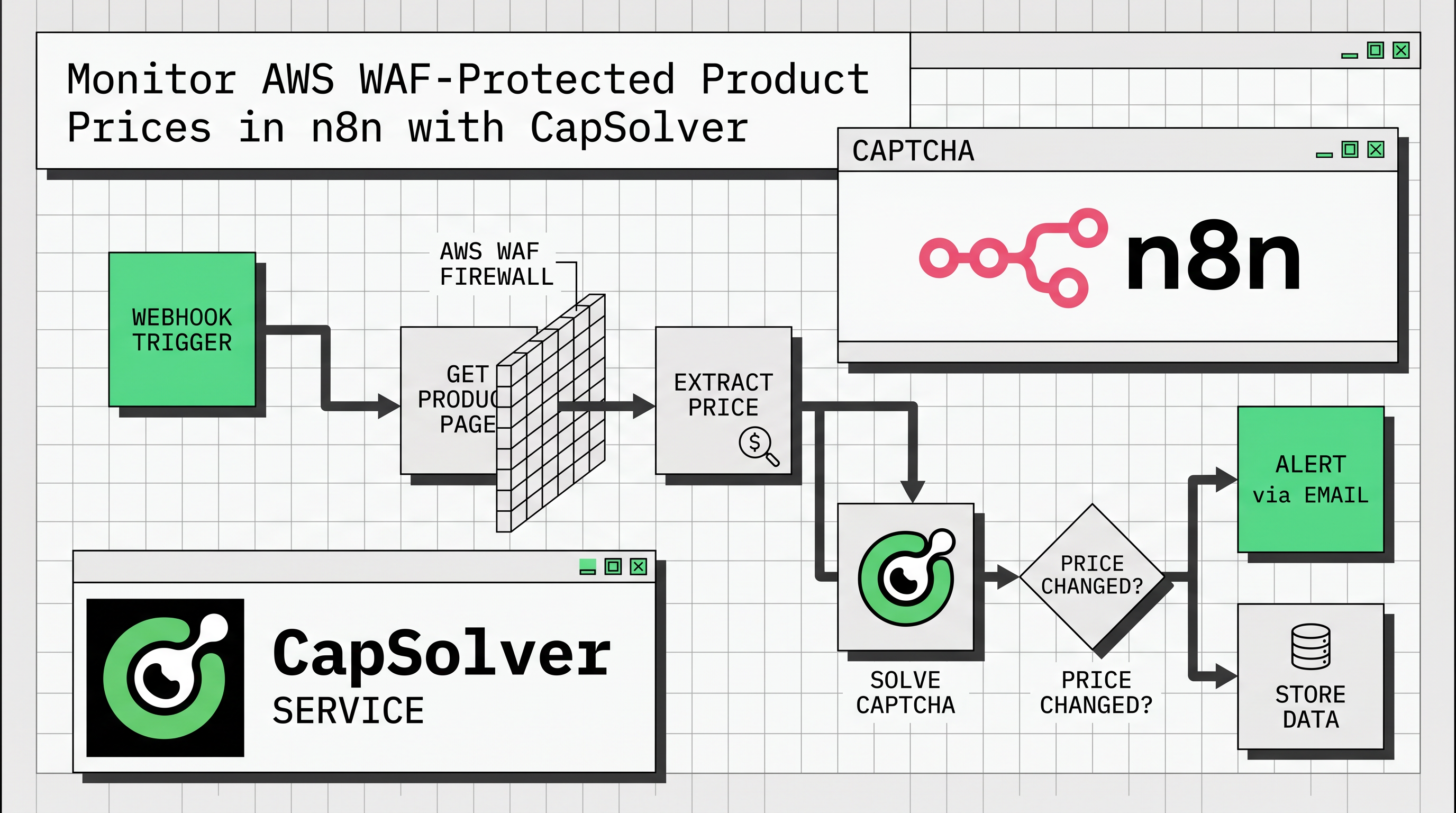
The template is designed for a practical monitoring loop: trigger the workflow, solve AWS WAF, fetch the product page, extract data, compare against prior results, and alert only when a change is detected.
AWS WAF often works differently from traditional CAPTCHA systems because it can rely on invisible, cookie-based verification instead of a visible checkbox or image challenge. In many cases, the automation flow must first obtain a valid aws-waf-token cookie and then submit that cookie in the Cookie HTTP header when requesting the protected page. If you are new to this integration pattern, the CapSolver n8n CAPTCHA solver integration provides useful context on how CapSolver fits into n8n workflows.
For price monitoring, this detail matters. A workflow that only sends a simple GET request to a product page may receive a challenge page instead of the actual HTML. To extract a price reliably, the automation must first solve AWS WAF and then use the solved cookie when requesting the target page.
| Challenge | Why It Matters for Price Monitoring | CapSolver + n8n Approach |
|---|---|---|
| Invisible AWS WAF challenge | The product page may not be returned to a basic HTTP request. | The CapSolver AWS WAF node solves the challenge before fetching the page. |
| Cookie-based access | AWS WAF uses an aws-waf-token cookie rather than a form token. |
The workflow sends the solved cookie through the Cookie HTTP header. |
| Repeated checks | Price tracking needs scheduled monitoring, not one-time scraping. | The template includes a scheduled trigger, such as every six hours. |
| On-demand checks | Teams may need to check a product price through another app or system. | The template also supports webhook-based execution. |
| Change detection | Raw scraping is not enough; users need to know what changed. | The workflow compares current and previous values before generating alerts. |
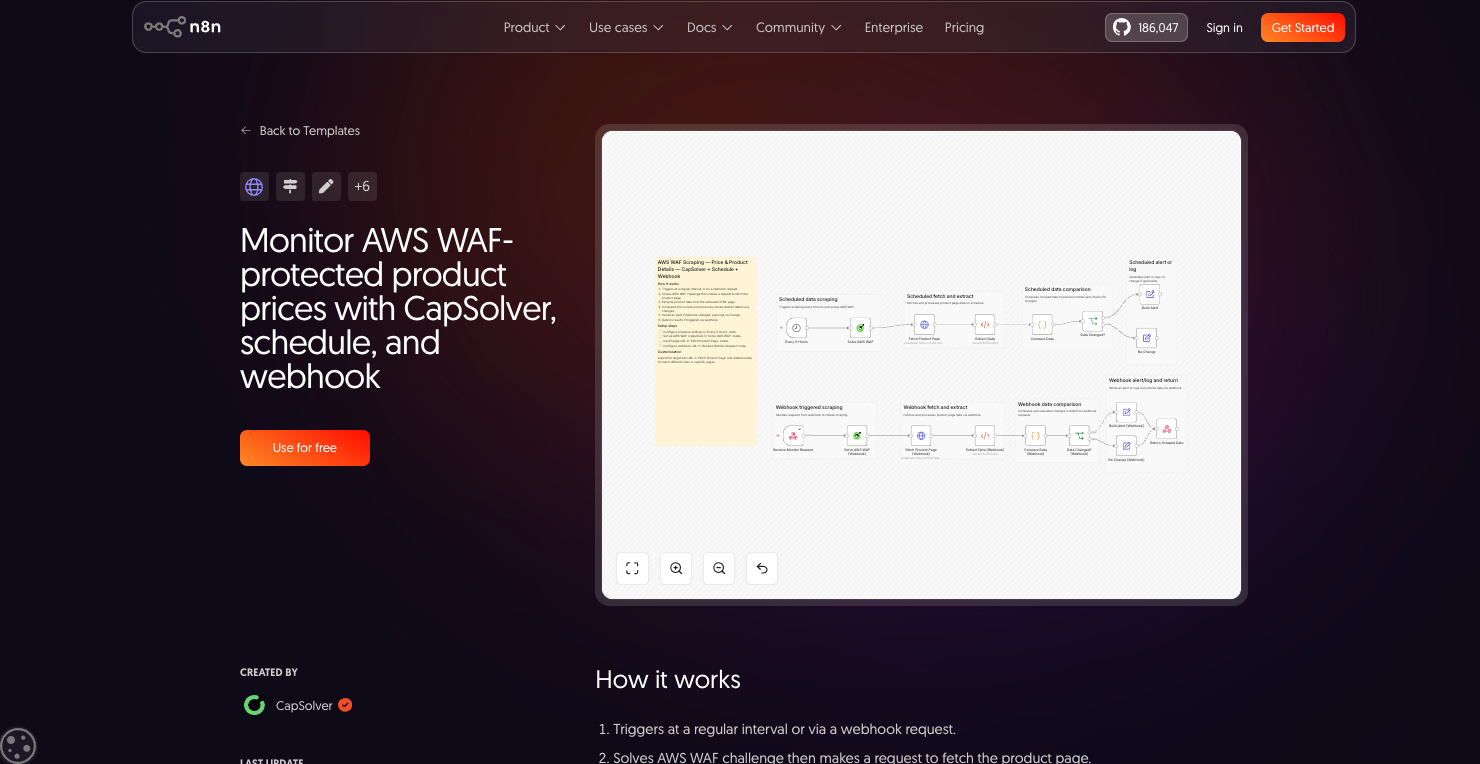
The CapSolver template is published in the n8n workflow library under the Market Research category and is created by CapSolver. It combines scheduling, webhook execution, AWS WAF solving, HTML extraction, stateful comparison, and conditional alert building into one ready-to-customize workflow. This is consistent with n8n’s own concept of workflows as connected nodes that automate a process, as described in the official n8n workflows documentation
At a high level, the workflow starts either at a regular interval or through a webhook request. It then uses CapSolver to solve the AWS WAF challenge, sends a request to retrieve the protected product page, extracts the product price and product name from the HTML, compares the new values with data stored from the previous execution, and returns or logs the result depending on how the workflow was triggered. For broader scraping workflows that use the same no-code automation mindset, you can also review How to Build Scrapers for Web Scraping in n8n with CapSolver.
| Workflow Stage | Purpose | Typical n8n Nodes or Concepts |
|---|---|---|
| Trigger | Start monitoring automatically or on demand. | Schedule Trigger and Webhook |
| Solve AWS WAF | Obtain the AWS WAF cookie needed to access the target page. | CapSolver AWS WAF node |
| Fetch Product Page | Request the protected page using the solved cookie. | HTTP Request |
| Extract Product Data | Read price and product name from the returned HTML. | HTML extraction with CSS selectors |
| Compare Data | Check whether the latest price differs from the stored previous value. | Code and workflow static data |
| Route Result | Decide whether to build an alert or log no change. | If and Edit Fields / Set |
| Respond | Return structured results for webhook executions. | Respond to Webhook |
The template is useful because it supports both scheduled monitoring and webhook-based execution. The scheduled path is ideal for continuous price tracking. For example, the template setup notes mention configuring the “Every 6 Hours” node, which makes it suitable for recurring checks without manual intervention.
The webhook path is useful when another internal tool, dashboard, bot, or backend system needs to trigger a price check on demand. The official n8n Webhook node documentation explains that the Webhook node can receive data from apps and services, start a workflow, and return generated workflow output, which makes it a good fit for API-like price checks.
| Trigger Type | Best For | Example Use Case |
|---|---|---|
| Scheduled trigger | Continuous market research and deal monitoring | Check a competitor product page every six hours and alert when the price changes. |
| Webhook trigger | On-demand automation and integrations | Let an internal dashboard request the latest protected product price when a user clicks “Refresh.” |
In most AWS WAF workflows, the required input is the websiteURL. Unlike reCAPTCHA or Turnstile, AWS WAF generally does not require a visible websiteKey or site key. CapSolver handles the challenge and returns a solution that can be used when requesting the protected page. If you need a step-by-step credential setup before using the template, How to Setup CapSolver on n8n explains how to add the CapSolver API credential inside n8n.
The most important implementation detail is how the solution is submitted. For AWS WAF, the solution is not normally placed into a form field. It is sent as an aws-waf-token cookie through the Cookie request header. The core pattern is straightforward: solve the challenge, submit the cookie to the target website, verify the response, and then process the protected data.
| Parameter or Output | Role in the Workflow |
|---|---|
websiteURL |
The target URL where the AWS WAF challenge appears. |
solution.cookie |
The solved AWS WAF cookie returned by CapSolver. |
Cookie header |
The correct place to submit the solved AWS WAF token in the HTTP request. |
| Optional AWS WAF parameters | Values such as awsKey, awsIv, awsContext, or awsChallengeJS may improve solve reliability for specific sites. |
After the workflow fetches the page successfully, it extracts product information from the HTML. In the reference implementation, the HTML extraction step looks for common price and title selectors such as .product-price, [data-price], .price, h1, and .product-title. This approach aligns with the official <a href=""https://docs.n8n.io/integrations/builtin/core-nodes/n8n-nodes-base.html/"" rel=""nofollow"">n8n HTML node documentation, which explains that the HTML node can extract content from HTML using a key, CSS selector, return value, and return-array setting.
This makes the workflow easy to adapt. If your target site uses a different HTML structure, you can update the CSS selectors in the extraction node. For example, one ecommerce site might store prices in .sale-price, while another might use [data-testid="price"]. MDN’s <a href=""https://developer.mozilla.org/en-US/docs/Web/CSS/CSS_selectors"" rel=""nofollow"">CSS selectors guide explains how selectors target HTML elements by type, attributes, state, and DOM position, which is exactly why choosing stable selectors is important for reliable price extraction.
A price tracker is only useful if it remembers previous results. The workflow uses n8n workflow state to compare the current price with the last stored price. In the reference workflow, $workflow.staticData.lastPrice persists the previous value across executions so the next run can determine whether the price changed.
This allows the workflow to distinguish between a first check, an unchanged price, a price drop, and a price increase. A drop can be marked with a stronger “deal” severity, while an increase can be marked as informational.
| Result | Meaning | Possible Action |
|---|---|---|
| First check | No previous value exists yet. | Store the current price and return a baseline result. |
| Unchanged | Current and previous prices match. | Log “no change” and avoid unnecessary alerts. |
| Price dropped | Current price is lower than the previous price. | Send a high-priority deal alert. |
| Price increased | Current price is higher than the previous price. | Send an informational alert for market tracking. |
Before using the template, you need an n8n instance and a CapSolver account. CapSolver is available as an n8n integration, so users can create a CapSolver API credential in n8n and reuse it across workflows.
Use code
CAP26when signing up at CapSolver to receive bonus credits!
| Step | What to Configure | Notes |
|---|---|---|
| 1 | Add CapSolver credentials in n8n | Create a CapSolver API credential and enter your API key. |
| 2 | Configure the schedule | Update the “Every 6 Hours” node if you need a different monitoring interval. |
| 3 | Set the target product URL | Replace the sample product page URL in the “Fetch Product Page” nodes. |
| 4 | Check extraction selectors | Update selectors for price and product name based on the target page HTML. |
| 5 | Configure the webhook | Set up the “Receive Monitor Request” node if you want on-demand checks. |
| 6 | Test the result | Verify that the AWS WAF cookie is accepted and that the extracted price is correct. |
The default workflow focuses on product price and product name, but the same pattern can support broader market research. You can extract availability, discount labels, stock status, shipping information, seller names, review counts, or promotional badges. After extraction, n8n can route the result to a spreadsheet, database, Slack channel, Telegram bot, email notification, or internal dashboard. If your use case expands into AI-assisted scraping on protected sites, How to Scrape CAPTCHA-Protected Sites with n8n, CapSolver, and OpenClaw is a relevant next read.
| Customization | How to Apply It |
|---|---|
| Track multiple fields | Add more CSS selectors in the HTML extraction step. |
| Monitor multiple products | Duplicate the workflow path, use a list of URLs, or trigger the workflow with webhook payloads. |
| Send alerts to team tools | Add Slack, Telegram, Discord, email, or database nodes after the change-detection branch. |
| Store historical data | Save each check to Google Sheets, Airtable, Postgres, MySQL, or another storage node. |
| Use optional AWS WAF parameters | Add parameters such as awsContext or awsChallengeJS if the target site requires more context. |
For reliable monitoring, start with a single product page and confirm that the workflow can fetch real product HTML after solving AWS WAF. If the response still shows a challenge page, verify that the solved cookie is sent in the Cookie header and that the cookie is used immediately after solving, because challenge cookies may expire quickly.
You should also keep selectors as specific as necessary but not overly fragile. A selector such as .price may work on many pages, but a more specific selector may reduce false matches if the page contains multiple prices. When monitoring important products, store both the raw extracted value and the parsed numeric value so that you can audit price changes later.
Finally, treat the workflow as part of a compliant market research process. Monitor only pages you are authorized to access, respect website terms, and avoid excessive request frequency. The template’s schedule-based design makes it easier to keep monitoring predictable instead of continuously hammering a target site.
The main advantage of the CapSolver n8n template is that it packages a full AWS WAF-aware monitoring pattern into a reusable workflow. Instead of separately building a solver step, cookie submission request, HTML extractor, state comparison, alert branch, and webhook response, you can start from a working structure and customize the target URL, selectors, schedule, and alert destination.
| Benefit | Practical Impact |
|---|---|
| Faster setup | Start from a ready-made AWS WAF price monitoring workflow. |
| Less manual checking | Let n8n run price checks on a schedule. |
| AWS WAF-aware request flow | Use CapSolver to solve the challenge before fetching protected data. |
| Built-in change detection | Alert only when product data changes. |
| Flexible integration | Run by schedule, trigger by webhook, and connect results to other n8n nodes. |
The “Monitor AWS WAF-protected product prices with CapSolver, schedule, and webhook” n8n template is a practical starting point for ecommerce price monitoring and market research on AWS WAF-protected pages. It combines CapSolver ’s AWS WAF solving capability with n8n’s visual automation features, allowing teams to fetch protected product pages, extract pricing data, compare changes over time, and trigger alerts without writing a full scraper from scratch.
If your workflow needs to monitor protected product pages, this template provides the essential building blocks: scheduled checks, webhook execution, AWS WAF solving, cookie-based page fetching, HTML extraction, persistent comparison, and structured alerting.
It is an n8n workflow template created by CapSolver that monitors AWS WAF-protected product prices. It solves AWS WAF, fetches the product page, extracts product data, compares current and previous values, and sends an alert when data changes.
Yes. The template includes a scheduled trigger, and the setup instructions mention configuring the “Every 6 Hours” node. You can adjust the interval based on your monitoring needs.
Yes. The template also supports webhook execution, which means another app, dashboard, or service can trigger a product price check and receive the result.
In most cases, AWS WAF does not require a public site key. The websiteURL is typically the required parameter, while optional parameters may be used for specific implementations.
The solved AWS WAF token should be submitted as a cookie in the Cookie HTTP header, not as a form field.
You should configure your CapSolver credentials, update the monitoring schedule, replace the target product URL, adjust the CSS selectors used for price and product name extraction, and configure the webhook if you need on-demand checks.
Ethan Collins
AI Agent Workflow Engineer
Building clearer handoffs between AI agents and tools.
ABOUT THE AUTHOR
Learn how to build web scrapers in n8n for captcha-protected sites using CapSolver. This step-by-step guide covers solving reCAPTCHA, submitting tokens correctly, extracting product data, and automating workflows with schedule and webhook triggers.
Learn how to integrate CapSolver with n8n to solve CAPTCHAs and build reliable automation workflows with ease.