🎉全新面向 AI Agent 的 CapSolver-MCP、agent 工具和 SDK 集成

Ethan Collins
AI Agent Workflow Engineer
已发表 Jul 28, 2026
已更新 Jul 28, 2026 · 最小阅读量
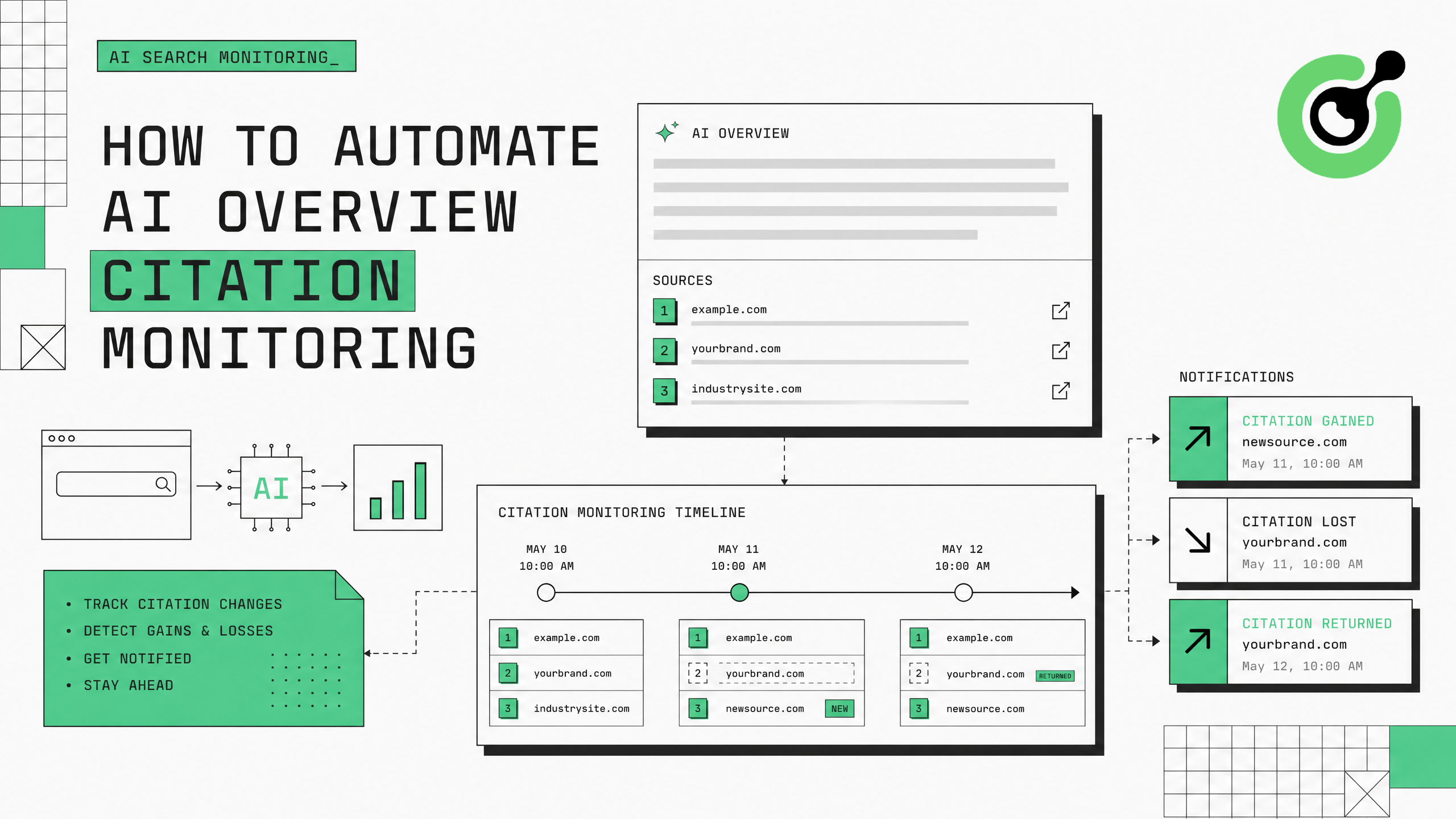
Google的AI摘要现在出现在越来越多的搜索查询中,并引用特定的网页作为来源。对于品牌和出版商而言,被这些AI生成的摘要引用会带来大量流量和权威性。监控哪些页面被引用——以及引用何时发生变化——需要从Google搜索结果中自动收集数据。本指南展示了如何使用CapSolver来处理Google的验证挑战,从而构建一个AI摘要引用监控系统并保持持续跟踪。
Google AI摘要代表了搜索流量流动的根本性变化。当Google生成一个AI驱动的答案并引用您的页面时,您会获得直接链接和隐含的权威性。当您的引用消失时,该查询的流量会立即下降。Search Engine Land的研究表明,AI摘要现在出现在15-30%的信息性查询中,且该比例每月增长。
监控的挑战在于AI摘要引用是动态的——它们会根据内容的新鲜度、查询重写和Google持续的模型更新而变化。今天被引用的页面可能明天就失去引用而没有任何通知。在规模上手动检查是不现实的:一个跟踪200个关键词的品牌需要手动搜索每个关键词,滚动到AI摘要,并记录哪些来源被引用——每周多次。
自动化监控可以解决这个问题,但Google的机器人保护会阻止系统化的搜索访问。在50-100次自动查询后,Google会显示一个reCAPTCHA挑战或完全阻止该IP。CapSolver提供了清除验证的层,使您的监控流程持续运行。
安装所需包:
pip install git+https://github.com/capsolver-ai/capsolver-core.git
pip install aiohttp beautifulsoup4 pandas
设置API密钥:
export CAPSOLVER_API_KEY="your-capsolver-api-key"其他要求:
并非所有查询都会生成AI摘要。将您的监控集中在AI摘要持续出现的关键词上:
from dataclasses import dataclass, field
from typing import List, Optional
import time

@dataclass
class AIOverviewCitation:
    """AI摘要中的单个引用。"""
    position: int          # 引用列表中的1-based位置
    url: str               # 被引用的页面URL
    domain: str            # 被引用页面的域名
    anchor_text: str       # 用于链接到来源的文本
    snippet_context: str   # AI摘要中的上下文文本

@dataclass
class AIOverviewResult:
    """一个关键词的AI摘要监控结果。"""
    keyword: str
    has_ai_overview: bool
    citations: List[AIOverviewCitation] = field(default_factory=list)
    overview_text: str = ""
    timestamp: float = 0.0
    your_domain_cited: bool = False
    your_citation_position: Optional[int] = None

# 最可能触发AI摘要的关键词
PRIORITY_KEYWORDS = [
    # 信息性查询(AI摘要触发率最高)
    "什么是生成式引擎优化",
    "如何优化AI搜索",
    "AI引用的最佳实践",
    # 商业调查查询
    "最好的CAPTCHA解决API",
    "2025年顶级AI代理框架",
    # 比较查询
    "reCAPTCHA vs Cloudflare Turnstile",
]
信息性和“如何做”类查询的AI摘要触发率最高(40-60%),其次是比较查询(20-30%)和商业调查查询(15-25%)。
监控永远不会触发AI摘要的关键词会浪费CAPTCHA解决积分。专注于您的内容有引用潜力的查询——您专业领域内的信息性查询、与您的产品相关的比较查询,以及您类别的“最佳”查询。
创建一个从Google搜索结果页面中提取AI摘要引用的解析器:
from bs4 import BeautifulSoup
import re

class AIOverviewExtractor:
    """从Google SERP HTML中提取AI摘要引用。"""

    def extract(self, html: str, keyword: str, your_domain: str = "") -> AIOverviewResult:
        """解析HTML并提取AI摘要引用数据。"""
        soup = BeautifulSoup(html, 'html.parser')

        # 检测AI摘要是否存在
        # Google使用各种容器类来表示AI摘要
        ai_containers = soup.select(
            '[data-attrid*="ai"], '
            '.ai-overview, '
            '[class*="aiOverview"], '
            '.kp-wholepage [data-md-type]'
        )

        if not ai_containers:
            return AIOverviewResult(
                keyword=keyword,
                has_ai_overview=False,
                timestamp=time.time()
            )

        # 提取AI摘要文本
        overview_container = ai_containers[0]
        overview_text = overview_container.get_text(separator=" ", strip=True)[:2000]

        # 提取引用(AI摘要中的源链接)
        citations = []
        source_links = overview_container.select('a[href^="http"]')

        for i, link in enumerate(source_links, 1):
            url = link.get('href', '')
            if not url or 'google.com' in url:
                continue

            domain = self._extract_domain(url)
            anchor = link.get_text(strip=True)

            # 获取上下文
            parent = link.parent
            context = parent.get_text(strip=True)[:200] if parent else ""

            citations.append(AIOverviewCitation(
                position=i,
                url=url,
                domain=domain,
                anchor_text=anchor,
                snippet_context=context
            ))

        # 检查您的域名是否被引用
        your_cited = any(your_domain in c.domain for c in citations) if your_domain else False
        your_position = next(
            (c.position for c in citations if your_domain in c.domain), None
        ) if your_domain else None

        return AIOverviewResult(
            keyword=keyword,
            has_ai_overview=True,
            citations=citations,
            overview_text=overview_text[:500],
            timestamp=time.time(),
            your_domain_cited=your_cited,
            your_citation_position=your_position
        )

    def _extract_domain(self, url: str) -> str:
        """从URL中提取域名。"""
        match = re.search(r'https?://([^/]+)', url)
return match.group(1) if match else url构建具有集成CAPTCHA解决的数据收集层:
import asyncio
import aiohttp
import random
from capsolver_core import create_capsolver, CaptchaType, CaptchaInfo

class CitationMonitorCollector:
    """具有CAPTCHA处理的AI摘要数据收集器。"""

    def __init__(self, api_key: str, proxies: list):
        self.cap = create_capsolver(api_key=api_key)
        self.proxies = proxies
        self.proxy_idx = 0
        self.extractor = AIOverviewExtractor()
        self.stats = {"searches": 0, "captchas": 0, "overviews_found": 0}

    async def collect_citation_data(
        self, keyword: str, your_domain: str = "", location: str = "us"
    ) -> AIOverviewResult:
        """收集关键词的AI摘要引用数据。"""
        proxy = self.proxies[self.proxy_idx % len(self.proxies)]
        self.proxy_idx += 1

        url = f"https://www.google.com/search?q={keyword}&gl={location}&hl=en"
        headers = {
            "User-Agent": "Mozilla/5.0 (Macintosh; Intel Mac OS X 10_15_7) AppleWebKit/537.36 (KHTML, like Gecko) Chrome/125.0.0.0 Safari/537.36",
            "Accept": "text/html,application/xhtml+xml",
            "Accept-Language": "en-US,en;q=0.9"
        }

        async with aiohttp.ClientSession() as session:
            async with session.get(url, headers=headers, proxy=proxy, timeout=30) as resp:
                html = await resp.text()

            # 处理触发的CAPTCHA
            if "unusual traffic" in html.lower() or "g-recaptcha" in html:
                self.stats["captchas"] += 1
                html = await self._solve_and_retry(session, url, headers, proxy)

            self.stats["searches"] += 1

        # 提取引用数据
        result = self.extractor.extract(html, keyword, your_domain)
        if result.has_ai_overview:
            self.stats["overviews_found"] += 1

        return result

    async def _solve_and_retry(self, session, url, headers, proxy) -> str:
        """解决Google的reCAPTCHA并重试搜索。"""
        info = CaptchaInfo(
            type=CaptchaType.RECAPTCHA_V2,
            website_url="https://www.google.com",
            website_key="6LfwuyUTAAAAAOAmoS0fdqijC2PbbdH4kjq62Y1b"
        )
        solution = await self.cap.solve(info)

        # 解决后使用新代理重试
        new_proxy = self.proxies[self.proxy_idx % len(self.proxies)]
        self.proxy_idx += 1

        async with session.get(url, headers=headers, proxy=new_proxy, timeout=30) as resp:
            return await resp.text()

    async def monitor_batch(
        self, keywords: list, your_domain: str = "", delay: float = 7.0
    ) -> list:
        """以速率限制监控一批关键词。"""
        results = []
        for keyword in keywords:
            result = await self.collect_citation_data(keyword, your_domain)
            results.append(result)
            await asyncio.sleep(delay + random.uniform(0, 3))
        return results

    async def close(self):
await self.cap.aclose()CapSolver的reCAPTCHA文档详细介绍了Google特定的reCAPTCHA实现。
跟踪随时间变化的引用并检测您的页面获得或失去AI摘要引用时发出警报:
class CitationChangeDetector:
    """检测AI摘要引用随时间的变化。"""

    def __init__(self, your_domain: str):
        self.your_domain = your_domain
        self.history = {}  # keyword -> list of AIOverviewResult

    def record_and_detect(self, results: list) -> list:
        """记录新结果并检测与上一次检查的变更。"""
        changes = []

        for result in results:
            keyword = result.keyword
            previous = self.history.get(keyword, [])

            if previous:
                last = previous[-1]

                # 引用获得
                if result.your_domain_cited and not last.your_domain_cited:
                    changes.append({
                        "type": "CITATION_GAINED",
                        "keyword": keyword,
                        "position": result.your_citation_position,
                        "timestamp": result.timestamp
                    })

                # 引用丢失
                elif last.your_domain_cited and not result.your_domain_cited:
                    changes.append({
                        "type": "CITATION_LOST",
                        "keyword": keyword,
                        "previous_position": last.your_citation_position,
                        "timestamp": result.timestamp
                    })

                # 位置变化
                elif (result.your_domain_cited and last.your_domain_cited and
                      result.your_citation_position != last.your_citation_position):
                    changes.append({
                        "type": "POSITION_CHANGED",
                        "keyword": keyword,
                        "old_position": last.your_citation_position,
                        "new_position": result.your_citation_position,
                        "timestamp": result.timestamp
                    })

                # AI摘要出现/消失
                if result.has_ai_overview and not last.has_ai_overview:
                    changes.append({
                        "type": "AI_OVERVIEW_APPEARED",
                        "keyword": keyword,
                        "timestamp": result.timestamp
                    })

            # 更新历史记录
            if keyword not in self.history:
                self.history[keyword] = []
            self.history[keyword].append(result)
            # 保留最近30天的历史记录
            self.history[keyword] = self.history[keyword][-60:]

        return changes

    def generate_report(self) -> dict:
        """生成引用状态的摘要报告。"""
        total_keywords = len(self.history)
        cited_keywords = sum(
            1 for k, h in self.history.items()
            if h and h[-1].your_domain_cited
        )
        overview_keywords = sum(
            1 for k, h in self.history.items()
            if h and h[-1].has_ai_overview
        )

        return {
            "total_keywords_monitored": total_keywords,
            "keywords_with_ai_overview": overview_keywords,
            "keywords_where_cited": cited_keywords,
            "citation_rate": f"{cited_keywords/max(overview_keywords,1)*100:.1f}%",
            "average_citation_position": self._avg_position()
        }

    def _avg_position(self) -> float:
        positions = [
            h[-1].your_citation_position
            for h in self.history.values()
if h and h[-1].your_citation_position return sum(positions) / len(positions) if positions else 0## 第5步 — 部署为定时监控系统
按计划运行完整流程:
```python
async def run_daily_monitoring():
"""每日AI摘要引用监控运行。"""
collector = CitationMonitorCollector(
api_key="YOUR_CAPSOLVER_API_KEY",
proxies=RESIDENTIAL_PROXY_LIST
)
detector = CitationChangeDetector(your_domain="capsolver.com")
# 监控所有优先关键词
results = await collector.monitor_batch(
keywords=PRIORITY_KEYWORDS,
your_domain="capsolver.com",
delay=8.0
)
# 检测变化
changes = detector.record_and_detect(results)
# 报告
if changes:
print(f"\n{'='*50}")
print(f"检测到引用变化: {len(changes)}")
for change in changes:
print(f" [{change['type']}] {change['keyword']}")
print(f"{'='*50}\n")
report = detector.generate_report()
print(f"摘要: {report}")
await collector.close()
# 每日运行
asyncio.run(run_daily_monitoring())领取您的优惠码:在 CapSolver仪表板 使用优惠码 WEBS,每次充值可额外获得5%的奖励。这对于GEO团队大规模跟踪AI摘要引用至关重要。
监控数据直接指导您的生成式引擎优化策略:
CapSolver关于AI和自动化的博客 详细介绍了AI驱动的数据收集模式。对于处理不同搜索引擎的CAPTCHA类型,CapSolver产品页面 列出了所有支持的验证系统。
自动化AI摘要引用监控需要一个具备CAPTCHA处理能力的搜索收集层、引用提取解析器和变化检测系统。CapSolver 提供了清除验证的基础设施,使您能够持续监控Google的AI摘要,3-8秒内解决reCAPTCHA挑战,确保您的GEO策略始终拥有最新的引用数据。
从20-50个高优先级关键词开始,您期望AI摘要出现,验证提取准确性,然后扩展到完整的关键词覆盖。引用变化数据直接指导内容优化决策——帮助您了解Google的AI认为哪些内容值得引用。
对于高优先级关键词(品牌术语、核心产品查询),每天检查一次。对于更广泛的监控(行业术语、信息性查询),每周检查2-3次就足够了。AI摘要引用可能在内容更新后几小时内发生变化,因此更频繁的检查可以更快地捕捉到变化。
目前15-30%的信息性查询会显示AI摘要,这一比例正在增长。"如何"类查询、定义类查询和比较类查询的触发率最高。商业性和交易性查询显示AI摘要的频率较低。
大多数AI摘要引用3-8个来源,前2-3个位置获得大部分点击流量。引用列表中的第1位获得的点击量大约是第5位的3-5倍。监控您的引用位置与监控是否被引用同样重要。
可以。将 your_domain 设置为竞争对手的域名,即可跟踪其引用频率和位置。将您的引用率与竞争对手进行比较,以识别内容差距和机会。跟踪那些在您缺席的关键词中持续出现的竞争对手。
在200个关键词、8秒延迟和约10%的CAPTCHA出现率下,每天需要大约20次CAPTCHA解决。按每1000次reCAPTCHA v2解决2-3美元计算,每日成本约为0.04-0.06美元——每月约2美元即可实现全面的AI摘要引用跟踪。
Ethan Collins
AI Agent Workflow Engineer
Building clearer handoffs between AI agents and tools.
关于作者