🎉NEWCapSolver for AI agents-MCP, agent tools, and SDK integrations

Rajinder Singh
Deep Learning Researcher
Published May 15, 2026
Updated May 15, 2026 · min read
Web scraping captcha handling is a practical issue for teams that collect permitted public data, run market monitoring, test owned applications, or operate internal automation. CapSolver can support these workflows when the goal is lawful, controlled challenge handling rather than uncontrolled traffic. The best approach is not to add a solver first. It is to confirm permission, reduce unnecessary requests, identify the challenge type, preserve browser context, and add an API workflow only where it is allowed. This guide explains how to design a web scraping captcha process that is technically reliable, easier to audit, and aligned with responsible automation rules.
Web scraping captcha checks usually appear when a site wants more confidence about a visitor, request pattern, browser environment, or account behavior. Some challenges are visible, while others are score-based or token-based. Google states that reCAPTCHA v3 runs without interrupting users and returns a risk score from 0.0 to 1.0 for each request. Cloudflare states that Turnstile tokens must be validated on the server, are single-use, and are valid for 300 seconds. These systems are part of a broader traffic validation pattern, not just a visual puzzle.
That means web scraping captcha handling cannot be separated from request quality. High request rates, unstable IP reputation, missing browser signals, or inconsistent session state can increase challenge frequency. Before adding an API, teams should reduce avoidable triggers by caching responsibly, respecting robots and terms, limiting concurrency, identifying their use case where appropriate, and stopping when a site denies or restricts access.
| Cause | Practical response | Why it helps |
|---|---|---|
| High request rate | Add queue limits and backoff | Reduces load and failed attempts. |
| Browser mismatch | Use a consistent browser automation profile | Keeps page context stable. |
| Proxy inconsistency | Keep proxy, session, and challenge task aligned | Prevents token context mismatch. |
| Unknown challenge type | Detect reCAPTCHA, Turnstile, or image challenge before task creation | Sends the right API payload. |
| Unclear permission | Review terms, robots, contracts, and data sensitivity | Keeps automation within approved boundaries. |
Web scraping captcha work should begin with governance. OWASP describes unwanted automation as software that diverges from accepted behavior and creates undesirable effects for a web application, and its automated threat taxonomy includes scraping and CAPTCHA-related abuse scenarios. For teams, this means the same technical workflow can be acceptable in one context and unacceptable in another.
A responsible policy should list allowed domains, allowed data types, business purpose, request-rate limits, account rules, retention rules, and escalation contacts. It should also explain what the automation must not do, such as accessing private areas, collecting sensitive data without permission, or continuing after denial signals. This policy protects both the target site and your own organization because it creates a clear line between approved data collection and prohibited activity.
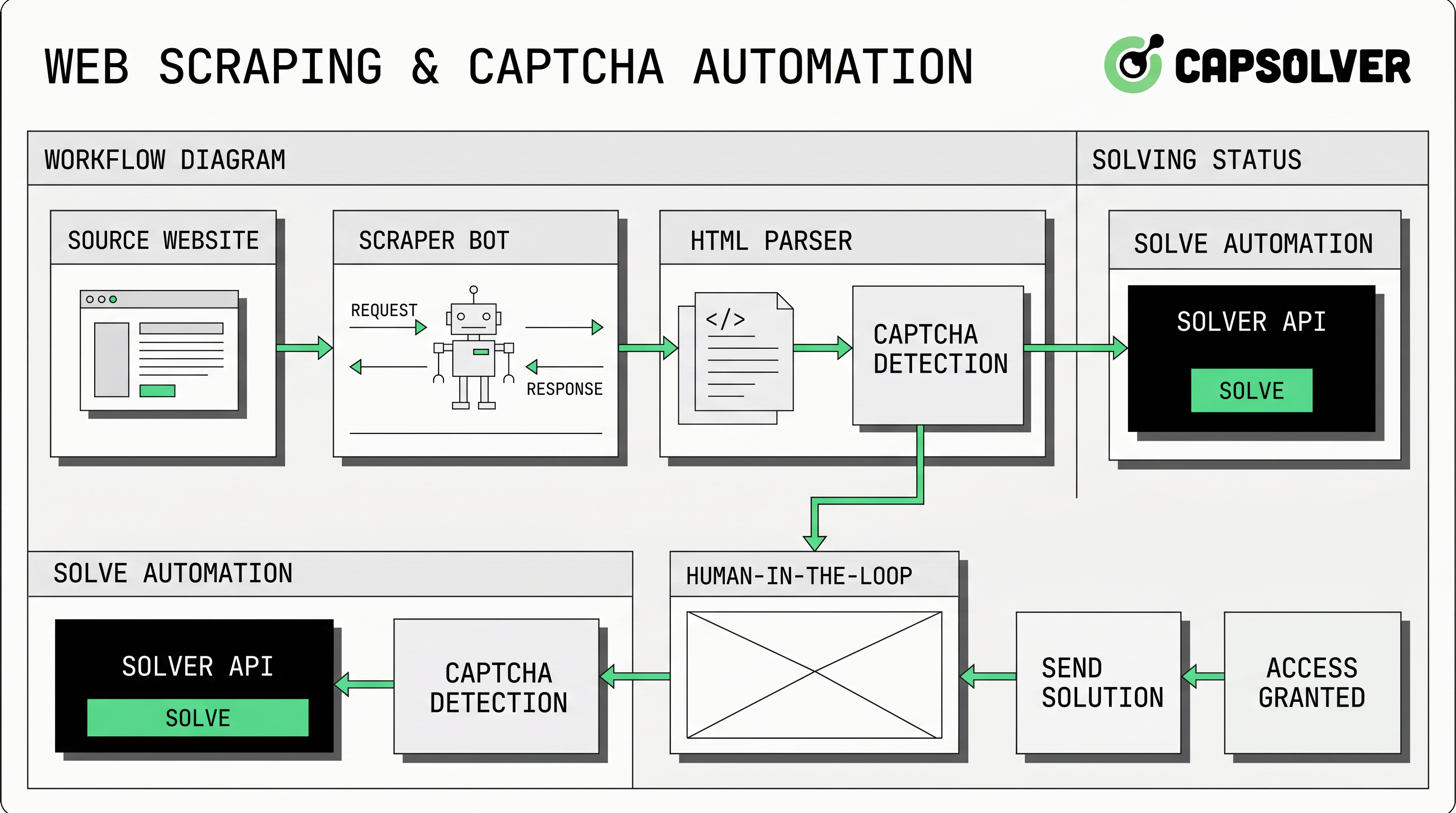
Web scraping captcha handling usually fits one of three technical patterns. The first is avoidance through better request hygiene: fewer requests, better caching, and less noisy browser behavior. The second is human review for edge cases, where a low-volume process routes difficult pages to an operator. The third is an API-based challenge workflow, where an approved job sends challenge parameters to a provider and retrieves a solution.
CapSolver’s official API documentation describes a task-based flow with createTask and getTaskResult. In this model, the scraper detects the challenge, submits the right task object, receives a task ID, and polls until the result is ready. The createTask guide states that requests require clientKey and a task object, and the getTaskResult guide documents processing and ready states for asynchronous tasks.
For reCAPTCHA pages, teams should review CapSolver’s reCAPTCHA v2 guide or reCAPTCHA v3 guide rather than copying generic payloads. For Turnstile pages, use the Cloudflare Turnstile guide and remember that Cloudflare’s own server-side validation rules make token freshness important.
Web scraping captcha errors often come from context mismatch. If the browser requests a page through one proxy but the challenge task uses another network path, the returned token may not match the expected environment. If the page action changes between detection and submission, a score-based token may not validate as intended. If the worker waits too long, a token can expire.
This is why the automation layer should bind a challenge task to a job ID, browser session, proxy, target URL, site key, and timestamp. CapSolver’s resources on Selenium in web automation and Puppeteer in web automation are useful internal links for teams that need to standardize browser drivers before adding challenge handling. When proxies are involved, the proxy ports for scraping and automation guidance can help keep network settings consistent.
Redeem Your CapSolver Bonus Code
Boost your automation budget instantly!
Use bonus code CAP26 when topping up your CapSolver account to get an extra 5% bonus on every recharge — with no limits.
Redeem it now in your CapSolver Dashboard
Web scraping captcha handling should match the volume, permission level, and reliability requirement of the job. A low-volume research task may only need human review. A recurring monitoring job usually needs API-based state handling, logs, and stop conditions. A poorly governed high-volume job should not proceed at all, even if the technical integration works.
| Option | Best use case | Main risk |
|---|---|---|
| Request hygiene only | Public pages with low challenge frequency | May not handle challenge pages when they appear. |
| Human review | Low-volume research or debugging | Slow and not suitable for scheduled jobs. |
| API-based handling | Approved recurring workflows with known challenge types | Requires accurate context, audit logs, and policy controls. |
| Do not proceed | Restricted, private, sensitive, or denied access | Continuing can create legal, privacy, and security risk. |
CapSolver’s article on Selenium versus Puppeteer for CAPTCHA solving is useful when selecting browser automation tooling, while the guide to browser automation for developers can help teams separate browser control from challenge handling.
Web scraping captcha implementation should be small, observable, and reversible. Start with a staging workflow and a limited allowlist. Record challenge type, target URL, site key, proxy ID, task ID, task status, latency, and final outcome. If the site changes its policy, challenge behavior, or response status, stop the job and review the workflow rather than increasing retries.
A practical checklist includes permission review, robots and terms review, data minimization, domain allowlist, rate limit, browser profile, proxy consistency, challenge detection, API task creation, polling policy, timeout, error handling, audit logs, and post-run review. Teams can add guidance on using a web scraping and CAPTCHA solving service to internal documentation because it frames the service as part of a broader workflow rather than a standalone shortcut.
Web scraping captcha projects often fail when teams treat challenge handling as a separate add-on. A token returned by an API is only useful if it fits the browser state, target page, action, and time window. Another common mistake is unlimited retrying. If a task fails repeatedly, the correct response is to inspect parameters, permission, and site signals, not to increase load.
Teams should also avoid storing secrets in scraper scripts, sharing API keys across environments, or sending challenge tasks for domains outside the approved allowlist. Use central configuration, secret storage, and job-level logging. If your workflow uses an API, CapSolver’s API documentation and getTaskResult guide should remain the source of truth for endpoint behavior.
Web scraping captcha handling is safest when it is designed as a controlled workflow: permission first, request hygiene second, challenge detection third, and API integration only where it is allowed. The right setup keeps browser context stable, treats tokens as short-lived, logs every result, and stops when access is not authorized. If your team needs documented challenge handling for approved scraping, QA, or monitoring, start with a small test workflow using CapSolver.
Web scraping captcha means a scraper encounters a traffic validation challenge while collecting data. The right response depends on permission, challenge type, rate limits, and the site’s access rules.
Yes, in approved workflows, an API can create a challenge task and return a solution through a documented result endpoint. For a general overview, see how web scraping and CAPTCHA solving services provide an API.
Selenium and Puppeteer can generate browser patterns that sites review during traffic validation, especially at high request rates or with unstable sessions. Standardizing Selenium web automation or Puppeteer settings helps reduce avoidable inconsistencies.
Use proxies only where they are lawful and allowed, and keep proxy identity consistent between the browser session and the challenge task. The goal is stable context, not aggressive request volume.
No. Public visibility does not automatically create permission for automated collection. Review site terms, robots guidance, contracts, privacy requirements, data sensitivity, and rate limits before running any scraper.
Rajinder Singh
Deep Learning Researcher
Making CAPTCHA solving more reliable in automated workflows.
ABOUT THE AUTHOR
Learn scalable Rust web scraping architecture with reqwest, scraper, async scraping, headless browser scraping, proxy rotation, and compliant CAPTCHA handling.

Learn the best techniques to scrape job listings without getting blocked. Master Indeed scraping, Google Jobs API, and web scraping API with CapSolver.