
🎉NEWCapSolver for AI agents-MCP, agent tools, and SDK integrations

Ethan Collins
AI Agent Workflow Engineer
Published Aug 26, 2026
Updated Aug 26, 2026 · min read
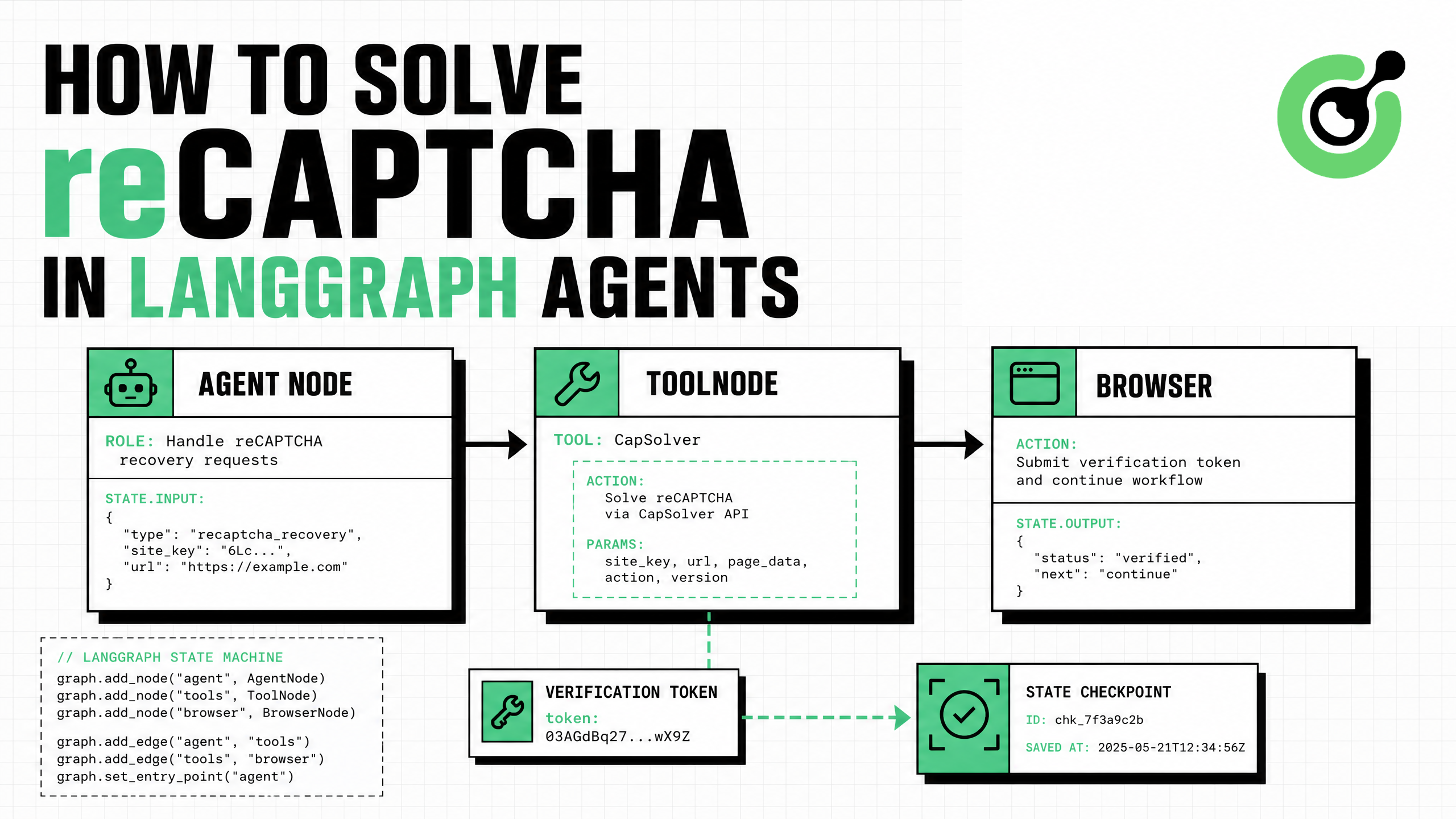
capsolver-agent with the LangChain extra and load its ready-made tools with get_langchain_tools().ToolNode.gRecaptchaResponse at the API level.The most maintainable way to solve reCAPTCHA in LangGraph agents is to treat challenge recovery as a typed tool node rather than embedding network logic in the model prompt. CapSolver's Agent SDK provides LangChain-compatible tools, while LangGraph provides explicit state, routing, error handling, and resumability. The model can decide that a supported challenge blocks the next authorized step, but a deterministic tool validates the page parameters, calls the solver, and returns a structured result. This architecture keeps API keys out of messages, makes retries observable, and prevents unrelated targets from being submitted. This tutorial builds a minimal graph, shows how to route tool calls, explains the reCAPTCHA v2 parameters, and adds production safeguards for browser automation, QA, RPA, and approved public-data workflows.
LangGraph is designed for stateful workflows in which nodes perform bounded work and edges control what happens next. CapSolver fits naturally into a dedicated tool node:
User-directed task
      ↓
Reasoning node identifies a supported challenge
      ↓
ToolNode executes CapSolver tool
      ↓
Structured solution or normalized error
      ↓
Browser resumes, retries, or requests human review
The model should decide when recovery is needed. It should not decide where secrets are stored, which hosts are authorized, or how many retries are permitted. Those decisions belong in deterministic application code.
The CapSolver AI blog includes agent integration patterns, and the CapSolver AI and automation FAQ explains how a recovery layer complements an existing agent stack.
The user-provided CapSolver Agent documentation specifies that capsolver-agent depends on capsolver-core. Install the core first, then the agent package with its LangChain integration.
pip install git+https://github.com/capsolver-ai/capsolver-core.git
pip install "capsolver-agent[langchain] @ git+https://github.com/capsolver-ai/capsolver-agent.git"
pip install langchain-openai langgraph
Configure credentials through the runtime environment:
export CAPSOLVER_API_KEY="CAP-xxxxxxxxxxxxxxxx"
export OPENAI_API_KEY="sk-xxxxxxxxxxxxxxxx"
The official CapSolver Agent repository documents this import path:
from capsolver_agent.langchain_tools import get_langchain_tools

tools = get_langchain_tools(api_key="YOUR_API_KEY")
The returned objects are LangChain-compatible BaseTool instances. The official LangChain tools guide explains that tools expose defined inputs and outputs to the model, while type information and descriptions help the model choose the correct action.
For a standard proxyless reCAPTCHA v2 task, the required inputs are the page URL and site key. CapSolver's official reCAPTCHA v2 documentation lists ReCaptchaV2TaskProxyLess for the built-in proxy path and separate Enterprise task types when the page uses reCAPTCHA Enterprise.
| Field | Requirement | Guidance |
|---|---|---|
captcha_type |
Required by the agent tool | Use the SDK's documented reCAPTCHA v2 identifier |
website_url |
Required | Send the full URL of the authorized page |
website_key |
Required | Use the exact site key loaded by the page |
| Enterprise payload | Conditional | Include only when the target's documented configuration requires it |
| Invisible flag or action | Conditional | Preserve values detected on the authorized page |
At the REST-task level, the solution token is returned as solution.gRecaptchaResponse. The Agent SDK wraps the core result in a structured dictionary so the graph can route on success or failure without parsing arbitrary prose.
For parameter discovery, see the CapSolver browser extension guide and the reCAPTCHA v2 implementation guide.
The example below loads the official CapSolver tools, binds them to a chat model, and places them in a ToolNode. The graph loops back to the reasoning node after each tool response.
import os
from typing import Literal

from capsolver_agent.langchain_tools import get_langchain_tools
from langchain_openai import ChatOpenAI
from langgraph.graph import START, StateGraph
from langgraph.graph.message import MessagesState
from langgraph.prebuilt import ToolNode, tools_condition

capsolver_tools = get_langchain_tools(
    api_key=os.environ["CAPSOLVER_API_KEY"]
)

model = ChatOpenAI(
    model="gpt-4o-mini",
    temperature=0,
).bind_tools(capsolver_tools)


def agent_node(state: MessagesState):
    response = model.invoke(state["messages"])
    return {"messages": [response]}


def safe_tool_error(error: Exception) -> str:
    return (
        "The challenge tool failed. Do not retry automatically. "
        "Return the workflow to operator review."
    )

builder = StateGraph(MessagesState)
builder.add_node("agent", agent_node)
builder.add_node(
    "tools",
    ToolNode(
        capsolver_tools,
        handle_tool_errors=safe_tool_error,
    ),
)
builder.add_edge(START, "agent")
builder.add_conditional_edges("agent", tools_condition)
builder.add_edge("tools", "agent")

graph = builder.compile()
The LangGraph ToolNode reference documents that ToolNode accepts BaseTool instances, executes tool calls, and supports configurable error handling. This makes it suitable for a recovery branch that must be observable and predictable.
The model needs enough context to call the correct tool, but it should not receive unrestricted authority. Construct the message from validated application data:
request = {
    "website_url": "https://staging.example.com/approved-form",
    "website_key": "6LcXXXXXXXXXXXXXXXXXXXXXXXXXXXXXXXXXXXXX",
}

messages = [
    (
        "system",
        "You operate only on approved workflows. If a supported reCAPTCHA "
        "blocks the next step, call the CapSolver solve_captcha tool once "
        "with the exact URL and site key supplied by the application. "
        "Never invent a target or request credentials. If solving fails, "
        "stop and request operator review.",
    ),
    (
        "user",
        "Continue the approved staging task. The browser reported a "
        f"reCAPTCHA v2 at {request['website_url']} with site key "
        f"{request['website_key']}.",
    ),
]

result = graph.invoke(
    {"messages": messages},
    config={"recursion_limit": 6},
)
A recursion limit prevents uncontrolled graph loops. In production, also restrict the allowed hostname before constructing the message and avoid storing solution tokens in traces.
The CapSolver tools solve what they are asked to solve; your application must decide which jobs are authorized. Validate the page URL outside the model:
from urllib.parse import urlparse

ALLOWED_HOSTS = {
    "staging.example.com",
    "qa.example.com",
}


def validate_target(url: str) -> str:
    parsed = urlparse(url)
    if parsed.scheme != "https":
        raise ValueError("Only HTTPS targets are allowed")
    if parsed.hostname not in ALLOWED_HOSTS:
        raise PermissionError("Target host is not approved")
    return url
Use a tenant-specific allowlist or signed workflow manifest when multiple customers share the same platform. Do not allow natural-language instructions to modify this policy.
A useful recovery graph needs three outcomes, not just “solved” and “crashed.” Normalize tool output into a workflow decision:
from typing import TypedDict

class RecoveryDecision(TypedDict):
    status: Literal["continue", "retry", "review"]
    reason: str


def classify_recovery(result: dict, attempt: int) -> RecoveryDecision:
    if result.get("success"):
        return {"status": "continue", "reason": "solution returned"}

    error = str(result.get("error", "unknown error"))
    if attempt == 0 and "timeout" in error.lower():
        return {"status": "retry", "reason": "one bounded retry allowed"}

    return {"status": "review", "reason": error}
Do not expose raw tokens in model messages when the browser can consume them directly. The ideal boundary is: tool result → trusted browser controller → submission outcome → redacted status back to the graph.
The CapSolver errors and troubleshooting FAQ provides common diagnostic paths, while the CapSolver response API guide explains result handling.
| Mode | Best when | Graph receives | Main operational concern |
|---|---|---|---|
| Token mode | URL and site key are known | Structured token result | Correct parameters and timely consumption |
| Browser mode | Widget parameters are dynamic | Solved page/session status | Same-page session continuity |
| Human review | Repeated or unsupported failure | Redacted error and screenshot reference | Preventing unbounded retries |
Token mode is usually simpler for known reCAPTCHA parameters. Browser mode is useful when an authorized Playwright flow needs detect() and solve_on_page() in the same session. The CapSolver Agent documentation maps solve_captcha to core token solving and solve_on_page to browser recovery.
Record graph transitions and operational metrics, not sensitive values. Useful fields include:
safe_event = {
    "workflow_id": "wf_01J...",
    "node": "tools",
    "tool": "solve_captcha",
    "target_host": "staging.example.com",
    "challenge_type": "recaptcha_v2",
    "attempt": 1,
    "duration_ms": 6420,
    "outcome": "success",
}
Never log the CapSolver API key, full solution token, authenticated cookies, or form data. Apply trace redaction before sending events to external observability systems.
Bonus Code: Use code WEBS at CapSolver Dashboard to get an extra 5% bonus on every recharge.
A production LangGraph reCAPTCHA solver should have a hostname allowlist, fixed task policy, short token lifetime handling, bounded retries, trace redaction, explicit stop conditions, and an operator-review node. Test it against an authorized staging page before connecting it to unattended automation.
The CapSolver CAPTCHA-solving FAQ covers task behavior, and the CapSolver Python scraping guide provides browser automation practices.
Use this workflow only on systems you own, test, or have explicit permission to automate. Challenge solving does not grant access rights. Respect site terms, rate limits, privacy obligations, and purpose restrictions. Require human confirmation before the graph submits forms, changes account data, or performs any high-impact action.
A LangGraph reCAPTCHA solver is most reliable when solving is an explicit tool node with strict routing. Load CapSolver's ready-made LangChain tools, bind them to the model, execute them through ToolNode, and keep authorization, secrets, retries, and token consumption in deterministic application code. This gives the agent a recovery capability without giving it unrestricted control.
Start with CapSolver, validate the graph against an approved staging workflow, and add trace redaction and human review before scaling.
Use from capsolver_agent.langchain_tools import get_langchain_tools, then call get_langchain_tools(api_key=...) to obtain LangChain-compatible tools that can be passed to ToolNode.
The page URL and reCAPTCHA site key are required. Enterprise, invisible, action, or session fields should be included only when the authorized page actually uses them.
Prefer sending the token directly from the trusted tool layer to the browser controller. Return only a redacted success or failure event to the reasoning graph when possible.
Usually one bounded retry is sufficient for a transient timeout. Repeated rejection should route to human review because the URL, key, session, or page configuration may be incorrect.
Yes. Use the browser-capable CapSolver core methods through a controlled tool when the workflow needs detection and page-level recovery in the same Playwright session.
Ethan Collins
AI Agent Workflow Engineer
Building clearer handoffs between AI agents and tools.
ABOUT THE AUTHOR
Estimate CAPTCHA solving costs in Browser Use by separating agent runs, challenge types, billable solves, retries, and verified outcomes from browser costs.

Set up CapSolver MCP in Claude Code, check the available CAPTCHA tools, and choose token or page solving for a supported, authorized browser task.
