
🎉NEWCapSolver for AI agents-MCP, agent tools, and SDK integrations

Ethan Collins
AI Agent Workflow Engineer
Published Aug 17, 2026
Updated Aug 19, 2026 · min read
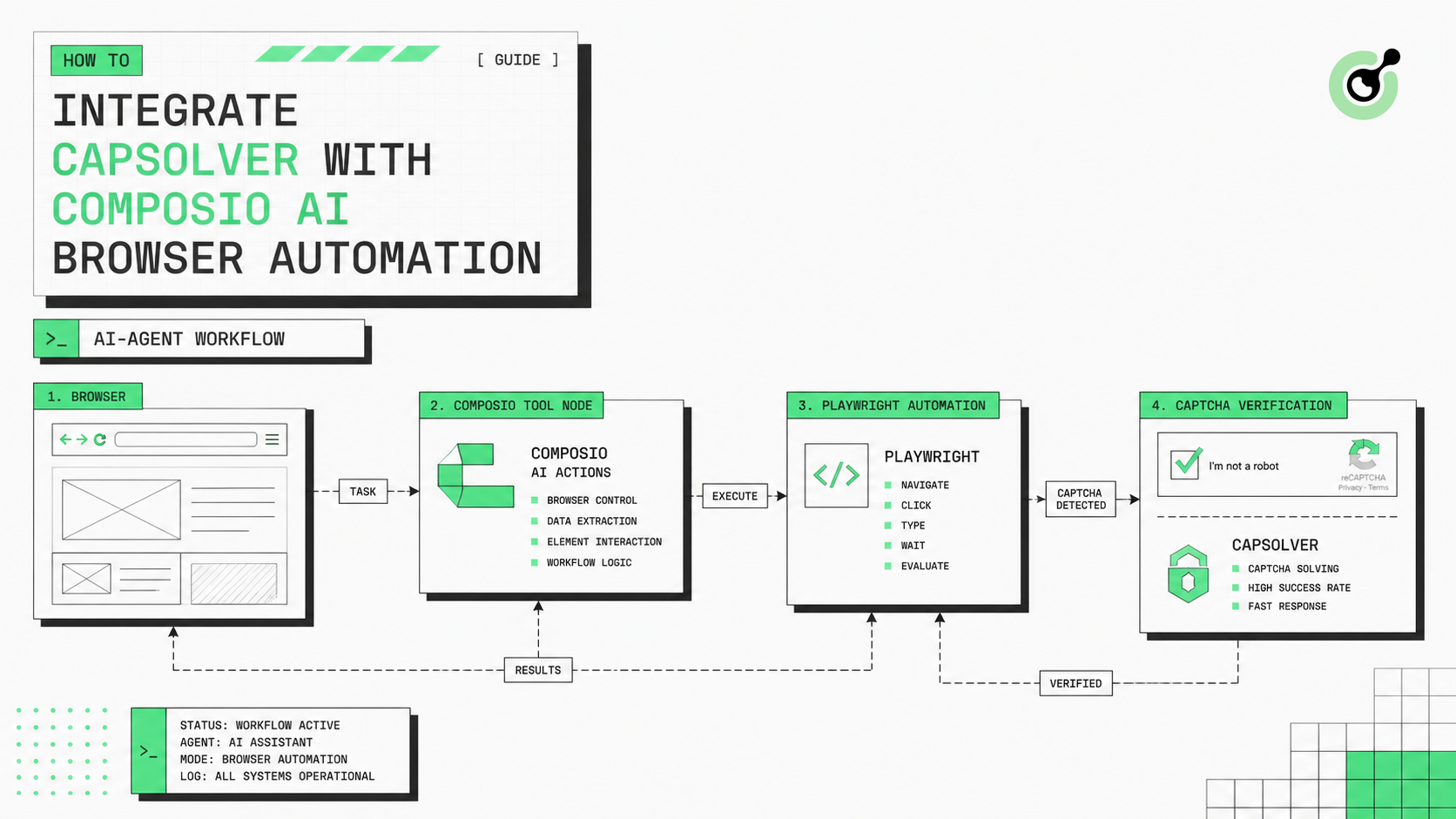
sessions: write permission, which returns 403, and a missing Pydantic BaseModel annotation on the tool's first parameter, which triggers a ValidationError.This guide integrates CapSolver with Composio as an agent tool that completes a reCAPTCHA v2 workflow. Instead of returning only a token, the tool runs the full page sequence and treats the page's actual response as the success condition. OpenAI Agents SDK decides when to call the tool, while Playwright browser automation preserves the page context used for submission and verification.
Use this pattern only for lawful, reasonable, responsible, and user-authorized workflows. Technical capability does not grant permission to access private, restricted, sensitive, or unauthorized data; review the relevant AI automation guidance before deployment.
Workflow:
Run the script
  -> OpenAI Agents SDK decides which tool to call
  -> Composio custom tool: complete_recaptcha_v2
       -> Playwright opens the page
       -> capsolver.solve(...) returns gRecaptchaResponse
       -> Apply the token to g-recaptcha-response
       -> Playwright submits and waits for the page
       -> Read the page and determine accepted
  -> Tool returns {"accepted": ..., "message": ...}
  -> Agent reports the result from accepted
The components have the following responsibilities:
| Component | Responsibility |
|---|---|
| OpenAI Agents SDK | Understands natural-language instructions, decides when to call the tool, executes it, and organizes the response |
| Composio | Registers a standard Python function as an agent-callable tool |
| Playwright | Opens the page, applies the result, submits the form, and reads the resulting page state |
| CapSolver SDK | Returns the CAPTCHA result through a single solve() call |
pip install composio composio-openai-agents openai-agents capsolver pydantic playwright
playwright install chromium
Each dependency serves a specific role:
| Package | Purpose |
|---|---|
| composio | Creates sessions and registers or loads custom tools |
| composio-openai-agents | Converts Composio tools into objects that OpenAI Agents can call |
| openai-agents | Provides Agent, Runner, and SQLite multi-turn memory |
| capsolver | Provides the official SDK and returns a result through solve() |
| pydantic | Defines the tool input schema |
| playwright | Opens pages, applies results, submits forms, and reads responses |
# API keys.
COMPOSIO_API_KEY = "ak_..."
OPENAI_API_KEY = "sk-..."          # Your official OpenAI API key.
os.environ["OPENAI_API_KEY"] = OPENAI_API_KEY   # OpenAI SDK reads the key from env.

# Configure CapSolver and Composio.
capsolver.api_key = "CAP-..."
composio = Composio(
    api_key=COMPOSIO_API_KEY,
    provider=OpenAIAgentsProvider(),
)
Configuration notes:
OPENAI_API_KEYmust be written to the environment because the SDK reads it there;OpenAIAgentsProvidermakes the tools returned bysession.tools()compatible with Agent; and the Composio key needssessions: writepermission or session creation returns 403.
The current Composio OpenAI provider and OpenAI Agents SDK references explain the provider and agent boundary used by this configuration.
Redeem Your CapSolver Bonus Code
Boost your automation budget instantly!
Use bonus code CAP26 when topping up your CapSolver account to get an extra 5% bonus on every recharge — with no limits.
Redeem it now in your CapSolver Dashboard
Stopping condition: the tool reports success only when the page contains the expected success text. The
finallyblock closes the browser in both success and failure paths.
import os
from typing import List, cast
import capsolver
from agents import Agent, Runner, SQLiteSession
from composio import Composio
from composio.core.models.custom_tool import CustomTool
from composio.core.models.tool_router import ToolRouterExperimentalConfig
from composio_openai_agents import OpenAIAgentsProvider
from playwright.sync_api import sync_playwright
from pydantic import BaseModel, Field

# API keys.
COMPOSIO_API_KEY = "ak_..."
OPENAI_API_KEY = "sk-..."          # Your official OpenAI API key.
os.environ["OPENAI_API_KEY"] = OPENAI_API_KEY

# Configure CapSolver and Composio.
capsolver.api_key = "CAP-..."
composio = Composio(
    api_key=COMPOSIO_API_KEY,
    provider=OpenAIAgentsProvider(),
)


# Input schema for the custom tool; Composio requires a Pydantic BaseModel here.
class CompleteRecaptchaInput(BaseModel):
    target_url: str = Field(
        default="https://www.google.com/recaptcha/api2/demo",
        description="Page URL containing the reCAPTCHA v2 demo",
    )
    website_key: str = Field(
        default="6Le-wvkSAAAAAPBMRTvw0Q4Muexq9bi0DJwx_mJ-",
        description="reCAPTCHA v2 website key from the current page",
    )


# Register the whole flow as one Composio tool the agent can call.
# The first parameter's type annotation is required by Composio to infer the schema.
@composio.experimental.tool(preload=True)
def complete_recaptcha_v2(input: CompleteRecaptchaInput, _ctx):
    """Open the page with Playwright, solve reCAPTCHA v2, submit, and verify."""
    with sync_playwright() as p:
        browser = p.chromium.launch(headless=False)  # Set headless=True to hide the window.
        page = browser.new_page()
        try:
            page.goto(input.target_url)
            # Ask CapSolver to solve the reCAPTCHA v2 challenge.
            solution = capsolver.solve(
                {
                    "type": "ReCaptchaV2TaskProxyLess",
                    "websiteURL": input.target_url,
                    "websiteKey": input.website_key,
                }
            )
            token = solution.get("gRecaptchaResponse")
            page.evaluate(
                """
                (token) => {
                    const textarea = document.getElementById('g-recaptcha-response');
                    if (textarea) {
                        textarea.value = token;
                    }
                }
                """,
                token,
            )
            page.click("#recaptcha-demo-submit")
            page.wait_for_load_state("networkidle")
            result_page = page.content()
            # Success only if the page actually shows the success text
            accepted = "Verification Success" in result_page
            return {
                "accepted": accepted,
                "message": (
                    "Verification Success"
                    if accepted
                    else "The page did not report Verification Success"
                ),
            }
        finally:
            browser.close()
def main():
    experimental: ToolRouterExperimentalConfig = {
        "custom_tools": cast(List[CustomTool], [complete_recaptcha_v2]),
    }
    session = composio.sessions.create(
        user_id="playwright-recaptcha-demo-user",
        experimental=experimental,
        sandbox={"enable": False},  # Run the tool in this process, not a sandbox.
    )
    agent = Agent(
        name="Playwright reCAPTCHA Assistant",
        instructions=(
            "When the user asks to run the demo, call complete_recaptcha_v2 "
            "with its default values. Report success only when accepted is true."
        ),
        model="gpt-5.2",
        tools=session.tools(),
    )
    # Memory for multi-turn conversation
    memory = SQLiteSession("conversation")
    print("Composio + Playwright reCAPTCHA v2 demo running once...")
    user_input = (
        "Call complete_recaptcha_v2 now with its default target_url "
        "and website_key. Do not ask for confirmation."
    )
    result = Runner.run_sync(
        starting_agent=agent,
        input=user_input,
        session=memory,
    )
    print(f"Assistant: {result.final_output}\n")
if __name__ == "__main__":
main()The same pattern can handle a standard image-text CAPTCHA by registering a second Composio tool. This example uses the BotDetect CAPTCHA Demo: the image element is #demoCaptcha_CaptchaImage, the input is #captchaCode, and the validation button is #validateCaptchaButton.
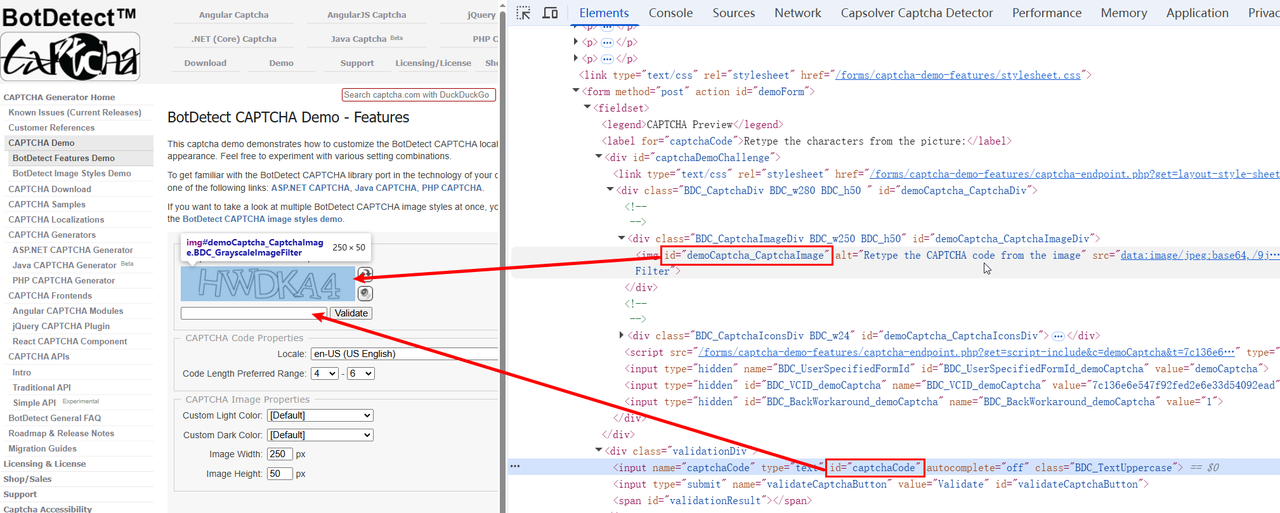
The ImageToTextTask request submits the Base64 image through body. Unlike token-based tasks, this task returns the recognized text directly and does not require a separate polling loop.
image_src = page.locator("#demoCaptcha_CaptchaImage").get_attribute("src")
if not image_src or "," not in image_src:
    raise RuntimeError("A valid CAPTCHA image Data URL was not found")
base64_image = image_src.split(",", 1)[1] # Strip the "data:image/...;base64," prefix.class CompleteImageCaptchaInput(BaseModel):
target_url: str = Field(
default="https://captcha.com/demos/features/captcha-demo.aspx",
description="Image CAPTCHA demo page URL",
)
module: str = Field(
default="common",
description="CapSolver ImageToTextTask recognition module",
)
@composio.experimental.tool(preload=True)
def complete_image_captcha(input: CompleteImageCaptchaInput, _ctx):
"""Open the page with Playwright, recognize the image CAPTCHA, submit, and verify."""
with sync_playwright() as p:
browser = p.chromium.launch(headless=False)
page = browser.new_page()
try:
page.goto(input.target_url)
page.wait_for_selector("#demoCaptcha_CaptchaImage", state="visible")
# The image src is already a data URL; strip the prefix to get Base64.
image_src = page.locator("#demoCaptcha_CaptchaImage").get_attribute("src")
if not image_src or "," not in image_src:
raise RuntimeError("A valid CAPTCHA image Data URL was not found")
base64_image = image_src.split(",", 1)[1]
solution = capsolver.solve(
{
"type": "ImageToTextTask",
"websiteURL": input.target_url,
"module": input.module,
"body": base64_image,
}
)
captcha_text = solution.get("text")
if not isinstance(captcha_text, str) or not captcha_text:
raise RuntimeError("CapSolver did not return recognized text")
page.fill("#captchaCode", captcha_text) # Fill the recognized text.
page.click("#validateCaptchaButton")
page.wait_for_load_state("networkidle")
result_page = page.content()
# The demo page shows "Correct!" on success, "Incorrect!" on failure.
accepted = "Correct!" in result_page
return {
"accepted": accepted,
"recognized_text": captcha_text,
"message": "Correct!" if accepted else "The page did not report Correct!",
}
finally:
browser.close()Flow overview:
Playwright opens the CAPTCHA page
  -> Wait for #demoCaptcha_CaptchaImage to become visible
  -> Read src (data URL) and remove the prefix to get Base64
  -> capsolver.solve(ImageToTextTask) returns text
  -> page.fill writes the result to #captchaCode
  -> page.click activates #validateCaptchaButton
  -> page.content checks Correct! or Incorrect!
-> finally closes the browserThe module parameter is optional and defaults to common. If the CAPTCHA contains only numbers, use number. Special styles can use a documented independent model when appropriate.
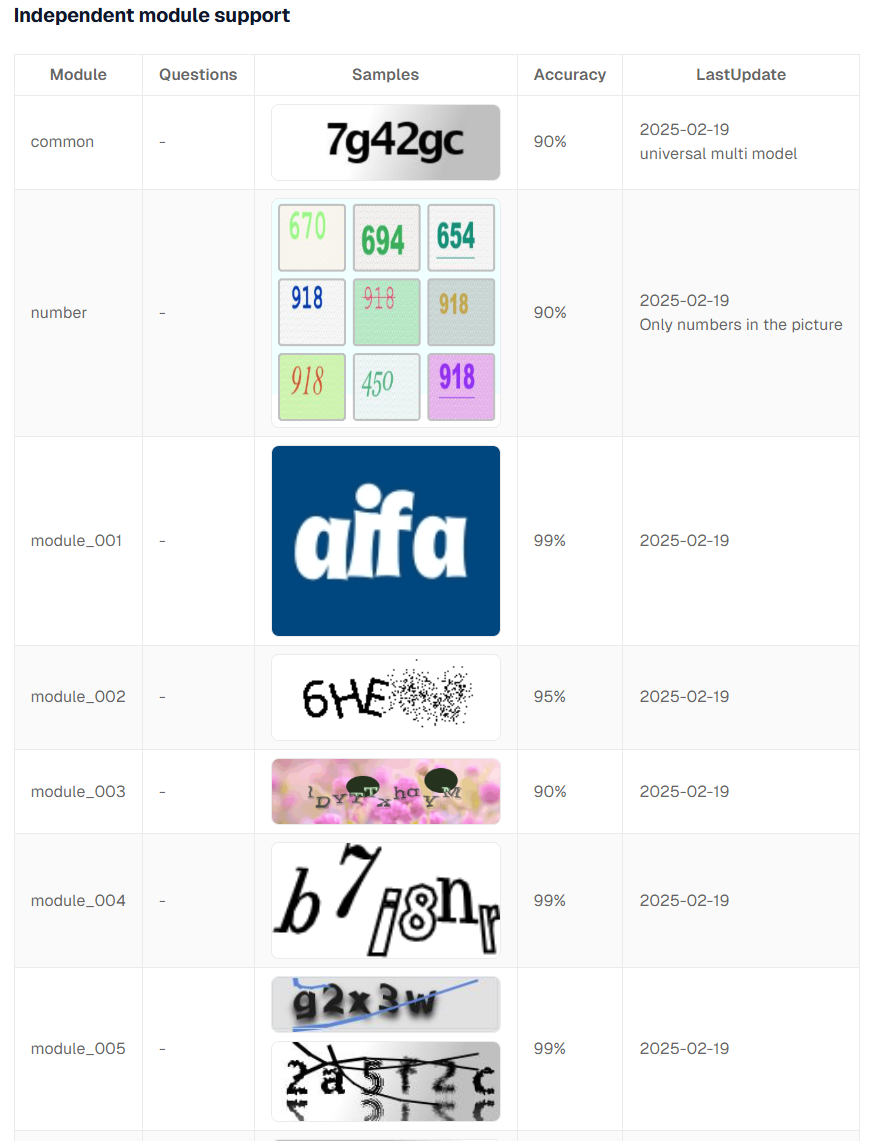
For example, use the following unchanged source code for numeric-only recognition:
solution = capsolver.solve({
    "type": "ImageToTextTask",
    "module": "number",
    "images": [base64_image],
})

answers = solution["answers"]
The number model supports multiple images in one submission, and images can contain up to nine Base64 strings. The supported model names and use cases are listed in the CapSolver ImageToTextTask page linked above.
experimental.tool: first parameter of "complete_recaptcha_v2" must be
annotated with a Pydantic BaseModel subclass. Got: <class 'inspect._empty'>
Composio infers the input schema from the first parameter's type annotation, so input: CompleteRecaptchaInput cannot be omitted. This is a functional annotation, not an optional type hint. The Pydantic BaseModel reference describes the model type used for the schema.
Session creation can return the following error:
403 APIKey_InsufficientPermissions
This route requires "sessions" write access
The cause is that composio.sessions.create() requires project-key write access for sessions, while the current key has read-only access. The key is valid, but its scope is insufficient, so the response is 403 rather than 401.
Resolution steps:
sessions: write and replace COMPOSIO_API_KEY at the top of the script.The core of this integration is a complete business workflow packaged as one Composio tool:
Composio tool = Playwright page actions + CapSolver result + page-state verificationRun the example only on pages and processes you own or are authorized to automate. Use environment variables or a secret manager for credentials, stop when the page does not reach the expected business state, and review repeated failures instead of retrying indefinitely.
For an authorized Composio agent workflow that needs a focused CAPTCHA infrastructure layer, test CapSolver with your own controlled pages and verify the application result after every solve.
What does Composio handle in this integration?
Composio registers the Python function as an agent-callable custom tool, creates the session, exposes the tool schema, and routes execution from the OpenAI agent.
Why must the first tool parameter be a Pydantic BaseModel?
Composio uses that annotation to infer the tool's input schema. Omitting it prevents schema construction and raises a validation error before the browser workflow starts.
Does the reCAPTCHA v2 tool stop after CapSolver returns a token?
No. The unchanged code applies the token, submits the demo form, reads the resulting HTML, and reports success only when the page contains the expected Verification Success text.
Does ImageToTextTask require a separate polling loop?
No. In this workflow, the official SDK returns the recognized text directly. The tool then fills the input, submits the page, and checks for Correct! as the stopping condition.
Can this workflow be used on any website?
No. Use it only for lawful, reasonable, responsible, and user-authorized automation. Respect site terms, applicable laws, rate limits, and data-minimization requirements.
Ethan Collins
AI Agent Workflow Engineer
Building clearer handoffs between AI agents and tools.
ABOUT THE AUTHOR
Estimate CAPTCHA solving costs in Browser Use by separating agent runs, challenge types, billable solves, retries, and verified outcomes from browser costs.

Set up CapSolver MCP in Claude Code, check the available CAPTCHA tools, and choose token or page solving for a supported, authorized browser task.

