
🎉NEWCapSolver for AI agents-MCP, agent tools, and SDK integrations

Aloísio Vítor
Image Processing Expert
Published Aug 27, 2026
Updated Aug 27, 2026 · min read
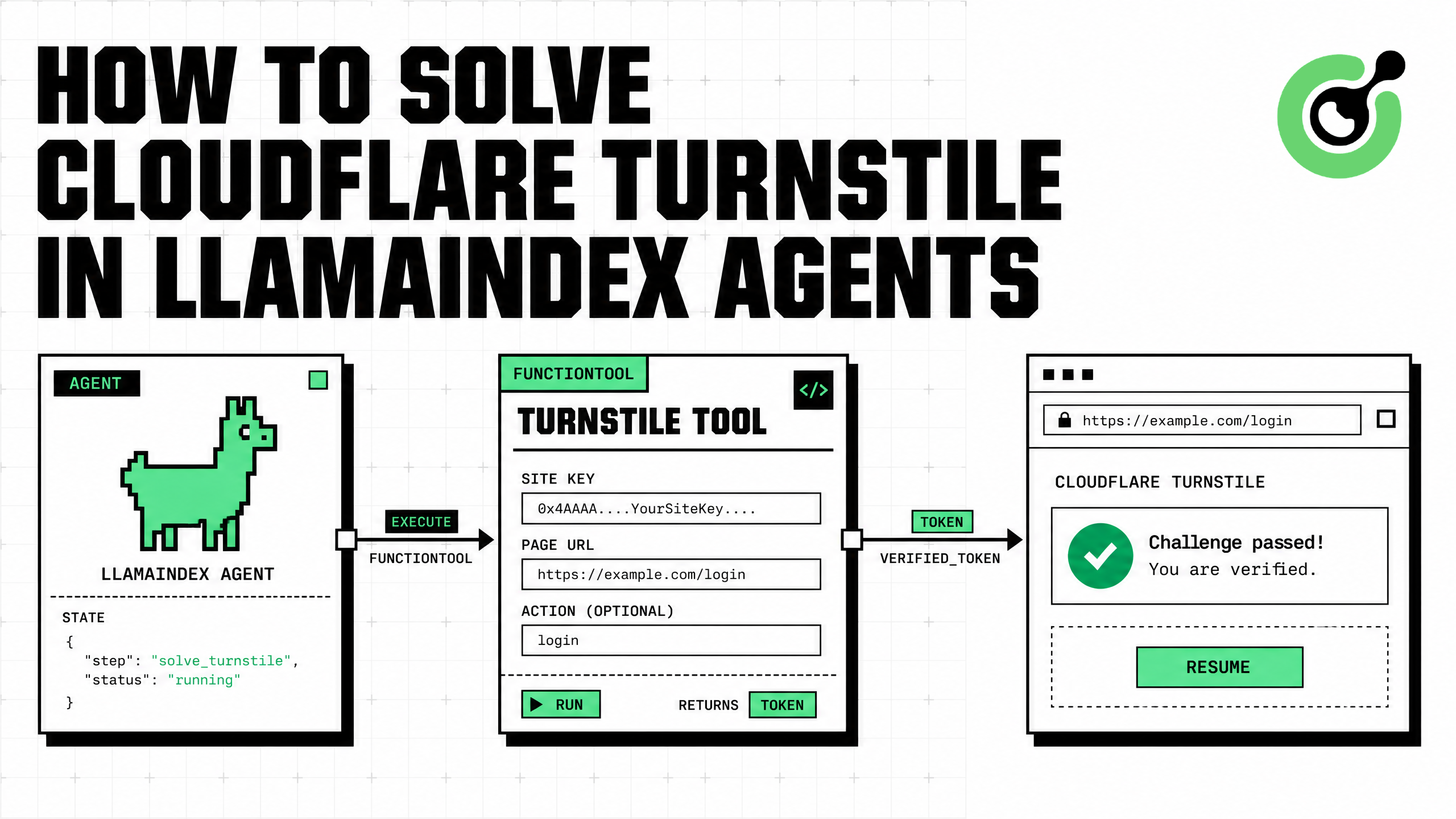
FunctionTool.from_defaults().AntiTurnstileTaskProxyLess task with the exact page URL and site key.action and cdata only when the authorized page exposes those optional values.The safest way to solve Cloudflare Turnstile in LlamaIndex agents is to expose CapSolver as a typed function tool while keeping browser state, secrets, and authorization checks outside the model. LlamaIndex can decide that a supported challenge blocks the next approved step, but deterministic Python should validate the target, build the documented AntiTurnstileTaskProxyLess, and return a short-lived solution token to the browser controller. This follows the CapSolver AI Agent architecture: the model decides, a tool adapter defines the action, and the core solving layer executes it. This guide shows the exact Turnstile fields, a LlamaIndex FunctionTool implementation, a FunctionAgent workflow, secure token handoff, bounded retries, and responsible-use controls for QA, RPA, and permitted browser automation.
LlamaIndex treats tools as agent-facing APIs. Its official tools documentation explains that FunctionTool can wrap synchronous or asynchronous Python functions and infer a schema from the function signature. The tool name, description, annotations, and docstring influence when the model calls it.
That boundary is useful for challenge recovery because the model should never generate arbitrary solving code or receive a CapSolver API key. A narrow function can accept only an approved page URL, a Turnstile site key, and optional widget metadata.
The CapSolver AI blog covers agent integrations, while the CapSolver AI and automation FAQ explains how challenge recovery complements an existing agent stack.
CapSolver's Cloudflare Turnstile documentation specifies AntiTurnstileTaskProxyLess. The task requires websiteURL and websiteKey. Optional metadata can include the widget's action and cdata values.
| Field | Required | Source | Purpose |
|---|---|---|---|
type |
Yes | Fixed | AntiTurnstileTaskProxyLess |
websiteURL |
Yes | Approved current page | Associates the solution with the page |
websiteKey |
Yes | Turnstile widget | Identifies the widget configuration |
metadata.action |
No | data-action |
Preserves a widget action value |
metadata.cdata |
No | data-cdata |
Preserves customer data used by the widget |
CapSolver automatically supports managed, non-interactive, and invisible Turnstile presentations, so the task does not need a subtype. Cloudflare's Turnstile documentation describes the widget and the server-side validation process used by the site owner.
pip install llama-index llama-index-llms-openai capsolverFor the broader CapSolver agent architecture provided in the user's documentation, install the core and agent packages as well:
pip install git+https://github.com/capsolver-ai/capsolver-core.git
pip install git+https://github.com/capsolver-ai/capsolver-agent.git
Configure secrets outside the prompt:
export CAPSOLVER_API_KEY="CAP-xxxxxxxxxxxxxxxx"
export OPENAI_API_KEY="sk-xxxxxxxxxxxxxxxx"
The direct SDK example below uses the exact Turnstile task fields. LlamaIndex supplies the framework shell; CapSolver performs the task.
Validate the URL before sending it to CapSolver. The model should not be able to select an arbitrary hostname.
import os
from typing import Annotated
from urllib.parse import urlparse

import capsolver

capsolver.api_key = os.environ["CAPSOLVER_API_KEY"]

ALLOWED_HOSTS = {
    "staging.example.com",
    "qa.example.com",
}


def solve_turnstile(
    website_url: Annotated[str, "Approved HTTPS page containing Turnstile"],
    website_key: Annotated[str, "Exact Turnstile site key from the page"],
    action: Annotated[str, "Optional data-action value"] = "",
    cdata: Annotated[str, "Optional data-cdata value"] = "",
) -> dict:
    """Solve Cloudflare Turnstile for an approved page and return a token."""
    parsed = urlparse(website_url)
    if parsed.scheme != "https" or parsed.hostname not in ALLOWED_HOSTS:
        return {
            "success": False,
            "error": "Target is outside the approved hostname allowlist",
        }

    if not website_key.startswith("0x4"):
        return {
            "success": False,
            "error": "Unexpected Turnstile site-key format",
        }

    task = {
        "type": "AntiTurnstileTaskProxyLess",
        "websiteURL": website_url,
        "websiteKey": website_key,
    }

    metadata = {}
    if action:
        metadata["action"] = action
    if cdata:
        metadata["cdata"] = cdata
    if metadata:
        task["metadata"] = metadata

    try:
        solution = capsolver.solve(task)
        token = solution.get("token")
        if not token:
            return {"success": False, "error": "No token returned"}
        return {
            "success": True,
            "token": token,
            "solution_type": solution.get("type", "turnstile"),
        }
    except Exception as exc:
        return {"success": False, "error": str(exc)}
The format check is a useful early warning, but it does not replace exact parameter extraction from the authorized page. Use the CapSolver browser extension guide when you need to inspect a widget's configuration during development.
FunctionTool.from_defaults() converts the function signature and docstring into an agent tool schema.
from llama_index.core.tools import FunctionTool

turnstile_tool = FunctionTool.from_defaults(
    fn=solve_turnstile,
    name="solve_turnstile",
    description=(
        "Solve Cloudflare Turnstile only for an approved HTTPS page. "
        "Use the exact page URL, site key, and optional action/cdata "
        "provided by the trusted browser controller."
    ),
)
Keep the name short and the description operational. Do not describe the tool as a general access mechanism. The model should understand that it is a recovery action inside an already approved workflow.
LlamaIndex's FunctionAgent uses an LLM's tool-calling capability to choose and execute tools.
from llama_index.core.agent.workflow import FunctionAgent
from llama_index.llms.openai import OpenAI

llm = OpenAI(model="gpt-4o-mini", temperature=0)

agent = FunctionAgent(
    tools=[turnstile_tool],
    llm=llm,
    system_prompt=(
        "You operate only approved browser workflows. "
        "Call solve_turnstile only when the trusted application supplies "
        "an exact page URL and site key. Never invent targets, keys, "
        "actions, or cdata. Call the tool once. If it fails, stop and "
        "request operator review."
    ),
)
Start the run with parameters produced by deterministic browser code:
import asyncio

async def main():
    response = await agent.run(
        "The approved staging workflow found Turnstile at "
        "https://staging.example.com/account-check with site key "
        "0x4AAAAAAAAAAAAAAAAAAAAAAAAAAAAAAAAAAAAAAA and action "
        "account_check. Call the registered tool once and return "
        "the structured result."
    )
    print(response)

asyncio.run(main())
In production, avoid constructing this message directly from untrusted user text. The browser controller should extract, validate, and serialize the values.
A Turnstile token is short-lived and tied to the site workflow. Pass it directly from the trusted tool result to deterministic browser code when possible.
async def apply_turnstile_token(page, token: str) -> None:
    await page.evaluate(
        """
        (token) => {
          const field = document.querySelector(
            'input[name="cf-turnstile-response"]'
          );
          if (!field) {
            throw new Error('Turnstile response field not found');
          }
          field.value = token;
          field.dispatchEvent(new Event('input', { bubbles: true }));
          field.dispatchEvent(new Event('change', { bubbles: true }));
        }
        """,
        token,
    )
Some applications use callback-based rendering or server-managed submission. Test against your own staging application and follow its supported integration. Cloudflare's Siteverify documentation explains that the site owner validates the token server-side.
The CapSolver Turnstile guide provides implementation context, and the CapSolver troubleshooting FAQ helps diagnose rejected solutions.
Do not let an agent loop indefinitely. Classify validation failures as final, and permit at most one retry for a transient timeout.
import asyncio

async def solve_with_policy(params: dict) -> dict:
    last_error = "unknown error"

    for attempt in range(1, 3):
        result = solve_turnstile(**params)
        if result.get("success"):
            return {**result, "attempt": attempt}

        last_error = result.get("error", last_error)
        normalized = last_error.lower()
        if "allowlist" in normalized or "site-key" in normalized:
            break
        if attempt == 1:
            await asyncio.sleep(2)

    return {
        "success": False,
        "error": last_error,
        "requires_operator_review": True,
    }
Log the hostname, task type, duration, attempt count, and normalized outcome. Never log the full token, API key, cookies, or form contents.
| Mode | Best for | Input | Output |
|---|---|---|---|
| Token mode | Known Turnstile URL and site key | URL, key, optional metadata | Solution token |
| Browser mode | Dynamic widgets in an existing Playwright session | Live page object | Page recovery result |
| Human review | Repeated failure or unsupported state | Redacted error and screenshot reference | Operator decision |
The user-provided CapSolver Agent documentation maps solve_captcha to core token solving and solve_on_page to browser recovery. If the page is dynamic, install the browser extra and keep the original browser session intact:
pip install "capsolver-agent[browser] @ git+https://github.com/capsolver-ai/capsolver-agent.git"Use the CapSolver automation tutorials for related browser workflows and the CapSolver products page for supported solution categories.
Bonus Code: Use code WEBS at CapSolver Dashboard to get an extra 5% bonus on every recharge.
A production LlamaIndex Turnstile integration should use an approved-host registry, secret isolation, short-lived token handoff, one bounded retry, trace redaction, operator review, and a strict separation between read-only automation and high-impact actions.
| Control | Recommended implementation |
|---|---|
| Target permission | Tenant-specific HTTPS allowlist |
| Parameter source | Trusted browser controller |
| Secret storage | Executor environment only |
| Retry policy | One retry for transient errors |
| Token handling | Direct handoff to browser; no long-term storage |
| Tracing | Redact tokens and cookies |
| Final actions | Require confirmation for submissions or changes |
The CapSolver CAPTCHA-solving FAQ explains the task lifecycle, and the CapSolver web-scraping FAQ covers operational considerations.
Use this integration only on applications you own, test, or have explicit permission to automate. Challenge solving does not grant authorization to access private data, create accounts, submit transactions, or ignore site terms. Apply rate limits, maintain an audit trail, and require confirmation before any action that changes data or affects users.
To solve Cloudflare Turnstile in LlamaIndex reliably, make CapSolver a narrow FunctionTool and keep authorization, secrets, retries, and token consumption in deterministic code. The LlamaIndex agent decides when recovery is needed, the tool creates the documented AntiTurnstileTaskProxyLess, and the browser resumes the same approved workflow with the returned token.
Start with CapSolver, validate the integration against a staging page you control, and add allowlists and trace redaction before production.
Use FunctionTool.from_defaults() to wrap a typed sync or async Python function. For a tool-calling model, pass the resulting tool to FunctionAgent.
The documented AntiTurnstileTaskProxyLess uses CapSolver's proxyless task path, so you do not provide a proxy in the task.
websiteURL and websiteKey are required. Include metadata.action and metadata.cdata only when the authorized widget exposes them.
No. Prefer a direct handoff to trusted browser code and return only a redacted success or failure state to the agent.
Verify the URL, site key, optional metadata, and page state. After one bounded retry, stop and route the workflow to operator review.
Aloísio Vítor
Image Processing Expert
Interpreting the visual signals behind web workflows.
ABOUT THE AUTHOR
Estimate CAPTCHA solving costs in Browser Use by separating agent runs, challenge types, billable solves, retries, and verified outcomes from browser costs.

Set up CapSolver MCP in Claude Code, check the available CAPTCHA tools, and choose token or page solving for a supported, authorized browser task.
