🎉NEWCapSolver for AI agents-MCP, agent tools, and SDK integrations

Sora Fujimoto
AI Solutions Architect
Published May 07, 2026
Updated May 07, 2026 · min read
The best ai agent frameworks now connect LLM reasoning with real browser execution. They help teams plan tasks, inspect pages, call tools, validate outcomes, and recover when web workflows change. This guide is for automation engineers, QA teams, data teams, and operations teams that need reliable web automation with responsible CAPTCHA solving. The main conclusion is direct: choose ai agent frameworks by control and governance, not popularity. A strong framework should support browser tools, structured logs, human approval, and clear policy checks. When CAPTCHA appears in a permitted workflow, CapSolver can provide the solving layer while the framework manages task flow and compliance.
AI agent frameworks add decision-making to browser automation. A traditional script follows fixed selectors and fixed steps. An agent workflow can read context, choose the next action, and verify whether the result is correct.
Selenium states that it automates browsers, mainly for web application testing and web-based administration through Selenium browser automation. That model remains useful for stable pages.
IBM describes AI agents as systems that plan, call external tools, execute steps, and learn from feedback through IBM’s AI agent framework overview. That is why the best ai agent frameworks should coordinate browser tools rather than replace them.
A practical web automation stack has three layers. The agent framework plans and stores state. The browser layer clicks, types, waits, and extracts data. The verification layer handles CAPTCHA, human approval, logs, and exceptions. This architecture is more stable.
Most top articles include a definition, TL;DR, ranked framework list, comparison table, selection criteria, CTA, and FAQ. This article keeps those common sections but adds production guidance for authenticated sessions, changing pages, CAPTCHA checkpoints, and safe stop conditions.
McKinsey reports that 23% of surveyed organizations are scaling agentic AI somewhere in the enterprise, while another 39% are experimenting with AI agents through McKinsey’s State of AI 2025 survey. That makes governance a central requirement for the best ai agent frameworks.
OWASP explains that web applications face unwanted automated usage, and its project documents symptoms, mitigations, and controls through OWASP Automated Threats to Web Applications. Responsible automation should therefore respect site rules, business purpose, and security controls.
The best ai agent frameworks differ by control model. Some are strong for deterministic state machines. Some are strong for multi-agent collaboration. Some are better as browser execution layers.
| Framework or Layer | Best Fit | Web Automation Strength | CAPTCHA Workflow Fit | Compliance Notes |
|---|---|---|---|---|
| LangGraph | Strict production workflows | High with Playwright or Browser Use | Strong, as CAPTCHA can be a workflow node | Good for approvals, retries, and audit paths |
| CrewAI | Role-based agent teams | Medium to high with browser tools | Good for separating browser and validation roles | Needs clear task boundaries |
| AutoGen | Conversational multi-agent research | Medium with custom tools | Good with human review rules | Strong for experimentation |
| Browser Use | Browser-native execution | Very high | Strong with CapSolver | Needs session and policy controls |
| OpenAI Agents or Responses API | GPT-native tool workflows | Medium to high with a browser layer | Good as an approved tool step | Needs external logs and permissions |
| LlamaIndex | Research and evidence pipelines | Medium | Limited without browser tools | Best after data collection |
| Semantic Kernel | Enterprise orchestration | Medium with connectors | Good for policy-driven systems | Strong for Microsoft-heavy stacks |
LangGraph is the best default for controlled production automation. Its graph design lets developers define states, branches, retries, and stopping rules.
It works well with Playwright, Puppeteer, or Browser Use. For CAPTCHA solving, LangGraph can treat verification as a controlled node. It can check policy, call CapSolver only when allowed, store the result, and continue after validation.
CrewAI is one of the best ai agent frameworks when work can be divided into roles. One agent can research a page, another can operate the browser, and a third can validate extracted data.
CrewAI should connect to Playwright, Puppeteer, Browser Use, or APIs. For CAPTCHA workflows, a policy step should decide when CapSolver may be called. CapSolver’s captcha solving FAQ is a useful starting point.
AutoGen fits teams testing collaborative agent behavior. It supports agents that discuss plans, call tools, and coordinate work. For web automation, it is strongest when the task requires reasoning before browser execution.
AutoGen is less ideal when every step needs strict state control. In that case, LangGraph may be easier to manage. Still, AutoGen remains useful for research planning, evidence comparison, and structured reporting from public pages. CAPTCHA solving should be defined as an explicit tool action with approval rules, not left to open-ended conversation.
Browser Use is important because many ai agent frameworks need a browser-native execution layer. Playwright and Puppeteer can open pages, click buttons, type text, wait for elements, and collect page data. Agent frameworks add planning above them.
This layered model is practical. Use LangGraph or CrewAI to plan. Use Browser Use, Playwright, or Puppeteer to act. Use CapSolver when an authorized workflow meets CAPTCHA verification. CapSolver’s Puppeteer and extension guide gives readers a related integration path.
OpenAI’s agent tooling can fit teams already building around GPT models and tool calls. For web automation, it still needs a browser layer such as Playwright, a hosted browser, or an internal API. For production use, teams still need state management, approvals, monitoring, and failure handling.
LlamaIndex is best when web automation feeds a knowledge workflow. It helps structure retrieval, document indexing, and evidence-based responses.
It is not the first choice for direct browser control. It becomes valuable after data is collected. Teams can use browser automation to gather pages, then use LlamaIndex to store, search, and summarize the content. That makes it one of the best ai agent frameworks for research pipelines and compliance reports.
Semantic Kernel fits teams working in Microsoft-heavy environments. It supports planners, memory, connectors, and enterprise workflow patterns.
For web automation, it is most useful when the browser task connects to internal systems. An agent may read a public page, update a CRM, create a ticket, or request manager approval. It is not the simplest option for small scripts, but its value grows when governance and internal integrations matter.
CapSolver is not a replacement for ai agent frameworks. It is the CAPTCHA solving service that fits into an authorized automation pipeline.
In real browser automation, CAPTCHA can appear during form submission, QA testing, public data access, or internal workflow checks. A responsible system pauses, checks policy, records context, and calls a verified service only when the workflow is legitimate.
Readers can review CapSolver’s AI and automation FAQ and web scraping FAQ for broader automation context.
The safest pattern is simple: confirm permission, identify the CAPTCHA type, create the task through CapSolver, retrieve the result if asynchronous, log the result, and continue only if validation passes.
The official CapSolver createTask documentation shows this request pattern:
POST https://api.capsolver.com/createTask
Host: api.capsolver.com
Content-Type: application/json

{
    "clientKey":"YOUR_API_KEY",
    "appId": "APP_ID",
    "task": {
        "type":"ImageToTextTask",
        "body":"BASE64 image"
    }
}
For asynchronous tasks, the official getTaskResult documentation shows this request pattern:
POST https://api.capsolver.com/getTaskResult
Host: api.capsolver.com
Content-Type: application/json

{
    "clientKey":"YOUR_API_KEY",
    "taskId": "37223a89-06ed-442c-a0b8-22067b79c5b4"
}
CapSolver’s documentation states that asynchronous results are queried through getTaskResult, and a processing status should be retried after three seconds. The CapSolver CAPTCHA solver overview explains related solving scenarios before production planning.
Redeem Your CapSolver Bonus Code
Boost your automation budget instantly!
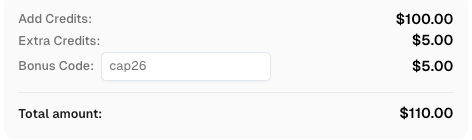
Use bonus code CAP26 when topping up your CapSolver account to get an extra 5% bonus on every recharge — with no limits.
Redeem it now in your CapSolver Dashboard
Start with the workflow, not the brand. The best ai agent frameworks are the ones that match your task shape.
Choose LangGraph when the workflow has strict states and compliance checks. Choose CrewAI when specialized agents improve quality. Choose AutoGen when research or discussion between agents is central. Choose Browser Use with Playwright or Puppeteer when browser interaction is the hardest part. Choose LlamaIndex when collected data must become searchable evidence.
Then test five operational questions. Can the framework stop safely? Can it log each browser action? Can it request human approval? Can it call CapSolver with documented API formats only? Can it respect rate limits and site rules?
Responsible automation protects both the business and the website owner. It should be clear, limited, and reviewed.
| Control | Practical Standard |
|---|---|
| Permission | Automate only workflows you own, are allowed to access, or have a lawful basis to process. |
| Scope | Limit pages, accounts, regions, and request volume before agents run. |
| Rate limits | Add pauses, caps, and backoff rules to avoid harmful load. |
| Human review | Require approval for payments, account changes, personal data, or unusual CAPTCHA frequency. |
| Logging | Store page URL, timestamp, agent decision, CAPTCHA type, and final status. |
| Data handling | Avoid collecting sensitive data unless the workflow requires it and policy allows it. |
This checklist separates a production system from a demo. It also makes CapSolver a controlled service call.
The best ai agent frameworks for web automation are defined by control, browser reliability, compliance, and recovery. LangGraph is the best default for stateful production workflows. CrewAI is strong for role-based teams. AutoGen is useful for multi-agent experiments. Browser Use, Playwright, and Puppeteer remain essential execution layers.
For CAPTCHA solving, add CapSolver as a dedicated, policy-controlled layer. Use official CapSolver documentation, log each step, and keep automation within reasonable and permitted boundaries. If your team is building web automation with ai agent frameworks, map your workflow states first. Then add CapSolver where CAPTCHA verification appears in approved tasks.
AI agent frameworks are development tools for building agents that plan, call tools, remember context, and complete multi-step tasks. For web automation, they coordinate browser tools, APIs, validation steps, and human approvals.
The best ai agent frameworks depend on the workflow. LangGraph is best for controlled state machines. CrewAI is best for role-based agent teams. AutoGen is best for conversational experiments. Browser Use with Playwright or Puppeteer is best for direct browser execution.
No. CapSolver is a CAPTCHA solving service. It fits beside ai agent frameworks as a verification-handling layer for legitimate automation workflows that encounter CAPTCHA challenges.
No. CAPTCHA solving should be limited to permitted, reasonable, and documented workflows. Teams should check site rules, business purpose, data policy, request volume, and human approval requirements before using any solving service.
Developers should model CapSolver as a defined tool step. The agent framework should check policy first, then call CapSolver using official documentation. It should store task status, handle errors, and continue only after validation succeeds.
Sora Fujimoto
AI Solutions Architect
Connecting agents, browsers, and APIs into one workflow.
ABOUT THE AUTHOR
Estimate CAPTCHA solving costs in Browser Use by separating agent runs, challenge types, billable solves, retries, and verified outcomes from browser costs.

Set up CapSolver MCP in Claude Code, check the available CAPTCHA tools, and choose token or page solving for a supported, authorized browser task.