🎉NEWCapSolver for AI agents-MCP, agent tools, and SDK integrations

Ethan Collins
AI Agent Workflow Engineer
Published Apr 29, 2026
Updated Apr 29, 2026 · min read
TL;DR:
Real-time image recognition has become a cornerstone technology in modern web automation. For developers building scalable data extraction pipelines, automated testing workflows, or robotic process automation (RPA) systems, understanding how AI-powered image recognition works—and how it integrates with web challenges—can significantly improve both the reliability and speed of automated solutions. CapSolver provides AI-powered image recognition services that handle these challenges efficiently for developers building automated workflows.
This article explores the technical foundations of real-time image recognition in the context of web automation, with a focus on how such systems handle image-based challenges like CAPTCHAs, and how developers can effectively integrate these capabilities into their projects.
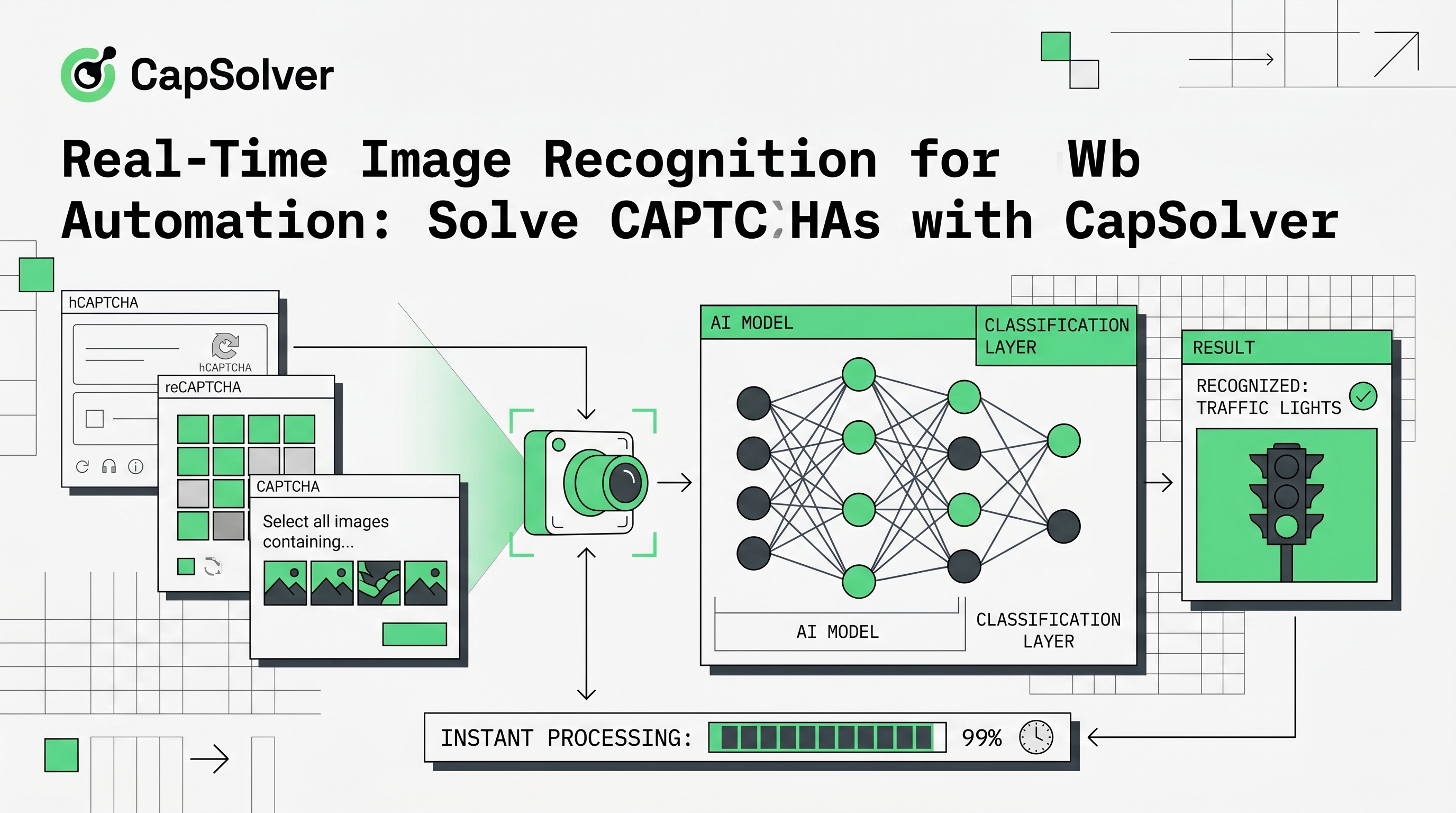
At its core, real-time image recognition in web automation involves capturing visual elements from a webpage, processing them through machine learning models, and returning actionable results within tight time constraints—typically under 5 seconds for a smooth user experience.
The pipeline generally follows these stages:
Image Capture: The system captures screenshots or specific DOM elements containing visual challenges (such as distorted text, object selection grids, or slider puzzles).
Preprocessing: Images are normalized—resized, contrast-adjusted, and noise-reduced—to improve recognition accuracy across diverse challenge formats.
Model Inference: Pre-trained convolutional neural networks (CNNs) or transformer-based vision models analyze the image, extracting features and matching them against learned patterns.
Post-Processing: Model outputs are decoded into actionable responses—whether that's transcribed text, selected coordinates, or behavioral signals.
The "real-time" aspect hinges on optimized inference paths. Modern systems use model quantization, batch processing, and geographically distributed compute nodes to minimize latency while maintaining accuracy above 95% for standard challenge types.
Websites deploy various image-based challenges to distinguish between human users and automated bots. Understanding these challenge types helps developers select the right recognition approach:
CapSolver's reCAPTCHA recognition service handles these challenges with high accuracy.
reCAPTCHA v2 and Enterprise often present grid-based image selection tasks ("Select all images containing street signs"). These require multi-label classification—identifying multiple correct regions across a 3×3 or 4×4 grid. Real-time recognition systems must handle:
Use code
CAP26when signing up at CapSolver to receive bonus credits!
Many websites implement proprietary image-based challenges—distorted text overlaid on noisy backgrounds, scrambled image puzzles, or color-selection tasks. Additionally, security solutions like AWS WAF introduce their own unique visual challenges. Real-time recognition systems must offer:
Achieving sub-second recognition times while maintaining accuracy requires careful architectural decisions. Here's a breakdown of the key components:
Modern image recognition systems for web automation typically leverage established computer vision architectures. Common choices include:
Edge Deployment: Deploying models closer to end users reduces network round-trip time. Geographically distributed solve nodes ensure low latency regardless of user location.
GPU Acceleration: Real-time inference benefits significantly from GPU-accelerated computation, particularly for complex vision models processing multiple images simultaneously.
Model Caching: Frequently encountered challenge types can be cached with pre-computed solution patterns, reducing repeated inference overhead.
For developers integrating real-time image recognition into automation workflows, CapSolver provides specific task types tailored to different challenges. Here is how you can integrate various recognition tasks:
# Example: Solving different types of image challenges via CapSolver API
import capsolver

# Initialize with your API key
capsolver.api_key = "YOUR_API_KEY"

# 1. ImageToTextTask: For standard alphanumeric image CAPTCHAs
# Documentation: https://docs.capsolver.com/en/guide/recognition/ImageToTextTask/
def solve_image_to_text(base64_image):
    solution = capsolver.solve({
        "type": "ImageToTextTask",
        "module": "queueit", # Optional: specify module if known
        "body": base64_image
    })
    return solution["text"]

# 2. ReCaptchaClassification: For reCAPTCHA grid image challenges
# Documentation: https://docs.capsolver.com/en/guide/recognition/ReCaptchaClassification/
def solve_recaptcha_classification(base64_image, question):
    solution = capsolver.solve({
        "type": "ReCaptchaV2Classification",
        "image": base64_image,
        "question": question # e.g., "/m/015qff" (crosswalk)
    })
    return solution["objects"] # Returns array of indices

# 3. AwsWafClassification: For AWS WAF image challenges
# Documentation: https://docs.capsolver.com/en/guide/recognition/AwsWafClassification/
def solve_aws_waf_classification(base64_images, question):
    solution = capsolver.solve({
        "type": "AwsWafClassification",
        "images": base64_images, # List of base64 strings
        "question": question # e.g., "aws:toycar"
    })
return solution["box"] # Returns coordinates or indices depending on the challengeReal-time image recognition enables several legitimate automation scenarios:
Research teams and businesses often need to collect publicly available data from websites that deploy CAPTCHA challenges. Image recognition APIs like CapSolver allow automated pipelines to handle these challenges without manual intervention, enabling:
QA engineers can integrate image recognition into end-to-end testing frameworks, automating interactions with CAPTCHA-protected staging environments:
Robotic Process Automation systems can extend their capabilities to handle visual challenges:
While real-time image recognition has matured significantly, developers should be aware of certain limitations:
Challenge Complexity: Highly distorted or novel CAPTCHA designs may require longer processing times or human fallback mechanisms.
Rate Limiting: Aggressive rate limiting on target websites can impact recognition throughput. Implement exponential backoff and respect robots.txt directives.
Ethical Boundaries: Always ensure your automation activities comply with the target website's terms of service and applicable laws. Legitimate use cases include accessibility support, authorized testing, and personal automation.
Conclusion:
Real-time image recognition is an indispensable tool for modern web automation, enabling developers to bypass complex visual roadblocks like reCAPTCHA, custom image CAPTCHAs, and AWS WAF challenges. By leveraging advanced AI models, optimized infrastructure, and specific API task types (such as ImageToTextTask, ReCaptchaClassification, and AwsWafClassification), automated workflows can achieve high accuracy and sub-second latency.
Ready to streamline your web automation and eliminate CAPTCHA bottlenecks? Explore CapSolver today to access our unified API. And start building more resilient automation pipelines. For detailed integration guides, visit the official CapSolver documentation.
1. What is the average response time for solving an image CAPTCHA using CapSolver?
Most standard image recognition tasks, including Image-to-Text and ReCaptcha Classification, are processed in under 1 to 5 seconds, ensuring your automation scripts run smoothly without triggering timeouts.
2. Can CapSolver handle complex or custom image challenges like AWS WAF?
Yes, CapSolver provides specialized task types such as AwsWafClassification designed specifically to handle complex and proprietary visual challenges deployed by advanced security systems.
3. How do I integrate CapSolver into my existing Python/Selenium workflow?
Integration is straightforward. You can use the CapSolver Python SDK to send the base64-encoded image of the CAPTCHA element to the API. The API returns the solved text or coordinates, which you can then inject back into the webpage using Selenium.
4. What happens if a CAPTCHA is solved incorrectly?
While CapSolver maintains an accuracy rate above 95% for standard challenges, occasional errors can occur due to extreme image distortion. Developers should implement retry logic in their automation scripts to request a new challenge and solve it again if the first attempt fails.
Ethan Collins
AI Agent Workflow Engineer
Building clearer handoffs between AI agents and tools.
ABOUT THE AUTHOR
Estimate CAPTCHA solving costs in Browser Use by separating agent runs, challenge types, billable solves, retries, and verified outcomes from browser costs.

Set up CapSolver MCP in Claude Code, check the available CAPTCHA tools, and choose token or page solving for a supported, authorized browser task.