
🎉NEWCapSolver for AI agents-MCP, agent tools, and SDK integrations

Ethan Collins
AI Agent Workflow Engineer
Published Oct 21, 2024
Updated Oct 22, 2024 · min read

Web scraping is a powerful technique for extracting data from websites, enabling automation of tasks like gathering pricing information, monitoring content updates, or collecting large datasets. One of the most popular libraries for performing web scraping in C++ is libcurl, a free and open-source client-side URL transfer library. It supports multiple protocols such as HTTP, HTTPS, FTP, and more, making it an ideal choice for retrieving web content.
libcurl is a powerful C library for making HTTP requests, supporting various protocols such as HTTP, HTTPS, FTP, and many more. It's a flexible tool used widely in C++ applications for performing web requests.
Features:
CURLM for managing multiple requests at once.Before using libcurl, you must:
curl/curl.h header in your C++ code.You can install libcurl on Linux with:
sudo apt-get install libcurl4-openssl-devHere’s how to perform a simple GET request using libcurl in C++:
#include <iostream>
#include <curl/curl.h>

static size_t WriteCallback(void* contents, size_t size, size_t nmemb, void* userp)
{
    ((std::string*)userp)->append((char*)contents, size * nmemb);
    return size * nmemb;
}

int main() {
    CURL* curl;
    CURLcode res;
    std::string readBuffer;

    curl_global_init(CURL_GLOBAL_DEFAULT);
    curl = curl_easy_init();

    if(curl) {
        curl_easy_setopt(curl, CURLOPT_URL, "https://httpbin.org/get");
        curl_easy_setopt(curl, CURLOPT_WRITEFUNCTION, WriteCallback);
        curl_easy_setopt(curl, CURLOPT_WRITEDATA, &readBuffer);

        res = curl_easy_perform(curl);
        if(res != CURLE_OK) {
            std::cerr << "curl_easy_perform() failed: " << curl_easy_strerror(res) << std::endl;
        } else {
            std::cout << "Response: " << readBuffer << std::endl;
        }

        curl_easy_cleanup(curl);
    }
    curl_global_cleanup();

    return 0;
}Here’s an example where we fetch data from an API and print the results:
#include <iostream>
#include <curl/curl.h>

static size_t WriteCallback(void* contents, size_t size, size_t nmemb, void* userp)
{
    ((std::string*)userp)->append((char*)contents, size * nmemb);
    return size * nmemb;
}

int main() {
    CURL* curl;
    CURLcode res;
    std::string readBuffer;

    curl_global_init(CURL_GLOBAL_DEFAULT);
    curl = curl_easy_init();

    if(curl) {
        curl_easy_setopt(curl, CURLOPT_URL, "https://jsonplaceholder.typicode.com/posts");
        curl_easy_setopt(curl, CURLOPT_WRITEFUNCTION, WriteCallback);
        curl_easy_setopt(curl, CURLOPT_WRITEDATA, &readBuffer);

        res = curl_easy_perform(curl);
        if(res != CURLE_OK) {
            std::cerr << "curl_easy_perform() failed: " << curl_easy_strerror(res) << std::endl;
        } else {
            std::cout << "Response: " << readBuffer << std::endl;
        }

        curl_easy_cleanup(curl);
    }
    curl_global_cleanup();

    return 0;
}To route your requests through a proxy server with libcurl:
#include <iostream>
#include <curl/curl.h>

static size_t WriteCallback(void* contents, size_t size, size_t nmemb, void* userp)
{
    ((std::string*)userp)->append((char*)contents, size * nmemb);
    return size * nmemb;
}

int main() {
    CURL* curl;
    CURLcode res;
    std::string readBuffer;

    curl_global_init(CURL_GLOBAL_DEFAULT);
    curl = curl_easy_init();

    if(curl) {
        curl_easy_setopt(curl, CURLOPT_URL, "https://httpbin.org/ip");
        curl_easy_setopt(curl, CURLOPT_PROXY, "http://proxyserver:8080");
        curl_easy_setopt(curl, CURLOPT_PROXYUSERPWD, "username:password");
        curl_easy_setopt(curl, CURLOPT_WRITEFUNCTION, WriteCallback);
        curl_easy_setopt(curl, CURLOPT_WRITEDATA, &readBuffer);

        res = curl_easy_perform(curl);
        if(res != CURLE_OK) {
            std::cerr << "curl_easy_perform() failed: " << curl_easy_strerror(res) << std::endl;
        } else {
            std::cout << "Response: " << readBuffer << std::endl;
        }

        curl_easy_cleanup(curl);
    }
    curl_global_cleanup();

    return 0;
}libcurl can manage cookies by enabling the COOKIEFILE option:
#include <iostream>
#include <curl/curl.h>

static size_t WriteCallback(void* contents, size_t size, size_t nmemb, void* userp)
{
    ((std::string*)userp)->append((char*)contents, size * nmemb);
    return size * nmemb;
}

int main() {
    CURL* curl;
    CURLcode res;
    std::string readBuffer;

    curl_global_init(CURL_GLOBAL_DEFAULT);
    curl = curl_easy_init();

    if(curl) {
        curl_easy_setopt(curl, CURLOPT_URL, "https://httpbin.org/cookies/set?name=value");
        curl_easy_setopt(curl, CURLOPT_COOKIEFILE, "");
        curl_easy_setopt(curl, CURLOPT_WRITEFUNCTION, WriteCallback);
        curl_easy_setopt(curl, CURLOPT_WRITEDATA, &readBuffer);

        res = curl_easy_perform(curl);
        if(res != CURLE_OK) {
            std::cerr << "curl_easy_perform() failed: " << curl_easy_strerror(res) << std::endl;
        } else {
            std::cout << "Response: " << readBuffer << std::endl;
        }

        curl_easy_cleanup(curl);
    }
    curl_global_cleanup();

    return 0;
}To send custom headers or perform a POST request with libcurl:
#include <iostream>
#include <curl/curl.h>

static size_t WriteCallback(void* contents, size_t size, size_t nmemb, void* userp)
{
    ((std::string*)userp)->append((char*)contents, size * nmemb);
    return size * nmemb;
}

int main() {
    CURL* curl;
    CURLcode res;
    std::string readBuffer;

    curl_global_init(CURL_GLOBAL_DEFAULT);
    curl = curl_easy_init();

    if(curl) {
        struct curl_slist* headers = nullptr;
        headers = curl_slist_append(headers, "User-Agent: Mozilla/5.0");
        headers = curl_slist_append(headers, "Accept-Language: en-US,en;q=0.5");

        curl_easy_setopt(curl, CURLOPT_URL, "https://httpbin.org/post");
        curl_easy_setopt(curl, CURLOPT_HTTPHEADER, headers);
        curl_easy_setopt(curl, CURLOPT_POSTFIELDS, "username=testuser&password=testpass");
        curl_easy_setopt(curl, CURLOPT_WRITEFUNCTION, WriteCallback);
        curl_easy_setopt(curl, CURLOPT_WRITEDATA, &readBuffer);

        res = curl_easy_perform(curl);
        if(res != CURLE_OK) {
            std::cerr << "curl_easy_perform() failed: " << curl_easy_strerror(res) << std::endl;
        } else {
            std::cout << "Response: " << readBuffer << std::endl;
        }

        curl_slist_free_all(headers);
        curl_easy_cleanup(curl);
    }
    curl_global_cleanup();

    return 0;
}In this example, we will demonstrate how to solve ReCaptcha V3 using CapSolver: with the libcurl library in C++. The CapSolver API allows for easy interaction with ReCaptcha tasks and retrieving solutions.
Before starting, make sure you have the following prerequisites:
sudo apt-get install libcurl4-openssl-dev on Linux)."YourKey" in the code below with your actual key).
Here’s a step-by-step guide to solving ReCaptcha V3 using CapSolver:
The first step is to send a request to CapSolver’s API to create a task for solving ReCaptcha. The task includes details like the website URL, the site key (from the target page), and the specific page action.
#include <iostream>
#include <string>
#include <curl/curl.h>
#include <json/json.h>

const std::string CAPSOLVER_KEY = "YourKey";
const std::string PAGE_URL = "https://antcpt.com/score_detector";
const std::string PAGE_KEY = "6LcR_okUAAAAAPYrPe-HK_0RULO1aZM15ENyM-Mf";
const std::string PAGE_ACTION = "homepage";

static size_t WriteCallback(void* contents, size_t size, size_t nmemb, void* userp) {
    ((std::string*)userp)->append((char*)contents, size * nmemb);
    return size * nmemb;
}

std::string createTask(const std::string& url, const std::string& key, const std::string& action) {
    CURL* curl;
    CURLcode res;
    std::string readBuffer;

    curl = curl_easy_init();
    if (curl) {
        curl_easy_setopt(curl, CURLOPT_URL, "https://api.capsolver.com/createTask");
        curl_easy_setopt(curl, CURLOPT_POST, 1L);

        // JSON payload for task creation
        Json::Value payload;
        payload["clientKey"] = CAPSOLVER_KEY;
        payload["task"]["type"] = "ReCaptchaV3TaskProxyLess";
        payload["task"]["websiteURL"] = url;
        payload["task"]["websiteKey"] = key;
        payload["task"]["pageAction"] = action;

        Json::StreamWriterBuilder writer;
        std::string requestData = Json::writeString(writer, payload);

        curl_easy_setopt(curl, CURLOPT_POSTFIELDS, requestData.c_str());

        struct curl_slist* headers = nullptr;
        headers = curl_slist_append(headers, "Content-Type: application/json");
        curl_easy_setopt(curl, CURLOPT_HTTPHEADER, headers);
        curl_easy_setopt(curl, CURLOPT_WRITEFUNCTION, WriteCallback);
        curl_easy_setopt(curl, CURLOPT_WRITEDATA, &readBuffer);

        res = curl_easy_perform(curl);
        curl_slist_free_all(headers);
        curl_easy_cleanup(curl);
    }
    return readBuffer;
}
This function sends a POST request to the CapSolver API with the necessary task details and returns the response, which will include a taskId.
Once the task is created, you’ll need to query CapSolver’s API to get the result of the task, which contains the token to bypass the ReCaptcha challenge.
std::string getTaskResult(const std::string& taskId) {
    CURL* curl;
    CURLcode res;
    std::string readBuffer;

    curl = curl_easy_init();
    if (curl) {
        curl_easy_setopt(curl, CURLOPT_URL, "https://api.capsolver.com/getTaskResult");
        curl_easy_setopt(curl, CURLOPT_POST, 1L);

        // JSON payload to get the task result
        Json::Value payload;
        payload["clientKey"] = CAPSOLVER_KEY;
        payload["taskId"] = taskId;

        Json::StreamWriterBuilder writer;
        std::string requestData = Json::writeString(writer, payload);

        curl_easy_setopt(curl, CURLOPT_POSTFIELDS, requestData.c_str());

        struct curl_slist* headers = nullptr;
        headers = curl_slist_append(headers, "Content-Type: application/json");
        curl_easy_setopt(curl, CURLOPT_HTTPHEADER, headers);
        curl_easy_setopt(curl, CURLOPT_WRITEFUNCTION, WriteCallback);
        curl_easy_setopt(curl, CURLOPT_WRITEDATA, &readBuffer);

        do {
            readBuffer.clear();
            res = curl_easy_perform(curl);
            std::this_thread::sleep_for(std::chrono::seconds(5));
        } while (readBuffer.find("\"status\":\"ready\"") == std::string::npos);

        curl_slist_free_all(headers);
        curl_easy_cleanup(curl);
    }
    return readBuffer;
}
This function repeatedly checks the status of the task until it is ready, at which point it returns the ReCaptcha solution.
Finally, here’s how you can integrate both functions into your main code:
int main() {
    std::cout << "Creating CAPTCHA task..." << std::endl;
    std::string taskResponse = createTask(PAGE_URL, PAGE_KEY, PAGE_ACTION);

    Json::CharReaderBuilder reader;
    Json::Value jsonResponse;
    std::string errors;
    std::istringstream taskStream(taskResponse);
    std::string taskId;

    if (Json::parseFromStream(reader, taskStream, &jsonResponse, &errors)) {
        taskId = jsonResponse["taskId"].asString();
        std::cout << "Task ID: " << taskId << std::endl;

        std::cout << "Retrieving CAPTCHA result..." << std::endl;
        std::string resultResponse = getTaskResult(taskId);

        Json::Value resultJson;
        std::istringstream resultStream(resultResponse);
        Json::parseFromStream(reader, resultStream, &resultJson, &errors);

        std::string token = resultJson["solution"]["gRecaptchaResponse"].asString();
        std::cout << "Token Solution: " << token << std::endl;
    } else {
        std::cerr << "Error parsing task response: " << errors << std::endl;
    }

    return 0;
}
This code will:
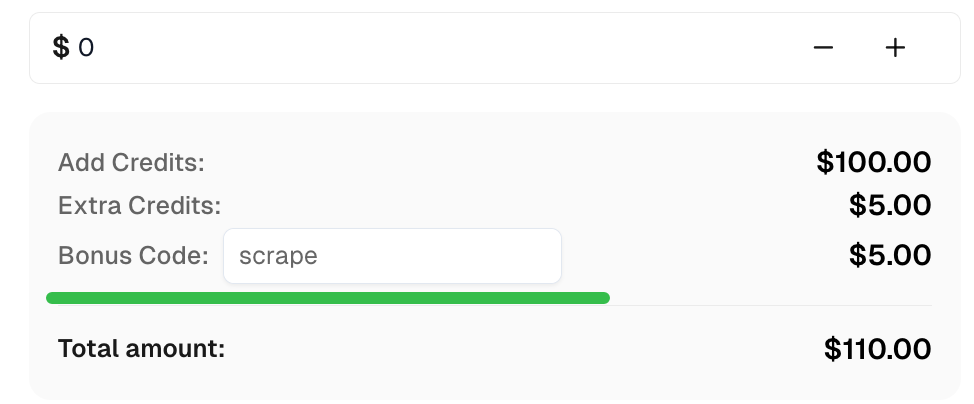
Claim your Bonus Code for top captcha solutions at CapSolver: scrape. After redeeming it, you will get an extra 5% bonus after each recharge, unlimited times.
With libcurl, you can easily handle HTTP requests in C++ applications. By integrating it with CapSolver, you can solve captchas such as ReCaptcha V3 and use the result in your requests.
Ethan Collins
AI Agent Workflow Engineer
Building clearer handoffs between AI agents and tools.
ABOUT THE AUTHOR
Connect a CAPTCHA solver to Patchright, handle reCAPTCHA page context correctly, and check token results before continuing your browser automation workflow.

Fix ERROR_IP_BANNED by stopping repeated bad CAPTCHA API requests, finding the first error, checking related codes, and resuming with a controlled test.
