🎉新着AI エージェント向け CapSolver-MCP、エージェントツール、SDK 統合

Sora Fujimoto
AI Solutions Architect
発行済み Jul 28, 2026
更新されました Jul 28, 2026 · 最小読み取り
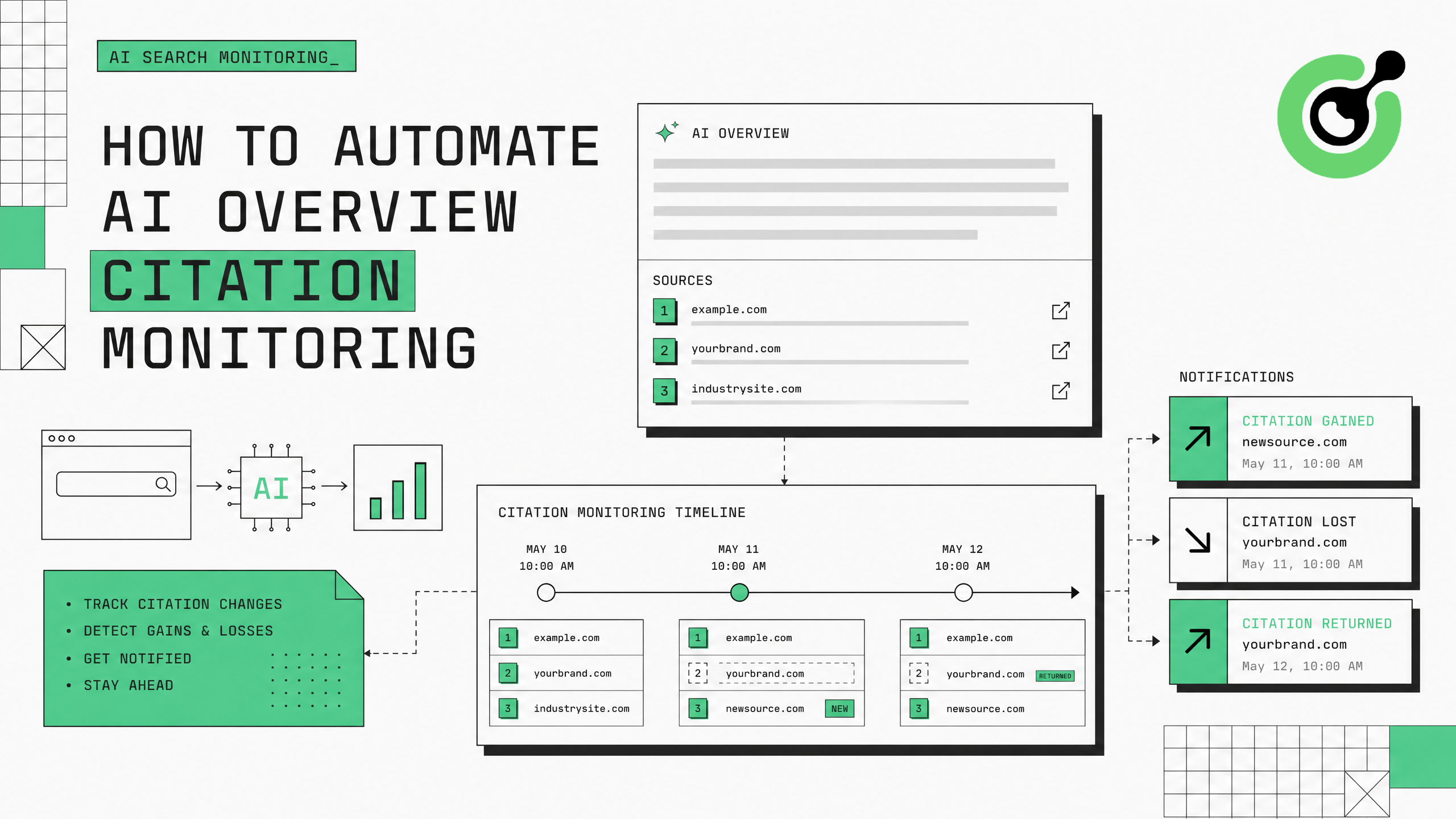
GoogleのAIオーバービューは、検索クエリの割合が増えるにつれて表示されるようになり、特定のウェブページをソースとして引用しています。ブランドや出版者にとって、これらのAI生成された要約で引用されることで、大きなトラフィックと権威が得られます。どのページが引用されているのか、また引用が変更されるタイミングを監視するには、Googleの検索結果から自動化されたデータ収集が必要です。このガイドでは、CapSolverを使用してGoogleの検証チャレンジを処理し、継続的なトラッキングを維持するAIオーバービュー引用監視システムの構築方法を説明します。
Google AIオーバービューは、検索トラフィックの流れに根本的な変化をもたらしています。GoogleがAI駆動の答えを生成し、あなたのページを引用した場合、直接的なリンクと間接的な権威が得られます。あなたの引用が消えれば、そのクエリからのトラフィックはすぐに減少します。Search Engine Landの研究によると、AIオーバービューは現在、情報クエリの15〜30%に表示されており、毎月増加しています。
監視の課題は、AIオーバービューの引用が動的であることです。これは、コンテンツの新鮮さ、クエリの再定義、Googleの継続的なモデルアップデートに応じて変化します。今日引用されているページが、明日通知なしに引用を失う可能性があります。スケール面で手動チェックは現実的ではありません。200のキーワードをトラッキングするブランドの場合、毎回それぞれのキーワードを手動で検索し、AIオーバービューにスクロールして、どのソースが引用されているかを記録する必要があります。これは週に何回も行われます。
自動監視はこれを解決しますが、Googleのボット保護により、システム的な検索アクセスがブロックされます。50〜100回の自動クエリ後に、GoogleはreCAPTCHAチャレンジを提示するか、IPアドレスを完全にブロックします。CapSolverは、監視パイプラインを継続的に動作させる検証クリア層を提供します。
必要なパッケージをインストールします:
pip install git+https://github.com/capsolver-ai/capsolver-core.git
pip install aiohttp beautifulsoup4 pandas
APIキーを設定します:
export CAPSOLVER_API_KEY="your-capsolver-api-key"追加の要件:
すべてのクエリがAIオーバービューを生成するわけではありません。あなたのモニタリングをAIオーバービューが一貫して表示されるキーワードに焦点を当てましょう:
from dataclasses import dataclass, field
from typing import List, Optional
import time

@dataclass
class AIOverviewCitation:
    """AIオーバービュー内の1つの引用。"""
    position: int          # 引用リスト内の1-basedの位置
    url: str               # 引用されたページのURL
    domain: str            # 引用されたページのドメイン
    anchor_text: str       # ソースへのリンクに使用されたテキスト
    snippet_context: str   # AIオーバービュー内の周辺テキスト

@dataclass
class AIOverviewResult:
    """1つのキーワードに対するAIオーバービュー監視結果。"""
    keyword: str
    has_ai_overview: bool
    citations: List[AIOverviewCitation] = field(default_factory=list)
    overview_text: str = ""
    timestamp: float = 0.0
    your_domain_cited: bool = False
    your_citation_position: Optional[int] = None

# AIオーバービューをトリガーする可能性の高いキーワード
PRIORITY_KEYWORDS = [
    # 情報クエリ(AIオーバービュー率が最高)
    "generative engine optimizationとは",
    "AI検索に最適化する方法",
    "AI引用のベストプラクティス",
    # 商業調査クエリ
    "最良のCAPTCHA解決API",
    "2025年のトップAIエージェントフレームワーク",
    # 比較クエリ
    "reCAPTCHA vs Cloudflare Turnstile",
]
情報クエリと「どうやって」クエリはAIオーバービューのトリガー率が最も高くなります(40〜60%)、続いて比較クエリ(20〜30%)、商業調査クエリ(15〜25%)です。
AIオーバービューをトリガーしないキーワードをモニタリングすると、CAPTCHA解決のクレジットを無駄にします。あなたのコンテンツが引用の可能性があるクエリに焦点を当てましょう—あなたの専門分野における情報クエリ、あなたの製品が関連する比較クエリ、あなたのカテゴリにおける「ベスト」クエリです。
Googleの検索結果ページからAIオーバービューの引用を抽出するパーサーを作成します:
from bs4 import BeautifulSoup
import re

class AIOverviewExtractor:
    """Google SERP HTMLからAIオーバービューの引用を抽出します。"""

    def extract(self, html: str, keyword: str, your_domain: str = "") -> AIOverviewResult:
        """HTMLを解析し、AIオーバービューの引用データを抽出します。"""
        soup = BeautifulSoup(html, 'html.parser')

        # AIオーバービューの存在を検出
        # GoogleはAIオーバービュー用のさまざまなコンテナクラスを使用しています
        ai_containers = soup.select(
            '[data-attrid*="ai"], '
            '.ai-overview, '
            '[class*="aiOverview"], '
            '.kp-wholepage [data-md-type]'
        )

        if not ai_containers:
            return AIOverviewResult(
                keyword=keyword,
                has_ai_overview=False,
                timestamp=time.time()
            )

        # AIオーバービューのテキストを抽出
        overview_container = ai_containers[0]
        overview_text = overview_container.get_text(separator=" ", strip=True)[:2000]

        # 引用(AIオーバービュー内のソースリンク)を抽出
        citations = []
        source_links = overview_container.select('a[href^="http"]')

        for i, link in enumerate(source_links, 1):
            url = link.get('href', '')
            if not url or 'google.com' in url:
                continue

            domain = self._extract_domain(url)
            anchor = link.get_text(strip=True)

            # 周囲のコンテキストを取得
            parent = link.parent
            context = parent.get_text(strip=True)[:200] if parent else ""

            citations.append(AIOverviewCitation(
                position=i,
                url=url,
                domain=domain,
                anchor_text=anchor,
                snippet_context=context
            ))

        # あなたのドメインが引用されているかを確認
        your_cited = any(your_domain in c.domain for c in citations) if your_domain else False
        your_position = next(
            (c.position for c in citations if your_domain in c.domain), None
        ) if your_domain else None

        return AIOverviewResult(
            keyword=keyword,
            has_ai_overview=True,
            citations=citations,
            overview_text=overview_text[:500],
            timestamp=time.time(),
            your_domain_cited=your_cited,
            your_citation_position=your_position
        )

    def _extract_domain(self, url: str) -> str:
        """URLからドメインを抽出します。"""
        match = re.search(r'https?://([^/]+)', url)
return match.group(1) if match else urlCAPTCHA処理を統合したデータ収集レイヤーを構築します:
import asyncio
import aiohttp
import random
from capsolver_core import create_capsolver, CaptchaType, CaptchaInfo

class CitationMonitorCollector:
    """CAPTCHA処理を備えたAIオーバービューデータの収集。"""

    def __init__(self, api_key: str, proxies: list):
        self.cap = create_capsolver(api_key=api_key)
        self.proxies = proxies
        self.proxy_idx = 0
        self.extractor = AIOverviewExtractor()
        self.stats = {"searches": 0, "captchas": 0, "overviews_found": 0}

    async def collect_citation_data(
        self, keyword: str, your_domain: str = "", location: str = "us"
    ) -> AIOverviewResult:
        """キーワードのAIオーバービュー引用データを収集します。"""
        proxy = self.proxies[self.proxy_idx % len(self.proxies)]
        self.proxy_idx += 1

        url = f"https://www.google.com/search?q={keyword}&gl={location}&hl=en"
        headers = {
            "User-Agent": "Mozilla/5.0 (Macintosh; Intel Mac OS X 10_15_7) AppleWebKit/537.36 (KHTML, like Gecko) Chrome/125.0.0.0 Safari/537.36",
            "Accept": "text/html,application/xhtml+xml",
            "Accept-Language": "en-US,en;q=0.9"
        }

        async with aiohttp.ClientSession() as session:
            async with session.get(url, headers=headers, proxy=proxy, timeout=30) as resp:
                html = await resp.text()

            # CAPTCHAがトリガーされた場合の処理
            if "unusual traffic" in html.lower() or "g-recaptcha" in html:
                self.stats["captchas"] += 1
                html = await self._solve_and_retry(session, url, headers, proxy)

            self.stats["searches"] += 1

        # 引用データの抽出
        result = self.extractor.extract(html, keyword, your_domain)
        if result.has_ai_overview:
            self.stats["overviews_found"] += 1

        return result

    async def _solve_and_retry(self, session, url, headers, proxy) -> str:
        """GoogleのreCAPTCHAを解決し、検索を再試行します。"""
        info = CaptchaInfo(
            type=CaptchaType.RECAPTCHA_V2,
            website_url="https://www.google.com",
            website_key="6LfwuyUTAAAAAOAmoS0fdqijC2PbbdH4kjq62Y1b"
        )
        solution = await self.cap.solve(info)

        # 解決後、新しいプロキシで再試行
        new_proxy = self.proxies[self.proxy_idx % len(self.proxies)]
        self.proxy_idx += 1

        async with session.get(url, headers=headers, proxy=new_proxy, timeout=30) as resp:
            return await resp.text()

    async def monitor_batch(
        self, keywords: list, your_domain: str = "", delay: float = 7.0
    ) -> list:
        """レートリミット付きのキーワード一括モニタリング。"""
        results = []
        for keyword in keywords:
            result = await self.collect_citation_data(keyword, your_domain)
            results.append(result)
            await asyncio.sleep(delay + random.uniform(0, 3))
        return results

    async def close(self):
await self.cap.aclose()CapSolverのreCAPTCHAドキュメントでは、Googleの特定のreCAPTCHA実装について詳しく説明しています。
時間の経過とともに引用の変更をトラッキングし、あなたのページがAIオーバービュー引用を獲得または失ったときにアラートを発します:
class CitationChangeDetector:
    """時間の経過とともにAIオーバービュー引用の変更を検出します。"""

    def __init__(self, your_domain: str):
        self.your_domain = your_domain
        self.history = {}  # キーワード -> AIOverviewResultのリスト

    def record_and_detect(self, results: list) -> list:
        """新しい結果を記録し、前のチェックからの変更を検出します。"""
        changes = []

        for result in results:
            keyword = result.keyword
            previous = self.history.get(keyword, [])

            if previous:
                last = previous[-1]

                # 引用が獲得された
                if result.your_domain_cited and not last.your_domain_cited:
                    changes.append({
                        "type": "CITATION_GAINED",
                        "keyword": keyword,
                        "position": result.your_citation_position,
                        "timestamp": result.timestamp
                    })

                # 引用が失われた
                elif last.your_domain_cited and not result.your_domain_cited:
                    changes.append({
                        "type": "CITATION_LOST",
                        "keyword": keyword,
                        "previous_position": last.your_citation_position,
                        "timestamp": result.timestamp
                    })

                # 位置が変更された
                elif (result.your_domain_cited and last.your_domain_cited and
                      result.your_citation_position != last.your_citation_position):
                    changes.append({
                        "type": "POSITION_CHANGED",
                        "keyword": keyword,
                        "old_position": last.your_citation_position,
                        "new_position": result.your_citation_position,
                        "timestamp": result.timestamp
                    })

                # AIオーバービューが表示/非表示になった
                if result.has_ai_overview and not last.has_ai_overview:
                    changes.append({
                        "type": "AI_OVERVIEW_APPEARED",
                        "keyword": keyword,
                        "timestamp": result.timestamp
                    })

            # ヒストリを更新
            if keyword not in self.history:
                self.history[keyword] = []
            self.history[keyword].append(result)
            # 最後の30日間の履歴を保持
            self.history[keyword] = self.history[keyword][-60:]

        return changes

    def generate_report(self) -> dict:
        """引用状況の要約レポートを生成します。"""
        total_keywords = len(self.history)
        cited_keywords = sum(
            1 for k, h in self.history.items()
            if h and h[-1].your_domain_cited
        )
        overview_keywords = sum(
            1 for k, h in self.history.items()
            if h and h[-1].has_ai_overview
        )

        return {
            "total_keywords_monitored": total_keywords,
            "keywords_with_ai_overview": overview_keywords,
            "keywords_where_cited": cited_keywords,
            "citation_rate": f"{cited_keywords/max(overview_keywords,1)*100:.1f}%",
            "average_citation_position": self._avg_position()
        }

    def _avg_position(self) -> float:
        positions = [
            h[-1].your_citation_position
            for h in self.history.values()
            if h and h[-1].your_citation_position
]
return sum(positions) / len(positions) if positions else 0パイプラインをスケジュールに従って実行します:
async def run_daily_monitoring():
    """毎日のAIオーバービューの引用監視実行。"""
    collector = CitationMonitorCollector(
        api_key="YOUR_CAPSOLVER_API_KEY",
        proxies=RESIDENTIAL_PROXY_LIST
    )
    detector = CitationChangeDetector(your_domain="capsolver.com")

    # すべての優先キーワードをモニタリング
    results = await collector.monitor_batch(
        keywords=PRIORITY_KEYWORDS,
        your_domain="capsolver.com",
        delay=8.0
    )

    # 変更を検出
    changes = detector.record_and_detect(results)

    # レポート
    if changes:
        print(f"\n{'='*50}")
        print(f"引用変更が検出されました: {len(changes)}")
        for change in changes:
            print(f"  [{change['type']}] {change['keyword']}")
        print(f"{'='*50}\n")

    report = detector.generate_report()
    print(f"要約: {report}")

    await collector.close()

# 毎日実行
asyncio.run(run_daily_monitoring())ボーナスコードを取得する: CapSolverダッシュボードでコード WEBS を使用して、すべてのチャージで追加の5%ボーナスを取得してください。大規模なAIオーバービューの引用を追跡するGEOチームにとって必須です。
モニタリングデータは直接的にあなたのジェネレーティブエンジン最適化戦略に影響を与えます:
CapSolverのAIと自動化に関するブログでは、AI駆動のデータ収集のための追加のパターンが紹介されています。検索エンジン間で異なるCAPTCHAタイプを処理するには、CapSolver製品ページでサポートされているすべての認証システムを確認してください。
AIオーバービューの引用モニタリングを自動化するには、CAPTCHA対応の検索収集レイヤー、引用抽出パーサー、および変更検出システムが必要です。CapSolverは、GoogleのAIオーバービューの継続的なモニタリングを可能にする検証クリアインフラを提供し、reCAPTCHAチャレンジを3〜8秒で解決することで、あなたのGEO戦略が常に最新の引用データを持つようにします。
20〜50の優先キーワードから始め、抽出精度を検証し、その後すべてのキーワードカバレッジにスケールアップしてください。引用変更データは直接的にコンテンツ最適化の決定に影響を与えるため、検索エンジンのAIがあなたのターゲットクエリに対して引用価値があると認識しているものを理解するのに役立ちます。
ブランド用語やコア製品クエリなどの高優先度キーワードの場合、毎日チェックしてください。業界用語や情報クエリの広範なモニタリングの場合、週に2〜3回で十分です。AIオーバービューの引用はコンテンツ更新後数時間以内に変化する可能性があるため、より頻繁にチェックすることで変更をより早くキャッチできます。
現在、情報クエリの15〜30%がAIオーバービューを表示しており、その割合は増加しています。"どうやって"クエリ、定義クエリ、比較クエリが最も高いトリガー率を持っています。商業的および取引クエリはAIオーバービューを表示する頻度が低くなります。
ほとんどのAIオーバービューは3〜8つのソースを引用しており、最初の2〜3つの位置がクリック率の大部分を占めています。引用リストの1位は5位以降に比べて約3〜5倍多くのクリックを獲得しています。引用されているかどうかだけでなく、引用位置をモニタリングすることも重要です。
はい。your_domainを競合のドメインに設定することで、その引用頻度と位置を追跡できます。あなたの引用率を競合と比較して、コンテンツギャップや機会を特定してください。あなたが存在しないキーワードで常に表示される競合を追跡してください。
200キーワードで8秒の遅延、約10%のCAPTCHA遭遇率の場合、1日の実行で約20回のCAPTCHA解決が必要です。1,000回のreCAPTCHA v2解決あたり$2〜3で計算すると、1日のコストは約$0.04〜0.06で、総合的なAIオーバービュー引用モニタリングで月額2ドル未満です。
Sora Fujimoto
AI Solutions Architect
Connecting agents, browsers, and APIs into one workflow.
著者について
スケーラブルなRustウェブスクレイピングアーキテクチャを学びましょう。リクエスト、スクレイパー、非同期スクレイピング、ヘッドレスブラウザスクレイピング、プロキシローテーション、およびコンプライアンス対応のCAPTCHA処理で。
2026年のデータ・アズ・ア・サービス(DaaS)を理解する。その利点、ユースケース、およびリアルタイムの洞察と拡張性を通じて企業を変革する方法について探る。