Firecrawl is our first shortlist choice for an agent that needs a managed API to turn web pages into usable content.
Crawl4AI suits teams that want a Python-based, self-hosted extraction workflow with Markdown and structured output.
Browser Use fits tasks where an AI agent must decide what to click or do next in a browser.
Crawlee suits repeatable, queued crawling jobs that supply data to agents. Playwright suits teams building precise browser actions themselves.
A CAPTCHA solver is a separate capability to evaluate. Browser automation, clean Markdown, and successful CAPTCHA handling are different requirements.
These are recommendations by workflow, based on official documentation—not speed, accuracy, or CAPTCHA success-rate benchmarks.
An AI research agent can receive a perfectly formatted page that contains no useful research: a verification screen, an error message, or the wrong destination. Choosing a scraping tool therefore involves more than checking whether it returns Markdown.
This guide ranks five web scraping tools for AI agents by the work they help developers complete. It also explains where a CAPTCHA solver such as CapSolver belongs when an authorized workflow encounters a supported challenge. The crawler collects content, the agent decides what to do with it, and the solver handles a specific CAPTCHA task.
Best Web Scraping Tools for AI Agents: Quick Comparison
Rank
Tool
Best starting point for
What you work with
Main tradeoff
1
Firecrawl
Getting web content through a managed API
Page content, Markdown, and extraction results
Check which browser interactions and session controls your chosen endpoint exposes
2
Crawl4AI
Building a self-hosted Python extraction pipeline
Markdown and structured extraction
You manage more of the crawling environment when self-hosting
3
Browser Use
Giving an agent a browser task expressed as a goal
Browser actions and task results
Define a clear stopping condition and verify the final page state
4
Crawlee
Feeding agents from scheduled or queued crawls
Request handlers, queues, and datasets
Agent reasoning is an additional application component
5
Playwright
Implementing exact browser actions as agent tools
Pages, browser contexts, and your own extraction logic
You build the crawling and agent-facing behavior
The order is an editorial shortlist for an agent developer starting with web data collection. It is not a claim that Firecrawl performs every task better than Playwright. For a browser interaction task, start with the relevant category instead of the first row.
How We Chose These Tools
The evaluation uses four practical questions:
What is the reader trying to obtain? A document, a collection of records, or the result of an interaction requires different tooling.
Who controls the browser? A hosted endpoint, your Python process, and an autonomous browser agent expose different integration opportunities.
What work remains after extraction? Consider scheduling, field validation, source tracking, and failure handling.
Can you verify the result? A completed request should lead to the expected content or application state before the agent continues.
Capabilities were checked against the projects' official documentation for this comparison. We did not run a common workload across all five tools, so the ranking contains no measured speed, cost-per-page, or solver success-rate claims. For a broader selection that also covers no-code products, see our AI scraping tools overview.
1. Firecrawl: Best for a Managed Web Data API
Firecrawl provides APIs for turning web pages into content an application can consume. Its documentation describes scraping into formats including Markdown and HTML. It also documents an Interact capability for actions such as clicking and filling forms, so evaluating it only as a static page fetcher would miss part of the product. See the official Firecrawl documentation.
Good fit: A research assistant needs the contents of known public URLs without your team building a complete crawler first. Start by checking whether the returned text includes the information the agent actually needs.
Tradeoff: Product-level capabilities do not mean every endpoint exposes the same browser state. If a task depends on a continuing session or a custom step between two interactions, verify the chosen API path before committing to it.
CAPTCHA consideration: Do not assume that a hosted scraping request lets you attach an external solver to its underlying browser. Confirm the documented extension points. If those controls are unavailable, surface the failed retrieval instead of feeding a challenge page into the agent's answer.
Related comparison: Read our Crawl4AI vs Firecrawl comparison for a closer look at their different approaches to web extraction.
2. Crawl4AI: Best for Self-Hosted Python Extraction
Crawl4AI is a Python web crawling and extraction project oriented toward LLM workflows. Its documentation covers Markdown output, structured extraction through CSS, XPath, or LLM-based approaches, browser hooks, and session reuse. It also offers a cloud service; self-hosting is the deployment choice highlighted here, not its only option. Read the Crawl4AI documentation for the current feature set.
Good fit: A team wants to collect approved public documentation, control how content is cleaned, and produce a consistent input for a retrieval or research agent.
Tradeoff: With a self-hosted workflow, browser setup and operational failures become your responsibility. Start with a small, representative set of pages before expanding the crawl.
CAPTCHA consideration: Browser hooks and session controls provide places to coordinate a solver step. The CapSolver guide below describes an integration approach; validate the exact runtime, challenge type, and point where extraction resumes for your application. A clean Markdown result still needs a content check.
3. Browser Use: Best for Goal-Driven Browser Tasks
Browser Use is an open-source Python project for AI browser agents, with a separate cloud offering. Its focus is letting an agent work through browser tasks, rather than treating every job as a URL-to-text request. The official Browser Use repository describes the local library and hosted options.
Good fit: An authorized workflow needs to navigate a changing page, choose a filter, or move through several screens before extracting information. The important output is completion of the task, not merely the text of the initial page.
Tradeoff: Give the agent an observable finishing condition. “Find the information” is harder to validate than “return the visible specification table and its source URL.” Keep consequential actions outside an unrestricted browsing task.
CAPTCHA consideration: A browser agent encountering a verification widget should not repeatedly guess its next action. Decide whether the selected environment supports an explicit solver handoff or requires human intervention. Local and cloud implementations need separate checks; support in one does not establish support in the other.
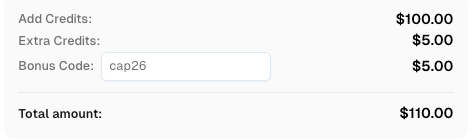
Boost your automation budget instantly! Use bonus code CAP26 when topping up your CapSolver account to get an extra 5% bonus on every recharge — with no limits. Redeem it now in your CapSolver Dashboard.
4. Crawlee: Best for Repeatable Crawls That Feed Agents
Crawlee is a crawling framework rather than an autonomous reasoning agent. Its Python documentation demonstrates browser-based crawling, link enqueueing, request handlers, dataset storage, and export. These capabilities help turn repeated collection work into an explicit application workflow. See the official Crawlee Python guide.
Good fit: An agent needs regularly refreshed records from a defined collection of public pages. The crawler can collect and validate the records before the agent receives them, rather than asking the model to rediscover the same navigation on every run.
Tradeoff: You still define the extraction rules and connect the resulting data to your agent. Crawlee supplies crawling machinery; it does not decide the business meaning of each record for you.
CAPTCHA consideration: In a browser-based handler, identify the verification state before saving data. A solver step requires a compatible challenge and access to the necessary page context. Successful request handling should mean that the expected record was extracted, not simply that the page navigation ended.
Integration guide: Our Crawlee and CapSolver tutorial covers the Node.js implementation. Use it for that runtime rather than copying its syntax into a Python crawler.
5. Playwright: Best for Precise Browser Actions
Playwright is a browser automation library with support for Chromium, Firefox, and WebKit. Its Python interface lets developers control browser behavior directly. It is a useful foundation when your agent should call a small, carefully defined action rather than freely navigate an entire site. Start with the official Playwright Python documentation.
Good fit: Your team owns the interaction logic and needs an exact sequence: open an authorized page, choose a permitted option, read a known result, and return it to the agent.
Tradeoff: You must build the data model, queueing policy, and agent-facing tool interface yourself. More control means more application code to maintain.
CAPTCHA consideration: Direct page control can make the location of a solver step clearer, but Playwright itself is not a CAPTCHA solver. Document which challenge is supported, preserve the relevant browser context, and check the application result after the verification step. Do not equate obtaining a solver response with completing the browser task.
Where a CAPTCHA Solver Fits in an AI Agent Workflow
Treat a verification challenge as a separate result state. Otherwise, an agent may summarize the challenge text as if it were the requested document, or keep retrying a page that needs different handling.
For an authorized workflow, the sequence should be explicit:
Attempt the intended retrieval or browser action. Check for the expected content, not only a successful navigation.
Identify the actual challenge. Distinguish a supported CAPTCHA from an access restriction, a broken page, or missing credentials.
Use the documented solver task where the application can support it. For example, CapSolver's reCAPTCHA v2 documentation describes the task inputs and returned solution. Match the task to the observed challenge rather than treating all widgets alike.
Continue through the application's supported flow. Keep the necessary page and session context available. The integration details depend on the selected tool and the page.
Verify the original result. Only pass the requested content to the agent after confirming it is present. Otherwise return a clear failure or request human help.
Keep solver credentials in the execution environment, outside prompts and extracted documents. If you are unfamiliar with task inputs, our API parameters glossary explains the role of configuration values in an API request.
This comparison does not establish native CapSolver support for all five tools. It identifies where to investigate a solver integration and where a hosted interface may limit your options.
How to Choose the Right Tool for Your Agent
Start with one representative task and write down its expected output. Then choose the smallest tool that can produce it:
Read and summarize known pages: Begin with Firecrawl. Consider Crawl4AI when controlling the extraction environment is a priority.
Build a regularly refreshed knowledge collection: Compare Crawl4AI's extraction approach with Crawlee's queued crawling workflow.
Let an agent decide how to navigate: Evaluate Browser Use and define a precise completion check.
Expose a fixed browser action to an agent: Consider Playwright; a predictable function may be easier to maintain than open-ended browsing.
For each candidate, include a normal page, a page with missing fields, and an authorized verification scenario in your evaluation. Record whether the result contains the expected fields, its source URL, and the retrieval time. Keep failures visible instead of converting them into empty but apparently successful records.
Compare total operating costs only after this small evaluation. Include hosting, browser runtime, model usage where applicable, solver calls, and engineering maintenance. An advertised request price alone does not describe the cost of delivering a valid record to your agent.
Build Reliable Automation Workflows with CapSolver
Choose the web scraping tool for the data or browser task first. Then add CAPTCHA solving where a documented challenge interrupts an authorized workflow and your chosen environment provides the required controls.
CapSolver can supply the supported CAPTCHA-solving step; it does not replace the crawler, the browser, or your final content checks. Validate that connection on a small workflow before scaling it.
FAQ
Q: What is the best web scraping tool for AI agents?
Firecrawl is a useful starting point for managed web content retrieval. Crawl4AI fits self-hosted extraction, Browser Use fits goal-driven interaction, Crawlee fits repeated crawl jobs, and Playwright fits custom browser actions. Choose by task rather than treating one ranking as universal.
Q: Should an AI agent receive Markdown or structured data?
Use Markdown when the agent needs to read and summarize documents. Prefer validated fields when the next step depends on specific values. In either case, retain the source URL and check that the content is the expected page.
Q: Do browser automation tools solve CAPTCHAs automatically?
Browser control alone does not establish CAPTCHA-solving support. Check the product's documented behavior for the challenge and deployment you use. An external solver also needs a supported integration point.
Q: Can I add CapSolver to any hosted scraping API?
Do not assume so. The API must expose the information and controls required for the relevant solver task and continuation step. A page-content response alone may not provide access to the underlying browser session.
Q: Do I need an LLM to scrape every page?
No. When the page structure and desired fields are known, deterministic extraction may be sufficient. Reserve agent reasoning for tasks that need interpretation or navigation decisions, and validate the collected data before using it.
Khadija Santos
AI Agent & MCP Engineer
Develops and maintains CapSolver’s MCP tooling, from implementation and package releases to AI agent integrations.