How to Solve CAPTCHA in CrewAI Multi-Agent Workflows

Ethan Collins
Pattern Recognition Specialist
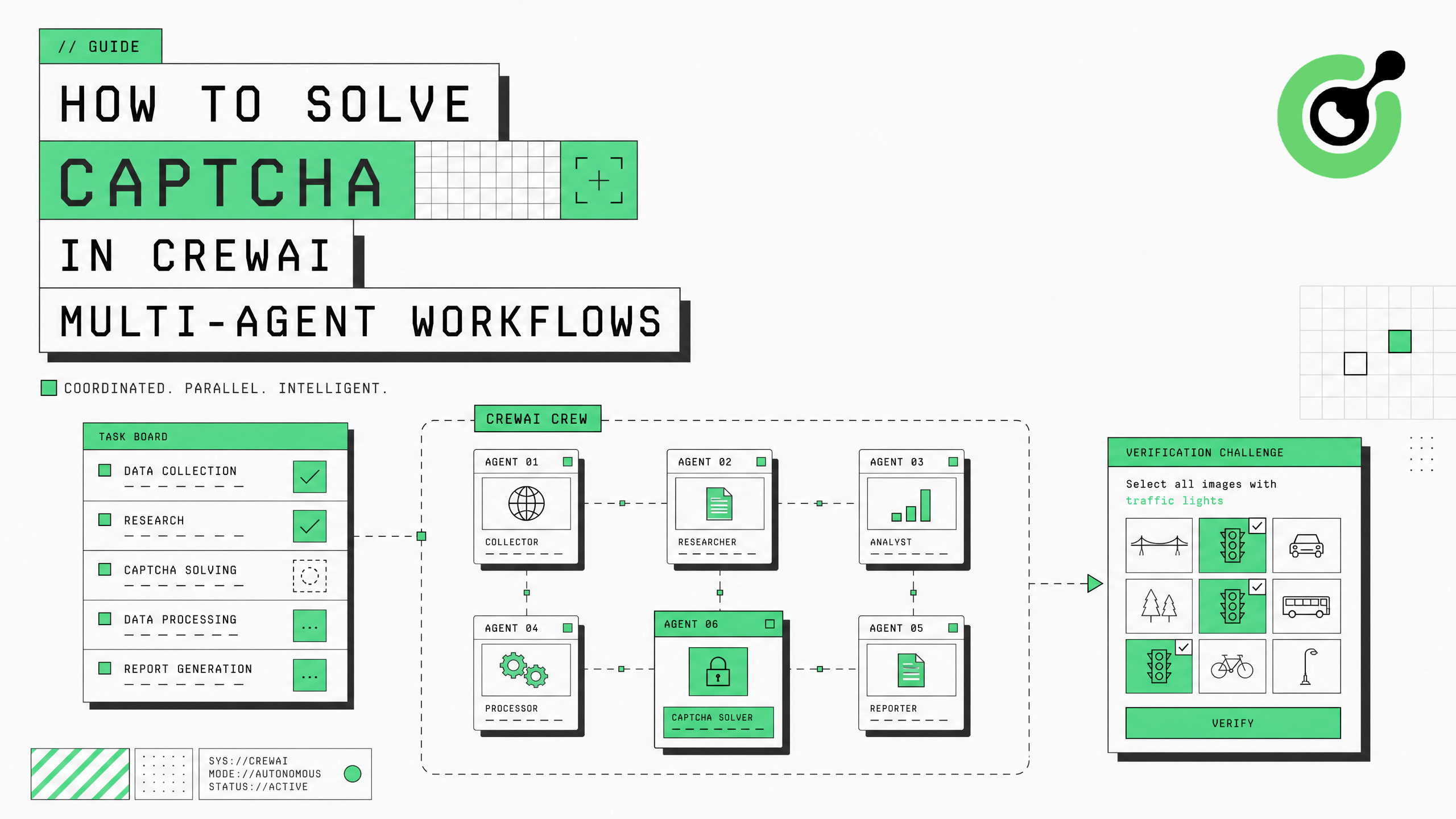
CrewAI orchestrates multiple AI agents working together on complex tasks — research, data collection, content creation, and workflow automation. When any agent in the crew encounters a CAPTCHA challenge during web interaction, the entire multi-agent pipeline stalls. CapSolver's capsolver-agent package integrates directly into CrewAI workflows, giving your agents the ability to clear reCAPTCHA, Cloudflare Turnstile, and other verification challenges without breaking the collaborative execution flow.
TL;DR
- CrewAI multi-agent workflows stall when any crew member hits a CAPTCHA during web tasks
- CapSolver provides tool schemas compatible with CrewAI's custom tool registration system
- The
capsolver-agentexecutor handles solving via CapSolver's AI service and returns structured results - Supports reCAPTCHA v2/v3 (including Enterprise) and Cloudflare Turnstile
- Integration requires under 15 lines of code using
create_executor()and CrewAI's@tooldecorator
Why CrewAI Agents Need CAPTCHA Solving
CrewAI enables teams of specialized AI agents to collaborate on tasks that require multiple capabilities. A typical crew might include a researcher agent that browses the web, an analyst agent that processes data, and a writer agent that produces reports. When the researcher agent encounters a CAPTCHA on a target website, it cannot proceed — and because CrewAI agents pass outputs sequentially, the entire crew's workflow halts.
This problem is amplified in CrewAI because multiple agents may need web access. A lead enrichment crew might have one agent scraping company data and another verifying contact information — both hitting CAPTCHAs on different sites simultaneously. Without a solving mechanism, production crews require constant human supervision, defeating the purpose of autonomous multi-agent orchestration.
According to CapSolver's production data, approximately 30% of agent web tasks encounter verification challenges. For a CrewAI crew executing 10 web-dependent tasks, that means 3 potential stall points per run — each requiring manual intervention without automated solving.
What You Need Before Starting
Install the required packages:
bash
# CapSolver core engine (required dependency)
pip install git+https://github.com/capsolver-ai/capsolver-core.git

# CapSolver agent tools
pip install git+https://github.com/capsolver-ai/capsolver-agent.git

# CrewAI framework
pip install crewai crewai-tools
Set environment variables:
bash
export CAPSOLVER_API_KEY="your-capsolver-api-key"
export OPENAI_API_KEY="your-openai-api-key"
Ensure you have a CapSolver account with API credits loaded. The CapSolver pricing page shows current rates per CAPTCHA type.
Step 1 — Create a CAPTCHA Solving Tool for CrewAI
What to Do
CrewAI uses custom tools defined with the @tool decorator. Wrap CapSolver's executor into a CrewAI-compatible tool:
python
import asyncio
from crewai import Agent, Task, Crew
from crewai.tools import tool
from capsolver_agent.schema import create_executor

# Create the CapSolver executor
executor = create_executor(api_key="YOUR_CAPSOLVER_API_KEY")

@tool("Solve CAPTCHA")
def solve_captcha(captcha_type: str, website_url: str, website_key: str) -> str:
    """Solve a CAPTCHA challenge and return the token.
    Use this tool when you encounter a CAPTCHA on a website.

    Args:
        captcha_type: The CAPTCHA type - 'reCaptchaV2', 'reCaptchaV3', or 'cloudflare'
        website_url: The full URL of the page with the CAPTCHA
        website_key: The site key (data-sitekey attribute value)

    Returns:
        The solved CAPTCHA token to submit with the form
    """
    result = asyncio.run(executor.execute("solve_captcha", {
        "captcha_type": captcha_type,
        "website_url": website_url,
        "website_key": website_key
    }))

    if result["success"]:
        return f"CAPTCHA solved successfully. Token: {result['solution']['token']}"
    else:
        return f"CAPTCHA solving failed: {result['error']}"
This tool follows CrewAI's standard pattern — the @tool decorator registers it with a name and description that the agent's LLM uses to decide when to invoke it.
Why This Matters
CrewAI agents select tools based on their descriptions. A well-described CAPTCHA solving tool allows the agent to autonomously recognize when it needs solving and invoke the tool with correct parameters. The structured return format gives the agent clear feedback on success or failure.
Common Mistakes to Avoid
- Using async directly in CrewAI tools: CrewAI's tool execution is synchronous. Wrap async CapSolver calls with
asyncio.run()inside the tool function. - Vague tool descriptions: The LLM needs a clear description to know when to use the tool. Include specific CAPTCHA type names and parameter explanations.
Step 2 — Build a CrewAI Agent with CAPTCHA Capability
What to Do
Create a CrewAI agent that has CAPTCHA solving as one of its available tools:
python
from crewai import Agent

# Research agent with CAPTCHA solving capability
researcher = Agent(
    role="Web Research Specialist",
    goal="Collect data from websites, handling any CAPTCHA challenges encountered",
    backstory="""You are an expert web researcher who collects data from various
    online sources. When you encounter a CAPTCHA challenge on a website, you use
    the solve_captcha tool to clear it and continue your research. You know how to
    identify CAPTCHA types: reCaptchaV2 (checkbox or invisible), reCaptchaV3
    (score-based), and cloudflare (Turnstile widget).""",
    tools=[solve_captcha],
    verbose=True
)
For crews that need multiple agents with web access, give the CAPTCHA tool to each agent that might encounter verification:
python
# Data collector agent
data_collector = Agent(
    role="Data Collection Specialist",
    goal="Extract structured data from target websites",
    backstory="You collect data from web sources and handle CAPTCHA challenges using the solve_captcha tool.",
    tools=[solve_captcha],
    verbose=True
)

# Verification agent
verifier = Agent(
    role="Data Verification Specialist",
    goal="Verify collected data against authoritative sources",
    backstory="You verify data accuracy by checking official sources, solving CAPTCHAs when needed.",
    tools=[solve_captcha],
    verbose=True
)
Step 3 — Assemble the Crew with CAPTCHA-Aware Tasks
What to Do
Define tasks that may require CAPTCHA solving and assemble them into a crew:
python
from crewai import Task, Crew, Process

# Task that may encounter CAPTCHA
research_task = Task(
    description="""Research the target website at {url}.
    If you encounter a CAPTCHA challenge, identify its type and site key,
    then use the solve_captcha tool to get a token.
    The site uses reCAPTCHA v2 with site key: {site_key}.
    Collect the required data after solving the CAPTCHA.""",
    expected_output="Collected data from the target website with CAPTCHA token if needed",
    agent=researcher
)

# Analysis task (depends on research results)
analysis_task = Task(
    description="Analyze the data collected by the researcher and produce a summary report.",
    expected_output="Structured analysis report of the collected data",
    agent=data_collector
)

# Create the crew
crew = Crew(
    agents=[researcher, data_collector],
    tasks=[research_task, analysis_task],
    process=Process.sequential,
    verbose=True
)

# Run the crew
result = crew.kickoff(inputs={
    "url": "https://example.com/data",
    "site_key": "6LeIxAcTAAAAAJcZVRqyHh71UMIEGNQ_MXjiZKhI"
})
print(result)
The sequential process ensures the researcher completes (including CAPTCHA solving) before the data collector begins analysis. For parallel execution, each agent independently handles CAPTCHAs on their assigned sites.
Why This Matters
CrewAI's strength is multi-agent collaboration. By giving CAPTCHA solving capability to the agents that need it, the crew operates autonomously end-to-end. No human intervention is needed when verification challenges appear — the agent recognizes the situation, invokes the tool, and continues.
Step 4 — Handle Multiple CAPTCHA Types in CrewAI
Different websites use different CAPTCHA systems. Create specialized tools for common scenarios:
python
@tool("Solve reCAPTCHA v3")
def solve_recaptcha_v3(website_url: str, website_key: str, page_action: str = "verify") -> str:
    """Solve a reCAPTCHA v3 challenge with a high score token.
    Use when the site uses invisible reCAPTCHA v3 (score-based, no visible checkbox).

    Args:
        website_url: The full URL of the page
        website_key: The reCAPTCHA site key
        page_action: The action name for v3 scoring (default: 'verify')
    """
    result = asyncio.run(executor.execute("solve_captcha", {
        "captcha_type": "reCaptchaV3",
        "website_url": website_url,
        "website_key": website_key,
        "page_action": page_action,
        "min_score": 0.7
    }))
    if result["success"]:
        return f"reCAPTCHA v3 solved. Token: {result['solution']['token']}"
    return f"Failed: {result['error']}"

@tool("Solve Cloudflare Turnstile")
def solve_turnstile(website_url: str, website_key: str) -> str:
    """Solve a Cloudflare Turnstile challenge.
    Use when the site is protected by Cloudflare and shows a Turnstile widget.

    Args:
        website_url: The full URL of the page
        website_key: The Turnstile site key (starts with 0x)
    """
    result = asyncio.run(executor.execute("solve_captcha", {
        "captcha_type": "cloudflare",
        "website_url": website_url,
        "website_key": website_key
    }))
    if result["success"]:
        return f"Turnstile solved. Token: {result['solution']['token']}"
return f"Failed: {result['error']}"| CAPTCHA Type | Tool to Use | Average Solve Time | Common On |
|---|---|---|---|
| reCAPTCHA v2 | solve_captcha | 5-12 seconds | Login pages, forms |
| reCAPTCHA v3 | solve_recaptcha_v3 | 3-8 seconds | APIs, invisible protection |
| Cloudflare Turnstile | solve_turnstile | 2-5 seconds | Modern SaaS, Shopify |
The CapSolver reCAPTCHA guide and Cloudflare Turnstile guide provide additional details on each CAPTCHA type's parameters and behavior.
Claim Your Bonus Code: Use code WEBS at CapSolver Dashboard to get an extra 5% bonus on every recharge. Perfect for teams running CrewAI multi-agent workflows at scale.
Step 5 — Production Patterns for CrewAI + CapSolver
What to Do
For production CrewAI deployments, add error handling and retry logic:
python
@tool("Solve CAPTCHA with Retry")
def solve_captcha_robust(captcha_type: str, website_url: str, website_key: str) -> str:
    """Solve a CAPTCHA with automatic retry on failure.
    Attempts solving up to 3 times before reporting failure.
    """
    for attempt in range(3):
        result = asyncio.run(executor.execute("solve_captcha", {
            "captcha_type": captcha_type,
            "website_url": website_url,
            "website_key": website_key
        }))
        if result["success"]:
            return f"Solved on attempt {attempt + 1}. Token: {result['solution']['token']}"
        if attempt < 2:
            import time
            time.sleep(3)
    return f"Failed after 3 attempts: {result.get('error', 'Unknown error')}"
For crews that process multiple sites, implement a balance check before starting:
python
@tool("Check CAPTCHA Solver Balance")
def check_balance() -> str:
    """Check the remaining balance for CAPTCHA solving credits."""
    result = asyncio.run(executor.execute("get_balance", {}))
    if result["success"]:
        return f"Balance: ${result['balance']:.2f}"
    return "Could not check balance"
The CapSolver web scraping documentation covers additional patterns for high-volume data collection that apply to CrewAI research agents. For agents using browser automation, the CapSolver extension helps identify CAPTCHA parameters during development.
Conclusion
Integrating CAPTCHA solving into CrewAI multi-agent workflows requires wrapping CapSolver's executor in CrewAI-compatible @tool functions, assigning those tools to agents that perform web tasks, and assembling crews that can operate autonomously through verification challenges. CapSolver provides the AI-powered solving infrastructure that keeps your multi-agent pipelines running without human intervention.
Start by creating a single CAPTCHA solving tool, test it with one agent, then expand to full crews with multiple web-interacting agents. The tool-based approach means agents decide when to solve based on context — no hardcoded CAPTCHA detection logic needed.
FAQ
Can multiple CrewAI agents solve CAPTCHAs simultaneously?
Yes. Each agent that has the CAPTCHA solving tool can invoke it independently. CapSolver's API supports concurrent task submissions without rate limiting, so parallel crew execution works without conflicts. Each solve is tracked with a unique request ID for debugging.
How does CrewAI know when an agent needs to solve a CAPTCHA?
The agent's LLM reasons about the situation based on the tool description and task context. When the task involves accessing a CAPTCHA-protected resource, the agent recognizes the need and calls the solving tool with appropriate parameters. You can also include CAPTCHA details in the task description for explicit guidance.
What happens if CAPTCHA solving fails in a CrewAI workflow?
The tool returns a failure message to the agent. The agent can then retry, try alternative parameters, or report the failure in its task output. CrewAI's error handling allows the crew to continue with remaining tasks even if one task encounters an unresolvable CAPTCHA.
Is CapSolver compatible with CrewAI's hierarchical process mode?
Yes. In hierarchical mode, the manager agent delegates tasks to crew members. If a delegated task requires CAPTCHA solving, the assigned agent uses its tool independently. The manager receives the completed result without needing to understand the CAPTCHA solving details.
How much does CAPTCHA solving cost per CrewAI run?
Cost depends on the number of CAPTCHAs encountered and their types. reCAPTCHA v2 costs approximately $2-3 per 1,000 solves, reCAPTCHA v3 costs $1-2 per 1,000, and Cloudflare Turnstile costs $1-2 per 1,000. A typical CrewAI research crew encountering 3-5 CAPTCHAs per run costs $0.005-0.015 per execution.
More
AIJul 28, 2026
How to Solve reCAPTCHA in OpenAI Agents SDK
Step-by-step guide to integrating reCAPTCHA solving into OpenAI Agents SDK using CapSolver function_tool, with async code examples for v2 and v3.
AIJul 23, 2026
How to Solve Cloudflare Turnstile in LangGraph Agents
Build a LangGraph Cloudflare Turnstile solver workflow with CapSolver, Playwright session handling, policy gates, retries, verification, and review.