🎉NEWCapSolver for AI agents-MCP, agent tools, and SDK integrations

Ethan Collins
AI Agent Workflow Engineer
Published Aug 27, 2025
Updated Aug 27, 2025 · min read

UI.Vision is a popular open-source RPA and browser automation extension for Chrome and Firefox. It’s widely used for web scraping, data extraction, automated testing, and form filling, allowing both developers and non-coders to build macros or run Selenium IDE scripts directly in the browser. However, when dealing with websites protected by CAPTCHAs, these automations often break and require manual solving.
CapSolver is an AI-powered CAPTCHA-solving service designed for scraping, crawling, and browser automation at scale. It can automatically solve reCAPTCHA, Cloudflare Turnstile, and other common challenges. By combining the CapSolver extension with UI.Vision, you can create fully hands free automation workflows without trouble.
This guide shows how to quickly integrate CapSolver into UI.Vision, including setup, a ready-to-use macro example, and best practices for reliable web automation.
UI.Vision RPA is a versatile browser automation tool that combines visual scripting with advanced features like computer vision (via XModules), API calls, and desktop automation. As an extension, it runs directly in the browser, supporting Chrome, Firefox, and Edge, with options for headless mode and command-line execution. It's free for unlimited use, with optional paid add-ons for enhanced capabilities.
UI.Vision is suitable for a range of automation tasks, including:
CAPTCHAs often appear in these scenarios, especially on login pages or forms, making a solving integration essential for uninterrupted runs.
Websites use CAPTCHAs to block automated bots, which can stop UI.Vision macros mid-execution. These defenses require human verification, leading to failures in headless or scheduled automations.
Common CAPTCHA types include:
| CAPTCHA Type | Description |
|---|---|
| reCAPTCHA v2 | Requires users to check a box or select images based on a prompt.  |
| reCAPTCHA v3 | Uses a scoring system to assess user behavior, often invisible to users. |
| Cloudflare Turnstile | A privacy-focused CAPTCHA alternative that minimizes user interaction.  |
CapSolver's browser extension auto-detects and solves these, allowing UI.Vision to wait for resolution before proceeding.
CapSolver offers a browser extension that automatically solves CAPTCHAs on pages. Integrate it with UI.Vision by installing the extension and using wait/assert commands in your macro to detect the "solved" state.
UI.Vision uses JSON-based macros. The example below waits for CapSolver's "solved" indicator (an element with id='capsolver-solver-tip-button' and data-state='solved').
Below is a complete UI.Vision macro (in JSON format) that demonstrates solving a reCAPTCHA v2 on a demo page using CapSolver's extension.
{
  "Name": "solve captcha",
  "CreationDate": "2025-8-20",
  "Commands": [
    {
      "Command": "open",
      "Target": "https://www.google.com/recaptcha/api2/demo",
      "Value": "",
      "Description": ""
    },
    {
      "Command": "waitForPageToLoad",
      "Target": "",
      "Value": "",
      "Description": ""
    },
    {
      "Command": "waitForElementPresent",
      "Target": "xpath=//*[@id='capsolver-solver-tip-button' and @data-state='solved']",
      "Value": "30000",
      "Description": ""
    },
    {
      "Command": "assertElementPresent",
      "Target": "xpath=//*[@id='capsolver-solver-tip-button' and @data-state='solved']",
      "Value": "",
      "Description": ""
    },
    {
      "Command": "click",
      "Target": "id=recaptcha-demo-submit",
      "Value": "",
      "Description": ""
    }
  ]
}| Step | Description |
|---|---|
| 1. Open Page | Uses open to navigate to the reCAPTCHA demo site where the CAPTCHA appears. |
| 2. Wait for Page Load | waitForPageToLoad ensures the page is fully loaded before proceeding. |
| 3. Wait for CAPTCHA Solved | waitForElementPresent checks for CapSolver's solved indicator (XPath for the button with data-state='solved'), timing out after 30 seconds. The extension auto-solves in the background. |
| 4. Assert Solved | assertElementPresent verifies the CAPTCHA is solved; if not, the macro fails. |
| 5. Submit Form | click on the submit button to complete the action once solved. |
| 6. Run and Monitor | Play the macro in UI.Vision; the extension handles solving, and logs show progress. |
This macro relies on the CapSolver extension to inject the solution automatically.
This macro automates CAPTCHA solving on the reCAPTCHA demo:
For real-world use, adjust timeouts or add error handling (e.g., loops) if solving takes longer.
| Question | Answer |
|---|---|
| What types of CAPTCHAs can CapSolver solve? | CapSolver supports reCAPTCHA v2/v3,Cloudflare Turnstile, and more. Refer to the CapSolver documentation for a complete list. |
| How do I handle different CAPTCHA types? | The extension auto-detects types; configure supported types in CapSolver settings. Update XPath if the indicator changes. |
| What if CapSolver fails to solve the CAPTCHA? | Add retry loops in the macro or check extension logs. Increase wait time for complex CAPTCHAs. |
| Can I use CapSolver with other RPA tools? | Yes, CapSolver's extension works with any browser-based tool; API integration available for code-based setups. |
| Do I need proxies with CapSolver in UI.Vision? | Proxies help with IP blocks; configure in the extension or UI.Vision for advanced scenarios. |
Integrating CapSolver's browser extension with UI.Vision simplifies CAPTCHA handling in RPA workflows, allowing macros to run autonomously. This combination leverages UI.Vision's visual automation with CapSolver's AI solving for efficient, reliable tasks.
To begin, sign up for CapSolver and install the extension. Download UI.Vision and import the example macro. For more, explore CapSolver docs and UI.Vision docs. Automate your CAPTCHAs today!
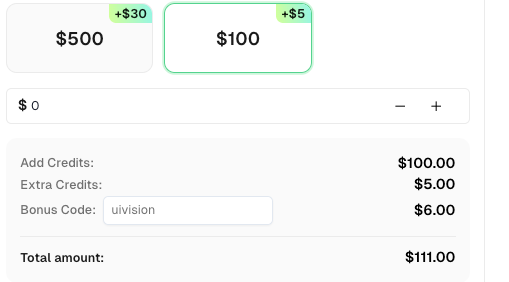
Bonus for ui.vision Users: Use the promo code uivision when recharging your CapSolver account and receive an exclusive 6% bonus credit—no limits, no expiration.
Ethan Collins
AI Agent Workflow Engineer
Building clearer handoffs between AI agents and tools.
ABOUT THE AUTHOR
Find CapSolver MCP in the Official MCP Registry, install version 0.1.3 with uvx or pip, configure a local client, and verify the stdio tools.

Add CAPTCHA tools to Pydantic AI using the official CapSolver adapter, test tool execution locally, and handle typed inputs and structured solver results.