
🎉NEWCapSolver for AI agents-MCP, agent tools, and SDK integrations

Nikolai Smirnov
Software Development Lead
Published Nov 20, 2026
Updated Nov 20, 2026 · min read
A Python developer choosing a CAPTCHA service usually has a more specific problem than finding the longest list of supported challenges. A synchronous script may need a short API wrapper. An async worker needs a client that fits its event loop. A browser workflow also needs the correct page parameters and a reliable way to check what happens after submitting the result.
This guide compares three established options through those decisions. It is published by CapSolver, which is one of the services evaluated. The recommendations below are based on documented interfaces and integration fit. They do not claim an independent performance benchmark, and current capabilities should be rechecked before a 2027 deployment.
The most useful shortlist separates the Python client from the work performed by the service and your browser.
| Service | Python interface to evaluate | Strong fit for this shortlist | Check before choosing |
|---|---|---|---|
| CapSolver | capsolver; separately, capsolver-core |
Task-based Python scripts, or supported async token workflows with optional page helpers | The Core SDK's scope differs from the image-task examples using capsolver |
| 2Captcha | 2captcha-python, with TwoCaptcha and AsyncTwoCaptcha |
Teams wanting task-specific methods in either synchronous or asynchronous code | Result shape, polling settings, and callback behavior for the selected method |
| CapMonster Cloud | capmonstercloudclient |
Async Python applications that prefer explicit request objects | The exact request class, fields, and response for your challenge type |
The order follows the development paths discussed here. It does not imply that the first service is fastest or that the third has lower recognition accuracy. Choose the entry whose documented interface matches the application you maintain.
A suitable Python CAPTCHA solver connects a supported challenge to your application with clear inputs, predictable result handling, and an understandable failure path.
An SDK packages some of that work into Python methods. The service still receives the task over a network connection. Installing an open-source client does not turn a paid solving service into a local recognition engine or include its API usage.
Start with the actual task. An image CAPTCHA supplies image data and expects recognized text. A supported web widget may require a page URL, public site key, and additional task-specific context, then return a token. Those are different contracts. A library being installable on Python is not evidence that it handles every challenge your workflow encounters.
Keep the service's API key in the Python process or its secret store. The key authorizes service usage; it is different from a widget's public site key. Avoid embedding a paid service credential in browser-side code or recording it in debug output.
The evaluation focuses on Python integration decisions that can be checked before committing to a service.
The criteria are documented Python entry points, synchronous or asynchronous operation, task input and result shape, browser responsibilities, and the effort required to test a bounded workflow. First-party documentation and repositories support provider-specific statements. A useful selection should also survive a review of the package your team will actually install, rather than relying on a generic language-support badge.
For this guide, the Python clients were installed and their relevant imports checked. A CapSolver image task was also exercised against a self-created numeric image. Paid recognition requests were not run against the other two providers, so that check supplies no comparative accuracy or latency evidence.
The practical ranking is therefore by use case. If your decision depends on throughput, recognition quality, or total price, run a representative pilot with the same permitted inputs and acceptance criteria across the providers you are considering.
CapSolver is a strong fit when you want to choose between a direct task interface and a separate browser-aware token SDK.
The official ImageToTextTask example uses the capsolver package and a task dictionary. For that image task, the submitted image is Base64 data and the recognized text is returned in the result. This path fits a Python service that already knows which image it needs to read.
The Python Core SDK serves a different scope: supported reCAPTCHA and Turnstile token workflows. It provides async operations and optional Playwright page helpers for detection, parameter reading, solving, and fill-back. Its documented token mode does not click image grids or drag sliders.
Choose the package by task rather than by name similarity. The existing Core SDK versus HTTP API comparison explains that boundary in more detail. A successful fill-back still needs a separate application check, such as the expected form response.
Consider a Python worker that reads a permitted image challenge before submitting a business enquiry. Its selection question is whether the image task produces the text that the owned workflow accepts. A browser token workflow has a different selection question: whether the SDK supports that exact widget and exposes enough information to diagnose a failed submission. Evaluate those paths separately instead of treating one successful demonstration as proof for both.
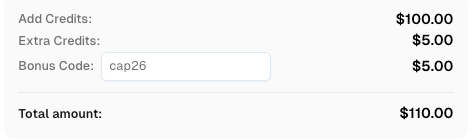
Redeem Your CapSolver Bonus Code
Boost your automation budget instantly!
Use bonus code CAP26 when topping up your CapSolver account to get an extra 5% bonus on every recharge — with no limits.
Redeem it now in your CapSolver Dashboard
2Captcha is worth evaluating when your team wants named methods for individual CAPTCHA types and a choice of synchronous or asynchronous Python clients.
Its official Python package documents TwoCaptcha and AsyncTwoCaptcha, image recognition, reCAPTCHA, Turnstile, and other task methods. The package also exposes timeout and polling controls. Those details matter if you want to make waiting behavior explicit in an existing script.
Pay attention to callback configuration. The repository states that setting a callback changes the usual behavior: methods return a task identifier rather than polling for the answer. Your application then needs a result-receiving path or an explicit retrieval step. Treat that as a workflow decision, not simply another optional string.
The provider's Python integration page is a starting point for matching the method to the challenge. Confirm the selected method's response fields before adapting an existing parser. A Python client does not remove the need to locate the challenge or validate the destination response.
A team maintaining both a small synchronous utility and an async service can evaluate whether one provider's two client styles reduce maintenance. Prototype the result-handling path in each application. A wrapper that feels convenient in a command-line script may need different cancellation, retry, or shutdown handling in a long-running service.
CapMonster Cloud is an option for Python teams that prefer constructing a request object and awaiting a solving operation.
The official Python client repository documents capmonstercloudclient, ClientOptions, CapMonsterClient, and task-specific request classes. Its examples use an asynchronous solve operation. The repository describes support for challenges including reCAPTCHA and Turnstile, with separate request structures for the tasks.
For evaluation, inspect the request class you intend to use. Similar concepts can have different field names between services or client models. Do not assume a dictionary from another SDK can be passed through unchanged simply because both services support the same CAPTCHA family.
This guide evaluates the cloud client's Python interface. It does not treat vendor-published speed or success-rate comparisons as results from our own testing. Check the provider's current documentation and run your own bounded acceptance test before making a performance-dependent choice.
This interface can suit a team that already uses typed request objects throughout an async backend. The benefit to investigate is consistency with that application's style: constructing the request, awaiting the response, and handling a failed task. That is a maintainability judgment, separate from whether the remote service returns the right answer on your permitted workload.
SDK behavior affects the amount of application work you must build around a CAPTCHA service.
For synchronous code, check what the method waits for before returning and which exceptions reach your caller. For async code, confirm that the specific method is designed for asynchronous use. An async application should not assume that adding await to a blocking method changes its behavior.
Next, distinguish an API task from the browser action that consumes it. A method may return recognized text, a token, a task identifier, or a structured object. Write down the output your next step expects. If your callback path returns only an identifier, the next operation must not mistake that identifier for a solution.
Finally, define where retries belong. A network interruption, a service error, and a form rejection are different observations. Repeating the entire business operation after every error can create unwanted duplicate submissions. Preserve the failure stage and check the application's state before trying again.
These checks are useful even when the SDK example is short. They reveal the operational contract that a single successful sample does not show.
A useful budget starts with the CAPTCHA types and billable requests your workflow produces.
Use each provider's current task pricing, then account for the number of requests needed by the permitted workflow. CapSolver's current pricing is the appropriate place to check its rates; this guide does not forecast 2027 prices or assume that one task's rate applies to all challenge types.
Keep three observations separate in a pilot: requests sent to the solver, usable results returned, and completed application actions. The counts can differ. Investigate why an action failed before deciding that a cheaper request produces a cheaper completed workflow.
Also estimate the engineering work. If your team must add a callback receiver, adapt a result model, or maintain browser integration code, that work belongs in the decision. Choose criteria relevant to your application rather than assigning a universal score to every SDK feature.
A small acceptance test should prove that the selected Python interface completes one representative, authorized task.
Start with an owned test page or an input you are permitted to process. Record the challenge family, installed package version, required fields, returned result, and application outcome. Include a deliberately invalid input or answer so the test demonstrates a meaningful failure as well as success.
For browser-based workflows, verify that the task belongs to the page and form being operated. Keep the browser session attached to the action, and check the final response instead of stopping when a solver returns a value. For image workflows, preserve the image and its expected answer in the controlled test environment so recognition can be checked independently of form handling.
After the small test works, broaden only to the task types and environments you actually need. A Python SDK selection should become easier to explain as evidence accumulates: the interface fits the codebase, the supported task fits the challenge, and the application accepts the result.
Choose the service whose documented Python path matches your workload, then verify that path from input to application result. CapSolver provides task APIs and Python tooling for supported CAPTCHA workflows; begin with the relevant task documentation and a bounded test before increasing usage.
Q: What is the best CAPTCHA solver for Python?
The best choice depends on the challenge and application. CapSolver is a candidate for task-based scripts and supported browser token workflows, 2Captcha offers synchronous and async task clients, and CapMonster Cloud offers an async request-object interface. This guide does not establish a universal performance winner.
Q: Is a Python CAPTCHA SDK the same as a local solver?
No. The Python clients discussed here communicate with remote solving services. Installing the client does not provide a local model or include paid API usage. Check both the client license and the service's commercial terms.
Q: Can I use a CAPTCHA solver with an async Python application?
Yes, when the selected client and operation support asynchronous use. Check the actual package interface, connection cleanup, timeouts, and result flow. Do not assume that a synchronous method becomes nonblocking when called from an async function.
Q: Does a CAPTCHA solver replace Playwright or Selenium?
A task solver does not generally replace browser automation. The browser handles page interaction, while the solver produces a result for a supported challenge. Some SDKs provide page helpers, but your application still needs to confirm its intended action succeeded.
Q: Were all three services benchmarked for this ranking?
No. The shortlist compares first-party interface documentation and Python development fit. A CapSolver image task was exercised on an owned fixture, while the other clients received import checks only. Those checks cannot establish comparative speed, accuracy, or production reliability.
Nikolai Smirnov
Software Development Lead
Building dependable software for complex automation.
ABOUT THE AUTHOR
Test a CAPTCHA solver API with Postman, configure JSON requests, inspect task results, distinguish API errors, and keep account credentials out of shared files.

Compare CAPTCHA solver accuracy and speed using accepted results, latency percentiles, fresh trials, and clear retry rules for an authorized test workload.