
🎉NEWCapSolver for AI agents-MCP, agent tools, and SDK integrations

Anh Tuan
Data Science Expert
Published Jun 04, 2026
Updated Jun 02, 2026 · min read
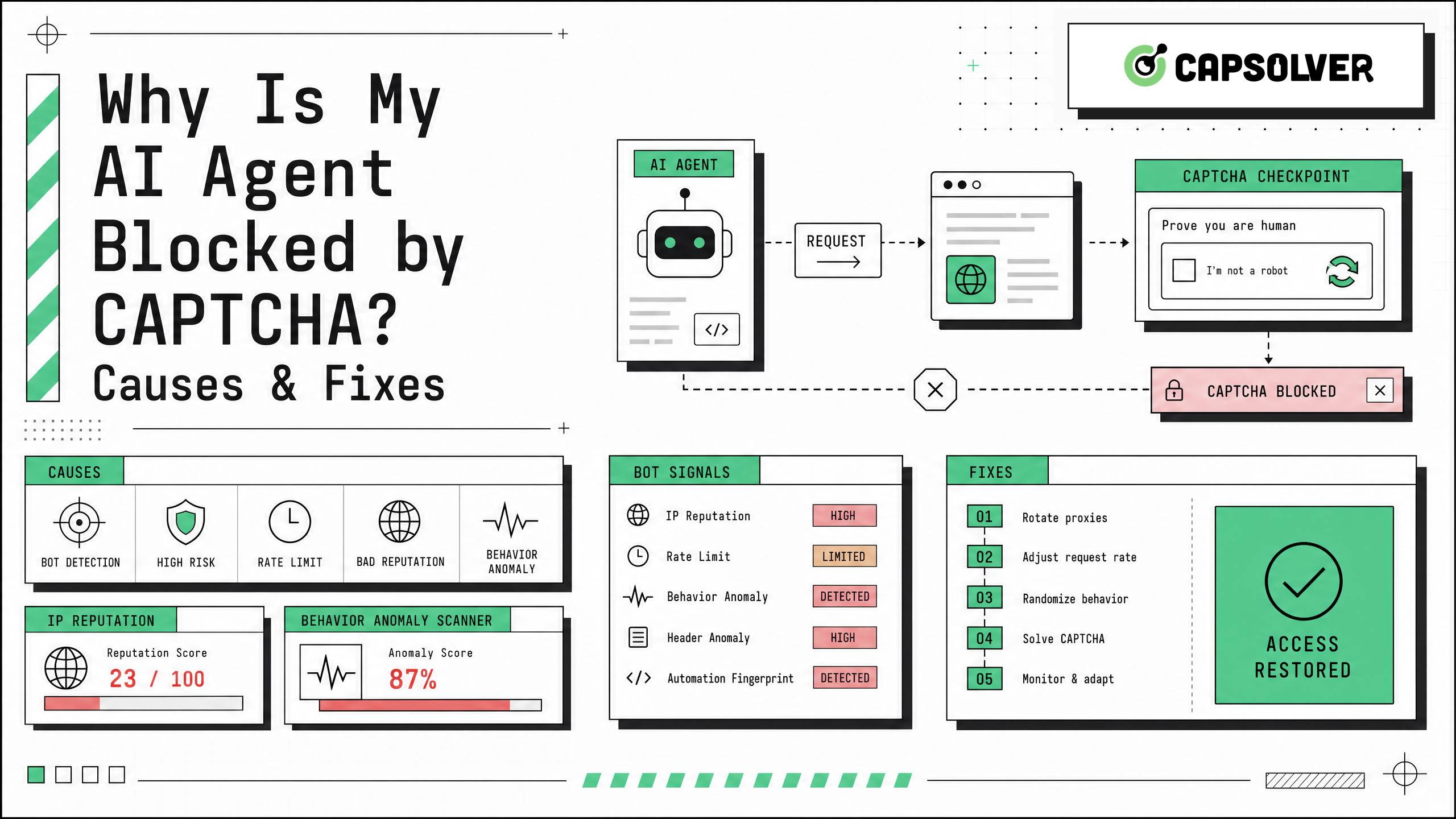
Why is my AI agent blocked by captcha? The short answer is that most AI agents look abnormal to modern traffic validation systems. They often run from cloud infrastructure, use headless browsers, move too quickly, lose cookies between steps, or trigger risk controls on login, search, checkout, and form pages. If your team uses agents for QA, public data monitoring, RPA, or research workflows, the fix is not endless retries. It is a structured diagnosis of signals, permissions, and challenge type. CapSolver can be one part of that workflow when CAPTCHA handling is allowed and technically relevant, but responsible automation starts with clear authorization, rate limits, and accurate logging.
Why is my AI agent blocked by captcha even when the same page works in a normal browser? The reason is that CAPTCHA is only one visible part of a broader risk-control pipeline. Google explains that reCAPTCHA v3 returns a score from 0.0 to 1.0 and recommends that site owners verify the response on the backend, including action names and expected context through server-side checks via Google reCAPTCHA v3 documentation. Cloudflare Turnstile also adapts outcomes using non-interactive JavaScript challenges, browser-environment probes, proof-of-work, proof-of-space, browser quirks, and human-behavior signals, according to Cloudflare Turnstile documentation.
For an AI agent, that means a page may fail before the model understands what happened. The agent can see a blank page, a 403 response, a looped verification screen, an invisible score-based rejection, or a visible checkbox. In many cases, the CAPTCHA is not the root cause. It is the final checkpoint after earlier signals made the session look risky.
| Symptom in the agent run | Likely cause | Practical fix |
|---|---|---|
| The page loads for a human but not for the agent | Headless browser or incomplete JavaScript execution | Use a full browser runtime, wait for network idle states, and capture screenshots for debugging. |
| CAPTCHA appears after several requests | Request cadence is too fast or repetitive | Add human-paced delays, reduce concurrency, and respect the target site’s limits. |
| The agent passes once but fails later | Cookies or session state are not preserved | Reuse allowed session state, store cookies securely, and avoid restarting the browser for each step. |
| The page returns 403 without a puzzle | IP reputation, WAF rule, or region mismatch | Review infrastructure, align locale and timezone, and avoid repeated retries from the same poor-quality route. |
| reCAPTCHA v3 score is low | Browser behavior or action context looks risky | Verify action names, improve session quality, and do not call tokens too early because tokens expire quickly. |
This table is the fastest way to answer Why is my AI agent blocked by captcha without guessing. The goal is to classify the failure before changing code.
A major reason behind Why is my AI agent blocked by captcha is browser fingerprint mismatch. A normal browser reports a consistent combination of device memory, fonts, graphics capability, timezone, language, screen size, installed APIs, and browser behavior. Many automation stacks expose unusual combinations: a Linux data-center environment with missing fonts, a generic viewport, no realistic graphics stack, or inconsistent headers.
Cloudflare’s Turnstile documentation states that it can gather signals from JavaScript challenges, browser APIs, browser quirks, and behavior. That is important because rotating only the User-Agent string does not make an environment consistent. A browser that says it is Chrome on Windows while its TLS, timezone, font list, and rendering stack suggest otherwise can still be flagged.
For CapSolver readers working with browser automation, the fix is to test the full environment, not only the agent prompt. Capture screenshots, HAR files, console errors, response codes, and cookies. Compare a successful human session with a failed agent session. If the agent never executes the challenge script, the issue is browser execution. If it executes the script but fails validation, the issue is likely session quality, behavior, or policy.
Why is my AI agent blocked by captcha after only a few pages? Speed is often the answer. AI agents are efficient by design. They open pages, extract text, click immediately, and repeat. Real visitors pause, scroll, wait, move between pages unevenly, and rarely submit many forms in a short period.
Traffic validation systems use request cadence as a risk signal. A burst of near-identical actions from the same account, IP range, or browser profile can increase challenge frequency. This matters for agent workflows that monitor prices, search public listings, test checkout paths, or collect public records.
A safer workflow uses rate limits, randomized but reasonable pacing, and backoff. It also avoids retry storms. If the agent receives a challenge or 403, the next step should be logging and classification, not ten more retries. CapSolver’s AI and automation FAQ is a useful internal resource for teams that need to align CAPTCHA handling with automation governance.
Another common answer to Why is my AI agent blocked by captcha is infrastructure reputation. Many agents run in public cloud data centers. This is convenient for engineering, but some websites treat data-center traffic as higher risk because it is commonly used for automated requests. A mismatch between IP region, browser timezone, accept-language header, and account history can make the session look even less reliable.
This does not mean every workflow needs proxies. It means infrastructure must match the allowed use case. QA against your own application can run from a controlled network and use test keys. Vendor portal automation should use approved access, stable identity, and agreed limits. Public data monitoring should follow site terms, privacy rules, and reasonable request rates.
AWS has described CAPTCHA friction as a major obstacle for browser-based agentic workflows and has discussed verifiable agent identity through Web Bot Auth as a permission-aware direction for legitimate automation via AWS AgentCore Web Bot Auth guidance. The key lesson is that identity and permission can be as important as challenge handling.
Why is my AI agent blocked by captcha on forms, logins, or checkout pages? These pages often rely on JavaScript-rendered widgets, short-lived tokens, and backend verification. Google notes that reCAPTCHA tokens expire after two minutes and should be generated when the user takes the protected action rather than on page load. Google also recommends verifying the expected action on the backend.
If an agent grabs a token too early, submits it to the wrong action, loses cookies between steps, or changes browser context after the challenge, validation may fail. For Turnstile, CapSolver’s documentation states that supported tasks use AntiTurnstileTaskProxyLess, with required websiteURL and websiteKey, plus optional metadata such as action and cdata when the target widget uses them, as shown in the Cloudflare Turnstile task guide.
This is why a reliable agent pipeline should treat CAPTCHA as a stateful part of the browser flow. The token, page URL, site key, action, cookies, and submission timing must remain consistent. If any one of these pieces is mismatched, the agent can remain blocked even after a valid-looking token is returned.
Sometimes the best answer to Why is my AI agent blocked by captcha is policy. Many sites use CAPTCHA and WAF rules to enforce terms, prevent account abuse, protect paid content, stop credential attacks, reduce scraping load, or protect privacy. Technical ability does not grant permission to access private, restricted, sensitive, or unauthorized data.
Responsible teams build a decision gate before engineering a fix. If the workflow touches customer data, login pages, payments, health information, financial records, gated communities, or accounts you do not control, add legal and security review. If the target site offers an API, data partnership, feed, export, or approved automation program, that path is usually more stable than browser automation.
A structured workflow solves more problems than scattered patches. Start by recording the exact failure. Capture the URL, status code, final page title, screenshot, console errors, and network requests. Then classify the challenge. Is it reCAPTCHA, Cloudflare Turnstile, AWS WAF, image CAPTCHA, a generic Cloudflare challenge page, or a direct server block? CapSolver’s article on what CAPTCHAs are can help non-specialists use consistent terminology.
Next, check permission and scope. If automation is allowed, reproduce the flow in a visible browser and compare it with the agent’s run. Look for missing JavaScript, blocked third-party scripts, cookie resets, action mismatches, and unrealistic timing. If the problem is challenge-specific and the workflow is allowed, connect a solver at the exact point where the challenge appears. For broader site blocks, improve session quality, identity, and rate controls first.
| Step | Question to answer | Output |
|---|---|---|
| Permission check | Are we allowed to automate this workflow? | Proceed, request access, use an API, or stop. |
| Challenge classification | Which protection is appearing? | reCAPTCHA, Turnstile, AWS WAF, image CAPTCHA, or WAF block. |
| Environment comparison | What differs from a successful human session? | Browser, cookies, JavaScript, IP, locale, or timing. |
| Token timing review | Is the token generated and submitted in the right context? | Correct action, URL, cookies, and short-lived token timing. |
| Governance review | Can we log, rate-limit, and audit the flow? | Monitoring, alerts, and human review points. |
This workflow addresses Why is my AI agent blocked by captcha at the system level. It also keeps teams from turning a temporary challenge into a compliance problem.
CapSolver is useful when the problem is a supported CAPTCHA challenge inside an approved workflow. For example, a QA team may need to test its own CAPTCHA-protected staging form. A public-data monitoring workflow may occasionally hit a supported challenge after rate limits and permission checks are already in place. A browser automation pipeline may need a consistent way to handle CAPTCHA-solving API responses, error handling, and retries.
Redeem Your CapSolver Bonus Code
Boost your automation budget instantly!
Use bonus code CAP26 when topping up your CapSolver account to get an extra 5% bonus on every recharge — with no limits.
Redeem it now in your CapSolver Dashboard
The most reliable implementation keeps CapSolver inside a larger control plane. The agent should know when to stop, when to ask for human review, when to reduce request rate, and when to skip a target. For supported CAPTCHA types, use documented parameters only. Do not invent endpoint fields or rely on hidden browser state that your logs cannot explain.
For production work, the fix to Why is my AI agent blocked by captcha should be measurable. Define a baseline success rate, challenge rate, average task duration, and failure reason distribution. Add structured logs for challenge type, page URL, status code, browser profile, and retry count. Cap retries, rotate only approved infrastructure, and use separate sessions for unrelated workflows.
Teams should also document responsible-use boundaries. Public pages can still have terms, rate limits, copyrighted content, or privacy constraints. Account-based workflows should use accounts you own or have permission to operate. Sensitive flows should include a human review step. CapSolver’s errors and troubleshooting FAQ can support operational runbooks when a solver request fails or returns an unexpected result.
Why is my AI agent blocked by captcha? In most cases, the agent is blocked because the session looks risky, moves too quickly, mishandles browser state, uses inconsistent infrastructure, or touches a workflow where automation is restricted. The durable fix is not more retries. It is a permission-first diagnostic process that improves browser realism, session continuity, token timing, and rate control. When your workflow is lawful, authorized, and technically suited for CAPTCHA handling, CapSolver can help you integrate supported challenge solving into a governed automation pipeline.
Your manual browser has a consistent device profile, cookies, interaction history, and network context. The agent may use a headless browser, cloud IP, missing cookies, unusual timing, or incomplete JavaScript support. These differences can trigger traffic validation even when the page works for you.
Usually no. The User-Agent is only one signal. Modern systems can also evaluate JavaScript execution, TLS behavior, cookies, browser APIs, timing, IP reputation, and server-side risk scores. A full diagnostic workflow is more reliable than header changes alone.
Use a CAPTCHA-solving API only when the workflow is allowed, the challenge type is supported, and the agent can preserve the correct page context, cookies, site key, action, and token timing. It should not replace permission, rate limits, or human review for sensitive workflows.
The token may be expired, tied to the wrong action, generated for a different URL, submitted without the right cookies, or used after the browser context changed. For score-based systems, the browser session may still be considered risky even if a token is present.
It depends on the site, jurisdiction, data type, account relationship, and terms of service. Technical access is not the same as permission. Teams should review site rules, privacy obligations, contract terms, and internal compliance requirements before automating CAPTCHA-protected workflows.
Anh Tuan
Data Science Expert
Turning task outcomes into actionable insights.
ABOUT THE AUTHOR
Find CapSolver MCP in the Official MCP Registry, install version 0.1.3 with uvx or pip, configure a local client, and verify the stdio tools.

Add CAPTCHA tools to Pydantic AI using the official CapSolver adapter, test tool execution locally, and handle typed inputs and structured solver results.

