
🎉NEWCapSolver for AI agents-MCP, agent tools, and SDK integrations

Emma Foster
Machine Learning Engineer
Published Aug 25, 2026
Updated Aug 25, 2026 · min read
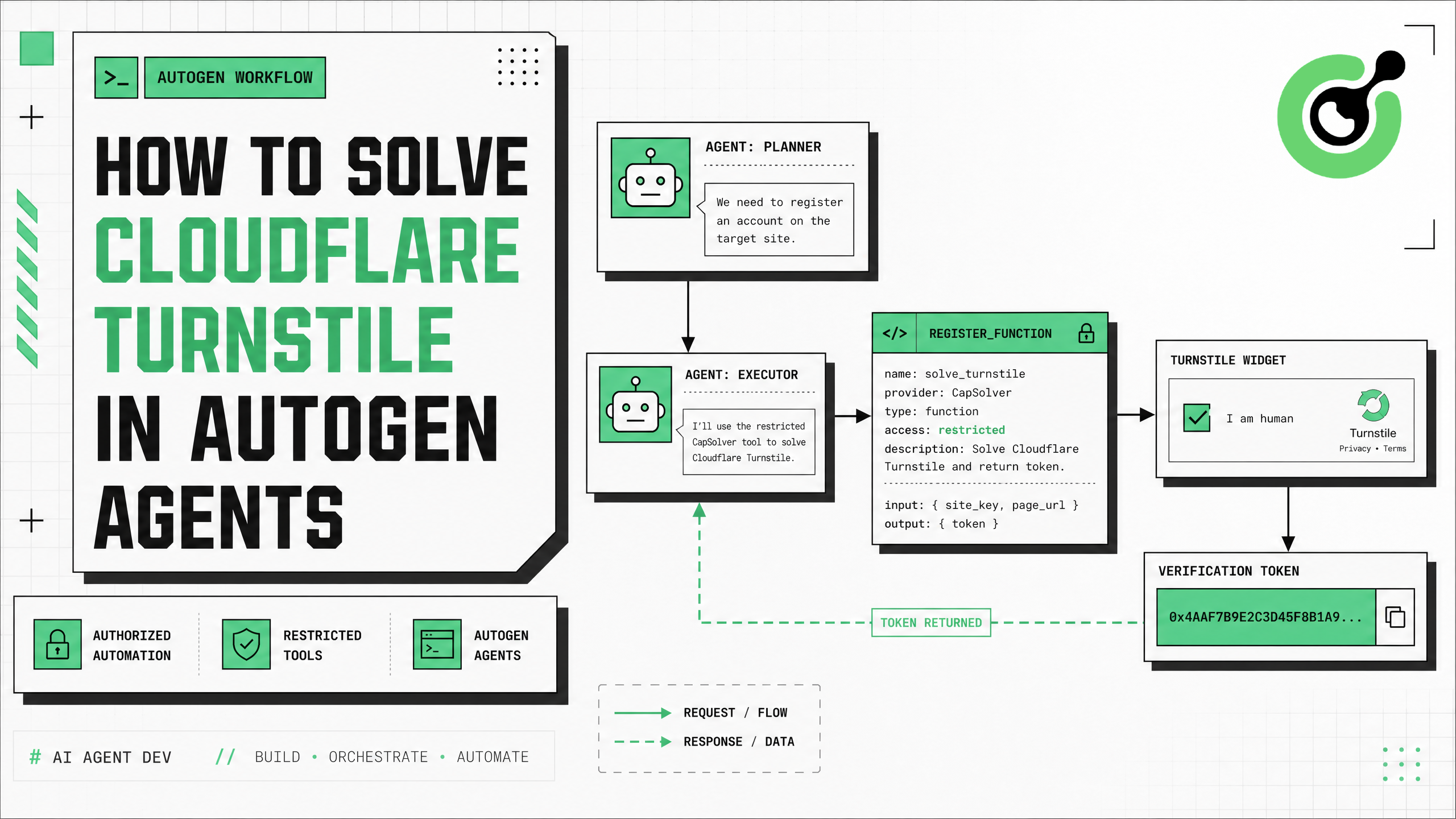
solve_turnstile Python function with AutoGen instead of allowing agents to write arbitrary solving code.AntiTurnstileTaskProxyLess task with websiteURL and websiteKey.action and cdata only when they are present on the authorized page.The safest way to solve Cloudflare Turnstile in AutoGen is to register CapSolver as a typed, narrowly scoped function tool. AutoGen can decide when the workflow needs a Turnstile solution, but deterministic Python code should validate the target URL and site key, create the documented AntiTurnstileTaskProxyLess, and return only the resulting token. The browser layer then applies that token to the same authorized workflow and continues. This architecture follows the CapSolver AI Agent documentation's “model decides, core executes” boundary and AutoGen's official tool-registration model. In this guide, you will create the solver function, register it with caller and executor agents, handle optional widget metadata, add bounded retries, and design production controls that prevent credentials or unrestricted targets from reaching the model.
AutoGen tools are predefined functions that agents can call. The official AutoGen tool-use guide explains that tools constrain what an agent can do more effectively than allowing it to generate arbitrary executable code. Type hints and concise descriptions are used to create the tool schema automatically.
That boundary is especially important for challenge handling. The agent should not receive your CapSolver API key, choose arbitrary sites, or control the browser context directly. It should only request a solution for a validated page already approved by the automation workflow.
The CapSolver AI blog covers agent-oriented patterns, while the CapSolver AI and automation FAQ explains how solving tools fit into controlled automation.
CapSolver's official Turnstile documentation specifies the proxyless task type AntiTurnstileTaskProxyLess. The required parameters are websiteURL and websiteKey. Optional metadata can include the widget's action and cdata values.
| Parameter | Required | Source | Purpose |
|---|---|---|---|
type |
Yes | Fixed value | Must be AntiTurnstileTaskProxyLess |
websiteURL |
Yes | Current authorized page | Associates the token with the target page |
websiteKey |
Yes | Turnstile widget | Identifies the site's Turnstile configuration |
metadata.action |
No | data-action attribute |
Preserves an action value used by the widget |
metadata.cdata |
No | data-cdata attribute |
Preserves customer data attached to the widget |
Cloudflare documents managed, non-interactive, and invisible widget modes. The Cloudflare Turnstile overview describes how a widget evaluates browser signals and issues a token for server-side validation. CapSolver handles the supported subtype automatically, so the task does not need a subtype field.
pip install pyautogen capsolverStore credentials in environment variables:
export CAPSOLVER_API_KEY="CAP-xxxxxxxxxxxxxxxx"
export OPENAI_API_KEY="sk-xxxxxxxxxxxxxxxx"
For the newer CapSolver agent architecture described in the user-provided documentation, teams can also install the core and adapter packages:
pip install git+https://github.com/capsolver-ai/capsolver-core.git
pip install git+https://github.com/capsolver-ai/capsolver-agent.git
The direct capsolver.solve() function below uses the official Turnstile task fields and is wrapped as an AutoGen tool. This keeps the framework integration simple and makes the task payload easy to audit.
The model should receive only non-secret inputs. The CapSolver key remains inside the function's runtime environment.
import os
from typing import Annotated
from urllib.parse import urlparse

import capsolver

capsolver.api_key = os.environ["CAPSOLVER_API_KEY"]

ALLOWED_HOSTS = {
    "staging.example.com",
    "app.example.com",
}


def solve_turnstile(
    website_url: Annotated[str, "Approved page URL containing Turnstile"],
    website_key: Annotated[str, "Turnstile site key from the widget"],
    action: Annotated[str, "Optional data-action value"] = "",
    cdata: Annotated[str, "Optional data-cdata value"] = "",
) -> dict:
    """Solve Turnstile for an approved page and return a token."""
    parsed = urlparse(website_url)
    if parsed.scheme != "https" or parsed.hostname not in ALLOWED_HOSTS:
        return {
            "success": False,
            "error": "Target is not in the approved host allowlist",
        }

    if not website_key.startswith("0x4"):
        return {
            "success": False,
            "error": "Unexpected Turnstile site-key format",
        }

    task = {
        "type": "AntiTurnstileTaskProxyLess",
        "websiteURL": website_url,
        "websiteKey": website_key,
    }

    metadata = {}
    if action:
        metadata["action"] = action
    if cdata:
        metadata["cdata"] = cdata
    if metadata:
        task["metadata"] = metadata

    try:
        solution = capsolver.solve(task)
        token = solution.get("token")
        if not token:
            return {"success": False, "error": "No Turnstile token returned"}
        return {
            "success": True,
            "token": token,
            "solution_type": solution.get("type", "turnstile"),
        }
    except Exception as exc:
        return {"success": False, "error": str(exc)}
The allowlist is intentional. Without it, a prompt could direct the agent to submit unrelated targets. Production systems can build the allowlist from tenant configuration, job permissions, or a signed workflow manifest.
AutoGen's classic AgentChat API separates the agent that proposes a tool call from the executor that runs it. The official documentation provides register_function() as a convenient way to register the same function with both agents.
import os
from autogen import ConversableAgent, register_function

assistant = ConversableAgent(
    name="TurnstileCoordinator",
    system_message=(
        "Continue only approved automation workflows. "
        "Call solve_turnstile only when the application reports a Turnstile widget "
        "and provides the exact page URL and site key. "
        "Never invent targets or request credentials. "
        "If the tool fails twice, stop and request operator review."
    ),
    llm_config={
        "config_list": [{
            "model": "gpt-4o-mini",
            "api_key": os.environ["OPENAI_API_KEY"],
        }]
    },
)

executor = ConversableAgent(
    name="TurnstileToolExecutor",
    llm_config=False,
    human_input_mode="NEVER",
)

register_function(
    solve_turnstile,
    caller=assistant,
    executor=executor,
    name="solve_turnstile",
    description=(
        "Solve Cloudflare Turnstile for an approved HTTPS page using its exact "
        "site key and optional action/cdata values."
    ),
)
AutoGen generates the tool schema from the function signature and type annotations. Keep descriptions operational and specific so the model understands when the tool is appropriate.
For other framework patterns, review CapSolver automation tutorials and the CapSolver products page.
The browser or orchestration layer should detect the widget and provide exact parameters. The model should not inspect secrets or scrape arbitrary pages to discover targets.
chat_result = executor.initiate_chat(
    assistant,
    message=(
        "The approved staging workflow encountered Cloudflare Turnstile.\n"
        "website_url=https://staging.example.com/account-check\n"
        "website_key=0x4AAAAAAAAAAAAAAAAAAAAAAAAAAAAAAAAAAAAAAA\n"
        "action=account_check\n"
        "cdata=\n"
        "Call the registered tool once and return the structured result."
    ),
    max_turns=4,
)
In a production design, structured application code should construct this message from validated runtime data. Do not accept a site key or target URL directly from untrusted natural-language input.
A Turnstile token is generally consumed by the original form or server request. The exact integration depends on the authorized application. For a browser workflow, pass the returned token back to deterministic code that knows the widget and submission path.
async def apply_turnstile_token(page, token: str):
    await page.evaluate(
        """
        (token) => {
          const response = document.querySelector(
            'input[name="cf-turnstile-response"]'
          );
          if (!response) {
            throw new Error('Turnstile response field not found');
          }
          response.value = token;
          response.dispatchEvent(new Event('input', { bubbles: true }));
          response.dispatchEvent(new Event('change', { bubbles: true }));
        }
        """,
        token,
    )
Some applications use callback-based rendering or server-managed submission. Test against your own staging application and follow its supported integration rather than assuming that setting a hidden field is sufficient. Cloudflare's server-side validation documentation explains that the site owner must validate tokens with Siteverify.
The CapSolver Turnstile guide provides further implementation context, and the CapSolver troubleshooting FAQ helps diagnose invalid or rejected tokens.
Do not allow an agent to retry indefinitely. Limit attempts and classify failures so the automation can stop safely.
import asyncio

MAX_ATTEMPTS = 2

async def solve_with_policy(params: dict) -> dict:
    last_error = "unknown error"

    for attempt in range(1, MAX_ATTEMPTS + 1):
        result = solve_turnstile(**params)
        if result.get("success"):
            return {
                **result,
                "attempt": attempt,
            }

        last_error = result.get("error", last_error)
        if "allowlist" in last_error or "site-key" in last_error:
            break
        await asyncio.sleep(2 * attempt)

    return {
        "success": False,
        "error": last_error,
        "requires_operator_review": True,
    }
Log only safe metadata: target hostname, task type, duration, outcome, normalized error, and attempt count. Do not log the full solution token, API key, session cookies, or form contents.
Bonus Code: Use code WEBS at CapSolver Dashboard to get an extra 5% bonus on every recharge.
| Control | Recommended implementation |
|---|---|
| Target authorization | HTTPS hostname allowlist or signed job manifest |
| Secret isolation | CapSolver key available only to the executor process |
| Tool schema | Typed parameters with concise descriptions |
| Optional metadata | Send action and cdata only when present |
| Retry policy | Maximum two attempts, then human review |
| Token handling | Never store or expose full tokens in logs |
| Browser integration | Apply the token in the same approved workflow |
| Compliance | Respect terms, rate limits, privacy, and purpose limits |
The CapSolver CAPTCHA-solving FAQ explains general task behavior, while the CapSolver web-scraping FAQ covers operational controls for automated collection.
Use this workflow only on applications you own, test, or have explicit permission to automate. A solver token does not grant authorization to access private data, submit transactions, create accounts, or ignore a site's terms. Apply rate limits, keep audit records, and require confirmation for actions that change data or affect users.
To solve Cloudflare Turnstile in AutoGen reliably, make CapSolver a constrained tool rather than open-ended agent logic. The AutoGen assistant decides when the tool is appropriate, the executor runs a validated AntiTurnstileTaskProxyLess, and the browser layer consumes the resulting token inside the same authorized workflow. This division makes the integration easier to test, audit, and secure.
Start with CapSolver, validate the flow against a staging page you control, and add host allowlists, bounded retries, and token-safe logging before production deployment.
The documented task type is AntiTurnstileTaskProxyLess, so you do not supply a proxy to the task. Your broader browser workflow may still have its own network configuration.
websiteURL and websiteKey are required. metadata.action and metadata.cdata are optional and should be supplied only when the widget uses them.
The safer design is for a deterministic browser or application layer to extract and validate the site key, then provide it to the tool. Do not let the model invent or guess the value.
The caller can propose the tool call, while the executor runs controlled Python code without an LLM. This keeps secrets and runtime permissions away from the reasoning agent.
Confirm the page URL, site key, optional action or cdata, token freshness, and submission path. Retry at most once or twice, then pause for operator review instead of looping.
Emma Foster
Machine Learning Engineer
Where machine learning meets practical AI tooling.
ABOUT THE AUTHOR
Estimate CAPTCHA solving costs in Browser Use by separating agent runs, challenge types, billable solves, retries, and verified outcomes from browser costs.

Set up CapSolver MCP in Claude Code, check the available CAPTCHA tools, and choose token or page solving for a supported, authorized browser task.