
🎉NEWCapSolver for AI agents-MCP, agent tools, and SDK integrations

Ethan Collins
AI Agent Workflow Engineer
Published Jul 29, 2026
Updated Jul 29, 2026 · min read
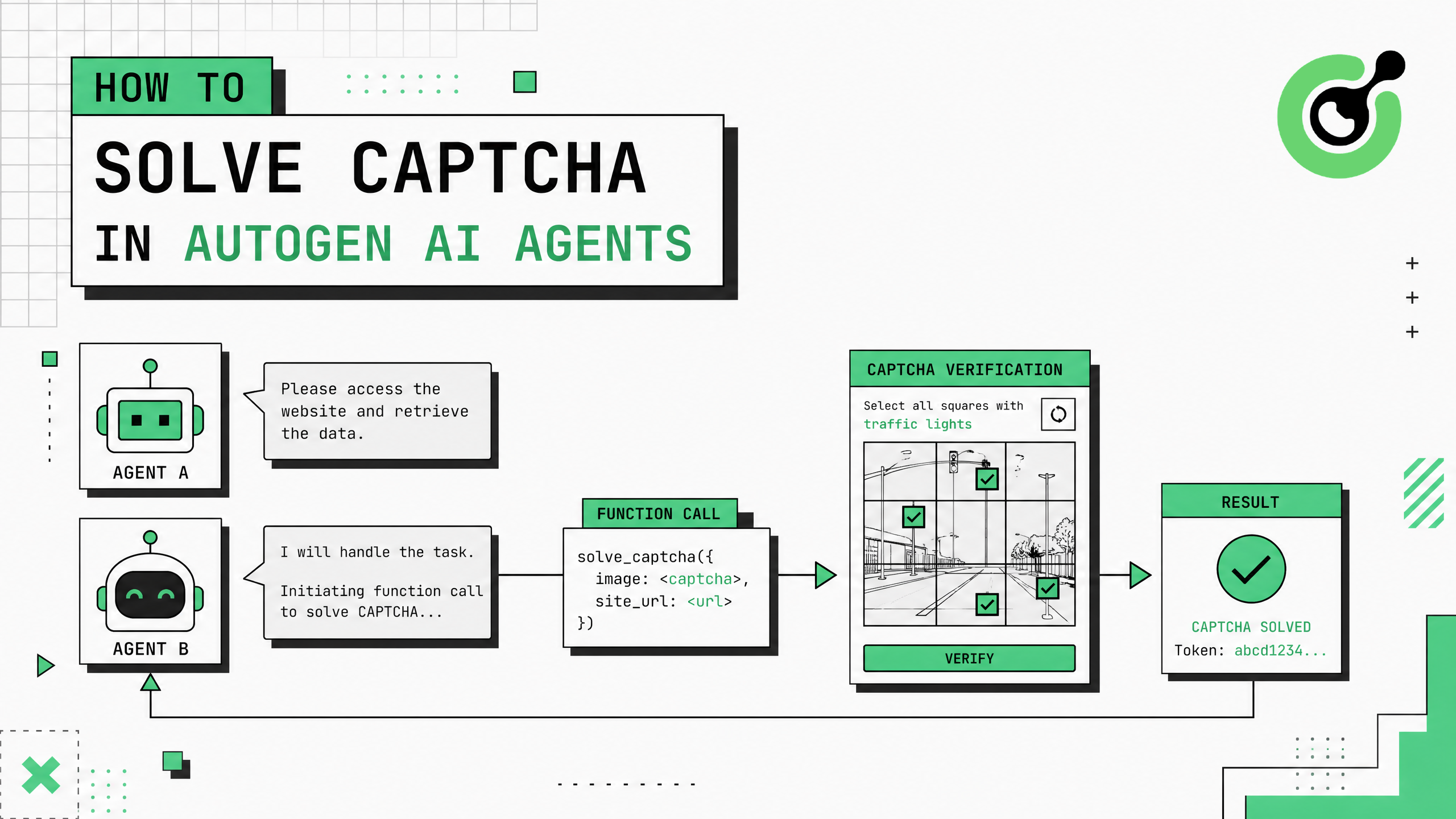
Microsoft's AutoGen framework enables conversational AI agents that collaborate through multi-turn dialogue to complete complex tasks. When AutoGen agents perform web-based operations — data retrieval, form submission, or automated research — CAPTCHA challenges interrupt the conversation flow and block task completion. CapSolver's capsolver-agent package provides tool schemas and an async executor that integrate directly into AutoGen's function-calling mechanism, giving your agents the ability to clear reCAPTCHA, Cloudflare Turnstile, and other verification challenges mid-conversation.
register_function API as a callable toolcapsolver-agent executor handles solving asynchronously and returns structured resultsAutoGen's multi-agent architecture uses conversational patterns where agents collaborate through messages. A typical setup includes an AssistantAgent (the AI) and a UserProxyAgent (that executes code and tools). When the assistant determines that a web task requires CAPTCHA solving, it needs a registered function to call — otherwise the conversation loop stalls with no way to proceed.
The problem is amplified in AutoGen's group chat scenarios. Multiple agents may need web access simultaneously: one agent researching company data, another verifying contact information, a third checking regulatory filings. Each may encounter CAPTCHAs on different sites. Without a solving mechanism, the entire group conversation halts at the first verification wall.
According to CapSolver's production data, approximately 30% of agent web tasks encounter verification challenges. For an AutoGen workflow executing 10 web-dependent steps, that means 3 potential interruptions per conversation — each requiring either human intervention or an automated solving tool.
Install required packages:
# CapSolver core engine (required dependency)
pip install git+https://github.com/capsolver-ai/capsolver-core.git

# CapSolver agent tools
pip install git+https://github.com/capsolver-ai/capsolver-agent.git

# AutoGen framework
pip install autogen-agentchat
Set environment variables:
export CAPSOLVER_API_KEY="your-capsolver-api-key"
export OPENAI_API_KEY="your-openai-api-key"
You need a CapSolver account with API credits loaded.
AutoGen uses register_function to make tools available to agents. Create a CAPTCHA solving function and register it:
import asyncio
from autogen import AssistantAgent, UserProxyAgent, config_list_from_json
from capsolver_agent.schema import create_executor

# Create the CapSolver executor
executor = create_executor(api_key="YOUR_CAPSOLVER_API_KEY")

def solve_captcha(
    captcha_type: str,
    website_url: str,
    website_key: str,
    page_action: str = "",
    min_score: float = 0.7
) -> str:
    """Solve a CAPTCHA challenge and return the verification token.

    Args:
        captcha_type: The CAPTCHA type - 'reCaptchaV2', 'reCaptchaV3', or 'cloudflare'
        website_url: The full URL of the page with the CAPTCHA
        website_key: The site key (data-sitekey attribute)
        page_action: Action name for reCAPTCHA v3 (optional)
        min_score: Minimum score for reCAPTCHA v3 (default 0.7)

    Returns:
        The solved CAPTCHA token or error message
    """
    params = {
        "captcha_type": captcha_type,
        "website_url": website_url,
        "website_key": website_key
    }
    if page_action and captcha_type == "reCaptchaV3":
        params["page_action"] = page_action
        params["min_score"] = min_score

    result = asyncio.run(executor.execute("solve_captcha", params))

    if result["success"]:
        token = result["solution"]["token"]
        return f"CAPTCHA solved successfully. Token (first 80 chars): {token[:80]}..."
return f"CAPTCHA solving failed: {result['error']}"AutoGen's function registration is the standard way to give agents executable capabilities. The assistant agent sees the function description, understands its parameters through the docstring, and calls it when the conversation requires CAPTCHA solving. This follows AutoGen's design pattern exactly.
Create an AssistantAgent and UserProxyAgent pair with CAPTCHA solving capability:
# LLM configuration
llm_config = {
    "config_list": [{"model": "gpt-4o", "api_key": "YOUR_OPENAI_KEY"}],
    "temperature": 0
}

# Assistant agent (the AI that decides what to do)
assistant = AssistantAgent(
    name="web_assistant",
    system_message="""You are a web research assistant with CAPTCHA solving capability.
    When a task requires accessing a CAPTCHA-protected website, use the solve_captcha
    function with the appropriate parameters:
    - captcha_type: 'reCaptchaV2', 'reCaptchaV3', or 'cloudflare'
    - website_url: the full page URL
    - website_key: the site key from the page

    After solving, return the token to the user for form submission.""",
    llm_config=llm_config
)

# User proxy (executes functions on behalf of the assistant)
user_proxy = UserProxyAgent(
    name="user_proxy",
    human_input_mode="NEVER",
    max_consecutive_auto_reply=5,
    code_execution_config={"work_dir": "workspace", "use_docker": False}
)

# Register the CAPTCHA solving function
from autogen import register_function

register_function(
    solve_captcha,
    caller=assistant,      # The assistant decides when to call
    executor=user_proxy,   # The user proxy executes the function
    name="solve_captcha",
    description="Solve a CAPTCHA challenge (reCAPTCHA v2/v3 or Cloudflare Turnstile) and return the verification token"
)The two-agent pattern is AutoGen's core architecture. The assistant reasons about the task and decides to call solve_captcha when needed. The user proxy executes the function call and returns the result to the assistant, which then continues the conversation with the token available.
Initiate a conversation that requires CAPTCHA solving:
# Start the conversation
user_proxy.initiate_chat(
    assistant,
    message="""I need to access a page protected by reCAPTCHA v2.
    URL: https://example.com/data-portal
    Site key: 6LeIxAcTAAAAAJcZVRqyHh71UMIEGNQ_MXjiZKhI

    Please solve the CAPTCHA and provide me with the token."""
)
The conversation flow:
solve_captcha with the parametersFor complex workflows with multiple agents, register CAPTCHA solving in a group chat:
from autogen import GroupChat, GroupChatManager

# Specialized agents
researcher = AssistantAgent(
    name="researcher",
    system_message="You research websites and collect data. Use solve_captcha when you encounter verification challenges.",
    llm_config=llm_config
)

analyst = AssistantAgent(
    name="analyst",
    system_message="You analyze collected data and produce insights.",
    llm_config=llm_config
)

executor_agent = UserProxyAgent(
    name="executor",
    human_input_mode="NEVER",
    code_execution_config={"work_dir": "workspace", "use_docker": False}
)

# Register CAPTCHA solving for the researcher
register_function(
    solve_captcha,
    caller=researcher,
    executor=executor_agent,
    name="solve_captcha",
    description="Solve CAPTCHA challenges on websites"
)

# Create group chat
group_chat = GroupChat(
    agents=[researcher, analyst, executor_agent],
    messages=[],
    max_round=10
)

manager = GroupChatManager(groupchat=group_chat, llm_config=llm_config)

# Start group research task
executor_agent.initiate_chat(
    manager,
    message="Research the data at https://example.com/reports. It's protected by reCAPTCHA v2 (key: 6Le...). Solve the CAPTCHA, collect the data, then analyze it."
)| CAPTCHA Type | Task Type Parameter | Avg Solve Time | Common Sites |
|---|---|---|---|
| reCAPTCHA v2 | reCaptchaV2 |
5-12 seconds | Login pages, forms, portals |
| reCAPTCHA v3 | reCaptchaV3 |
3-8 seconds | APIs, invisible protection |
| Cloudflare Turnstile | cloudflare |
2-5 seconds | Modern SaaS, Shopify sites |
The CapSolver reCAPTCHA guide and Cloudflare Turnstile documentation provide additional parameter details for each CAPTCHA type.
Claim Your Bonus Code: Use code WEBS at CapSolver Dashboard to get an extra 5% bonus on every recharge. Perfect for teams running AutoGen multi-agent workflows.
Add retry logic and balance checking for production deployments:
def solve_captcha_with_retry(
    captcha_type: str,
    website_url: str,
    website_key: str,
    max_retries: int = 3
) -> str:
    """Solve CAPTCHA with automatic retry on failure."""
    for attempt in range(max_retries):
        params = {
            "captcha_type": captcha_type,
            "website_url": website_url,
            "website_key": website_key
        }
        result = asyncio.run(executor.execute("solve_captcha", params))

        if result["success"]:
            return f"Solved (attempt {attempt+1}). Token: {result['solution']['token'][:80]}..."

        if attempt < max_retries - 1:
            import time
            time.sleep(3)

    return f"Failed after {max_retries} attempts: {result.get('error', 'Unknown')}"

def check_captcha_balance() -> str:
    """Check remaining CAPTCHA solving credits."""
    result = asyncio.run(executor.execute("get_balance", {}))
    if result["success"]:
        return f"CapSolver balance: ${result['balance']:.2f}"
    return "Could not retrieve balance"
Register both functions for comprehensive capability:
register_function(solve_captcha_with_retry, caller=assistant, executor=user_proxy,
    name="solve_captcha", description="Solve CAPTCHA with retry logic")
register_function(check_captcha_balance, caller=assistant, executor=user_proxy,
    name="check_balance", description="Check CAPTCHA solving credit balance")
The CapSolver web scraping documentation covers additional patterns for high-volume data collection applicable to AutoGen research agents. For browser-based automation, the CapSolver extension helps identify CAPTCHA parameters during development.
Integrating CAPTCHA solving into AutoGen agents requires registering a solving function via register_function, connecting it to CapSolver's executor, and letting the assistant agent decide when to invoke it during conversations. CapSolver provides the AI-powered solving infrastructure that clears verification challenges in 3-12 seconds, keeping your AutoGen conversations flowing without human intervention.
Start with the two-agent pattern for simple tasks, then expand to group chat for complex multi-agent workflows. The function registration approach means agents naturally decide when to solve based on conversation context — no hardcoded CAPTCHA detection needed.
Yes. While AutoGen's register_function uses synchronous function signatures, you can wrap CapSolver's async executor with asyncio.run() inside the registered function. This provides the async solving benefits (connection pooling, concurrent requests) within AutoGen's synchronous function-calling interface.
Yes. Register the same solving function with multiple caller agents in a group chat. Each agent can independently invoke CAPTCHA solving when their specific task requires it. CapSolver's API handles concurrent requests without conflicts.
AutoGen's assistant agent uses the function description and conversation context to decide. When the task mentions accessing a CAPTCHA-protected resource, the assistant recognizes the need and generates a function call with appropriate parameters. You can also include explicit instructions in the system message.
The function returns an error message to the assistant agent. The assistant can then retry with different parameters, ask for clarification, or report the failure. AutoGen's conversation loop continues regardless — the failure is handled as part of the dialogue rather than crashing the system.
A typical AutoGen conversation encountering 1-3 CAPTCHAs costs $0.002-0.009 in solving fees. reCAPTCHA v2 costs approximately $2-3 per 1,000 solves, and Cloudflare Turnstile costs $1-2 per 1,000. For most workflows, CAPTCHA solving cost is negligible compared to LLM API costs.
Ethan Collins
AI Agent Workflow Engineer
Building clearer handoffs between AI agents and tools.
ABOUT THE AUTHOR
Find CapSolver MCP in the Official MCP Registry, install version 0.1.3 with uvx or pip, configure a local client, and verify the stdio tools.

Add CAPTCHA tools to Pydantic AI using the official CapSolver adapter, test tool execution locally, and handle typed inputs and structured solver results.

