CAPSOLVER
Blog
CapSolver Extension - Solve Cloudflare in your browser

CapSolver Extension - Solve Cloudflare in your browser

Logo of CapSolver

Rajinder Singh

Deep Learning Researcher

22-Aug-2023

Introduction

Cloudflare Turnstile is widely used to protect websites from automated abuse while maintaining a smooth user experience. For users and developers who frequently encounter Turnstile challenges during browsing or testing, solving them manually can be time-consuming. In this guide, we demonstrate how to solve Cloudflare Turnstile Captcha directly in your browser using the CapSolver API and the official CapSolver Chrome extension. The entire process requires minimal configuration and works automatically once set up.

☄️ Step 1: Obtain a CapSolver API Key

Before you can solve Cloudflare Turnstile Captcha in your browser, you must meet a few basic requirements.

⚙️ Requirements:
  • A valid CapSolver API key
  • Available balance on your API key
  • The CapSolver Chrome extension

How to obtain your API key

  1. Register on CapSolver or log in to CapSolver.
    If you already have an account, you can skip the registration step.
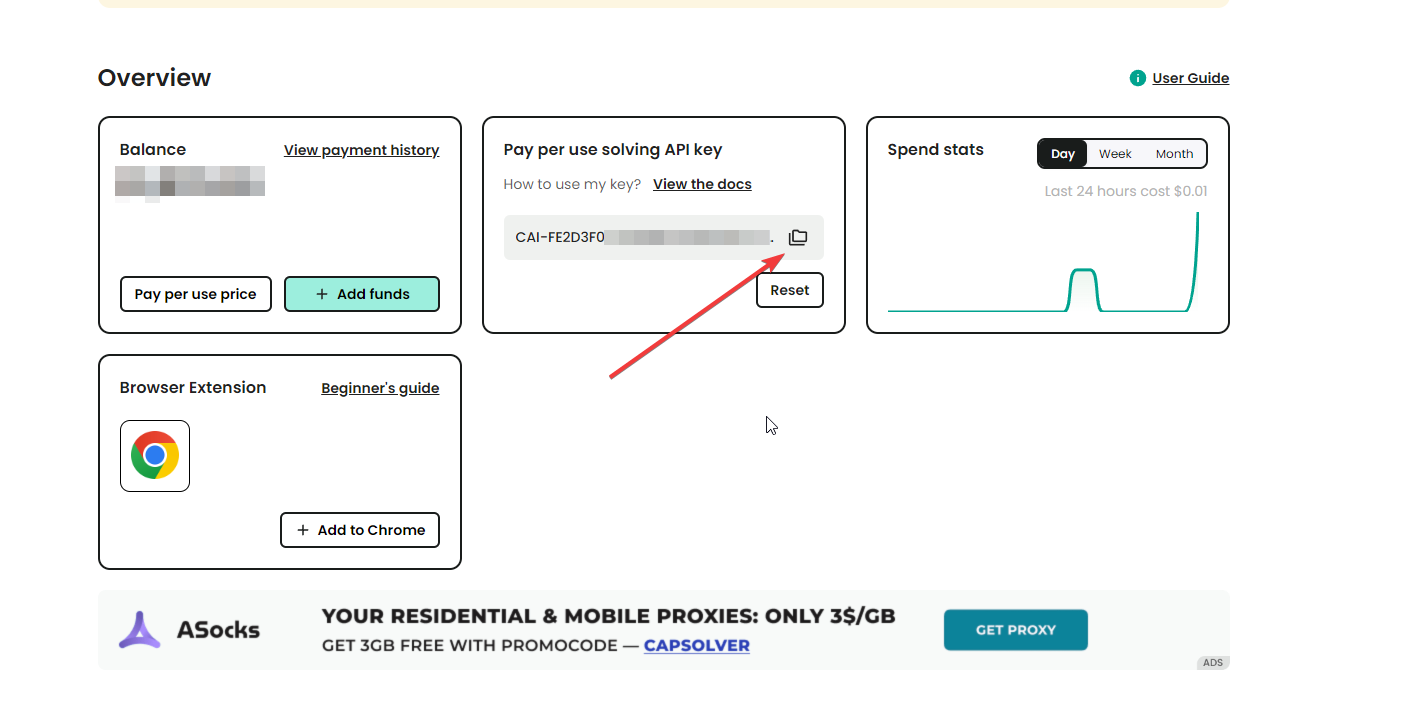
  2. Copy your API key from the dashboard.
Copy your API key

🤯 Step 2: Install the CapSolver Extension in Chrome

  1. Download the CapSolver Chrome extension.
  2. Paste the API key you copied earlier into the extension settings.
  1. Once configured, the extension is ready to solve Cloudflare Turnstile captchas automatically.
  2. Visit the Cloudflare Turnstile demo page.
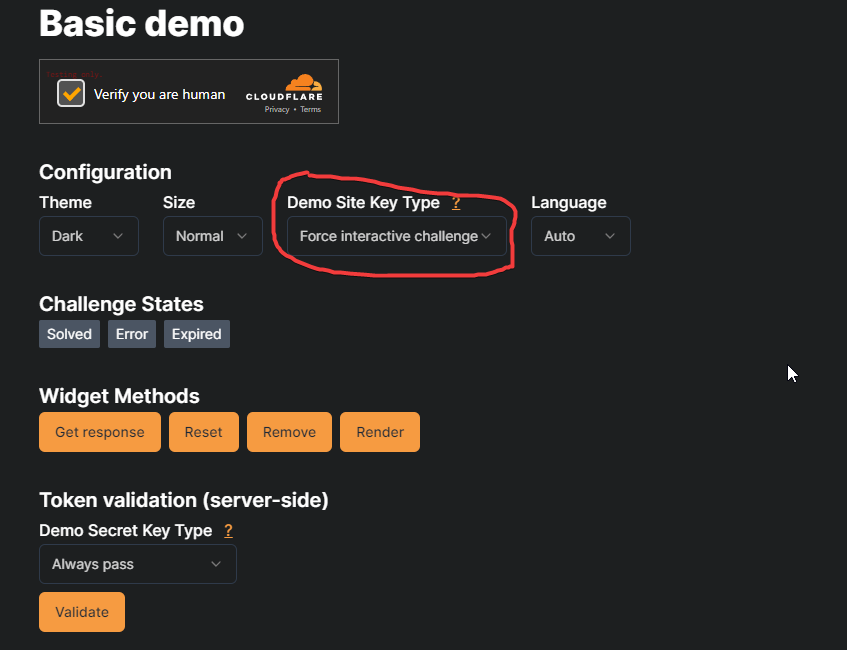
  3. Under Demo Site Key Type, select Force Interactive Challenge, as shown below:
Setup page for solving Cloudflare Turnstile
  1. The CapSolver extension will automatically solve the Turnstile captcha. To continue testing, simply click the Reset button.
  2. Enjoy a seamless browsing experience.

Redeem Your CapSolver Bonus Code

Boost your automation budget instantly!
Use bonus code CAPN when topping up your CapSolver account to get an extra 5% bonus on every recharge — with no limits.
Redeem it now in your CapSolver Dashboard
.

Conclusion

With the CapSolver API and Chrome extension, solving Cloudflare Turnstile captchas in your browser becomes a straightforward and fully automated process. After a one-time setup, the extension handles challenges in the background, allowing you to focus on testing, browsing, or workflow execution without repeated interruptions. This solution is ideal for developers, QA engineers, and power users who regularly interact with Turnstile-protected pages.

FAQs

1. Do I need programming knowledge to use the CapSolver browser extension?

No. The CapSolver Chrome extension is designed for ease of use and does not require any coding. You only need to provide your API key and ensure sufficient balance.

2. Why does the extension not solve the captcha automatically?

Common reasons include an invalid API key, insufficient account balance, or the extension not being properly configured. Double-check your API key and extension settings.

3. Can I use CapSolver for other captcha types besides Cloudflare Turnstile?

Yes. CapSolver supports multiple captcha types and can be used via browser extensions or APIs across different platforms and programming languages.

Compliance Disclaimer: The information provided on this blog is for informational purposes only. CapSolver is committed to compliance with all applicable laws and regulations. The use of the CapSolver network for illegal, fraudulent, or abusive activities is strictly prohibited and will be investigated. Our captcha-solving solutions enhance user experience while ensuring 100% compliance in helping solve captcha difficulties during public data crawling. We encourage responsible use of our services. For more information, please visit our Terms of Service and Privacy Policy.

More

Best CAPTCHA Solver Chrome Extension in 2026
Best CAPTCHA Solver Chrome Extension in 2026: Compared & Ranked

Discover the best CAPTCHA solver Chrome extension in 2026. Compare top tools like CapSolver and AZcaptcha for speed, accuracy, and AI-powered bypass of reCAPTCHA and Cloudflare.


Extension
Logo of CapSolver

Sora Fujimoto

13-Jan-2026

CapSolver Extension icon with the text "Solve image captcha in your browser," illustrating the extension's primary function for ImageToText challenges.
CapSolver Extension: Effortlessly Solve Image Captcha and ImageToText Challenges in Your Browser

Use the CapSolver Chrome Extension for AI-powered, one-click solving of Image Captcha and ImageToText challenges directly in your browser.

Extension
Logo of CapSolver

Lucas Mitchell

11-Dec-2025

How to Solve AWS Captcha Using Puppeteer [Javascript] with CapSolver Extension

Learn to seamlessly solve AWS Captcha with Puppeteer and Capsolver Extension, a detailed guide on setting up and automating captcha solutions effectively

Extension
Logo of CapSolver

Ethan Collins

25-Nov-2025

The-Ultimate-CAPTCHA-Solver
Best Captcha Solver Extension, What Extension Service Solves Captcha Automatically?

Solve CAPTCHAs automatically with the CapSolver browser extension — the fastest, AI-powered CAPTCHA solver for Chrome

Extension
Logo of CapSolver

Sora Fujimoto

21-Oct-2025

Captcha Solver Extensions
Captcha Solver Extensions, How to Install Captcha Solver Extension

How to install and use the CapSolver browser extension — the best AI-powered CAPTCHA solver for Chrome and Firefox. Discover its benefits, automation integration, and easy setup guide for effortless CAPTCHA handling.

Extension
Logo of CapSolver

Lucas Mitchell

20-Oct-2025

reCAPTCHA-Auto-Solver
How to Solve reCAPTCHAs Automatically | the Best reCAPTCHA Auto Solver

Discover the ultimate reCAPTCHA Auto Solver. Learn how CapSolver's AI-powered Chrome Extension automates reCAPTCHA v2, v3 solving with high accuracy and efficiency. Boost your productivity today.

Extension
Logo of CapSolver

Ethan Collins

20-Oct-2025