🎉NEWCapSolver for AI agents-MCP, agent tools, and SDK integrations

Anh Tuan
Data Science Expert
Published Apr 03, 2026
Updated Apr 03, 2026 · min read
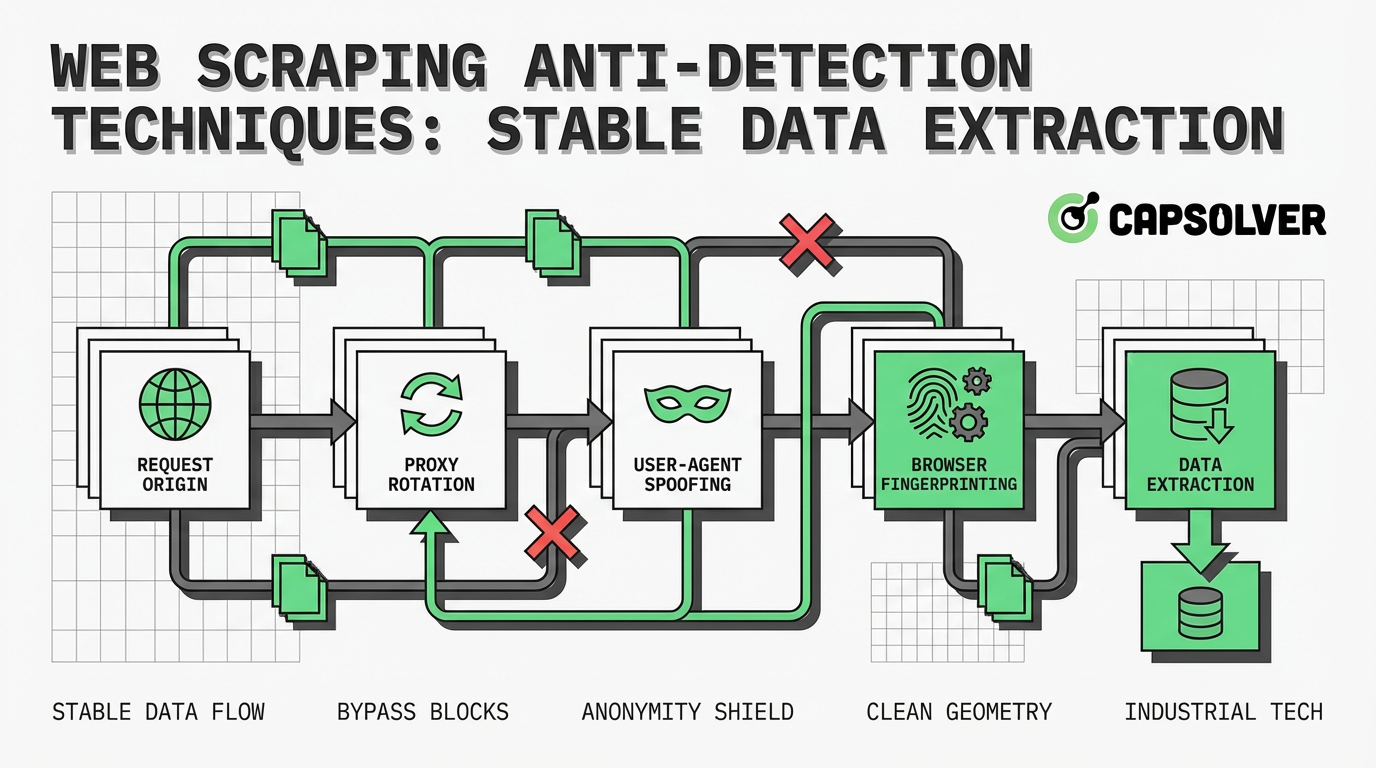
Data extraction is a critical component of modern business intelligence, but websites are increasingly deploying sophisticated defenses to block automated access. Understanding web scraping anti-detection techniques is no longer optional for developers; it is a fundamental requirement for maintaining stable and reliable data pipelines. This guide explores the core mechanisms behind bot detection, from basic IP rate limiting to advanced browser fingerprinting. By examining these defensive strategies, data engineers and scraping professionals can implement robust methodologies to ensure consistent access to public information. The focus here is on practical, structured approaches to bypassing detection while maintaining ethical and compliant scraping practices.
Web scraping anti-detection techniques refer to the methodologies and tools used by developers to prevent their automated scripts from being identified and blocked by target websites. When a scraper accesses a website, it leaves a digital footprint. If this footprint deviates from the typical behavior of a human user, the website's security systems will flag the activity as automated.
The primary goal of anti-detection is to mimic human interaction as closely as possible. This involves managing network-level identifiers, such as IP addresses, and application-level characteristics, such as HTTP headers and browser fingerprints. Without these techniques, scrapers face immediate IP bans, CAPTCHA challenges, or deceptive responses like honeypots. Understanding the underlying technology of bot detection is the first step in building resilient data extraction systems.
Website administrators employ a multi-layered approach to identify and mitigate automated traffic. These defenses range from simple rule-based filters to complex machine learning algorithms that analyze user behavior in real-time.
The most fundamental detection method involves monitoring the frequency and origin of incoming requests. If a single IP address generates an unusually high volume of traffic within a short period, the server will likely block it. This is known as rate limiting. Furthermore, websites often maintain blacklists of known datacenter IP ranges, immediately flagging traffic originating from these sources as suspicious.
Every HTTP request contains headers that provide information about the client. Security systems scrutinize these headers, particularly the User-Agent, which identifies the browser and operating system. Scrapers using default libraries often send missing or anomalous headers. For instance, a request lacking an Accept-Language header or presenting an outdated User-Agent string is a strong indicator of automated activity.
Advanced detection systems go beyond headers to analyze the unique characteristics of the client's browser. This technique, known as browser fingerprinting, collects data on screen resolution, installed fonts, supported plugins, and hardware concurrency. Even more sophisticated methods involve Canvas and WebGL fingerprinting, which instruct the browser to render a hidden image and analyze the minute differences in how the hardware processes the graphics. These subtle variations create a highly accurate identifier for the device.
Modern security solutions evaluate how a user interacts with the page. They track mouse movements, scrolling patterns, and the timing between clicks. Bots typically exhibit linear, predictable behavior, whereas humans are erratic. Additionally, websites deploy honeypots—hidden links or form fields invisible to human users but discoverable by scrapers parsing the HTML. Interacting with a honeypot instantly reveals the presence of a bot.
To maintain stable data extraction, developers must implement strategies that counter each layer of website defense. The following methods form the foundation of effective anti-detection.
Relying on a single IP address is a guaranteed path to getting blocked. To circumvent rate limiting and IP bans, scrapers must utilize proxy networks. By routing requests through different IP addresses, the scraper distributes its traffic, making it appear as though multiple users are accessing the site.
While datacenter proxies are fast and cost-effective, they are easily identified. For high-security targets, residential proxies are necessary. These proxies route traffic through real devices provided by Internet Service Providers (ISPs), offering a much higher level of legitimacy. To learn more about managing IP addresses effectively, review this guide on how to avoid IP bans.
Crafting realistic HTTP headers is crucial for bypassing basic filtering. The User-Agent string must match a modern, widely used browser. However, simply changing the User-Agent is insufficient; the entire header profile must be consistent.
For example, if the User-Agent indicates a Windows machine, the Sec-Ch-Ua-Platform header must also reflect Windows. Including headers like Accept, Accept-Encoding, and Referer adds authenticity to the request. The Referer header, which indicates the previous page visited, can be set to a popular search engine to simulate organic traffic. For detailed recommendations, consult this resource on selecting the best User-Agent.
Many modern websites rely heavily on JavaScript to render content dynamically. Traditional HTTP clients cannot execute JavaScript, resulting in incomplete data extraction. Headless browsers, such as Puppeteer, Playwright, or Selenium, solve this problem by running a full browser environment without a graphical user interface.
Headless browsers can execute JavaScript, handle dynamic content, and interact with the page just like a real user. However, default headless configurations leak identifiable variables, such as navigator.webdriver = true. Developers must use stealth plugins or specialized frameworks to mask these indicators and prevent the headless browser from being detected.
To defeat behavioral analysis, scrapers must abandon predictable request patterns. Implementing randomized delays between requests simulates the natural pauses a human takes while reading or navigating a site. Furthermore, adding random mouse movements and scrolling actions within a headless browser environment can help bypass systems that monitor user interaction.
| Detection Method | Description | Mitigation Strategy |
|---|---|---|
| IP Rate Limiting | Blocking IPs that exceed a specific request threshold. | Use rotating residential or mobile proxy networks. |
| Header Filtering | Analyzing HTTP headers for anomalies or missing data. | Craft consistent, modern headers (User-Agent, Referer, Accept). |
| Browser Fingerprinting | Identifying devices based on hardware and software traits. | Use anti-detect browsers or stealth plugins to spoof fingerprints. |
| JavaScript Challenges | Requiring JS execution to access content or verify the client. | Deploy headless browsers (Playwright, Puppeteer) with stealth configurations. |
| Honeypot Traps | Hidden HTML elements designed to catch automated parsers. | Analyze CSS visibility properties before interacting with elements. |
Even with perfect IP rotation and header optimization, scrapers frequently encounter CAPTCHAs. These challenges are specifically designed to differentiate humans from bots by requiring the user to solve visual puzzles or analyze complex behavioral data.
Security systems like Cloudflare Turnstile and DataDome employ advanced risk analysis, evaluating the client's IP reputation, TLS fingerprint, and interaction history before deciding whether to present a CAPTCHA. When a scraper encounters these barriers, manual intervention is impossible at scale. This is where automated solving services become essential for maintaining the data pipeline. For insights into current trends, read about solving CAPTCHA while web scraping 2025.
When web scraping anti-detection techniques reach their limits, CapSolver provides a robust solution for handling complex CAPTCHAs. CapSolver is an AI-powered service that automates the resolution of various challenges, including reCAPTCHA, Cloudflare Turnstile, and image-based puzzles.
By integrating CapSolver into your scraping architecture, you can programmatically bypass these interruptions. The service utilizes advanced machine learning models to analyze and solve challenges quickly and accurately, ensuring that your data extraction processes remain efficient and uninterrupted. This approach is particularly valuable when dealing with high-volume scraping tasks where encountering CAPTCHAs is inevitable.
Use code
CAP26when signing up at CapSolver to receive bonus credits!
Integrating CapSolver into a Python-based scraping script is straightforward. The following example demonstrates how to use the CapSolver API to resolve a reCAPTCHA v2 challenge. This method utilizes the ReCaptchaV2TaskProxyLess task type, which leverages CapSolver's built-in proxy infrastructure.
import requests
import time

# Configuration
API_KEY = "YOUR_CAPSOLVER_API_KEY"
SITE_KEY = "6Le-wvkSAAAAAPBMRTvw0Q4Muexq9bi0DJwx_mJ-"
SITE_URL = "https://www.google.com/recaptcha/api2/demo"

def solve_recaptcha():
    # Step 1: Create the task
    payload = {
        "clientKey": API_KEY,
        "task": {
            "type": "ReCaptchaV2TaskProxyLess",
            "websiteKey": SITE_KEY,
            "websiteURL": SITE_URL
        }
    }

    response = requests.post("https://api.capsolver.com/createTask", json=payload)
    task_data = response.json()
    task_id = task_data.get("taskId")

    if not task_id:
        print("Failed to create task:", response.text)
        return None

    print(f"Task created successfully. Task ID: {task_id}")

    # Step 2: Poll for the result
    while True:
        time.sleep(2)
        result_payload = {
            "clientKey": API_KEY,
            "taskId": task_id
        }

        result_response = requests.post("https://api.capsolver.com/getTaskResult", json=result_payload)
        result_data = result_response.json()
        status = result_data.get("status")

        if status == "ready":
            print("CAPTCHA solved successfully!")
            return result_data.get("solution", {}).get("gRecaptchaResponse")
        elif status == "failed" or result_data.get("errorId"):
            print("Failed to solve CAPTCHA:", result_response.text)
            return None

# Execute the solver
token = solve_recaptcha()
if token:
    print(f"Token received: {token[:50]}...")
    # Proceed to submit the token to the target website
For more detailed implementation strategies, explore this comprehensive guide on how to solve reCAPTCHA in web scraping using Python.
While mastering web scraping anti-detection techniques is crucial for technical success, it must be balanced with ethical considerations. Data extraction should always respect the target website's infrastructure and terms of service.
Developers should adhere to the guidelines specified in the robots.txt file, which outlines the allowed and disallowed areas for crawling. Furthermore, implementing reasonable rate limits ensures that the scraping activity does not degrade the website's performance for legitimate users. Responsible scraping focuses on extracting publicly available data without causing harm or violating privacy regulations.
Successfully navigating the complexities of data extraction requires a deep understanding of web scraping anti-detection techniques. By implementing robust IP rotation, optimizing HTTP headers, and managing browser fingerprints, developers can significantly reduce the likelihood of being blocked. However, as security systems evolve, encountering CAPTCHAs remains a persistent challenge. Integrating automated solutions like CapSolver ensures that your scraping infrastructure remains resilient, allowing for stable and continuous data collection in an increasingly restrictive digital environment.
What are the most common web scraping anti-detection techniques?
The most common techniques include rotating IP addresses using proxy networks, spoofing HTTP headers (especially the User-Agent), utilizing headless browsers with stealth plugins, and implementing randomized delays between requests to mimic human behavior.
Why do websites block web scrapers?
Websites block scrapers to protect their server resources from being overwhelmed by automated traffic, to safeguard proprietary or copyrighted data, and to prevent competitors from monitoring their pricing or content strategies. According to Cloudflare, malicious bots can consume significant bandwidth and degrade the user experience.
How does browser fingerprinting work in bot detection?
Browser fingerprinting collects specific details about a user's device, such as screen resolution, operating system, installed fonts, and hardware capabilities. By combining these data points, security systems create a unique identifier that can track and block scrapers even if they change their IP address or clear their cookies.
Can headless browsers bypass all detection systems?
No. While headless browsers can execute JavaScript and handle dynamic content, default configurations are easily detected by advanced security systems like DataDome, which analyze bot detection techniques including WebDriver variables. Developers must use stealth modifications to hide the automated nature of the browser.
How should I handle CAPTCHAs during data extraction?
When encountering CAPTCHAs, the most efficient approach for large-scale scraping is to integrate an automated solving API like CapSolver. These services use machine learning to resolve challenges programmatically, allowing the scraping script to continue its operation without manual intervention.
Anh Tuan
Data Science Expert
Turning task outcomes into actionable insights.
ABOUT THE AUTHOR
Learn scalable Rust web scraping architecture with reqwest, scraper, async scraping, headless browser scraping, proxy rotation, and compliant CAPTCHA handling.

Learn the best techniques to scrape job listings without getting blocked. Master Indeed scraping, Google Jobs API, and web scraping API with CapSolver.