How to Solve CAPTCHA While Web Scraping in 2026

Rajinder Singh
Deep Learning Researcher
23-Jan-2025

Why CAPTCHAs Still Haunt Us in 2026
(Written by Someone Who’s Clicked 10,000 Traffic Lights So You Don’t Have To)
Websites got smarter. CAPTCHAs now analyze everything:

- Your mouse movements.
- Your browser fingerprint.
- How fast you solve puzzles (robots are too efficient).

But don’t worry – CapSolver’s API and extension evolved too.
Meet Your New Best Friend: CapSolver

Choose Your Solution:
- API: For coders who want total control.
- Extension: For humans who want to click “solve” and sip coffee.
Supported CAPTCHAs:
✅ reCAPTCHA v2/v3
✅ Cloudflare Turnstile/Cloudflare Challenge
✅ AWS WAF
✅ Text-based CAPTCHAs
✅ Datadome Slider
✅ GeeTest
Method 1: Using CapSolver’s API (For Coders)
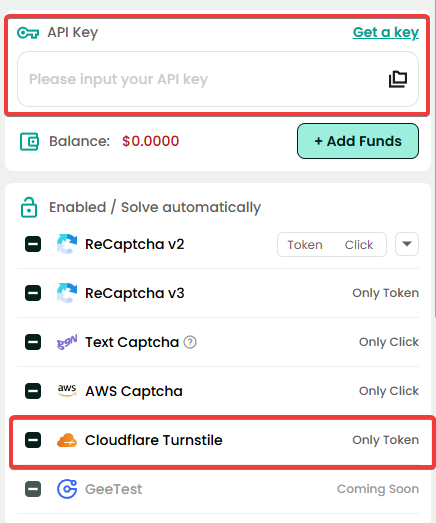
Step 1: Get Your API Key
Step 2: Solve reCAPTCHA in 3 API Calls
bash
# Submit task
POST https://api.capsolver.com/createTask
{
"clientKey": "YOUR_API_KEY",
"task": {
"type": "ReCaptchaV2TaskProxyless",
"websiteURL": "https://example.com",
"websiteKey": "6Le-wvkSAAAAAPBMRTvw0Q4Muexq9bi0DJwx_mJ-"
}
}
# Get result (repeat until "status": "ready")
POST https://api.capsolver.com/getTaskResult
{
"clientKey": "YOUR_API_KEY",
"taskId": "61138bb6-19fb-11ec-a9c8-0242ac110006"
}
# Use the token (gRecaptchaResponse) in your scraper!
Method 2: The Magic Browser Extension
For Normal Humans:
- Chrome: Install here
- Firefox: Install here
For Automation Wizards:
- Download from GitHub:
- Modify
config.js:
javascript{ // Your API key from Capsolver apiKey: "YOUR_API_KEY", // Toggle CAPTCHA types enabledForRecaptcha: true, enabledForCloudflare: true, enabledForAWS: true, enabledForTextCaptcha: true } - Load into Puppeteer/Playwright:javascript
const browser = await puppeteer.launch({ args: ['--load-extension=./capsolver-extension'] });
Config.js: The Secret Sauce
Critical Settings:
enabledForCloudflare: true: For Turnstile CAPTCHAs.enabledForRecaptcha: true: Google’s classic.enabledForAWS: true: Amazon’s sneaky CAPTCHAs.enabledForTextCaptcha: true: Old-school “type these letters” puzzles.
Pro Tip: Enable all if you’re not sure which CAPTCHA a site uses.
Real-World Code Examples
Python Scraper with Capsolver API:
python
import requests
def solve_recaptcha():
task_url = "https://api.capsolver.com/createTask"
task_data = {
"clientKey": "YOUR_API_KEY",
"task": {
"type": "ReCaptchaV2TaskProxyless",
"websiteURL": "https://example.com",
"websiteKey": "6Le-wvkSAAAAAPBMRTvw0Q4Muexq9bi0DJwx_mJ-"
}
}
response = requests.post(task_url, json=task_data).json()
task_id = response["taskId"]
# Poll for result
while True:
result = requests.post("https://api.capsolver.com/getTaskResult", json={"clientKey": "YOUR_API_KEY", "taskId": task_id}).json()
if result["status"] == "ready":
return result["solution"]["gRecaptchaResponse"]
“Why Isn’t This Working?!” Troubleshooting Guide
- Problem: “No CAPTCHAs are being solved!”
- Fix: Check
config.js– did you enable the right CAPTCHA type?
- Fix: Check
- Problem: “API returns ‘invalid API key’!”
- Fix: Copy-paste your key from Capsolver’s dashboard again.
- Problem: “Cloudflare still blocks me!”
- Fix: Rotate proxies, rotate fingerprints + slow down your scraper.
Happy scraping – and may the CAPTCHAs be ever in your favor! 😎
- Fix: Rotate proxies, rotate fingerprints + slow down your scraper.
Compliance Disclaimer: The information provided on this blog is for informational purposes only. CapSolver is committed to compliance with all applicable laws and regulations. The use of the CapSolver network for illegal, fraudulent, or abusive activities is strictly prohibited and will be investigated. Our captcha-solving solutions enhance user experience while ensuring 100% compliance in helping solve captcha difficulties during public data crawling. We encourage responsible use of our services. For more information, please visit our Terms of Service and Privacy Policy.
More

How Does Image Recognition AI Work? | Technical Guide
Discover how image recognition AI works. Learn about CNNs, pixel processing, and real-world applications in this comprehensive technical guide.

Ethan Collins
17-Apr-2026

Why Chrome Blocks Websites: Security vs. Automation Access Explained
Understand why Chrome blocks websites, from security features like Safe Browsing and SSL checks to common errors like ERR_CONNECTION_REFUSED. Learn how these impact automation and strategies for legitimate access, including CAPTCHA solving with CapSolver.

Ethan Collins
17-Apr-2026

reCAPTCHA Score Explained: Range, Meaning, and How to Improve It
Understand reCAPTCHA v3 score range (0.0 to 1.0), its meaning, and how to improve your score. Learn how to handle low scores and optimize user experience.

Rajinder Singh
16-Apr-2026

How to Solve Cloudflare Turnstile in Vehicle Data Automation
Learn how to handle Cloudflare Turnstile in vehicle data and public records automation. Use CapSolver and n8n to automate record scraping efficiently.

Lucas Mitchell
16-Apr-2026

reCAPTCHA Invalid Site Key or Token? Causes & Fix Guide
Facing "reCAPTCHA Invalid Site Key" or "invalid reCAPTCHA token" errors? Discover common causes, step-by-step fixes, and troubleshooting tips to resolve reCAPTCHA verification failed issues. Learn how to fix reCAPTCHA verification failed please try again.

Aloísio Vítor
16-Apr-2026

Finding the Most Cost-Effective AWS WAF Solver | Pricing, Performance & Optimization Guide
Looking for a cheap AWS WAF solver per thousand requests? Compare pricing, speed, and accuracy to find the best value for your automation needs.

Ethan Collins
16-Apr-2026