











How to Scrape Amazon: 2026 Guide for Ethical Data Extraction & CAPTCHA Solving

Emma Foster
Machine Learning Engineer
10-Apr-2026

TL;Dr:
- Amazon scraping in 2026 requires advanced techniques to overcome sophisticated sercurity measures.
- Ethical scraping practices, including respecting
robots.txtand managing request rates, are crucial. - Proxies and rotating user-agents are essential for maintaining anonymity and avoiding IP blocks.
- CAPTCHA challenges, especially AWS WAF, are common and can be effectively solved using specialized services like CapSolver.
- A step-by-step approach covering environment setup, API integration, request handling, and data processing ensures successful data extraction.
- Performance optimization through concurrency and distributed scraping can significantly improve efficiency.
Introduction
In the dynamic landscape of e-commerce, extracting data from Amazon remains a critical task for businesses and researchers alike. Whether for competitive analysis, price monitoring, product research, or market trend identification, Amazon scraping provides invaluable insights. However, as web scraping technologies evolve, so do the anti-bot mechanisms employed by major platforms like Amazon. ThThis 2026 guide offers a comprehensive, actionable framework for ethically and efficiently scraping Amazon, focusing on practical steps, code examples, and solutions to common challenges, including the pervasive AWS CAPTCHA. For an additional perspective on WAF bypass, consider this Amazon scraping guide with WAF bypass. We will delve into the necessary tools, techniques, and best practices to ensure your data extraction efforts are both successful and sustainable.
Understanding Amazon's Anti-Scraping Mechanisms
Amazon, like many large online platforms, employs a suite of sophisticated anti-scraping technologies to protect its data and ensure fair usage. These mechanisms are designed to detect and deter automated access, ranging from basic IP blocking to advanced CAPTCHA challenges. Understanding these defenses is the first step toward building a robust and resilient [web scraping anti-detection techniques](https://www.capsolver.com/blog/web scraping/web-scraping-anti-detection-techniques) solution.
Common Anti-Scraping Techniques:
- IP Blocking and Rate Limiting: Repeated requests from a single IP address within a short period can lead to temporary or permanent blocks. Amazon monitors request frequency and patterns to identify and restrict automated traffic.
- User-Agent and Header Checks: Websites often inspect HTTP headers, particularly the
User-Agentstring, to identify legitimate browser traffic. Non-standard or missing user-agents can trigger alarms. - CAPTCHA Challenges: CAPTCHAs (Completely Automated Public Turing test to tell Computers and Humans Apart) are designed to differentiate between human users and bots. Amazon frequently uses AWS WAF CAPTCHA, which involves complex JavaScript-based challenges or image recognition tasks.
- Honeypots and Traps: Hidden links or elements on a page, invisible to human users but detectable by automated scrapers, can serve as traps to identify and block bots.
- Dynamic Content Loading: Many parts of Amazon's pages are loaded dynamically using JavaScript, making it challenging for simple HTTP request-based scrapers to access all data.
Ethical Scraping: Best Practices and Compliance
Ethical and legal considerations are paramount in any web scraping endeavor. Adhering to these principles not only ensures compliance but also contributes to the long-term viability of your scraping operations. Always prioritize responsible data collection to avoid legal repercussions and maintain a positive relationship with data sources.
Key Ethical Guidelines:
- Review
robots.txt: Always check therobots.txtfile (e.g.,https://www.amazon.com/robots.txt) to understand which parts of the website are disallowed for crawling. Respecting these directives is a fundamental ethical practice. - Respect Terms of Service: Familiarize yourself with Amazon's Terms of Service. While some terms may restrict scraping, understanding them helps in making informed decisions and mitigating risks.
- Rate Limiting: Implement delays between requests to avoid overwhelming Amazon's servers. This prevents IP blocks and reduces the load on the target website. A common practice is to introduce random delays between 5 to 15 seconds.
- Identify Yourself (Responsibly): Use a descriptive
User-Agentstring that includes your contact information. This allows website administrators to reach out if they have concerns, fostering transparency. - Scrape Publicly Available Data Only: Focus on data that is publicly accessible and does not require login credentials. Avoid scraping personal or sensitive information.
Step-by-Step Guide to Scraping Amazon in 2026
This section outlines a detailed, actionable guide to setting up your scraping environment, handling requests, and processing data, with a special focus on integrating CAPTCHA solving.
Step 1: Environment Preparation
Before writing any code, ensure your development environment is properly set up. Python is a popular choice for web scraping with Python due to its rich ecosystem of libraries.
Purpose: To establish a stable and efficient foundation for your scraping project.
Operation:
-
Install Python: If not already installed, download and install Python 3.8+ from the official website.
-
Create a Virtual Environment: This isolates your project dependencies.
bashpython3 -m venv amazon_scraper_env source amazon_scraper_env/bin/activate # On Windows, use `amazon_scraper_env\Scripts\activate` -
Install Essential Libraries:
requests: For making HTTP requests.BeautifulSoup4: For parsing HTML content.lxml: A fast HTML parser, often used with BeautifulSoup.selenium(optional): For dynamic content rendering, if needed.webdriver_manager(optional): To manage browser drivers for Selenium.
bashpip install requests beautifulsoup4 lxml # If using Selenium: # pip install selenium webdriver_manager
Notes: Regularly update your libraries to benefit from the latest features and security patches.
Step 2: Making Initial Requests and Handling Basic Anti-Scraping
Start with basic requests, focusing on rotating user-agents and implementing delays to mimic human browsing patterns.
Purpose: To send requests to Amazon and retrieve HTML content while minimizing the risk of immediate blocking.
Operation:
- Rotate User-Agents: Maintain a list of common browser user-agents and rotate them with each request. This makes your scraper appear as different browsers.
- Implement Delays: Introduce random delays between requests to avoid triggering rate limits.
python
import requests
import time
import random
from bs4 import BeautifulSoup

user_agents = [
    'Mozilla/5.0 (Windows NT 10.0; Win64; x64) AppleWebKit/537.36 (KHTML, like Gecko) Chrome/109.0.0.0 Safari/537.36',
    'Mozilla/5.0 (Macintosh; Intel Mac OS X 10_15_7) AppleWebKit/537.36 (KHTML, like Gecko) Chrome/109.0.0.0 Safari/537.36',
    'Mozilla/5.0 (Windows NT 10.0; Win64; x64) AppleWebKit/537.36 (KHTML, like Gecko) Chrome/108.0.0.0 Safari/537.36',
    'Mozilla/5.0 (Macintosh; Intel Mac OS X 10_15_7) AppleWebKit/537.36 (KHTML, like Gecko) Chrome/108.0.0.0 Safari/537.36',
    'Mozilla/5.0 (X11; Linux x86_64) AppleWebKit/537.36 (KHTML, like Gecko) Chrome/108.0.0.0 Safari/537.36',
    'Mozilla/5.0 (Macintosh; Intel Mac OS X 10_15_7) AppleWebKit/605.1.15 (KHTML, like Gecko) Version/16.1 Safari/605.1.15',
    'Mozilla/5.0 (Macintosh; Intel Mac OS X 13_1) AppleWebKit/605.1.15 (KHTML, like Gecko) Version/16.1 Safari/605.1.15',
]

def fetch_amazon_page(url):
    headers = {'User-Agent': random.choice(user_agents)}
    try:
        response = requests.get(url, headers=headers, timeout=10)
        response.raise_for_status()  # Raise an exception for HTTP errors
        time.sleep(random.uniform(5, 15)) # Random delay
        return response.text
    except requests.exceptions.RequestException as e:
        print(f"Request failed: {e}")
        return None

# Example usage:
# product_page_url = "https://www.amazon.com/dp/B08XYZ123"
# html_content = fetch_amazon_page(product_page_url)
# if html_content:
#     soup = BeautifulSoup(html_content, 'lxml')
#     # Process soup object
Notes: For more advanced scenarios, consider using a proxy rotation service to manage a pool of IP addresses, further enhancing your anonymity when performing amazon scraping. For more insights into managing proxies, refer to proxy integration for CAPTCHA solving. This is crucial for large-scale operations.
Step 3: Handling CAPTCHA Challenges with CapSolver
Amazon frequently deploys AWS WAF CAPTCHA to block automated requests. These challenges can be token-based (requiring a real browser environment) or image classification-based. CapSolver offers robust solutions for both types, allowing you to seamlessly integrate CAPTCHA solving into your amazon scraping workflow.
Purpose: To programmatically solve AWS WAF CAPTCHA challenges and continue data extraction without interruption.
Operation:
CapSolver provides two main task types for AWS WAF CAPTCHA:
AntiAwsWafTask: For token-based challenges, often requiring parameters likeawsKey,awsIv,awsContext, andawsChallengeJS.AwsWafClassification: For image classification challenges, where you provide an image and a question.
Token-Based AWS WAF CAPTCHA (Python Example)
This example demonstrates how to solve token-based AWS WAF CAPTCHA using CapSolver's AntiAwsWafTask type. This is particularly useful when Amazon presents a JavaScript-based challenge.
python
import requests
import time

CAPSOLVER_API_KEY = "YOUR_CAPSOLVER_API_KEY" # Replace with your actual CapSolver API Key

def create_aws_waf_task(website_url, aws_key, aws_iv, aws_context, aws_challenge_js, proxy=None):
    payload = {
        "clientKey": CAPSOLVER_API_KEY,
        "task": {
            "type": "AntiAwsWafTask", # Use AntiAwsWafTaskProxyless if you don't want to use your own proxy
            "websiteURL": website_url,
            "awsKey": aws_key,
            "awsIv": aws_iv,
            "awsContext": aws_context,
            "awsChallengeJS": aws_challenge_js
        }
    }
    if proxy:
        payload["task"]["proxy"] = proxy # Add proxy if provided

    response = requests.post("https://api.capsolver.com/createTask", json=payload)
    response.raise_for_status()
    return response.json().get("taskId")

def get_task_result(task_id):
    payload = {
        "clientKey": CAPSOLVER_API_KEY,
        "taskId": task_id
    }
    while True:
        response = requests.post("https://api.capsolver.com/getTaskResult", json=payload)
        response.raise_for_status()
        result = response.json()
        if result.get("status") == "ready":
            return result.get("solution")
        elif result.get("status") == "failed":
            raise Exception(f"CapSolver task failed: {result.get('errorDescription')}")
        time.sleep(3) # Poll every 3 seconds

# Example usage (replace with actual values from the Amazon challenge page):
# website_url = "https://efw47fpad9.execute-api.us-east-1.amazonaws.com/latest"
# aws_key = "key_value_from_amazon_page"
# aws_iv = "iv_value_from_amazon_page"
# aws_context = "context_value_from_amazon_page"
# aws_challenge_js = "url_of_js_challenge_script"
# proxy_string = "http://user:pass@proxy:port" # Optional, if using AntiAwsWafTask

# try:
#     task_id = create_aws_waf_task(website_url, aws_key, aws_iv, aws_context, aws_challenge_js, proxy_string)
#     print(f"CapSolver Task ID: {task_id}")
#     solution = get_task_result(task_id)
#     aws_waf_token = solution.get("cookie")
#     print(f"AWS WAF Token: {aws_waf_token}")
#     # Use this token in your subsequent requests as a cookie:
#     # cookies = {'aws-waf-token': aws_waf_token}
#     # response = requests.get(target_url, headers=headers, cookies=cookies)
# except Exception as e:
#     print(f"Error solving CAPTCHA: {e}")
Notes: When integrating CapSolver, ensure you capture all necessary parameters (awsKey, awsIv, awsContext, awsChallengeJS) from the Amazon challenge page. These are typically found within the HTML source of the CAPTCHA page when a 405 status code is returned. For more details, refer to the CapSolver documentation on AWS WAF.
Use code
CAP26when signing up at CapSolver to receive bonus credits!
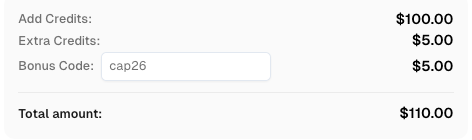
Image Classification AWS WAF CAPTCHA (Python Example)
For image-based CAPTCHAs, CapSolver's AwsWafClassification task type can be used. This involves sending the CAPTCHA image and any associated question to CapSolver for recognition.
python
import requests
import base64
import time

CAPSOLVER_API_KEY = "YOUR_CAPSOLVER_API_KEY" # Replace with your actual CapSolver API Key

def solve_aws_waf_classification(image_path, question):
    with open(image_path, "rb") as f:
        image_base64 = base64.b64encode(f.read()).decode("utf-8")

    payload = {
        "clientKey": CAPSOLVER_API_KEY,
        "task": {
            "type": "AwsWafClassification",
            "image": image_base64,
            "question": question
        }
    }
    response = requests.post("https://api.capsolver.com/createTask", json=payload)
    response.raise_for_status()
    task_id = response.json().get("taskId")

    get_payload = {"clientKey": CAPSOLVER_API_KEY, "taskId": task_id}
    while True:
        res = requests.post("https://api.capsolver.com/getTaskResult", json=get_payload)
        res.raise_for_status()
        data = res.json()
        if data.get("status") == "ready":
            return data.get("solution")
        elif data.get("status") == "failed":
            raise Exception(f"CapSolver classification task failed: {data.get('errorDescription')}")
        time.sleep(2)

# Example usage:
# Assuming 'captcha_image.png' is the downloaded CAPTCHA image file
# question_text = "Select all images with a bicycle" # The question accompanying the image
# try:
#     result = solve_aws_waf_classification("captcha_image.png", question_text)
#     print(f"Selected indices: {result}")
#     # The result will be a list of indices corresponding to the selected images.
#     # You would then use these indices to interact with the Amazon page.
# except Exception as e:
#     print(f"Error solving image CAPTCHA: {e}")
Notes: This method requires you to first capture the CAPTCHA image and the associated question from the Amazon page. This often involves using a headless browser like Selenium to render the page and take a screenshot of the CAPTCHA element. CapSolver simplifies the recognition process, making amazon scraping more reliable.
Step 4: Data Extraction and Processing
Once you have successfully retrieved the HTML content, the next step is to parse it and extract the desired data. BeautifulSoup is an excellent library for this purpose.
Purpose: To systematically extract specific data points from the HTML structure.
Operation:
- Inspect HTML Structure: Use browser developer tools to inspect the HTML structure of the Amazon page and identify the CSS selectors or XPath expressions for the data you need (e.g., product name, price, reviews).
- Parse with BeautifulSoup: Load the HTML content into a BeautifulSoup object and use its methods (
find,find_all,select) to navigate and extract data.
python
# ... (previous code for fetching HTML content)

def parse_amazon_product_page(html_content):
    soup = BeautifulSoup(html_content, 'lxml')
    product_data = {}

    # Example: Extract product title
    title_element = soup.select_one('#productTitle')
    if title_element:
        product_data['title'] = title_element.get_text(strip=True)

    # Example: Extract product price
    price_element = soup.select_one('.a-price .a-offscreen')
    if price_element:
        product_data['price'] = price_element.get_text(strip=True)

    # Example: Extract product rating
    rating_element = soup.select_one('#acrCustomerReviewText')
    if rating_element:
        product_data['reviews_count'] = rating_element.get_text(strip=True)

    # Add more extraction logic for other data points as needed
    return product_data

# Example usage:
# html_content = fetch_amazon_page("https://www.amazon.com/dp/B08XYZ123")
# if html_content:
#     data = parse_amazon_product_page(html_content)
#     print(data)
Notes: Amazon's HTML structure can change, so regularly review and update your selectors. Robust error handling and validation are essential to ensure data quality during amazon scraping.
Step 5: Storing and Managing Data
After extraction, store your data in a structured format for further analysis. Common formats include CSV, JSON, or databases.
Purpose: To persist extracted data in an organized and accessible manner.
Operation:
- Choose a Storage Format: For smaller datasets, CSV or JSON files are convenient. For larger, more complex datasets, consider a database (e.g., SQLite, PostgreSQL, MongoDB).
- Implement Storage Logic: Write code to save the extracted data to your chosen format.
python
import json
import csv

def save_to_json(data, filename):
    with open(filename, 'w', encoding='utf-8') as f:
        json.dump(data, f, ensure_ascii=False, indent=4)
    print(f"Data saved to {filename}")

def save_to_csv(data, filename, fieldnames):
    with open(filename, 'w', newline='', encoding='utf-8') as f:
        writer = csv.DictWriter(f, fieldnames=fieldnames)
        writer.writeheader()
        writer.writerows(data)
    print(f"Data saved to {filename}")

# Example usage:
# all_product_data = [
#     {'title': 'Product A', 'price': '$10.99', 'reviews_count': '1,234 ratings'},
#     {'title': 'Product B', 'price': '$25.00', 'reviews_count': '567 ratings'},
# ]
# save_to_json(all_product_data, 'amazon_products.json')
# save_to_csv(all_product_data, 'amazon_products.csv', ['title', 'price', 'reviews_count'])
Notes: When dealing with large volumes of data, consider incremental updates to your storage to avoid re-scraping existing information. This optimizes your amazon scraping process.
Troubleshooting Common Amazon Scraping Issues
Even with the best preparation, you might encounter issues during amazon scraping. Here are some common problems and their solutions.
Issue 1: IP Blocked or Rate Limited
Description: Your scraper receives HTTP 403 (Forbidden) or 429 (Too Many Requests) errors, or requests simply time out.
Solution:
- Implement Proxies: Use a rotating proxy service to distribute your requests across many IP addresses. This is one of the most effective ways to avoid IP blocks for amazon scraping. For a deeper dive into avoiding blocks, read about web scraping without getting blocked.
- Increase Delays: Lengthen the
time.sleep()duration between requests and introduce more randomness. - Session Management: Use
requests.Session()to persist cookies and headers across requests, mimicking a more natural browsing session.
Issue 2: CAPTCHA Encountered
Description: Amazon presents a CAPTCHA challenge, halting your scraping process.
Solution:
- Integrate CapSolver: As demonstrated in Step 3, use CapSolver's API to automatically solve AWS WAF CAPTCHAs. This is a reliable solution for complex challenges encountered during amazon scraping.
- Headless Browsers: For very complex JavaScript-based CAPTCHAs, you might need to use a headless browser (like Selenium with Chrome/Firefox) to render the page, capture the CAPTCHA, and then pass it to CapSolver.
Issue 3: HTML Structure Changes
Description: Your data extraction logic breaks because Amazon has updated its website's HTML structure.
Solution:
- Regular Monitoring: Periodically check your scraper's output and the target Amazon pages. Set up alerts for unexpected data formats or missing fields.
- Flexible Selectors: Use more general CSS selectors or XPath expressions that are less likely to change. Avoid relying on highly specific or auto-generated class names.
- Error Handling: Implement
try-exceptblocks around your parsing logic to gracefully handle missing elements and log errors for later review.
Issue 4: Dynamic Content Not Loading
Description: Some data you expect to scrape is not present in the initial HTML response.
Solution:
- Headless Browsers: Use Selenium or Playwright to render the full page, including JavaScript-loaded content. This allows you to access the complete DOM for amazon scraping.
- API Monitoring: Inspect network requests in browser developer tools to see if the data is loaded via an internal API call. If so, you might be able to directly call that API.
Performance Optimization for Large-Scale Amazon Scraping
For large-scale amazon scraping operations, efficiency is key. Optimizing your scraper's performance can save time and resources.
1. Concurrency and Parallelism
Instead of scraping pages sequentially, process multiple pages concurrently using threading or asynchronous programming.
- Threading: Use Python's
threadingmodule for I/O-bound tasks (like waiting for network responses). - Asyncio: For highly efficient I/O-bound operations,
asynciowithaiohttpcan be very effective.
Caution: When using concurrency, be extra mindful of Amazon's rate limits. Distribute your requests carefully to avoid overwhelming the server and triggering blocks.
2. Distributed Scraping
For extremely large projects, consider distributing your scraping tasks across multiple machines or cloud instances. This can be managed using tools like Celery with a message broker.
3. Smart Request Scheduling
Prioritize requests for critical data and schedule less important data for off-peak hours. Implement a robust retry mechanism for failed requests with exponential backoff.
4. Data Caching
Cache frequently accessed data locally to reduce the number of requests to Amazon. Only re-scrape data when it's known to have changed or after a certain time interval.
Comparison Summary: Manual vs. Automated vs. API Scraping
Choosing the right approach for amazon scraping depends on your project's scale, complexity, and resources. Here's a comparison of common methods, including insights from various best Amazon scraper APIs:
| Feature | Manual Scraping (Copy-Paste) | Custom Automated Scraper (Python) | Amazon Product Advertising API (PA-API) | Third-Party Scraping API |
|---|---|---|---|---|
| Effort | High | Medium to High | Medium | Low |
| Cost | Free (time-intensive) | Low (development time) | Varies (usage-based) | Varies (usage-based) |
| Flexibility | Very High | High | Limited (pre-defined data) | High |
| Speed | Very Low | Medium to High | High | Very High |
| Anti-Scraping | N/A (human) | High (requires constant updates) | Handled by Amazon | Handled by provider |
| CAPTCHA | N/A (human) | High (requires solver integration) | N/A | Handled by provider |
| Legality/Ethics | Low risk | Medium risk (if not careful) | Low risk (official API) | Low risk (provider handles compliance) |
| Best For | Small, one-off tasks | Custom data needs, control | Official product data, affiliates | Large scale, complex projects, speed |
Notes: While the Amazon Product Advertising API (PA-API) offers a legitimate way to access some product data, it often has limitations on the type and volume of data available, and requires adherence to its own terms of service. For comprehensive amazon scraping, a custom automated scraper with robust anti-blocking and CAPTCHA solving mechanisms, such as those provided by CapSolver, often provides the best balance of flexibility and control.
Conclusion
Successfully scraping Amazon in 2026 demands a strategic and adaptable approach. From meticulous environment setup and ethical considerations to advanced anti-bot circumvention and efficient data processing, each step plays a vital role. The integration of specialized tools like CapSolver for tackling complex AWS WAF CAPTCHA challenges is no longer optional but a necessity for uninterrupted and reliable data extraction. By adhering to the guidelines outlined in this guide, you can build a resilient amazon scraping solution that provides accurate, timely, and valuable insights from the world's largest e-commerce platform. Remember, responsible and ethical scraping practices are the foundation of any sustainable data collection effort.
Ready to enhance your amazon scraping capabilities and overcome CAPTCHA challenges? Explore CapSolver's advanced CAPTCHA solving services today and streamline your data extraction workflow. Get started with CapSolver
FAQ
Q1: Is Amazon scraping legal?
A1: The legality of amazon scraping is complex and depends on various factors, including the data being scraped, the purpose of scraping, and local regulations. Generally, scraping publicly available data is often considered legal, but violating terms of service or scraping private/personal data can lead to legal issues. Always consult legal counsel for specific situations. Ethical practices, such as respecting robots.txt and rate limits, are crucial.
Q2: How can I avoid getting blocked by Amazon?
A2: To avoid blocks during amazon scraping, implement a combination of strategies: use rotating proxies, rotate user-agents, introduce random delays between requests, manage cookies and sessions, and handle CAPTCHAs effectively with services like CapSolver. Avoid aggressive request patterns that mimic bot behavior.
Q3: What is AWS WAF CAPTCHA and why is it difficult to solve?
A3: AWS WAF CAPTCHA is a security measure used by Amazon Web Services to protect websites from automated threats. It's difficult to solve because it often involves complex JavaScript challenges, encrypted tokens, or image recognition tasks that are designed to be easily solvable by humans but challenging for bots. CapSolver specializes in solving these advanced CAPTCHAs programmatically.
Q4: Can I scrape Amazon product reviews?
A4: Yes, scraping publicly available product reviews is a common use case for amazon scraping. However, be mindful of the volume and frequency of your requests to avoid triggering anti-scraping mechanisms. Always ensure your methods comply with ethical guidelines and Amazon's terms of service.
Q5: How does CapSolver help with Amazon scraping?
A5: CapSolver provides specialized API services to automatically solve various CAPTCHA types, including AWS WAF CAPTCHA, which is frequently encountered during amazon scraping. By integrating CapSolver into your scraper, you can bypass these challenges programmatically, ensuring uninterrupted data flow and improving the reliability of your scraping operations. Learn more about CapSolver's solutions
Compliance Disclaimer: The information provided on this blog is for informational purposes only. CapSolver is committed to compliance with all applicable laws and regulations. The use of the CapSolver network for illegal, fraudulent, or abusive activities is strictly prohibited and will be investigated. Our captcha-solving solutions enhance user experience while ensuring 100% compliance in helping solve captcha difficulties during public data crawling. We encourage responsible use of our services. For more information, please visit our Terms of Service and Privacy Policy.
More
How to Solve AWS WAF Challenges Using Extension: A Comprehensive Guide
Learn how to solve AWS WAF CAPTCHAs and challenges automatically using the CapSolver extension. This guide covers image recognition, token mode, and n8n automation.

Ethan Collins
14-Apr-2026

How to Scrape Amazon: 2026 Guide for Ethical Data Extraction & CAPTCHA Solving
Master Amazon scraping in 2026 with this comprehensive guide. Learn step-by-step techniques, code examples, and how to overcome AWS CAPTCHA challenges using CapSolver for efficient and ethical data extraction.
Emma Foster
10-Apr-2026
How to Automate AWS WAF CAPTCHA Solving: Tools, API Integration & Pricing Guide
Learn how to automate AWS WAF CAPTCHA solving with the right tools, API integration steps, and a full cost breakdown. Compare top services and get started fast.

Sora Fujimoto
10-Apr-2026
How to Solve Amazon AWS WAF CAPTCHA in Browser Automation
Master solving Amazon AWS WAF CAPTCHA challenges in browser automation with expert strategies. Learn to integrate CapSolver for seamless, efficient automation workflows. This guide covers token-based and classification-based solutions.

Nikolai Smirnov
24-Mar-2026
How to Solve AWS Captcha / Challenge with PHP: A Comprehensive Guide
A detailed PHP guide to solving AWS WAF CAPTCHA and Challenge for reliable scraping and automation

Rajinder Singh
10-Dec-2025
How to Solve AWS Captcha / Challenge with Python
A practical guide to handling AWS WAF challenges using Python and CapSolver, enabling smoother access to protected websites
Sora Fujimoto
04-Dec-2025