How to Solve CAPTCHA with TinyFish AgentQL – Step-by-Step Guide Using CapSolver

Ethan Collins
Pattern Recognition Specialist
When your AI-powered web automation hits a CAPTCHA wall, the entire pipeline stalls. Pages fail to load, forms can't be submitted, and data extraction grinds to a halt — all because of a challenge designed to block bots. TinyFish AgentQL is a powerful suite of tools for connecting AI to the web, featuring natural language queries, Playwright integrations, and structured data extraction at enterprise scale. But like any browser automation framework, it gets stuck on CAPTCHAs.
CapSolver changes this completely. By loading the CapSolver Chrome extension into AgentQL's Playwright-powered browser context, CAPTCHAs are resolved automatically and invisibly in the background. No manual solving. No complex API orchestration on your end. Your automation scripts keep running as if the CAPTCHA was never there.
The best part? Your AgentQL queries and scripts don't need a single line of CAPTCHA-related code. The extension handles detection, solving, and token injection entirely on its own while your agent focuses on what it does best — extracting data and automating workflows.
What is TinyFish AgentQL?
TinyFish AgentQL is an enterprise-grade toolkit for connecting AI agents and LLMs to live web environments. Developed by TinyFish, it provides an AI-powered query language that lets you locate page elements and extract structured data using natural language — no brittle CSS selectors or XPaths required.
Key Features
- AI-Powered Query Language: Find elements intuitively based on page content. Queries self-heal as UI changes over time.
- Playwright Integration: Both Python and JavaScript SDKs seamlessly integrate with Playwright for advanced browser automation.
- Structured Data Extraction: Define output shapes and get clean, structured data from any page — public or private, static or dynamic.
- REST API: Execute queries without SDKs via a REST endpoint.
- Browser Debugger: A Chrome extension for testing and refining queries in real-time.
- Cross-Site Resilience: Works across similar websites without modification, adapting dynamically to page changes.
- Enterprise Scale: Built for high-throughput workloads, running hundreds of tasks in parallel.
AgentQL operates on any page — including authenticated content and dynamically generated pages — making it ideal for large-scale web automation, data collection, and AI agent workflows.
What is CapSolver?
CapSolver is a leading AI-powered CAPTCHA solving service that automatically resolves diverse CAPTCHA challenges. With fast response times and broad compatibility, CapSolver integrates seamlessly into automated workflows.
Supported CAPTCHA Types
- reCAPTCHA v2 (checkbox and invisible)
- reCAPTCHA v3 & v3 Enterprise
- Cloudflare Turnstile
- Cloudflare 5-second Challenge
- AWS WAF CAPTCHA
- More
Why This Integration is Different
Most CAPTCHA-solving integrations require you to write boilerplate code: create tasks, poll for results, inject tokens into hidden fields. That's the standard approach with raw Playwright or Puppeteer scripts.
AgentQL + CapSolver takes a fundamentally different approach:
| Traditional (Code-Based) | AgentQL + CapSolver Extension |
|---|---|
| Write a CapSolver service class | Load extension in Playwright context |
Call createTask() / getTaskResult() |
Extension handles everything automatically |
Inject tokens via page.evaluate() |
Token injection is invisible |
| Handle errors, retries, timeouts in code | Extension manages retries internally |
| Different code for each CAPTCHA type | Works for all types automatically |
The key insight: The CapSolver extension runs inside AgentQL's Playwright browser context. When AgentQL navigates to a page with a CAPTCHA, the extension detects it, solves it in the background, and injects the token — all before your script interacts with the form. Your automation code stays clean, focused, and CAPTCHA-free.
Prerequisites
Before setting up the integration, make sure you have:
- TinyFish AgentQL installed (Python SDK or JavaScript SDK)
- A CapSolver account with API key (sign up here)
- Node.js 16+ and Python 3.8+ (depending on your SDK choice)
- Playwright installed with Chromium
Important: Chrome extensions only work in Chromium with a persistent context in Playwright. This is a Playwright requirement, not an AgentQL limitation.
Step-by-Step Setup
Step 1: Install AgentQL
Python SDK:
bash
pip install agentql
playwright install chromium
JavaScript SDK:
bash
npm install agentql
npx playwright install chromium
Step 2: Download the CapSolver Chrome Extension
Download the CapSolver Chrome extension and extract it to a dedicated directory:
- Go to the CapSolver Chrome Extension v1.17.0 release
- Download
CapSolver.Browser.Extension-chrome-v1.17.0.zip - Extract the zip:
bash
mkdir -p ~/capsolver-extension
unzip CapSolver.Browser.Extension-chrome-v*.zip -d ~/capsolver-extension/- Verify the extraction worked:
bash
ls ~/capsolver-extension/manifest.jsonYou should see manifest.json — this confirms the extension is in the right place.
Step 3: Configure Your CapSolver API Key
Open the extension config file at ~/capsolver-extension/assets/config.js and replace the apiKey value with your own:
javascript
export const defaultConfig = {
  apiKey: 'CAP-XXXXXXXXXXXXXXXXXXXXXXXXXXXXXXXX', // ← your key here
  useCapsolver: true,
  // ... rest of the config
};
You can get your API key from your CapSolver dashboard.
Step 4: Launch AgentQL with the CapSolver Extension
The critical step is launching Playwright's Chromium with a persistent context that loads the CapSolver extension.
Python Example:
python
import agentql
from playwright.sync_api import sync_playwright
import time
import os

# Path to CapSolver extension
CAPSOLVER_EXTENSION_PATH = os.path.expanduser("~/capsolver-extension")

def main():
    with sync_playwright() as p:
        # Launch Chromium with persistent context and CapSolver extension
        context = p.chromium.launch_persistent_context(
            user_data_dir="./browser-data",
            headless=False,  # Extensions require headed mode
            args=[
                f"--disable-extensions-except={CAPSOLVER_EXTENSION_PATH}",
                f"--load-extension={CAPSOLVER_EXTENSION_PATH}",
            ],
        )

        # Wrap the page with AgentQL for AI-powered queries
        page = agentql.wrap(context.pages[0])

        # Navigate to your target page
        page.goto("https://example.com/protected-page")

        # Wait for CapSolver to detect and solve any CAPTCHA
        time.sleep(30)

        # Find and click the submit button using AgentQL's natural language queries
        response = page.query_elements("""
        {
            submit_button
        }
        """)

        # Click the submit button — CAPTCHA is already solved!
        response.submit_button.click()

        # Extract data after submission
        result = page.query_data("""
        {
            confirmation_message
        }
        """)

        print(f"Result: {result['confirmation_message']}")

        context.close()

if __name__ == "__main__":
    main()
JavaScript Example:
javascript
const { chromium } = require('playwright');
const agentql = require('agentql');
const path = require('path');
const os = require('os');

const CAPSOLVER_EXTENSION_PATH = path.join(os.homedir(), 'capsolver-extension');

(async () => {
  // Launch Chromium with persistent context and CapSolver extension
  const context = await chromium.launchPersistentContext('./browser-data', {
    headless: false, // Extensions require headed mode
    args: [
      `--disable-extensions-except=${CAPSOLVER_EXTENSION_PATH}`,
      `--load-extension=${CAPSOLVER_EXTENSION_PATH}`,
    ],
  });

  // Get the first page and wrap with AgentQL
  const page = agentql.wrap(context.pages()[0]);

  // Navigate to target page
  await page.goto('https://example.com/protected-page');

  // Wait for CapSolver to handle any CAPTCHA
  await page.waitForTimeout(30000);

  // Use AgentQL queries to interact — CAPTCHA already solved
  const response = await page.queryElements(`{
    submit_button
  }`);

  await response.submit_button.click();

  // Extract result data
  const result = await page.queryData(`{
    confirmation_message
  }`);

  console.log('Result:', result.confirmation_message);

  await context.close();
})();
Step 5: Verify the Extension is Loaded
After launching the browser, you can verify the CapSolver extension is active by navigating to chrome://extensions in the browser window. You should see the CapSolver extension listed and enabled.
Alternatively, check the browser console for CapSolver log messages indicating the service worker is running.
How to Use It
Once setup is complete, using CapSolver with AgentQL is straightforward.
The Golden Rule
Don't write CAPTCHA-specific code. Just add a wait time before interacting with CAPTCHA-protected forms, and let the extension do its work.
Example 1: Form Submission Behind reCAPTCHA
python
page.goto("https://example.com/contact")

# Fill in the form using AgentQL queries
response = page.query_elements("""
{
    contact_form {
        name_field
        email_field
        message_field
        submit_button
    }
}
""")

response.contact_form.name_field.fill("John Doe")
response.contact_form.email_field.fill("john@example.com")
response.contact_form.message_field.fill("Hello, I have a question about your services.")

# Wait for CapSolver to resolve the CAPTCHA
time.sleep(30)

# Submit — the CAPTCHA token is already injected
response.contact_form.submit_button.click()
Example 2: Login Page with Cloudflare Turnstile
python
page.goto("https://example.com/login")

# Wait for CapSolver to resolve the Turnstile challenge
time.sleep(25)

# Find login form elements with AgentQL
response = page.query_elements("""
{
    login_form {
        email_input
        password_input
        login_button
    }
}
""")

# Fill in the form — Turnstile is already handled
response.login_form.email_input.fill("me@example.com")
response.login_form.password_input.fill("mypassword123")

# Click login
response.login_form.login_button.click()
Example 3: Data Extraction from Protected Pages
python
page.goto("https://example.com/data")

# Wait for any CAPTCHA challenge to clear
time.sleep(30)

# Extract structured data with AgentQL
data = page.query_data("""
{
    products[] {
        name
        price
        rating
        availability
    }
}
""")

for product in data['products']:
    print(f"{product['name']}: ${product['price']} ({product['rating']} stars)")
Recommended Wait Times
| CAPTCHA Type | Typical Solve Time | Recommended Wait |
|---|---|---|
| reCAPTCHA v2 (checkbox) | 5-15 seconds | 30-60 seconds |
| reCAPTCHA v2 (invisible) | 5-15 seconds | 30 seconds |
| reCAPTCHA v3 | 3-10 seconds | 20-30 seconds |
| Cloudflare Turnstile | 3-10 seconds | 20-30 seconds |
Tip: When in doubt, use 30 seconds. It's better to wait a bit longer than to submit too early. The extra time doesn't affect the result.
How It Works Behind the Scenes
Here's what happens when AgentQL runs with the CapSolver extension loaded:
Your AgentQL Script
───────────────────────────────────────────────────
page.goto("https://...")       ──►  Chromium loads the page
                                           │
                                           ▼
                               ┌─────────────────────────────┐
                               │  Page with CAPTCHA widget     │
                               │                               │
                               │  CapSolver Extension:         │
                               │  1. Content script detects    │
                               │     CAPTCHA on the page       │
                               │  2. Service worker calls      │
                               │     CapSolver API             │
                               │  3. Token received            │
                               │  4. Token injected into       │
                               │     hidden form field         │
                               └─────────────────────────────┘
                                           │
                                           ▼
time.sleep(30)                   Extension resolves CAPTCHA...
                                           │
                                           ▼
page.query_elements(...)         AgentQL finds form elements
submit_button.click()            Form submits WITH valid token
                                           │
                                           ▼
                               "Verification successful!"
How the Extension Loads
When Playwright launches Chromium with the --load-extension flag:
- Chromium starts with the CapSolver extension loaded
- The extension activates — its service worker starts and content scripts inject into every page
- On pages with CAPTCHAs — the content script detects the widget, calls the CapSolver API, and injects the solution token into the page
- AgentQL operates normally — queries, clicks, and data extraction work as usual, with CAPTCHAs already handled
Full Configuration Reference
Here's a complete Python setup with all configuration options for the AgentQL + CapSolver integration:
python
import agentql
from playwright.sync_api import sync_playwright
import os

# Configuration
CAPSOLVER_EXTENSION_PATH = os.path.expanduser("~/capsolver-extension")
USER_DATA_DIR = "./browser-data"

with sync_playwright() as p:
    context = p.chromium.launch_persistent_context(
        user_data_dir=USER_DATA_DIR,
        headless=False,
        args=[
            f"--disable-extensions-except={CAPSOLVER_EXTENSION_PATH}",
            f"--load-extension={CAPSOLVER_EXTENSION_PATH}",
        ],
    )
    page = agentql.wrap(context.pages[0])
    # ... your automation code here
    context.close()
Configuration Options
| Option | Description |
|---|---|
user_data_dir |
Directory to store browser profile data (cookies, sessions). Required for persistent context. |
headless |
Must be False — Chrome extensions do not work in headless mode. |
--disable-extensions-except |
Restricts which extensions can load (prevents conflicts). |
--load-extension |
Path to the unpacked CapSolver extension directory. |
CAPSOLVER_EXTENSION_PATH |
Full path to the extracted CapSolver extension containing manifest.json. |
The CapSolver API key is configured directly in the extension's assets/config.js file (see Step 3 above).
Using CapSolver with TinyFish Browser
Everything above assumes you're running Chromium yourself, locally, with a persistent Playwright context so the CapSolver extension can be loaded. But not every setup gives you that kind of control — if your automation runs against TinyFish Browser, TinyFish's remote, on-demand browser session service, you don't manage the Chromium process directly, so you can't load an unpacked extension into it the same way.
For that scenario, CapSolver can instead be integrated via its API, directly inside your script: you request a remote browser session from TinyFish Browser, connect to it over CDP with Playwright, solve the CAPTCHA with the CapSolver SDK, and inject the resulting token into the page yourself. It's the more "traditional," code-based approach described earlier in this article — but it's the right tool when an extension can't be loaded into the browser instance you're controlling.
Before you begin, install the CapSolver SDK:
bash
pip install capsolverThe following code shows how to use CapSolver to solve a reCAPTCHA inside a TinyFish Browser session:
python
import time
import requests
import capsolver
from playwright.sync_api import sync_playwright


TINYFISH_API_KEY = "YOUR TINYFISH API KEY"
capsolver.api_key = "YOUR CAPSOLVER API KEY"


website_url = "https://www.google.com/recaptcha/api2/demo"
website_key = "6Le-wvkSAAAAAPBMRTvw0Q4Muexq9bi0DJwx_mJ-"
captcha_type = "ReCaptchaV2TaskProxyLess"


def create_tinyfish_browser(url):
    resp = requests.post(
        "https://api.browser.tinyfish.ai",
        headers={
            "X-API-Key": TINYFISH_API_KEY,
            "Content-Type": "application/json",
        },
        json={
            "url": url,
            "timeout_seconds": 300,
        },
        timeout=90,
    )
    resp.raise_for_status()
    return resp.json()


def close_tinyfish_browser(session_id):
    try:
        requests.delete(
            f"https://api.browser.tinyfish.ai/{session_id}",
            headers={"X-API-Key": TINYFISH_API_KEY},
            timeout=30,
        )
    except Exception as exc:
        print("   Failed to close tinyfish browser session:", repr(exc))


def solve_recaptcha_v2():
    print("3. Solving reCAPTCHA with CapSolver")
    solution = capsolver.solve({
        "type": captcha_type,
        "websiteURL": website_url,
        "websiteKey": website_key,
    })

    token = solution.get("gRecaptchaResponse")
    if not token:
        raise RuntimeError(f"CapSolver did not return a reCAPTCHA token: {solution}")

    print("   CapSolver task solved:", token)
    return token


def inject_recaptcha_token(page, token):
    page.evaluate(
        """
        (token) => {
            const textarea = document.getElementById('g-recaptcha-response');
            if (textarea) {
                textarea.value = token;
            }
        }
        """,
        token,
    )
    print("   CapSolver token injected")
    page.click('input[type="submit"]')
    print("   Submit button clicked")


def main():
    session_id = None
    try:
        print("1. Creating tinyfish browser session")
        session = create_tinyfish_browser(website_url)

        session_id = session["session_id"]
        cdp_url = session["cdp_url"]
        print("   Tinyfish session id:", session_id)
        print("   Tinyfish cdp url:", cdp_url)

        with sync_playwright() as p:
            print("2. Connecting to tinyfish browser via cdp")
            browser = p.chromium.connect_over_cdp(cdp_url)
            context = browser.contexts[0]
            page = context.pages[0] if context.pages else context.new_page()
            page.wait_for_load_state("domcontentloaded", timeout=60000)
            print("   Current page url:", page.url)

            token = solve_recaptcha_v2()

            print("4. Injecting the capsolver token")
            inject_recaptcha_token(page, token)

            page.wait_for_load_state("domcontentloaded", timeout=30000)
            time.sleep(3)

            body_text = page.locator("body").inner_text(timeout=10000)
            print("5. Page result:", " ".join(body_text.split()))

            print("6. Closing browser sessions")
            browser.close()
    finally:
        if session_id:
            close_tinyfish_browser(session_id)


if __name__ == "__main__":
    main()
Whichever approach fits your setup — loading the CapSolver extension into a local, persistent Playwright context, or calling the CapSolver API directly against a remote TinyFish Browser session — the goal is the same: your AgentQL automation should never need to carry CAPTCHA-handling logic of its own.
Troubleshooting
Extension Not Loading
Symptom: CAPTCHAs aren't being solved automatically.
Cause: You may be using a regular browser context instead of a persistent context, or running in headless mode.
Solution: Extensions in Playwright require a persistent context and headed mode:
python
# ✅ Correct — persistent context, headed
context = p.chromium.launch_persistent_context(
    user_data_dir="./browser-data",
    headless=False,
    args=[...extension args...]
)

# ❌ Wrong — regular context (extensions won't load)
browser = p.chromium.launch()
context = browser.new_context()
CAPTCHA Not Solved (Form Fails)
Possible causes:
- Insufficient wait time — Increase to 60 seconds
- Invalid API key — Check your CapSolver dashboard
- Insufficient balance — Top up your CapSolver account
- Extension not loaded — See "Extension Not Loading" above
Headless Mode Not Supported
Symptom: Script runs but no extension appears.
Cause: Chrome extensions do not work in headless mode.
Solution: Use headed mode with a virtual display on servers:
bash
# Install Xvfb
sudo apt-get install xvfb

# Start a virtual display
Xvfb :99 -screen 0 1280x720x24 &

# Set DISPLAY
export DISPLAY=:99
Google Chrome 137+ Compatibility
Symptom: Extension flag is silently ignored.
Cause: Google Chrome 137+ removed support for --load-extension in branded builds.
Solution: Use Playwright's bundled Chromium (recommended) or Chrome for Testing:
bash
# Install Playwright's Chromium (recommended)
npx playwright install chromium

# Or download Chrome for Testing
# Visit: https://googlechromelabs.github.io/chrome-for-testing/
Best Practices
-
Always use generous wait times. More wait time is always safer. The CAPTCHA typically resolves in 5-20 seconds, but network latency, complex challenges, or retries can add time. 30-60 seconds is the sweet spot.
-
Keep your automation scripts clean. Don't add CAPTCHA-specific logic to your AgentQL queries. The extension handles everything — your code should focus purely on data extraction and interaction.
-
Monitor your CapSolver balance. Each CAPTCHA resolution costs credits. Check your balance at capsolver.com/dashboard regularly to avoid interruptions.
-
Use persistent context consistently. Always launch with
launch_persistent_context()when you need extensions. This also preserves cookies and session data across runs, which can reduce CAPTCHA frequency. -
Use Xvfb on headless servers. Chrome extensions require a display context. Set up Xvfb for server environments where no physical display is available.
-
Match the integration to your environment. Use the extension-based approach whenever you control the Chromium process directly and can launch a persistent context. Use the API-based approach with the CapSolver SDK whenever you're connecting to a browser you don't control the launch of — such as a remote TinyFish Browser session over CDP.
Conclusion
The TinyFish AgentQL + CapSolver integration brings invisible CAPTCHA solving to one of the most powerful web automation toolkits available. Instead of writing complex CAPTCHA-handling code, you simply:
- Download the CapSolver extension and configure your API key
- Launch AgentQL's Playwright browser with the extension loaded via persistent context
- Write your automation scripts as usual — just add a wait time before submitting forms
The CapSolver Chrome extension handles the rest — detecting CAPTCHAs, solving them via the CapSolver API, and injecting tokens into the page. Your AgentQL scripts never need to know about CAPTCHAs at all.
And when your automation runs against a remote session instead — such as TinyFish Browser — CapSolver's API and SDK let you get the same result with a few extra lines of code: request the session, connect over CDP, solve, and inject.
This is what CAPTCHA solving looks like when you combine AI-powered web automation with AI-powered CAPTCHA solving: invisible, automatic, and code-free.
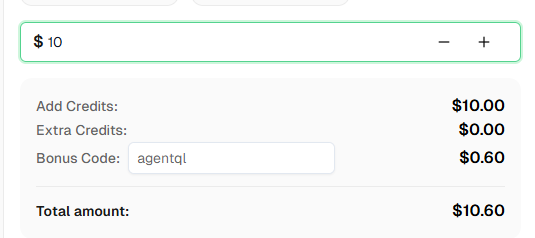
Ready to get started? Sign up for CapSolver and use the bonus code AGENTQL to get an extra 6% on your first top-up!
FAQ
Do I need to write CAPTCHA-specific code in my AgentQL scripts?
No. The CapSolver extension works entirely in the background within the Playwright browser context. Just add a time.sleep() or waitForTimeout() before submitting forms, and the extension handles detection, solving, and token injection automatically.
Why do I need a persistent context?
Playwright only supports Chrome extensions when using launch_persistent_context(). This is a Playwright architecture requirement. Regular browser contexts created via browser.new_context() cannot load extensions.
Can I run this in headless mode?
No. Chrome extensions require a headed browser. For server environments without a display, use Xvfb (X Virtual Framebuffer) to create a virtual display.
What if I'm using a remote TinyFish Browser session instead of my own local Chromium?
Since you don't control the browser launch directly, you can't load the CapSolver extension into a TinyFish Browser session. Instead, use the CapSolver SDK to solve the CAPTCHA and inject the resulting token yourself via page.evaluate() after connecting over CDP, as shown in the "Using CapSolver with TinyFish Browser" section above.
What CAPTCHA types does CapSolver support?
CapSolver supports reCAPTCHA v2 (checkbox and invisible), reCAPTCHA v3, Cloudflare Turnstile, AWS WAF CAPTCHA, and more. The extension automatically detects the CAPTCHA type and resolves it accordingly.
How much does CapSolver cost?
CapSolver offers competitive pricing based on CAPTCHA type and volume. Visit capsolver.com for current pricing.
Is TinyFish AgentQL free?
AgentQL offers both free and paid tiers. The SDK and query language are available for development and testing. Visit tinyfish.ai for pricing details.
How long should I wait for the CAPTCHA to be solved?
For most CAPTCHAs, 30-60 seconds is sufficient. The actual solve time is typically 5-20 seconds, but adding extra buffer ensures reliability. When in doubt, use 30 seconds.
More
AIApr 28, 2026
AI Agents in Web Scraping & Competitive Intelligence Guide
Discover how AI agents transform web scraping and competitive intelligence. Learn about automated data collection, anti-bot challenges, and CAPTCHA solutions for scalable workflows.

AIApr 24, 2026
AI Agent vs Chatbot: Key Differences in Automation Capabilities
Discover the key differences between AI agent vs chatbot. Learn how agentic AI outperforms traditional AI in automation, decision-making, and complex workflows.


