🎉MỚICapSolver cho AI agent-Tích hợp MCP, công cụ agent và SDK

Anh Tuan
Data Science Expert
Đã xuất bản Jul 28, 2026
Đã cập nhật Jul 28, 2026 · đọc tối thiểu
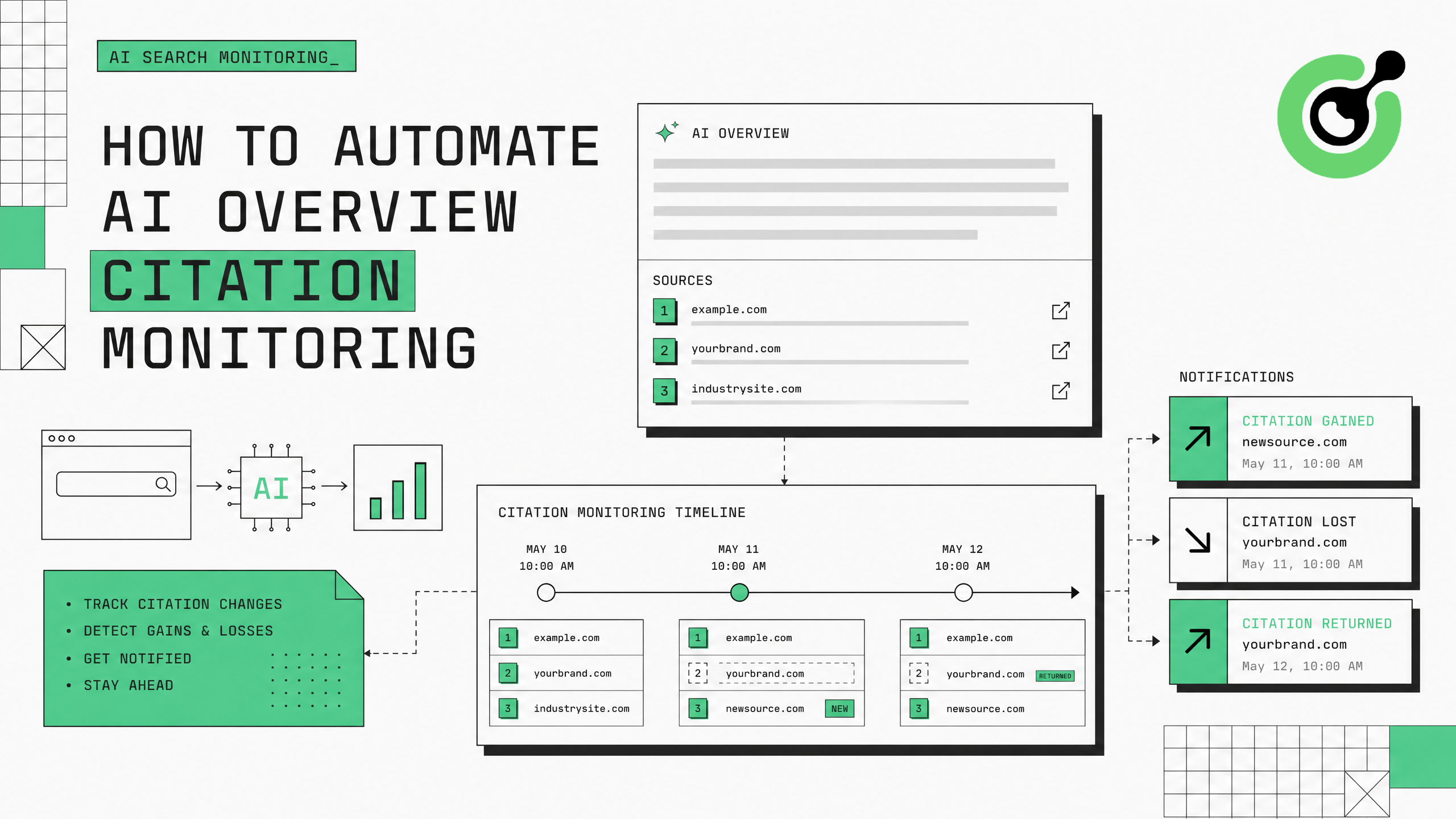
Google's AI Overviews now appear for a growing percentage of search queries, citing specific web pages as sources. For brands and publishers, being cited in these AI-generated summaries drives significant traffic and authority. Monitoring which pages get cited — and when citations change — requires automated data collection from Google's search results. This guide shows how to build an AI Overview citation monitoring system using CapSolver to handle Google's verification challenges and maintain continuous tracking.
Các bản tóm tắt AI của Google đại diện cho sự thay đổi cơ bản trong cách lưu lượng tìm kiếm di chuyển. Khi Google tạo ra câu trả lời được hỗ trợ bởi AI và trích dẫn trang của bạn, bạn sẽ nhận được cả liên kết trực tiếp và quyền lực gián tiếp. Khi trích dẫn của bạn biến mất, lưu lượng truy cập từ truy vấn đó sẽ giảm ngay lập tức. Nghiên cứu của Search Engine Land cho thấy rằng các bản tóm tắt AI hiện xuất hiện trên 15-30% các truy vấn thông tin, với tỷ lệ này tăng hàng tháng.
Thách thức trong việc theo dõi là các trích dẫn trong bản tóm tắt AI là động — chúng thay đổi dựa trên độ mới của nội dung, cách tái cấu trúc truy vấn và các cập nhật mô hình liên tục của Google. Một trang được trích dẫn hôm nay có thể mất trích dẫn vào ngày mai mà không có thông báo nào. Việc kiểm tra thủ công không khả thi ở quy mô lớn: một thương hiệu theo dõi 200 từ khóa sẽ cần phải tìm kiếm từng từ khóa, cuộn đến bản tóm tắt AI và ghi lại các nguồn được trích dẫn — nhiều lần mỗi tuần.
Việc theo dõi tự động giải quyết vấn đề này, nhưng bảo vệ bot của Google chặn truy cập tìm kiếm hệ thống. Sau 50-100 truy vấn tự động, Google hiển thị thách thức reCAPTCHA hoặc chặn IP hoàn toàn. CapSolver cung cấp lớp xóa xác minh giúp pipeline theo dõi của bạn chạy liên tục.
Cài đặt các gói cần thiết:
pip install git+https://github.com/capsolver-ai/capsolver-core.git
pip install aiohttp beautifulsoup4 pandas
Thiết lập khóa API của bạn:
export CAPSOLVER_API_KEY="your-capsolver-api-key"Yêu cầu bổ sung:
Không phải mọi truy vấn đều tạo ra bản tóm tắt AI. Tập trung theo dõi các từ khóa mà bản tóm tắt AI xuất hiện liên tục:
from dataclasses import dataclass, field
from typing import List, Optional
import time

@dataclass
class AIOverviewCitation:
    """Một trích dẫn duy nhất trong bản tóm tắt AI."""
    position: int          # Vị trí 1-based trong danh sách trích dẫn
    url: str               # URL trang được trích dẫn
    domain: str            # Tên miền của trang được trích dẫn
    anchor_text: str       # Văn bản được sử dụng để liên kết đến nguồn
    snippet_context: str   # Văn bản xung quanh trong bản tóm tắt AI

@dataclass
class AIOverviewResult:
    """Kết quả theo dõi bản tóm tắt AI cho một từ khóa."""
    keyword: str
    has_ai_overview: bool
    citations: List[AIOverviewCitation] = field(default_factory=list)
    overview_text: str = ""
    timestamp: float = 0.0
    your_domain_cited: bool = False
    your_citation_position: Optional[int] = None

# Từ khóa có khả năng kích hoạt bản tóm tắt AI cao nhất
PRIORITY_KEYWORDS = [
    # Các truy vấn thông tin (tỷ lệ bản tóm tắt AI cao nhất)
    "what is generative engine optimization",
    "how to optimize for AI search",
    "best practices for AI citation",
    # Các truy vấn điều tra thương mại
    "best CAPTCHA solving API",
    "top AI agent frameworks 2025",
    # Các truy vấn so sánh
    "reCAPTCHA vs Cloudflare Turnstile",
]
Các truy vấn thông tin và "how to" có tỷ lệ kích hoạt bản tóm tắt AI cao nhất (40-60%), tiếp theo là các truy vấn so sánh (20-30%) và các truy vấn điều tra thương mại (15-25%).
Theo dõi các từ khóa không bao giờ kích hoạt bản tóm tắt AI sẽ lãng phí tín dụng giải CAPTCHA. Tập trung vào các truy vấn mà nội dung của bạn có tiềm năng trích dẫn — các truy vấn thông tin trong lĩnh vực chuyên môn của bạn, các truy vấn so sánh mà sản phẩm của bạn liên quan, và các truy vấn "tốt nhất" trong danh mục của bạn.
Tạo bộ phân tích trích xuất các trích dẫn bản tóm tắt AI từ các trang kết quả tìm kiếm của Google:
from bs4 import BeautifulSoup
import re

class AIOverviewExtractor:
    """Trích xuất các trích dẫn bản tóm tắt AI từ HTML kết quả tìm kiếm Google."""

    def extract(self, html: str, keyword: str, your_domain: str = "") -> AIOverviewResult:
        """Phân tích HTML và trích xuất dữ liệu trích dẫn bản tóm tắt AI."""
        soup = BeautifulSoup(html, 'html.parser')

        # Phát hiện sự hiện diện của bản tóm tắt AI
        # Google sử dụng các lớp chứa khác nhau cho bản tóm tắt AI
        ai_containers = soup.select(
            '[data-attrid*="ai"], '
            '.ai-overview, '
            '[class*="aiOverview"], '
            '.kp-wholepage [data-md-type]'
        )

        if not ai_containers:
            return AIOverviewResult(
                keyword=keyword,
                has_ai_overview=False,
                timestamp=time.time()
            )

        # Trích xuất văn bản bản tóm tắt AI
        overview_container = ai_containers[0]
        overview_text = overview_container.get_text(separator=" ", strip=True)[:2000]

        # Trích xuất các trích dẫn (các liên kết nguồn trong bản tóm tắt AI)
        citations = []
        source_links = overview_container.select('a[href^="http"]')

        for i, link in enumerate(source_links, 1):
            url = link.get('href', '')
            if not url or 'google.com' in url:
                continue

            domain = self._extract_domain(url)
            anchor = link.get_text(strip=True)

            # Lấy bối cảnh xung quanh
            parent = link.parent
            context = parent.get_text(strip=True)[:200] if parent else ""

            citations.append(AIOverviewCitation(
                position=i,
                url=url,
                domain=domain,
                anchor_text=anchor,
                snippet_context=context
            ))

        # Kiểm tra xem tên miền của bạn có được trích dẫn không
        your_cited = any(your_domain in c.domain for c in citations) if your_domain else False
        your_position = next(
            (c.position for c in citations if your_domain in c.domain), None
        ) if your_domain else None

        return AIOverviewResult(
            keyword=keyword,
            has_ai_overview=True,
            citations=citations,
            overview_text=overview_text[:500],
            timestamp=time.time(),
            your_domain_cited=your_cited,
            your_citation_position=your_position
        )

    def _extract_domain(self, url: str) -> str:
        """Trích xuất tên miền từ URL."""
        match = re.search(r'https?://([^/]+)', url)
return match.group(1) if match else urlXây dựng lớp thu thập dữ liệu với xử lý CAPTCHA tích hợp:
import asyncio
import aiohttp
import random
from capsolver_core import create_capsolver, CaptchaType, CaptchaInfo

class CitationMonitorCollector:
    """Thu thập dữ liệu trích dẫn bản tóm tắt AI với xử lý CAPTCHA."""

    def __init__(self, api_key: str, proxies: list):
        self.cap = create_capsolver(api_key=api_key)
        self.proxies = proxies
        self.proxy_idx = 0
        self.extractor = AIOverviewExtractor()
        self.stats = {"searches": 0, "captchas": 0, "overviews_found": 0}

    async def collect_citation_data(
        self, keyword: str, your_domain: str = "", location: str = "us"
    ) -> AIOverviewResult:
        """Thu thập dữ liệu trích dẫn bản tóm tắt AI cho một từ khóa."""
        proxy = self.proxies[self.proxy_idx % len(self.proxies)]
        self.proxy_idx += 1

        url = f"https://www.google.com/search?q={keyword}&gl={location}&hl=en"
        headers = {
            "User-Agent": "Mozilla/5.0 (Macintosh; Intel Mac OS X 10_15_7) AppleWebKit/537.36 (KHTML, like Gecko) Chrome/125.0.0.0 Safari/537.36",
            "Accept": "text/html,application/xhtml+xml",
            "Accept-Language": "en-US,en;q=0.9"
        }

        async with aiohttp.ClientSession() as session:
            async with session.get(url, headers=headers, proxy=proxy, timeout=30) as resp:
                html = await resp.text()

            # Xử lý CAPTCHA nếu được kích hoạt
            if "unusual traffic" in html.lower() or "g-recaptcha" in html:
                self.stats["captchas"] += 1
                html = await self._solve_and_retry(session, url, headers, proxy)

            self.stats["searches"] += 1

        # Trích xuất dữ liệu trích dẫn
        result = self.extractor.extract(html, keyword, your_domain)
        if result.has_ai_overview:
            self.stats["overviews_found"] += 1

        return result

    async def _solve_and_retry(self, session, url, headers, proxy) -> str:
        """Giải CAPTCHA của Google và thử lại truy vấn."""
        info = CaptchaInfo(
            type=CaptchaType.RECAPTCHA_V2,
            website_url="https://www.google.com",
            website_key="6LfwuyUTAAAAAOAmoS0fdqijC2PbbdH4kjq62Y1b"
        )
        solution = await self.cap.solve(info)

        # Thử lại với proxy mới sau khi giải CAPTCHA
        new_proxy = self.proxies[self.proxy_idx % len(self.proxies)]
        self.proxy_idx += 1

        async with session.get(url, headers=headers, proxy=new_proxy, timeout=30) as resp:
            return await resp.text()

    async def monitor_batch(
        self, keywords: list, your_domain: str = "", delay: float = 7.0
    ) -> list:
        """Theo dõi một loạt từ khóa với giới hạn tốc độ."""
        results = []
        for keyword in keywords:
            result = await self.collect_citation_data(keyword, your_domain)
            results.append(result)
            await asyncio.sleep(delay + random.uniform(0, 3))
        return results

    async def close(self):
        await self.cap.aclose()
tài liệu reCAPTCHA của CapSolver giải thích chi tiết cách Google triển khai reCAPTCHA.
Theo dõi các thay đổi trích dẫn theo thời gian và cảnh báo khi trang của bạn nhận được hoặc mất trích dẫn trong bản tóm tắt AI:
class CitationChangeDetector:
    """Phát hiện thay đổi trong trích dẫn bản tóm tắt AI theo thời gian."""

    def __init__(self, your_domain: str):
        self.your_domain = your_domain
        self.history = {}  # keyword -> list of AIOverviewResult

    def record_and_detect(self, results: list) -> list:
        """Ghi lại kết quả mới và phát hiện thay đổi từ lần kiểm tra trước."""
        changes = []

        for result in results:
            keyword = result.keyword
            previous = self.history.get(keyword, [])

            if previous:
                last = previous[-1]

                # Trích dẫn được thêm
                if result.your_domain_cited and not last.your_domain_cited:
                    changes.append({
                        "type": "CITATION_GAINED",
                        "keyword": keyword,
                        "position": result.your_citation_position,
                        "timestamp": result.timestamp
                    })

                # Trích dẫn bị mất
                elif last.your_domain_cited and not result.your_domain_cited:
                    changes.append({
                        "type": "CITATION_LOST",
                        "keyword": keyword,
                        "previous_position": last.your_citation_position,
                        "timestamp": result.timestamp
                    })

                # Vị trí thay đổi
                elif (result.your_domain_cited and last.your_domain_cited and
                      result.your_citation_position != last.your_citation_position):
                    changes.append({
                        "type": "POSITION_CHANGED",
                        "keyword": keyword,
                        "old_position": last.your_citation_position,
                        "new_position": result.your_citation_position,
                        "timestamp": result.timestamp
                    })

                # Bản tóm tắt AI xuất hiện/được gỡ
                if result.has_ai_overview and not last.has_ai_overview:
                    changes.append({
                        "type": "AI_OVERVIEW_APPEARED",
                        "keyword": keyword,
                        "timestamp": result.timestamp
                    })

            # Cập nhật lịch sử
            if keyword not in self.history:
                self.history[keyword] = []
            self.history[keyword].append(result)
            # Giữ lại lịch sử 30 ngày gần nhất
            self.history[keyword] = self.history[keyword][-60:]

        return changes

    def generate_report(self) -> dict:
        """Tạo báo cáo tổng quan về trạng thái trích dẫn."""
        total_keywords = len(self.history)
        cited_keywords = sum(
            1 for k, h in self.history.items()
            if h and h[-1].your_domain_cited
        )
        overview_keywords = sum(
            1 for k, h in self.history.items()
            if h and h[-1].has_ai_overview
        )

        return {
            "total_keywords_monitored": total_keywords,
            "keywords_with_ai_overview": overview_keywords,
            "keywords_where_cited": cited_keywords,
            "citation_rate": f"{cited_keywords/max(overview_keywords,1)*100:.1f}%",
            "average_citation_position": self._avg_position()
        }

    def _avg_position(self) -> float:
        positions = [
            h[-1].your_citation_position
            for h in self.history.values()
            if h and h[-1].your_citation_position
]
return sum(positions) / len(positions) if positions else 0Chạy toàn bộ quy trình theo lịch:
async def run_daily_monitoring():
    """Chạy theo dõi trích dẫn AI Overview hàng ngày."""
    collector = CitationMonitorCollector(
        api_key="YOUR_CAPSOLVER_API_KEY",
        proxies=RESIDENTIAL_PROXY_LIST
    )
    detector = CitationChangeDetector(your_domain="capsolver.com")

    # Theo dõi tất cả từ khóa ưu tiên
    results = await collector.monitor_batch(
        keywords=PRIORITY_KEYWORDS,
        your_domain="capsolver.com",
        delay=8.0
    )

    # Phát hiện thay đổi
    changes = detector.record_and_detect(results)

    # Báo cáo
    if changes:
        print(f"\n{'='*50}")
        print(f"PHÁT HIỆN THAY ĐỔI TRÍCH DẪN: {len(changes)}")
        for change in changes:
            print(f"  [{change['type']}] {change['keyword']}")
        print(f"{'='*50}\n")

    report = detector.generate_report()
    print(f"Tóm tắt: {report}")

    await collector.close()

# Chạy hàng ngày
asyncio.run(run_daily_monitoring())
Nhận mã thưởng của bạn: Sử dụng mã WEBS tại Bảng điều khiển CapSolver để nhận thêm 5% thưởng cho mỗi lần nạp tiền. Đây là lựa chọn thiết yếu cho các nhóm GEO theo dõi trích dẫn AI Overview quy mô lớn.
Dữ liệu theo dõi trực tiếp định hướng chiến lược Tối ưu hóa Động cơ Tạo của bạn:
Bài viết trên blog CapSolver về AI và tự động hóa đề cập thêm các mẫu dữ liệu được thu thập bằng AI. Để xử lý các loại CAPTCHA khác nhau trên các công cụ tìm kiếm, trang sản phẩm CapSolver liệt kê tất cả các hệ thống xác minh được hỗ trợ.
Việc tự động hóa theo dõi trích dẫn AI Overviews yêu cầu lớp thu thập tìm kiếm nhận biết CAPTCHA, bộ phân tích trích dẫn và hệ thống phát hiện thay đổi. CapSolver cung cấp cơ sở hạ tầng giải mã xác minh cho phép theo dõi liên tục AI Overviews của Google, giải quyết các thách thức reCAPTCHA trong 3-8 giây để chiến lược GEO của bạn luôn có dữ liệu trích dẫn mới nhất.
Bắt đầu với 20-50 từ khóa ưu tiên mà bạn kỳ vọng AI Overviews, kiểm tra độ chính xác của việc trích xuất, sau đó mở rộng sang toàn bộ danh sách từ khóa. Dữ liệu thay đổi trích dẫn trực tiếp định hướng các quyết định tối ưu hóa nội dung — giúp bạn hiểu được điều gì mà AI của Google coi là đáng để trích dẫn cho các truy vấn mục tiêu của bạn.
Đối với các từ khóa ưu tiên (tên thương hiệu, truy vấn sản phẩm chính), kiểm tra hàng ngày. Đối với theo dõi rộng hơn (từ khóa ngành, truy vấn thông tin), 2-3 lần mỗi tuần là đủ. Trích dẫn AI Overviews có thể thay đổi trong vài giờ sau khi nội dung được cập nhật, vì vậy kiểm tra thường xuyên hơn sẽ phát hiện thay đổi nhanh hơn.
Hiện tại 15-30% truy vấn thông tin hiển thị AI Overviews, với tỷ lệ này đang tăng lên. Các truy vấn "How to" (Làm thế nào), truy vấn định nghĩa và truy vấn so sánh có tỷ lệ kích hoạt cao nhất. Các truy vấn thương mại và giao dịch thường ít xuất hiện AI Overviews hơn.
Hầu hết AI Overviews trích dẫn 3-8 nguồn, với 2-3 vị trí đầu tiên nhận được phần lớn lưu lượng nhấp chuột. Vị trí 1 trong danh sách trích dẫn nhận được khoảng 3-5 lần lưu lượng nhấp chuột so với vị trí 5+. Việc theo dõi vị trí trích dẫn quan trọng không kém việc theo dõi xem bạn có được trích dẫn hay không.
Có. Đặt your_domain thành tên miền của đối thủ để theo dõi tần suất trích dẫn và vị trí của họ. So sánh tỷ lệ trích dẫn của bạn với đối thủ để xác định khoảng trống nội dung và cơ hội. Theo dõi những đối thủ thường xuyên xuất hiện cho các từ khóa mà bạn vắng mặt.
Với 200 từ khóa, thời gian chờ 8 giây và tỷ lệ 10% gặp CAPTCHA, bạn cần khoảng 20 lần giải CAPTCHA mỗi lần chạy. Với giá $2-3 cho 1.000 lần giải reCAPTCHA v2, chi phí hàng ngày khoảng $0.04-0.06 — dưới $2 mỗi tháng cho việc theo dõi trích dẫn AI Overviews toàn diện.
Anh Tuan
Data Science Expert
Turning task outcomes into actionable insights.
GIỚI THIỆU TÁC GIẢ
Học kiến trúc gỡ mã web Rust có thể mở rộng với reqwest, scraper, gỡ mã bất đồng bộ, gỡ mã trình duyệt không đầu, xoay proxy và xử lý CAPTCHA tuân thủ.
Tự động hóa việc giải CAPTCHA với Nanobot và CapSolver. Sử dụng Playwright để giải reCAPTCHA và Cloudflare tự động.