🎉新着AI エージェント向け CapSolver-MCP、エージェントツール、SDK 統合

Sora Fujimoto
AI Solutions Architect
発行済み Jan 12, 2026
更新されました Jan 13, 2026 · 最小読み取り
AI駆動型のオートメーションが現実的なワークフローでますます実用的になるにつれ、Agnoはプライバシーを最優先にした自律型マルチエージェントシステムを構築するための高速なフレームワークとして登場しました。これらのエージェントがウェブサイトをスクリーニング、データ収集、または自動ブラウジングを通じて相互作用するとき、CAPTCHAはしばしば問題になります。
CapSolverは、エージェントがオートメーションのフローを妨げることなくCAPTCHA保護ページを信頼性よく処理できるようにすることで、この問題を解決します。AgnoとCapSolverは、本番環境で動作するスケーラブルなオートメーションを構築しやすくします。
Agnoは、自前のインフラストラクチャ内で完全に動作するAIシステムを構築するためのオープンソースのマルチエージェントフレームワークおよびランタイムです。パフォーマンスとプライバシーを重視して設計されており、外部のコントロールプレーンは必要なく、データは環境外に漏れません。
| コンポーネント | 説明 |
|---|---|
| エージェント | 記憶、ツール、モデル統合を持つ自律型AIユニット |
| チーム | 複雑なタスクに協力するエージェントのグループ |
| ワークフロー | 予測可能な実行を目的とした構造化されたパイプライン |
| AgentOS | 本番環境デプロイ用のFastAPIベースのランタイム |
CapSolverは、さまざまなCAPTCHAチャレンジを回避するAI駆動型ソリューションを提供するリーディングなCAPTCHA解決サービスです。複数のCAPTCHAタイプをサポートし、高速な応答時間を提供し、オートメーティックなワークフローにシームレスに統合できます。
ウェブサイトと相互作用するAgnoエージェントを構築する際、データ収集、自動テスト、コンテンツ集約など、CAPTCHAチャレンジは大きな障害になります。自動ブラウザ環境でのCAPTCHAの解決について詳しく知りたい場合は、PuppeteerでCAPTCHAを解決する方法のガイドをご覧ください。では、統合がなぜ重要なのかを以下に示します。
まず、必要なパッケージをインストールします:
pip install agno
pip install requestsAgnoはモデルに依存しないで、23以上のLLMプロバイダーを内蔵してサポートしています:
# OpenAI
from agno.models.openai import OpenAIChat

# Anthropic Claude
from agno.models.anthropic import Claude

# Google Gemini
from agno.models.google import Gemini

# その他多くのプロバイダー...Agnoは、エージェントがタスクを遂行するために使用できるカスタムツールを作成できるようにしています。CAPTCHAチャレンジを処理するためのCapSolverツールの作成方法を以下に示します。
import requests
import time
from agno.tools import tool

CAPSOLVER_API_KEY = "YOUR_CAPSOLVER_API_KEY"


@tool
def solve_captcha(
    website_url: str,
    website_key: str,
    captcha_type: str = "ReCaptchaV2TaskProxyLess"
) -> str:
    """
    CapSolver APIを使用してCAPTCHAチャレンジを解決します。

    引数:
        website_url: CAPTCHAが設置されているウェブサイトのURL
        website_key: CAPTCHAのサイトキー
        captcha_type: CAPTCHAのタイプ(ReCaptchaV2TaskProxyLess、ReCaptchaV3TaskProxyLess、AntiTurnstileTaskProxyLess)

    戻り値:
        CAPTCHAの解決トークン
    """
    # タスクの作成
    payload = {
        "clientKey": CAPSOLVER_API_KEY,
        "task": {
            "type": captcha_type,
            "websiteURL": website_url,
            "websiteKey": website_key
        }
    }

    response = requests.post("https://api.capsolver.com/createTask", json=payload)
    result = response.json()

    if result.get("errorId") != 0:
        return f"タスク作成エラー: {result.get('errorDescription')}"

    task_id = result.get("taskId")

    # 結果をポーリング
    for _ in range(60):
        time.sleep(2)

        result = requests.post(
            "https://api.capsolver.com/getTaskResult",
            json={"clientKey": CAPSOLVER_API_KEY, "taskId": task_id}
        ).json()

        if result.get("status") == "ready":
            solution = result.get("solution", {})
            return solution.get("gRecaptchaResponse") or solution.get("token")
        elif result.get("status") == "failed":
            return f"タスク失敗: {result.get('errorDescription')}"

return "CAPTCHA解決を待つタイムアウト"import requests
import time
from agno.tools import tool
CAPSOLVER_API_KEY = "YOUR_CAPSOLVER_API_KEY"
@tool
def solve_recaptcha_v2(website_url: str, website_key: str) -> str:
"""
CapSolverを使用してreCAPTCHA v2のチャレンジを解決します。
引数:
website_url: reCAPTCHA v2が設置されているウェブサイトのURL
website_key: reCAPTCHAのサイトキー(data-sitekey属性)
戻り値:
g-recaptcha-responseトークン
"""
payload = {
"clientKey": CAPSOLVER_API_KEY,
"task": {
"type": "ReCaptchaV2TaskProxyLess",
"websiteURL": website_url,
"websiteKey": website_key
}
}
# タスクの作成
response = requests.post("https://api.capsolver.com/createTask", json=payload)
result = response.json()
if result.get("errorId") != 0:
return f"エラー: {result.get('errorDescription')}"
task_id = result.get("taskId")
# 結果をポーリング
for attempt in range(60):
time.sleep(2)
result = requests.post(
"https://api.capsolver.com/getTaskResult",
json={"clientKey": CAPSOLVER_API_KEY, "taskId": task_id}
).json()
if result.get("status") == "ready":
return result["solution"]["gRecaptchaResponse"]
if result.get("status") == "failed":
return f"失敗: {result.get('errorDescription')}"
return "解決を待つタイムアウト"import requests
import time
from agno.tools import tool
CAPSOLVER_API_KEY = "YOUR_CAPSOLVER_API_KEY"
@tool
def solve_recaptcha_v3(
website_url: str,
website_key: str,
page_action: str = "submit",
min_score: float = 0.7
) -> str:
"""
CapSolverを使用してreCAPTCHA v3のチャレンジをスコアベースの検証で解決します。
引数:
website_url: reCAPTCHA v3が設置されているウェブサイトのURL
website_key: reCAPTCHAのサイトキー
page_action: reCAPTCHA v3のアクションパラメータ
min_score: 必要スコア(0.1から0.9)
戻り値:
g-recaptcha-responseトークン
"""
payload = {
"clientKey": CAPSOLVER_API_KEY,
"task": {
"type": "ReCaptchaV3TaskProxyLess",
"websiteURL": website_url,
"websiteKey": website_key,
"pageAction": page_action,
"minScore": min_score
}
}
# タスクの作成
response = requests.post("https://api.capsolver.com/createTask", json=payload)
result = response.json()
if result.get("errorId") != 0:
return f"エラー: {result.get('errorDescription')}"
task_id = result.get("taskId")
# 結果をポーリング
for attempt in range(60):
time.sleep(2)
result = requests.post(
"https://api.capsolver.com/getTaskResult",
json={"clientKey": CAPSOLVER_API_KEY, "taskId": task_id}
).json()
if result.get("status") == "ready":
return result["solution"]["gRecaptchaResponse"]
if result.get("status") == "failed":
return f"失敗: {result.get('errorDescription')}"
return "解決を待つタイムアウト"import requests
import time
from agno.tools import tool
CAPSOLVER_API_KEY = "YOUR_CAPSOLVER_API_KEY"
@tool
def solve_turnstile(website_url: str, website_key: str) -> str:
"""
Cloudflare Turnstileのチャレンジを解決します。
引数:
website_url: Turnstileが設置されているウェブサイトのURL
website_key: Turnstileウィジェットのサイトキー
戻り値:
Turnstileトークン
"""
payload = {
"clientKey": CAPSOLVER_API_KEY,
"task": {
"type": "AntiTurnstileTaskProxyLess",
"websiteURL": website_url,
"websiteKey": website_key
}
}
# タスクの作成
response = requests.post("https://api.capsolver.com/createTask", json=payload)
result = response.json()
if result.get("errorId") != 0:
return f"エラー: {result.get('errorDescription')}"
task_id = result.get("taskId")
# 結果をポーリング
for attempt in range(60):
time.sleep(2)
result = requests.post(
"https://api.capsolver.com/getTaskResult",
json={"clientKey": CAPSOLVER_API_KEY, "taskId": task_id}
).json()
if result.get("status") == "ready":
return result["solution"]["token"]
if result.get("status") == "failed":
return f"失敗: {result.get('errorDescription')}"
return "解決を待つタイムアウト"import requests
import time
from agno.tools import tool
CAPSOLVER_API_KEY = "YOUR_CAPSOLVER_API_KEY"
@tool
def solve_cloudflare_challenge(website_url: str, proxy: str) -> dict:
"""
Cloudflareの5秒チャレンジページを解決します。
引数:
website_url: 保護されたページのURL
proxy: プロキシの形式: http://user:pass@ip:port
戻り値:
保護されたページにアクセスするためのクッキーとuser_agentの辞書
"""
payload = {
"clientKey": CAPSOLVER_API_KEY,
"task": {
"type": "AntiCloudflareTask",
"websiteURL": website_url,
"proxy": proxy
}
}
# タスクの作成
response = requests.post("https://api.capsolver.com/createTask", json=payload)
result = response.json()
if result.get("errorId") != 0:
return {"error": result.get('errorDescription')}
task_id = result.get("taskId")
# 結果をポーリング
for attempt in range(60):
time.sleep(3)
result = requests.post(
"https://api.capsolver.com/getTaskResult",
json={"clientKey": CAPSOLVER_API_KEY, "taskId": task_id}
).json()
if result.get("status") == "ready":
return {
"cookies": result["solution"]["cookies"],
"user_agent": result["solution"]["userAgent"]
}
if result.get("status") == "failed":
return {"error": result.get('errorDescription')}
return {"error": "解決を待つタイムアウト"}以下は、CAPTCHAチャレンジを処理するためにCapSolverを使用するAgnoエージェントの完全な例です:
import os
import requests
import time
from agno.agent import Agent
from agno.models.openai import OpenAIChat
from agno.tools import tool

# 設定
CAPSOLVER_API_KEY = "YOUR_CAPSOLVER_API_KEY"
os.environ["OPENAI_API_KEY"] = "YOUR_OPENAI_API_KEY"


@tool
def solve_recaptcha_v2(website_url: str, website_key: str) -> str:
    """
    CapSolverを使用してreCAPTCHA v2のチャレンジを解決します。

    引数:
        website_url: reCAPTCHA v2が設置されているウェブサイトのURL
        website_key: reCAPTCHAのサイトキー(data-sitekey属性)

    戻り値:
        g-recaptcha-responseトークンまたはエラーメッセージ
    """
    payload = {
        "clientKey": CAPSOLVER_API_KEY,
        "task": {
            "type": "ReCaptchaV2TaskProxyLess",
            "websiteURL": website_url,
            "websiteKey": website_key
        }
    }

    response = requests.post("https://api.capsolver.com/createTask", json=payload)
    result = response.json()

    if result.get("errorId") != 0:
        return f"エラー: {result.get('errorDescription')}"

    task_id = result.get("taskId")

    for _ in range(60):
        time.sleep(2)
        result = requests.post(
            "https://api.capsolver.com/getTaskResult",
            json={"clientKey": CAPSOLVER_API_KEY, "taskId": task_id}
        ).json()

        if result.get("status") == "ready":
            return result["solution"]["gRecaptchaResponse"]
        if result.get("status") == "failed":
            return f"失敗: {result.get('errorDescription')}"

    return "タイムアウト"


@tool
def solve_turnstile(website_url: str, website_key: str) -> str:
    """
    Cloudflare Turnstileのチャレンジを解決します。

    引数:
        website_url: Turnstileが設置されているウェブサイトのURL
        website_key: Turnstileウィジェットのサイトキー

    戻り値:
        Turnstileトークンまたはエラーメッセージ
    """
    payload = {
        "clientKey": CAPSOLVER_API_KEY,
        "task": {
            "type": "AntiTurnstileTaskProxyLess",
            "websiteURL": website_url,
            "websiteKey": website_key
        }
    }

    response = requests.post("https://api.capsolver.com/createTask", json=payload)
    result = response.json()

    if result.get("errorId") != 0:
        return f"エラー: {result.get('errorDescription')}"

    task_id = result.get("taskId")

    for _ in range(60):
        time.sleep(2)
        result = requests.post(
            "https://api.capsolver.com/getTaskResult",
            json={"clientKey": CAPSOLVER_API_KEY, "taskId": task_id}
        ).json()

        if result.get("status") == "ready":
            return result["solution"]["token"]
        if result.get("status") == "failed":
            return f"失敗: {result.get('errorDescription')}"

    return "タイムアウト"
"https://api.capsolver.com/getTaskResult",
            json={"clientKey": CAPSOLVER_API_KEY, "taskId": task_id}
        ).json()

        if result.get("status") == "ready":
            return result["solution"]["token"]
        if result.get("status") == "failed":
            return f"失敗: {result.get('errorDescription')}"

    return "タイムアウト"


@tool
def check_capsolver_balance() -> str:
    """
    現在のCapSolverアカウントの残高を確認します。

    戻り値:
        現在の残高情報
    """
    response = requests.post(
        "https://api.capsolver.com/getBalance",
        json={"clientKey": CAPSOLVER_API_KEY}
    )
    result = response.json()

    if result.get("errorId") != 0:
        return f"エラー: {result.get('errorDescription')}"

    return f"残高: ${result.get('balance', 0):.4f}"


# Webスクリーパーエージェントの作成
web_scraper_agent = Agent(
    name="Webスクリーパーエージェント",
    model=OpenAIChat(id="gpt-4o"),
    tools=[solve_recaptcha_v2, solve_turnstile, check_capsolver_balance],
    description="自動でCAPTCHAチャレンジを処理するエキスパートなWebスクリーパー",
    instructions=[
        "CAPTCHAを処理できる専門のWebスクリーパーです。",
        "CAPTCHAを検出したら、タイプを識別し適切なソルバーを使用してください。",
        "reCAPTCHA v2の場合、URLとサイトキーを使用してsolve_recaptcha_v2を呼び出してください。",
        "Turnstileの場合、URLとサイトキーを使用してsolve_turnstileを呼び出してください。",
        "大規模なスクリーピングジョブを開始する前に常に残高を確認してください。"
    ],
    markdown=True
)


def main():
    print("=" * 60)
    print("Agno + CapSolver統合デモ")
    print("=" * 60)

    # タスク: reCAPTCHAチャレンジを解決
    task = """
    私はreCAPTCHA v2チャレンジを解決する必要があります。

    ウェブサイトURL: https://www.google.com/recaptcha/api2/demo
    サイトキー: 6Le-wvkSAAAAAPBMRTvw0Q4Muexq9bi0DJwx_mJ-

    これをCAPTCHAを解決し、トークンの最初の50文字を報告してください。
    また、スクリーピングを開始する前に私のCapSolver残高を確認してください。
    """

    response = web_scraper_agent.run(task)
    print("\nエージェントの応答:")
    print(response.content)


if __name__ == "__main__":
main()Agnoはマルチエージェントチームをサポートしています。以下は、専門的なCAPTCHAソルバーを持つチームの作成方法です:
from agno.agent import Agent
from agno.team import Team
from agno.models.openai import OpenAIChat
from agno.tools import tool
import requests
import time

CAPSOLVER_API_KEY = "YOUR_CAPSOLVER_API_KEY"


@tool
def solve_any_captcha(
    website_url: str,
    website_key: str,
    captcha_type: str = "ReCaptchaV2TaskProxyLess"
) -> str:
    """複数のタイプのCAPTCHAをサポートするユニバーサルCAPTCHAソルバー。"""
    payload = {
        "clientKey": CAPSOLVER_API_KEY,
        "task": {
            "type": captcha_type,
            "websiteURL": website_url,
            "websiteKey": website_key
        }
    }

    response = requests.post("https://api.capsolver.com/createTask", json=payload)
    result = response.json()

    if result.get("errorId") != 0:
        return f"エラー: {result.get('errorDescription')}"

    task_id = result.get("taskId")

    for _ in range(60):
        time.sleep(2)
        result = requests.post(
            "https://api.capsolver.com/getTaskResult",
            json={"clientKey": CAPSOLVER_API_KEY, "taskId": task_id}
        ).json()

        if result.get("status") == "ready":
            solution = result.get("solution", {})
            return solution.get("gRecaptchaResponse") or solution.get("token")
        if result.get("status") == "failed":
            return f"失敗: {result.get('errorDescription')}"

    return "タイムアウト"


# CAPTCHA専門エージェント
captcha_agent = Agent(
    name="CAPTCHA専門家",
    model=OpenAIChat(id="gpt-4o"),
    tools=[solve_any_captcha],
    description="さまざまなCAPTCHAタイプを識別し解決するエキスパート",
    instructions=[
        "ページ分析からCAPTCHAタイプを識別する",
        "正しいパラメータで適切なソルバーを使用する",
        "成功または失敗を明確に報告する"
    ]
)

# データ抽出エージェント
data_agent = Agent(
    name="データ抽出者",
    model=OpenAIChat(id="gpt-4o"),
    description="ウェブページからのデータを抽出・処理する",
    instructions=[
        "HTMLコンテンツからの構造化データを抽出する",
        "必要に応じてCAPTCHAの解決をリクエストする",
        "抽出されたデータを検証およびクリーンアップする"
    ]
)

# チームの作成
scraping_team = Team(
    name="ウェブスクリーピングチーム",
    agents=[captcha_agent, data_agent],
    description="CAPTCHA処理を専門とするチーム"
)各CAPTCHAタイプには異なる提出方法があります:
from selenium import webdriver
from selenium.webdriver.common.by import By

def submit_recaptcha_token(driver, token: str):
    """reCAPTCHAトークンを挿入して送信"""
    recaptcha_response = driver.find_element(By.ID, "g-recaptcha-response")
    driver.execute_script("arguments[0].style.display = 'block';", recaptcha_response)
    recaptcha_response.clear()
    recaptcha_response.send_keys(token)

    form = driver.find_element(By.TAG_NAME, "form")
form.submit()def submit_turnstile_token(driver, token: str):
"""Turnstileトークンを挿入して送信"""
turnstile_input = driver.find_element(By.NAME, "cf-turnstile-response")
driver.execute_script("arguments[0].value = arguments[1];", turnstile_input, token)
form = driver.find_element(By.TAG_NAME, "form")
form.submit()import requests
def access_cloudflare_protected_page(url: str, cf_solution: dict):
"""Cloudflareチャレンジの解決結果を使用して保護されたページにアクセスします。"""
session = requests.Session()
for cookie in cf_solution["cookies"]:
session.cookies.set(cookie["name"], cookie["value"])
headers = {"User-Agent": cf_solution["user_agent"]}
response = session.get(url, headers=headers)
return response.textfrom agno.tools import tool
import time
@tool
def solve_with_retry(
website_url: str,
website_key: str,
max_retries: int = 3
) -> str:
"""エラー時に自動リトライするCAPTCHAソルバー。"""
for attempt in range(max_retries):
try:
result = solve_recaptcha_v2(website_url, website_key)
if not result.startswith("エラー") and not result.startswith("失敗"):
return result
except Exception as e:
if attempt == max_retries - 1:
return f"すべてのリトライに失敗しました: {str(e)}"
time.sleep(2 ** attempt) # 指数バックオフ
return "最大リトライ回数に達しました"@tool
def check_balance() -> float:
"""CapSolverアカウントの残高を確認します。"""
response = requests.post(
"https://api.capsolver.com/getBalance",
json={"clientKey": CAPSOLVER_API_KEY}
)
return response.json().get("balance", 0)Agnoはパフォーマンス向上のための非同期操作をサポートしています:
import asyncio
import aiohttp
from agno.tools import tool

@tool
async def solve_captcha_async(website_url: str, website_key: str) -> str:
    """非同期CAPTCHAソルバーでより高い並列性を実現します。"""
    async with aiohttp.ClientSession() as session:
        payload = {
            "clientKey": CAPSOLVER_API_KEY,
            "task": {
                "type": "ReCaptchaV2TaskProxyLess",
                "websiteURL": website_url,
                "websiteKey": website_key
            }
        }

        async with session.post(
            "https://api.capsolver.com/createTask",
            json=payload
        ) as response:
            result = await response.json()

        if result.get("errorId") != 0:
            return f"エラー: {result.get('errorDescription')}"

        task_id = result.get("taskId")

        for _ in range(60):
            await asyncio.sleep(2)

            async with session.post(
                "https://api.capsolver.com/getTaskResult",
                json={"clientKey": CAPSOLVER_API_KEY, "taskId": task_id}
            ) as response:
                result = await response.json()

            if result.get("status") == "ready":
                solution = result.get("solution", {})
                return solution.get("gRecaptchaResponse") or solution.get("token")
            if result.get("status") == "failed":
                return f"失敗: {result.get('errorDescription')}"

return "タイムアウト"CapSolverをAgnoと統合することで、ウェブベースのタスクに最適な自律型AIエージェントの潜在能力を引き出せます。Agnoの高速でプライバシーを重視したマルチエージェントのオーケストレーションと、CapSolverの業界をリードするCAPTCHAソルビングの能力を組み合わせることで、開発者は最も難しいウェブ保護メカニズムを扱う堅牢な自動化ソリューションを構築できます。
データ抽出パイプライン、自動テストフレームワーク、または知能ウェブエージェントを構築する場合、Agno + CapSolverの組み合わせは、生産環境に必要な速度、信頼性、スケーラビリティを提供します。
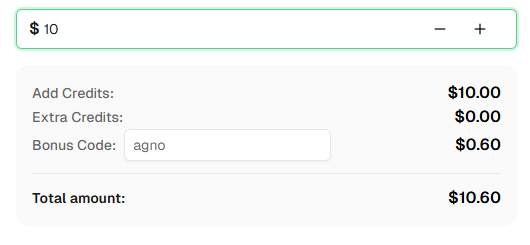
さっそく始めましょうか? CapSolverに登録 そして、ボーナスコード AGNO を使って最初の充電で6%のボーナスを獲得してください!
Agnoは、AI製品を構築するためのマルチエージェントフレームワーク、ランタイム、コントロールプレーンです。LangGraphの529倍の高速さで、メモリ使用量は24分の1で、最大のプライバシーを確保するためにあなたのインフラで動作します。
CapSolverは@toolでデコレートされたカスタムツールを通じてAgnoと統合されます。CapSolver APIをラップする関数を作成し、AIエージェントがウェブ操作中にCAPTCHAチャレンジに遭遇したときに自動的に解決できるようにします。
CapSolverはreCAPTCHA v2、reCAPTCHA v3、Cloudflare Turnstile、Cloudflareチャレンジ、AWS WAF、GeeTestなど、幅広いCAPTCHAタイプをサポートしています。
CapSolverは、解決するCAPTCHAのタイプとボリュームに基づいて競争力のある料金を提供しています。現在の料金詳細については capsolver.com を参照してください。初回充電でコード AGNO を使用すると、5%のボーナスが得られます。
はい!Agnoはモデルに依存せず、OpenAI、Anthropic Claude、Google Gemini、Groqなど50以上のモデルプロバイダーをサポートしています。
はい、AgnoはMITライセンスでオープンソースとしてリリースされており、無料で使用できます。ただし、LLM APIコールやCapSolverなどのCAPTCHAソルビングサービスのコストが発生する可能性があります。
サイトキーは通常、ページのHTMLソースにあります。以下を検索してください:
data-sitekey属性またはgrecaptcha.render()コールdata-sitekey属性Sora Fujimoto
AI Solutions Architect
Connecting agents, browsers, and APIs into one workflow.
著者について
スケーラブルなRustウェブスクレイピングアーキテクチャを学びましょう。リクエスト、スクレイパー、非同期スクレイピング、ヘッドレスブラウザスクレイピング、プロキシローテーション、およびコンプライアンス対応のCAPTCHA処理で。
2026年のデータ・アズ・ア・サービス(DaaS)を理解する。その利点、ユースケース、およびリアルタイムの洞察と拡張性を通じて企業を変革する方法について探る。