🎉NEWCapSolver for AI agents-MCP, agent tools, and SDK integrations

Aloísio Vítor
Image Processing Expert
Published Sep 17, 2026
Updated Sep 17, 2026 · min read
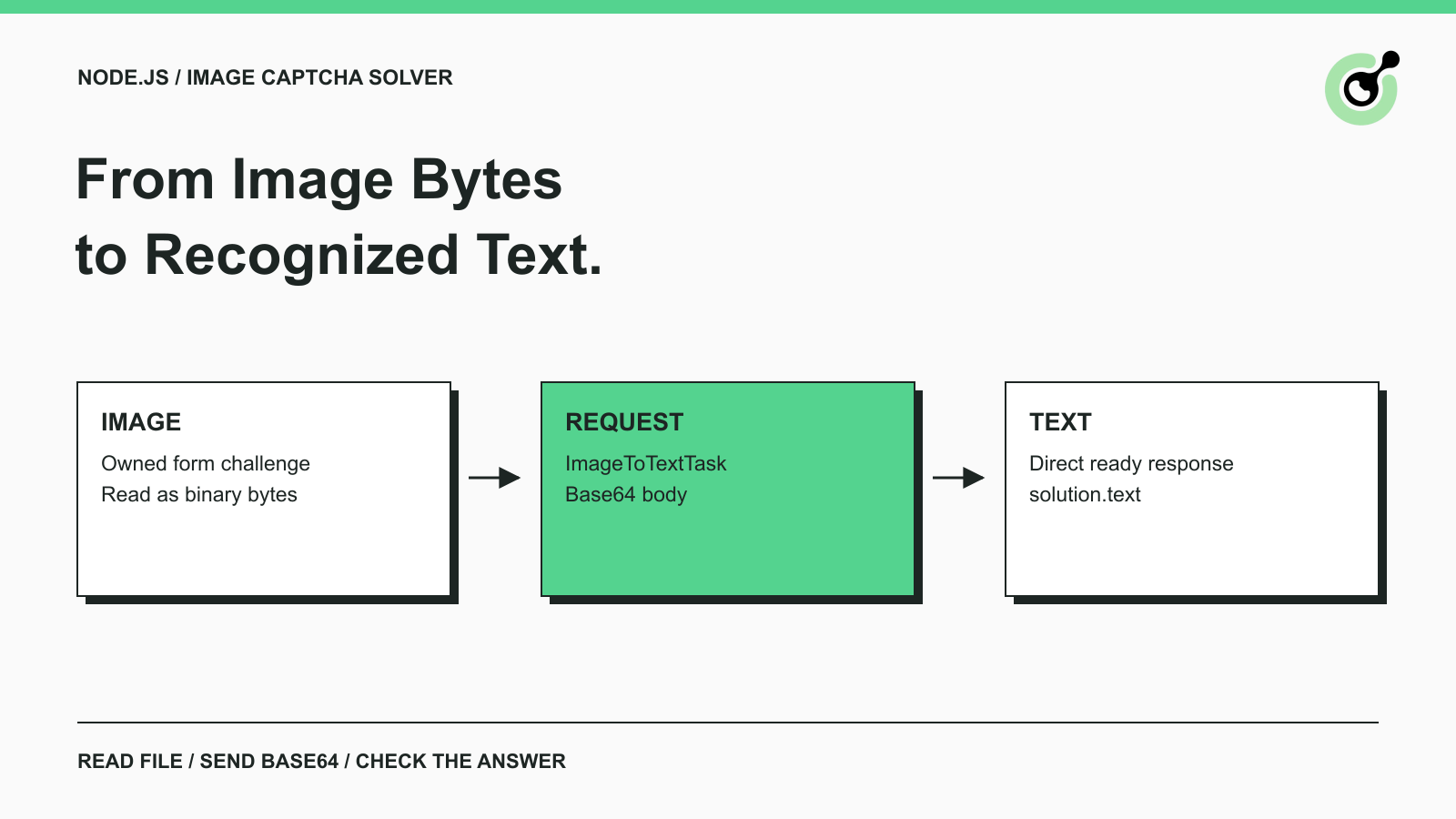
ImageToTextTask request.solution.text from createTask; this example does not poll.An image CAPTCHA integration starts with a distinction that affects the entire implementation: the input is an image file, and the useful output is text. When a Node.js test runner encounters a form containing distorted characters, it needs those characters for that particular attempt. A token-oriented reCAPTCHA example addresses a different task.
This guide uses the documented CapSolver image recognition request and a small Node.js adapter to show how a file becomes the request body and where the answer appears. The example assumes an owned test form with an image you can save locally. Browser navigation and application-specific form submission remain part of your test runner.
An image CAPTCHA solver returns the characters it recognizes in the submitted image. The CAPTCHA glossary entry provides the wider context; this implementation concerns a text image rather than an interactive widget.
The official ImageToTextTask documentation defines a task containing a type, a Base64 image in body, and a recognition module. A successful ready response exposes recognized text at solution.text. For this flow, the initial createTask response contains the result.
Keep these values separate when connecting the example to a form:
| Value | Purpose | Destination |
|---|---|---|
| Image bytes | Challenge to recognize | Local file, then Base64 task body |
| Recognized text | Proposed answer | The owned form's CAPTCHA answer field |
| Application result | Whether the attempt succeeded | Your assertion after submission |
A recognition result is an intermediate result. The application can still reject an answer if the challenge changed, the session expired, or the answer belongs to another image.
Use a Node.js version with built-in fetch and AbortSignal.timeout; the adapter was tested on Node.js 24.16.0. No npm dependency is required. Save the two JavaScript files below in one directory and place a non-sensitive test image beside them.
The example reads ./captcha.png. This is a local path, not an image URL or an encoded string. Inspect the file before debugging the API call: an HTML error page saved with a PNG extension is still an HTML page. Use a valid image supported by the service.
Get a solving API key from your CapSolver account and expose it to the process as CAPSOLVER_API_KEY through your environment or secret manager. Keep that credential out of browser JavaScript and source control. An administrative publishing or MCP credential is not a substitute for the solving API key.
Retain the form session associated with the image. Save a new image whenever the form generates a new challenge. Overwriting a shared filename while another request uses the previous form can produce a valid recognition response for the wrong attempt. Give concurrent attempts separate files or retain their bytes separately.
Read the image as binary data, then encode the resulting Buffer. Node's file system documentation describes readFile, and its Buffer documentation defines Base64 encoding.
The key expression below is image.toString('base64'). Do not read the file as UTF-8 first: image bytes are not a text document. Do not send the filename as task.body, either. The remote service needs the encoded content, not a path on your computer.
Send raw Base64 without a data:image/png;base64, prefix. A data URL has a useful role in browsers but differs from the task body shown in the recognition documentation. Generating the encoding from a Buffer avoids copying unrelated prefixes or line breaks.
This example rejects an empty file. It does not validate image format, dimensions, or visual quality. If your application accepts arbitrary uploads, validate them before this function. A successful read only establishes that bytes were available.
Save this adapter as recognize-image.mjs. The endpoint and task fields follow the official documentation. File loading, the timeout, and response checks are additions for this example. The adapter was run with mocked responses; using it against the real service requires your solving key and remains a live validation step.
import { readFile } from 'node:fs/promises';

// Request fields follow the official ImageToTextTask documentation.
export async function recognizeImage(path, apiKey, request = fetch) {
  if (!apiKey) throw new Error('Set CAPSOLVER_API_KEY first.');
  const image = await readFile(path);
  if (!image.length) throw new Error('The image file is empty.');

  const response = await request('https://api.capsolver.com/createTask', {
    method: 'POST',
    headers: { 'Content-Type': 'application/json' },
    signal: AbortSignal.timeout(60000),
    body: JSON.stringify({
      clientKey: apiKey,
      task: {
        type: 'ImageToTextTask',
        module: 'common',
        body: image.toString('base64')
      }
    })
  });
  if (!response.ok) throw new Error('HTTP status ' + response.status);
  const result = await response.json();
  if (result.errorId !== 0) {
    throw new Error(result.errorCode || 'Image recognition failed.');
  }
  if (result.status !== 'ready' ||
      typeof result.solution?.text !== 'string' ||
      !result.solution.text.length) {
    throw new Error('The API did not return recognized text.');
  }
  return result.solution.text;
}
The function accepts a path and API key and returns recognized text. Its third argument lets a test replace fetch; normal callers omit it. The 60-second timeout is a local setting, not a promised recognition time or service limit.
Response checks follow the request's stages. An unsuccessful HTTP status fails before parsing. Invalid JSON produces a parsing error. A provider error is handled through errorId. A successful-looking envelope must still contain a ready result with nonempty text, preventing a missing answer from silently becoming an empty form value.
There is no automatic repeat request. After a transport failure, the client may not know whether the service received the original task. Decide how to handle that uncertainty before adding retries.
Redeem Your CapSolver Bonus Code
Boost your automation budget instantly!
Use bonus code CAP26 when topping up your CapSolver account to get an extra 5% bonus on every recharge — with no limits.
Redeem it now in your CapSolver Dashboard
Save the following entry point as run.mjs beside the adapter. Its live request requires your own solving key; the local adapter tests do not establish a completed live solve:
import { recognizeImage } from './recognize-image.mjs';

try {
  const path = process.argv[2];
  if (!path) throw new Error('Usage: node run.mjs ./captcha.png');
  const text = await recognizeImage(path, process.env.CAPSOLVER_API_KEY);
  console.log(text); // Use only a non-sensitive owned test image here.
} catch (error) {
  console.error(error.message);
  process.exitCode = 1;
}
With the solving key available in your environment, run the command below. A live invocation was not performed for this guide:
node run.mjs ./captcha.pngA successful invocation prints the returned text. The answer depends on your image; there is no fixed expected value for a live call. Use a non-sensitive owned fixture for this terminal example, and avoid printing challenge answers in shared application logs.
In a test runner, call recognizeImage and send its return value to the answer field associated with the same image. The selector and submission method belong to your application, so they are not invented here. Assert the actual form outcome after submission, such as the expected test record being accepted.
Preserve the recognized string unless the form explicitly defines normalization. Converting every answer to uppercase or removing spaces can change its meaning. A known character set can help identify an unexpected result, but validation should not silently rewrite uncertain characters.
Choose the module according to the image task described by the service. This request explicitly uses common. Consult the module descriptions in the ImageToTextTask documentation before selecting a specialized mode.
A module cannot repair an unrelated input. A screenshot of the whole form, a stale challenge, or an image containing unrelated text may produce an unsuitable answer regardless of the setting. Confirm that the submitted bytes correspond to the intended challenge and active attempt first.
If your application generates several image styles, use representative owned samples for each style. Keep the expected answer from your fixture separate from the recognized answer. That makes a mismatch reproducible without presenting a synthetic encoding check as evidence of recognition accuracy.
For example, a fixture can assert that the exact file bytes survive Base64 encoding and decoding. A separate recognition check compares the provider's answer with the fixture's known characters. A third test submits that answer through the form. These tests answer different questions and should report separate outcomes.
Investigate local input failures before recognition quality. An unreadable path, empty file, or missing key means the request has not completed successfully. Changing the recognition module cannot resolve those failures.
For remote failures, retain the provider error code in a controlled diagnostic record and consult the official API error reference. Avoid dumping the request body, which contains both the credential and image. Record the failed stage and error identifier instead.
| Symptom | First check |
|---|---|
| File cannot be read | Working directory, path, permissions |
| Image task rejected | Task type, raw Base64, supported image input |
| No recognized text | Error fields and response structure |
| Text rejected by form | Same image and session, unchanged answer |
| Request times out | Whether the original outcome is uncertain |
Node's global API documentation covers the request and abort primitives used here. Ending the local wait does not establish that remote processing was canceled.
When reporting an issue, describe which stage failed. “The file read failed” and “the service returned text that the form rejected” require different evidence. Keep credentials and image contents out of shared reports unless a controlled support process explicitly needs them.
The adapter was executed with seven local test cases covering request construction and Base64 preservation, missing credentials, empty input, HTTP failures, provider errors, missing results, and malformed or failed responses. Some cases group related assertions. The tests replaced fetch, so they did not contact the paid service.
The image fixture checked encoding, and the answer was a supplied test value. These checks establish local JavaScript behavior. They do not measure recognition accuracy or prove acceptance by a real form. Complete those checks with your solving key and a current owned challenge before relying on the integration.
For token tasks in the same application, use the separate JavaScript CAPTCHA API guide. Keep image recognition in its own branch because the result type and documented retrieval flow differ. Try CapSolver with a representative owned image to validate that final connection.
Q: Do I need an npm package?
The adapter uses built-in Node.js APIs and requires no npm package. You still need a compatible runtime, a valid image, and a solving key. Node.js 24.16.0 was used for the local tests.
Q: Should ImageToTextTask use getTaskResult?
The documented recognition flow returns a ready result with solution.text from createTask. This adapter does not poll. A polling loop from another CAPTCHA task should not be copied automatically.
Q: Can I send an image URL instead of Base64?
This documented request uses image content encoded in the body field. Obtain the owned image through your application and encode its bytes. A filename or URL is not equivalent to that value.
Q: Why might the form reject recognized text?
Check that the image and session belong to the same attempt and that the answer was not altered. A returned string establishes neither recognition correctness nor application acceptance.
Q: Do the local tests prove recognition accuracy?
No. They use supplied responses to verify the adapter's behavior. Recognition and end-to-end acceptance require separate tests against the live service and your owned form.
Aloísio Vítor
Image Processing Expert
Interpreting the visual signals behind web workflows.
ABOUT THE AUTHOR
Compare ImageToTextTask and VisionEngine by CAPTCHA input, recognition output, module requirements, and application checks before choosing a solver task.

Choose CAPTCHA solver polling or webhooks using task status, receiver requirements, result freshness, and the documented CapSolver API completion flow.