
🎉NEWCapSolver for AI agents-MCP, agent tools, and SDK integrations

Ethan Collins
AI Agent Workflow Engineer
Published Nov 21, 2023
Updated Nov 25, 2025 · min read
Key Takeaways
s data parameter is essential for solving certain high-security reCAPTCHA challenges, particularly those deployed on reCAPTCHA Enterprise sites.s data leads directly to token invalidation and failure in your web scraping or automation tasks.s data parameter is required for successful CAPTCHA solving.s data value must be dynamically scraped from the website's network traffic before each reCAPTCHA Enterprise submission.In the world of web scraping and automation, successfully bypassing Google's reCAPTCHA is a constant challenge. While standard reCAPTCHA v2 and v3 often require only the sitekey and pageurl, high-security websites—especially those utilizing reCAPTCHA Enterprise—introduce additional, dynamic parameters to thwart automated solutions. Among these, the s data parameter is arguably the most critical.
The s data parameter is a unique, time-sensitive data blob used by Google's risk analysis engine to validate the legitimacy of the challenge response. If this data is missing or incorrect, the resulting reCAPTCHA token will be instantly flagged, leading to token invalidation and a failed automation attempt. This guide provides a technical deep dive into how to identify when this parameter is needed and the precise steps required to obtain it for reliable CAPTCHA solving using services like CapSolver.
The initial step in any advanced CAPTCHA solving strategy is diagnosis. You must determine if the reCAPTCHA instance you are targeting necessitates the submission of the s data parameter. This is often the case with reCAPTCHA Enterprise implementations or sites with custom security layers.
Failure to submit this data when required will result in an invalid token or a high chance of immediate token invalidation.
To quickly ascertain if s data is needed, leverage the detection features of specialized tools. The CapSolver Extension, for instance, includes a built-in CAPTCHA detection feature that analyzes the page's configuration.
When a data blob is required, the CapSolver Extension will display a specific panel indicating the need for extra parameters, as illustrated below:

This feature is a crucial best practice for quickly diagnosing complex reCAPTCHA setups [1].
Once you have confirmed the need for the s data parameter, the next challenge is its acquisition. Since this value is dynamic and changes with every challenge, it must be scraped anew before each CAPTCHA solving submission.
The process involves intercepting the network traffic generated when the reCAPTCHA challenge is loaded.
Start by opening your browser's Developer Tools (F12) and navigating to the Network tab. Then, trigger the reCAPTCHA (e.g., by clicking the checkbox or allowing the page to load).
Look for a specific POST request URL pattern related to the reCAPTCHA challenge, typically resembling:
/fc/gt2/public_key/[SITEKEY]
Note that the [SITEKEY] part will vary. This request is often the one that carries the necessary payload.
Inspect the payload of this POST request. Within the request's form data or payload, you will often find a parameter labeled "s" or "s data," from which you can copy the value.

In some complex cases, the s data value might be generated by a preceding request. To trace its origin:
s data value.Ctrl + Shift + F (or Cmd + Option + F on Mac) to open the global search panel.s data value into the search bar.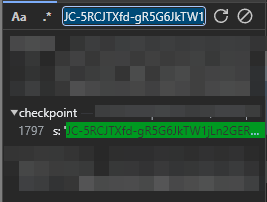
The search results should point to the network request or script that generated this value. Examining the response body of that source request is advisable, as the value might be HTML encoded or embedded within a larger JSON object.
Once the dynamic s data value is successfully scraped by your web scraping or automation script, it must be correctly formatted and submitted to your CAPTCHA solving service, such as CapSolver.
For reCAPTCHA Enterprise and other challenges requiring this parameter, the s data is typically submitted within the enterprisePayload object of the task creation request.
When specifying the data in the required format, it should be entered as follows:
{
  "clientKey": "YOUR_CAPSOLVER_API_KEY",
  "task": {
    "type": "ReCaptchaV2EnterpriseTask", // Or ReCaptchaV3EnterpriseTask
    "websiteURL": "https://example.com",
    "websiteKey": "SITEKEY_FROM_WEBSITE",
    "enterprisePayload": {
      // Required for high-security sites using s data
      "s": "[DYNAMICALLY_SCRAPED_S_VALUE]"
    }
  }
}The key takeaway for successful automation is that this value changes each time. Therefore, your web scraping script must perform the following sequence for every challenge:
s data value.s data along with the sitekey to CapSolver.The s data parameter represents a significant hurdle for basic web scraping tools, but it is a manageable challenge with the right technical approach. By understanding the need for this dynamic parameter and implementing a robust network interception strategy, you can ensure your reCAPTCHA Enterprise and high-security automation tasks maintain a high success rate and avoid costly token invalidation.
Ready to master complex reCAPTCHA challenges? Stop letting dynamic parameters block your data flow. Click here to explore CapSolver's advanced CAPTCHA solving solutions, including support for reCAPTCHA Enterprise and dynamic parameters, and start your free trial today!
Redeem Your CapSolver Bonus Code
Don’t miss the chance to further optimize your operations! Use the bonus code CAPN when topping up your CapSolver account and receive an extra 5% bonus on each recharge, with no limits. Visit the CapSolver to redeem your bonus now!
While not strictly always required, the s data parameter is a common feature of high-security reCAPTCHA Enterprise implementations. It is a crucial indicator that the site is employing advanced risk analysis, and submitting it is a necessary best practice to guarantee token validity.
No. The s data value is a dynamic, time-sensitive data blob. Reusing a previously scraped value will almost certainly result in immediate token invalidation. Your automation script must scrape a fresh s data value before every CAPTCHA solving attempt.
CapSolver provides the necessary API structure (enterprisePayload) to submit the dynamically scraped s data. By receiving this parameter, CapSolver's AI engine can generate a token that passes Google's advanced risk checks, preventing token invalidation and ensuring the success of your web scraping task.
You can find detailed guides on the CapSolver blog:
Ethan Collins
AI Agent Workflow Engineer
Building clearer handoffs between AI agents and tools.
ABOUT THE AUTHOR
Understand reCAPTCHA v3 score range (0.0 to 1.0), its meaning, and how to improve your score. Learn how to handle low scores and optimize user experience.

Facing "reCAPTCHA Invalid Site Key" or "invalid reCAPTCHA token" errors? Discover common causes, step-by-step fixes, and troubleshooting tips to resolve reCAPTCHA verification failed issues. Learn how to fix reCAPTCHA verification failed please try again.



