🎉NEWCapSolver for AI agents-MCP, agent tools, and SDK integrations

Nikolai Smirnov
Software Development Lead
Published Apr 15, 2026
Updated Apr 15, 2026 · min read
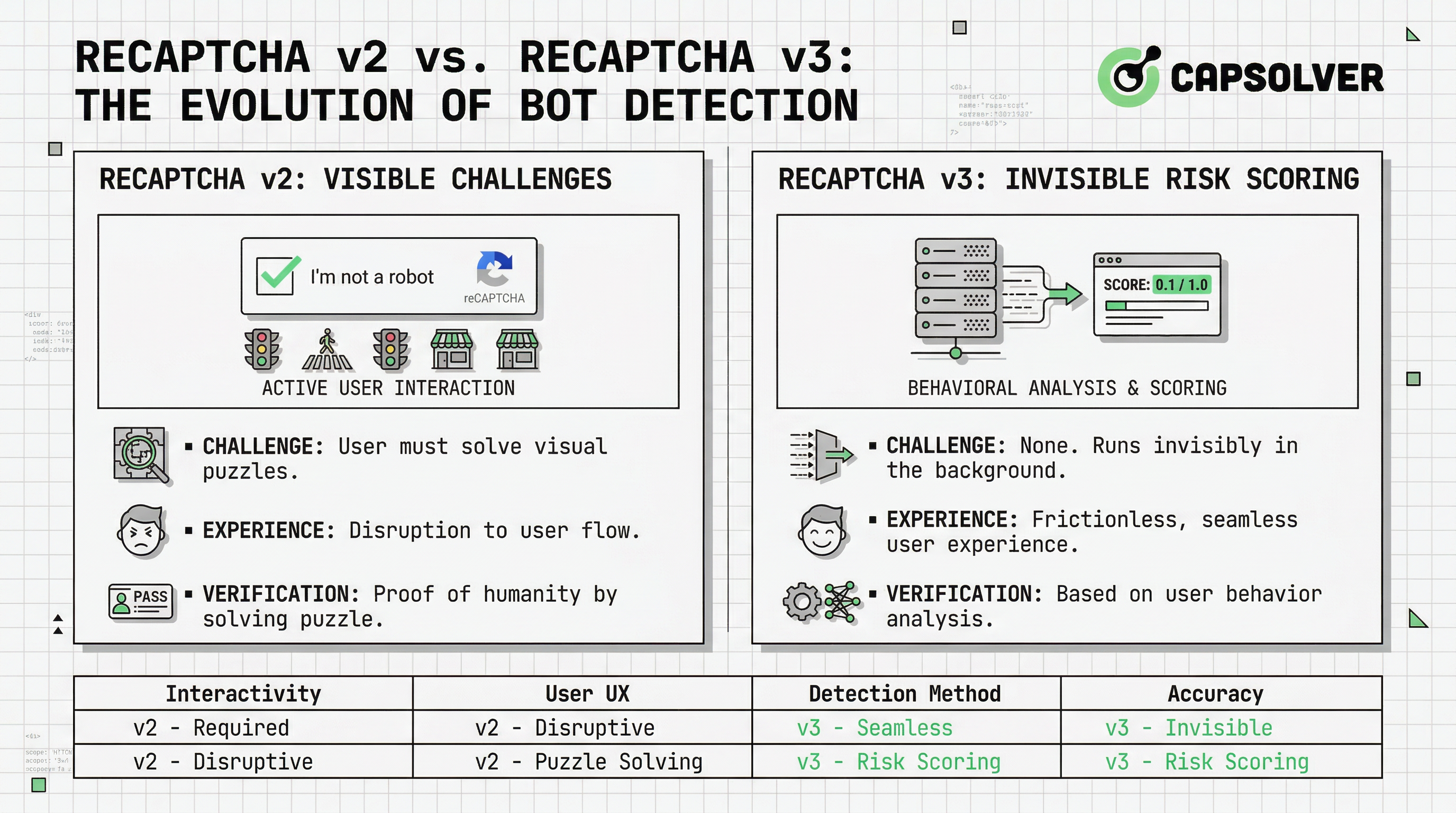
If you've ever built a web form, login page, or checkout flow, you've almost certainly encountered reCAPTCHA. Google's reCAPTCHA is the most widely deployed CAPTCHA system on the internet, protecting millions of sites from automated abuse. But the difference between reCAPTCHA v2 and v3 is more than a version number — the two systems work on fundamentally different principles, serve different UX goals, and require different implementation strategies.
This article breaks down reCAPTCHA v2 vs v3 in plain technical terms: what each version does, how it works under the hood, when to use one over the other, and what developers building automation or data pipelines need to understand about both.
reCAPTCHA is a free service from Google designed to distinguish human users from automated bots. It was originally acquired from Carnegie Mellon University in 2009 and has gone through several major iterations since then.
According to Google's official reCAPTCHA documentation, the current active versions are v2 (with two sub-types) and v3, each targeting a different balance between security and user experience. A fourth tier — reCAPTCHA Enterprise — builds on v3 with additional risk signals and is aimed at large-scale commercial deployments.
Understanding the difference between reCAPTCHA v2 and v3 starts with understanding what problem each version was designed to solve.
reCAPTCHA v2 is the version most users recognize. It presents an explicit challenge that must be completed before a form can be submitted.
When a user lands on a page protected by reCAPTCHA v2, the widget loads and analyzes passive signals — mouse movement, browsing history, cookies. If the system is confident the user is human, it may pass them automatically. If not, it presents a challenge.
There are two sub-types of reCAPTCHA v2:
1. Checkbox ("I'm not a robot")
The user clicks a checkbox. If passive signals are insufficient, an image grid challenge appears (e.g., "select all traffic lights"). This is the most recognizable form of reCAPTCHA v2.
2. Invisible reCAPTCHA v2
No checkbox is shown. The challenge triggers automatically when the user submits a form. If the risk score is too low, a visual challenge appears. This variant reduces friction while maintaining the v2 challenge mechanism.
| Property | reCAPTCHA v2 Checkbox | reCAPTCHA v2 Invisible |
|---|---|---|
| User interaction | Always visible | Only if triggered |
| Challenge type | Image grid / audio | Image grid / audio |
| Token validity | 2 minutes | 2 minutes |
| Implementation complexity | Low | Medium |
| UX friction | High | Medium |
The token generated by a successful v2 challenge is sent to your server and verified via Google's siteverify API. The response is binary: valid or invalid. There is no score.
reCAPTCHA v3 takes a completely different approach. It never shows a challenge to the user. Instead, it runs continuously in the background, collecting behavioral signals and returning a risk score between 0.0 and 1.0.
You embed the reCAPTCHA v3 script on every page you want to monitor. The script collects signals — interaction patterns, timing, device fingerprints — and when you call grecaptcha.execute(), it returns a token. Your server sends that token to Google's siteverify endpoint and receives a JSON response that includes:
login, checkout)According to Google's reCAPTCHA v3 documentation, a score of 0.5 is the default recommended threshold, but Google explicitly states that you should tune this based on your own traffic data.
The score is not a pass/fail verdict. It is a risk signal. Your application decides what to do:
This flexibility is powerful, but it also means reCAPTCHA v3 requires more server-side logic than v2.
Here is a structured comparison of the two versions across the dimensions that matter most for implementation decisions.
| Dimension | reCAPTCHA v2 | reCAPTCHA v3 |
|---|---|---|
| User-facing challenge | Yes (checkbox / image grid) | No |
| Output | Binary (pass/fail token) | Score (0.0–1.0) |
| User friction | High | None |
| False positive risk | Low (explicit pass) | Medium (score tuning required) |
| Implementation effort | Low | Medium–High |
| Server-side logic needed | Minimal | Required |
| Suitable for high-risk actions | Yes | With careful threshold tuning |
| Suitable for passive monitoring | No | Yes |
| Token validity | 2 minutes | 2 minutes |
| Works without user interaction | No (v2 invisible: partial) | Yes |
The core difference between reCAPTCHA v2 and v3 comes down to where the decision is made. In v2, Google makes the call and presents a challenge if needed. In v3, Google provides a signal and your application makes the call.
reCAPTCHA v2 is the right choice when:
The checkbox variant is particularly well-suited for forms where the user is already pausing to fill in fields. The added friction of a CAPTCHA challenge is less disruptive in that context.
reCAPTCHA v3 is the right choice when:
Many production systems use reCAPTCHA v3 as a first layer and fall back to reCAPTCHA v2 when the score is below a threshold. This hybrid approach is explicitly recommended in Google's reCAPTCHA FAQ.
Understanding reCAPTCHA v2 vs v3 also means knowing where developers go wrong.
Mistake 1: Using a fixed v3 threshold without tuning
Google's default of 0.5 is a starting point, not a universal rule. Sites with unusual traffic patterns (e.g., heavy mobile use, international audiences) may need to adjust significantly.
Mistake 2: Treating v3 as a drop-in replacement for v2
They solve different problems. Replacing v2 with v3 on a high-risk form without adding server-side score handling creates a security gap.
Mistake 3: Not verifying the action label
reCAPTCHA v3 tokens include the action name you defined. If you don't verify that the action matches what you expect, a token generated on one page could be replayed on another.
Mistake 4: Caching or reusing tokens
Both v2 and v3 tokens are single-use and expire after two minutes. Reusing a token will always fail verification.
Developers building web scrapers, automated testing suites, RPA pipelines, or data collection tools regularly encounter reCAPTCHA v2 and v3 on target sites. Both versions are designed to detect non-human interaction patterns, which means standard automation frameworks will often trigger challenges or receive low v3 scores.
For legitimate automation use cases — such as automated testing of your own web application, web scraping for market research, or SEO rank tracking — CapSolver provides a programmatic API that handles both reCAPTCHA v2 and v3 token generation.
CapSolver uses AI-powered recognition to return valid tokens that can be submitted to the target site's verification endpoint. This is particularly useful when you need to solve reCAPTCHA v2 challenges or handle reCAPTCHA v3 score requirements within an automated pipeline.
A basic integration with CapSolver's API for reCAPTCHA v2 looks like this (Python example from CapSolver's official documentation):
import capsolver

capsolver.api_key = "YOUR_API_KEY"

solution = capsolver.solve({
    "type": "ReCaptchaV2Task",
    "websiteURL": "https://example.com",
    "websiteKey": "YOUR_SITE_KEY",
})

print(solution["gRecaptchaResponse"])
For reCAPTCHA v3, the task type changes to ReCaptchaV3Task and you supply the pageAction parameter to match the action defined on the target page. Always ensure your automation use case complies with the target site's terms of service and applicable data regulations.
Redeem Your CapSolver Bonus Code
Boost your automation budget instantly!
Use bonus code CAP26 when topping up your CapSolver account to get an extra 5% bonus on every recharge — with no limits.
Redeem it now in your CapSolver Dashboard
This is a common question, and the answer is nuanced.
reCAPTCHA v2 provides a harder gate — a bot must solve a visual or audio challenge to proceed. This is more resistant to simple scripted attacks. However, it is also more disruptive to legitimate users and can be solved by specialized services.
reCAPTCHA v3 provides broader coverage — it monitors behavior across the entire session, not just at a single form submission point. A sophisticated bot that passes a v2 challenge once is done; a bot operating on a v3-protected site must maintain human-like behavior continuously.
In practice, security researchers at USENIX Security 2023 found that behavioral CAPTCHA systems like v3 are more effective against large-scale automated attacks when properly tuned, but more vulnerable to targeted attacks that mimic human behavior patterns.
The most robust deployments use both: v3 for passive monitoring and v2 as a step-up challenge when the score drops below an acceptable threshold.
The difference between reCAPTCHA v2 and v3 is not about which version is newer or better — it is about which model fits your security architecture. reCAPTCHA v2 gives you a clear binary gate with user-visible challenges. reCAPTCHA v3 gives you a continuous risk signal with no user interruption, but requires more sophisticated server-side handling.
For most production applications, the answer is not reCAPTCHA v2 vs v3 but reCAPTCHA v2 and v3 working together. Use v3 to monitor and score, and fall back to v2 when the risk signal demands a harder challenge.
If you are building automation tools that need to interact with either version — for testing, data collection, or workflow automation — CapSolver's API supports both reCAPTCHA v2 and v3 task types with fast response times and straightforward integration. You can explore the full documentation at capsolver.com.
Q1: Can I use reCAPTCHA v3 without any fallback?
Yes, but it is not recommended for high-risk actions. Without a fallback, users who receive a low score will be silently blocked or flagged, with no way to prove they are human. A v2 fallback gives legitimate users a path forward.
Q2: Does reCAPTCHA v3 slow down my website?
The reCAPTCHA v3 script adds a small amount of JavaScript to every page it is loaded on. Google reports the script size at approximately 35KB. For most sites, the performance impact is negligible, but it is worth measuring on pages where load time is critical.
Q3: What is the difference between reCAPTCHA v2 invisible and reCAPTCHA v3?
Both avoid showing a challenge unless necessary, but they work differently. reCAPTCHA v2 invisible still uses the v2 challenge mechanism — it will show an image grid if passive signals are insufficient. reCAPTCHA v3 never shows a challenge; it only returns a score. The decision about what to do with a low score is entirely up to your application.
Q4: How do I choose the right v3 score threshold?
Start with Google's recommended threshold of 0.5, then analyze your traffic data over 1–2 weeks. Look at the score distribution for known-good users (logged-in, verified accounts) versus anonymous traffic. Adjust the threshold to minimize false positives for your specific user base.
Q5: Is reCAPTCHA v3 GDPR compliant?
reCAPTCHA v3 collects behavioral data and sends it to Google's servers, which raises data privacy considerations under GDPR. You should disclose reCAPTCHA usage in your privacy policy and, depending on your jurisdiction, may need to obtain user consent before loading the script. Consult your legal team for guidance specific to your deployment.
Nikolai Smirnov
Software Development Lead
Building dependable software for complex automation.
ABOUT THE AUTHOR
Understand reCAPTCHA v3 score range (0.0 to 1.0), its meaning, and how to improve your score. Learn how to handle low scores and optimize user experience.

Facing "reCAPTCHA Invalid Site Key" or "invalid reCAPTCHA token" errors? Discover common causes, step-by-step fixes, and troubleshooting tips to resolve reCAPTCHA verification failed issues. Learn how to fix reCAPTCHA verification failed please try again.