How to solve reCaptcha v2

Lucas Mitchell
Automation Engineer
28-Aug-2023

What is reCaptcha?
There are several versions of reCAPTCHA:
- reCAPTCHA v1: The original version, which presented users with distorted text and asked them to type it into a box.
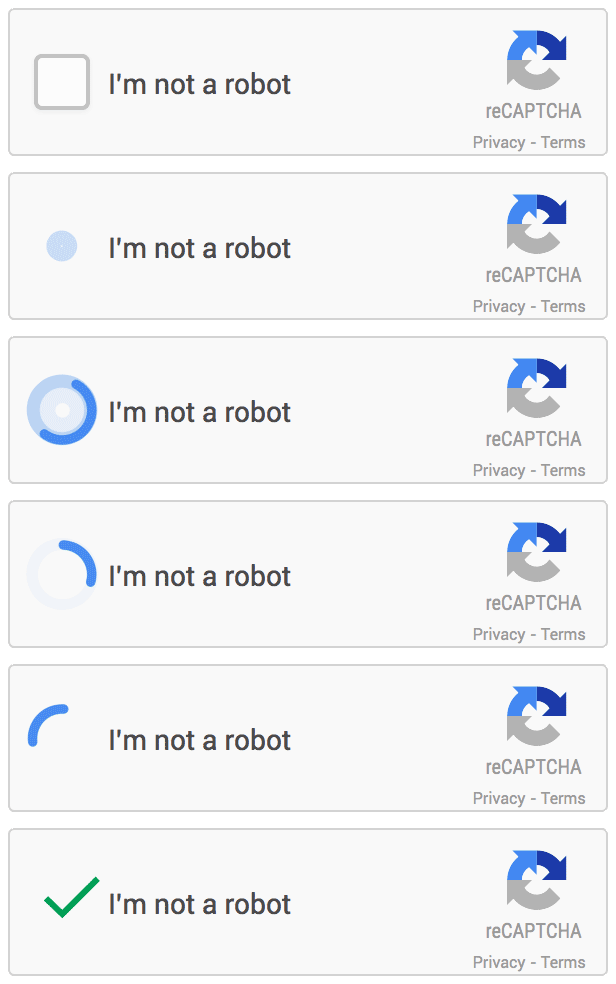
- reCAPTCHA v2: This version asks users to click on a checkbox confirming that they are not a robot. Sometimes it can also ask users to select specific types of images from a grid.
- reCAPTCHA v3: This version works in the background of websites to analyze user behavior and assign a score based on the perceived likelihood that the user is human or a bot. It's a more seamless experience for the user because it doesn't require any specific user interaction like previous versions.
In this blog, we will focus on solving reCAPTCHA v2 and looks like:
How to solve reCaptcha v2
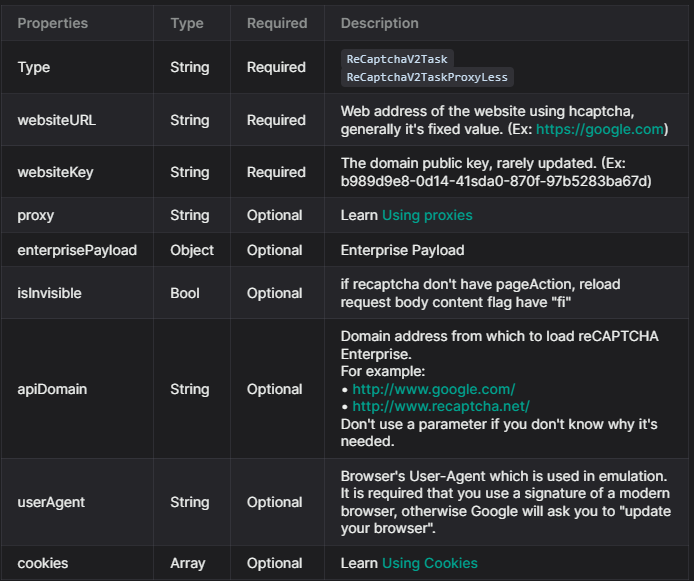
To solve reCaptcha v2, follow our documentation. Some parameters are required and some are optional. For this example, we will only use the required parameters. The task types for reCAPTCHA v2 are:
ReCaptchaV2Task: This task type requires your own proxies.ReCaptchaV2TaskProxyLess: This task type uses the server's built-in proxy.ReCaptchaV2EnterpriseTask: This task type requires your own proxies.ReCaptchaV2EnterpriseTaskProxyLess: This task type uses the server's built-in proxy.
For this example, we will use ReCaptchaV2TaskProxyLess as the site uses standard reCAPTCHA v2. If the site uses Recaptcha Enterprise, you will need to send the correct task type (ReCaptchaV2EnterpriseTaskProxyLess or ReCaptchaV2EnterpriseTask) and ensure all required parameters are included.
If any parameters are missing, you will likely encounter issues with the token not being accepted by the website. You can find all the parameters in this picture:
For get the captcha solved, first you need to submit all the information needed, for this we use the method createTask:
Step 1: Submitting the information to capsolver
JSON
POST https://api.capsolver.com/createTask
{
"clientKey": "YOUR_API_KEY",
"task": {
"type": "ReCaptchaV2TaskProxyless",
"websiteURL": "site url",
"websiteKey": "site key"
}
}
Step 2: Getting the results
To verify the results, you'll need to continuously poll the getTaskResult API endpoint until the captcha is resolved.
Here's an example request:
json
POST https://api.capsolver.com/getTaskResult
Host: api.capsolver.com
Content-Type: application/json
{
"clientKey":"YOUR_API_KEY",
"taskId": "TASKID_OF_CREATETASK" //ID created by the createTask method
}
Once the captcha is successfully resolved, you'll receive a response similar to the one depicted in the following image:
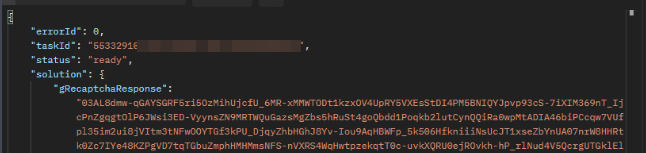
The captcha token received can be verified by submitting it to the relevant site.
⚠️ If the token is rejected, it may indicate that some information is missing or incorrect. We recommend thoroughly checking whether the reCaptcha is standard or enterprise and whether it requires additional parameters listed as optional in our documentation.
In conclusion, while solving reCAPTCHA may seem a daunting task, capsolver.com makes the process swift and efficient. By following the steps outlined above, you can easily resolve reCAPTCHA v2.
Capsolver Team 💜
Compliance Disclaimer: The information provided on this blog is for informational purposes only. CapSolver is committed to compliance with all applicable laws and regulations. The use of the CapSolver network for illegal, fraudulent, or abusive activities is strictly prohibited and will be investigated. Our captcha-solving solutions enhance user experience while ensuring 100% compliance in helping solve captcha difficulties during public data crawling. We encourage responsible use of our services. For more information, please visit our Terms of Service and Privacy Policy.
More

reCAPTCHA Verification Failed? How to Fix "Please Try Again" Errors
Fix reCAPTCHA verification failed errors fast. Step-by-step manual fixes for users and a Python API guide for developers using CapSolver. Covers v2, v3, and Enterprise.

Adélia Cruz
15-Apr-2026

reCAPTCHA v2 vs v3: Key Differences Every Developer Should Know
Understand the difference between reCAPTCHA v2 and v3 — how each works, when to use them, and how automated workflows handle both. A clear, technical comparison for developers.

Nikolai Smirnov
15-Apr-2026

Reliable CAPTCHA Solving API for reCAPTCHA: What to Look For
Looking for a reliable CAPTCHA solving API for reCAPTCHA? Compare top providers on speed, cost, and success rate. Find the best solution for your automation needs.

Rajinder Singh
09-Apr-2026

Optimize CAPTCHA Solving API Response Time for Faster Automation
Learn how to optimize CAPTCHA solving API response time for faster and more reliable automation. This guide covers key factors like CAPTCHA complexity, API performance, and polling strategies, with practical tips using CapSolver to achieve sub-10-second solve times.

Ethan Collins
03-Apr-2026

How to Solve reCAPTCHA v2 Python and API
Learn how to solve reCAPTCHA v2 using Python and API. This comprehensive guide covers Proxy and Proxyless methods with production-ready code for automation.

Sora Fujimoto
25-Mar-2026

How to Automate reCAPTCHA Solving for AI Benchmarking Platforms
Learn how to automate reCAPTCHA v2 and v3 for AI benchmarking. Use CapSolver to streamline data collection and maintain high-performance AI pipelines.

Ethan Collins
27-Feb-2026