🎉NEWCapSolver for AI agents-MCP, agent tools, and SDK integrations

Lucas Mitchell
Automation Engineer
Published Oct 25, 2024
Updated Oct 25, 2024 · min read

When I first started working with reCAPTCHA, I found it to be a double-edged sword. On one hand, it’s great for filtering out bots, but on the other, it can be quite the hurdle for legitimate automation projects. So in this article, I’ll guide you through solving reCAPTCHA using three powerful programming languages: Python, Java, and C++. Each language brings its own advantages to handling reCAPTCHA challenges, offering flexibility depending on your project’s needs. We’ll start by understanding what CAPTCHA and reCAPTCHA are, along with their importance in web security
Lets start with most basic concept: what is CAPTCHA, or "Completely Automated Public Turing test to tell Computers and Humans Apart," which is a common method to differentiate between human users and bots. It helps websites avoid automated attacks, spam, or exploitation by requiring users to solve tasks that are easy for humans but hard for machines. This could be recognizing distorted text, selecting images with specific objects, or solving logic puzzles.
reCAPTCHA is a service developed by Google that helps protect websites from spam and abuse by distinguishing human users from bots. It has evolved over time into different versions, each offering specific capabilities.
reCAPTCHA v2: This is the most common form where users solve tasks like clicking checkboxes ("I'm not a robot") or selecting images. It's more user-friendly but may still display a challenge based on risk factors.
reCAPTCHA v3: This version runs invisibly in the background without interrupting users. It assigns risk scores (0.0 to 1.0) based on user behavior. Low-risk users pass without seeing a challenge, while suspicious activity may trigger verification steps.
reCAPTCHA Enterprise: Designed for enterprise-level protection, this version offers enhanced security features for large businesses. It provides advanced analysis, machine learning models, and risk-based assessment tailored to high-risk transactions, with greater customization to meet business security needs.
Each of these versions aims to provide optimal security while minimizing friction for legitimate users, adapting to the increasing sophistication of bots and attacks.
- reCAPTCHA v2 Demo
View reCAPTCHA v2 demo- reCAPTCHA v3 Demo
View reCAPTCHA v3 demo- reCAPTCHA Enterprise Demo
Learn more about reCAPTCHA Enterprise
Each language offers unique strengths when it comes to handling reCAPTCHA challenges:
Python is known for its simplicity and large set of libraries that facilitate web automation and data scraping. Using libraries like Selenium and Playwright, you can easily automate browser tasks and bypass CAPTCHA with proper tools.
Java is great for enterprise-level applications and cross-platform projects. Its multithreading capabilities and frameworks like Selenium WebDriver allow smooth reCAPTCHA handling in scalable systems.
C++ offers performance advantages, making it ideal for systems that require speed and low latency. Although less commonly used for automation, it can be integrated with other tools to solve reCAPTCHA challenges in high-performance environments.
As you move forward, you’ll notice that solving reCAPTCHA challenges can get tricky due to evolving algorithms and complexities. That’s where CapSolver comes in. It’s a specialized service that automates the reCAPTCHA-solving process with high accuracy, handling multiple CAPTCHA types, including reCAPTCHA v2, reCAPTCHA v3, and more. By integrating CapSolver into your Python, Java, or C++ project, you can offload the complexity of solving CAPTCHA to a dedicated service, allowing your scripts to run smoothly and efficiently.
Next, we’ll walk through the sample code for each language and how you can quickly integrate CapSolver into your project...
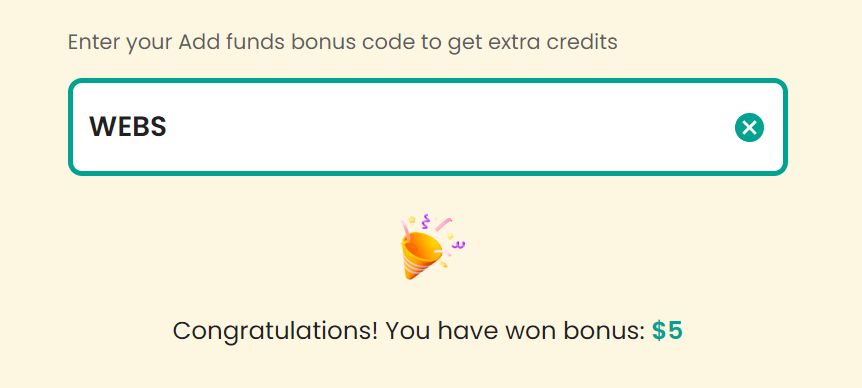
Claim Your Bonus Code for top captcha solutions; CapSolver: WEBS. After redeeming it, you will get an extra 5% bonus after each recharge, Unlimited
Step 1. Obtain the site key
For both V2 and V3, you can search for the request /recaptcha/api2/reload?k=6LcR_okUAAAAAPYrPe-HK_0RULO1aZM15ENyM-Mf in the browser request logs, where k= is the key value we need
Step 2. Differentiate between V2 and V3
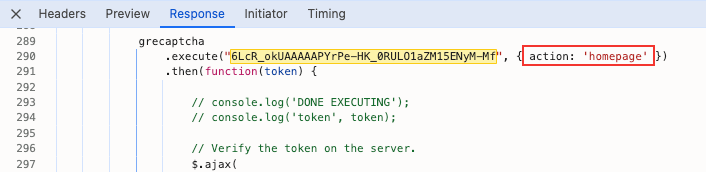
V2 and V3 have different handling methods. V2 requires image recognition to select answers, while V3 is relatively unobtrusive; However, V3 requires providing an Action during verification. Based on the previously obtained key value, search the response page, and you'll find the Action value in the page
Step 3. Call the CapSolver service
/recaptcha/api2/reload request, a /recaptcha/api2/userverify request is usually needed to obtain the passage token;/recaptcha/api2/reloadrequest can obtain the passage token directly# pip install requests
import requests
import time
# TODO: set your config
api_key = "YOUR_API_KEY" # your api key of capsolver
site_key = "6Le-wvkSAAAAAPBMRTvw0Q4Muexq9bi0DJwx_mJ-" # site key of your target site
site_url = "https://www.google.com/recaptcha/api2/demo" # page url of your target site
# site_key = "6LelzS8UAAAAAGSL60ADV5rcEtK0x0lRsHmrtm62"
# site_url = "https://mybaragar.com/index.cfm?event=page.SchoolLocatorPublic&DistrictCode=BC45"
def capsolver():
payload = {
"clientKey": api_key,
"task": {
"type": 'ReCaptchaV2TaskProxyLess',
"websiteKey": site_key,
"websiteURL": site_url
}
}
res = requests.post("https://api.capsolver.com/createTask", json=payload)
resp = res.json()
task_id = resp.get("taskId")
if not task_id:
print("Failed to create task:", res.text)
return
print(f"Got taskId: {task_id} / Getting result...")
while True:
time.sleep(3) # delay
payload = {"clientKey": api_key, "taskId": task_id}
res = requests.post("https://api.capsolver.com/getTaskResult", json=payload)
resp = res.json()
status = resp.get("status")
if status == "ready":
return resp.get("solution", {}).get('gRecaptchaResponse')
if status == "failed" or resp.get("errorId"):
print("Solve failed! response:", res.text)
return
token = capsolver()
print(token)# pip install requests
import requests
import time
# TODO: set your config
api_key = "YOUR_API_KEY" # your api key of capsolver
site_key = "6LcR_okUAAAAAPYrPe-HK_0RULO1aZM15ENyM-Mf" # site key of your target site
site_url = "https://antcpt.com/score_detector/" # page url of your target site
def capsolver():
payload = {
"clientKey": api_key,
"task": {
"type": 'ReCaptchaV3TaskProxyLess',
"websiteKey": site_key,
"websiteURL": site_url,
"pageAction": "homepage",
}
}
res = requests.post("https://api.capsolver.com/createTask", json=payload)
resp = res.json()
task_id = resp.get("taskId")
if not task_id:
print("Failed to create task:", res.text)
return
print(f"Got taskId: {task_id} / Getting result...")
while True:
time.sleep(1) # delay
payload = {"clientKey": api_key, "taskId": task_id}
res = requests.post("https://api.capsolver.com/getTaskResult", json=payload)
resp = res.json()
status = resp.get("status")
if status == "ready":
return resp.get("solution", {}).get('gRecaptchaResponse')
if status == "failed" or resp.get("errorId"):
print("Solve failed! response:", res.text)
return
# verify score
def score_detector(token):
headers = {
"accept": "application/json, text/javascript, */*; q=0.01",
"accept-language": "fr-CH,fr;q=0.9",
"content-type": "application/json",
"origin": "https://antcpt.com",
"priority": "u=1, i",
"referer": "https://antcpt.com/score_detector/",
"sec-ch-ua": "\"Not/A)Brand\";v=\"8\", \"Chromium\";v=\"126\", \"Google Chrome\";v=\"126\"",
"sec-ch-ua-mobile": "?0",
"sec-ch-ua-platform": "\"macOS\"",
"sec-fetch-dest": "empty",
"sec-fetch-mode": "cors",
"sec-fetch-site": "same-origin",
"user-agent": "Mozilla/5.0 (Macintosh; Intel Mac OS X 10_15_7) AppleWebKit/537.36 (KHTML, like Gecko) Chrome/126.0.0.0 Safari/537.36",
"x-requested-with": "XMLHttpRequest"
}
url = "https://antcpt.com/score_detector/verify.php"
data = {
"g-recaptcha-response": token
}
data = json.dumps(data, separators=(',', ':'))
response = requests.post(url, headers=headers, data=data)
print(response.json())
print(response)
token = capsolver()
print(token)
...
...
{
'success': True,
'challenge_ts': '2024-07-19T10:50:56Z',
'hostname': 'antcpt.com',
'score': 0.7,
'action': 'homepage'
}Before we dive into the code, there are a few prerequisites you should have in place to follow along with this tutorial successfully:
Once you’ve met these prerequisites, you’re ready to set up your environment and start solving reCAPTCHA challenges with JavaScript and CapSolver.
/recaptcha/api2/reload?k=6Le-wvkSAAAAAPBMRTvw0Q4Muexq9bi0DJwx_mJ-, where the value after k= is the Site Key we need. Or you can find all the paramters to solve recapctha through CapSolver extensionpip install requestsimport requests
import time
from DrissionPage import ChromiumPage
# Create an instance of ChromiumPage
page = ChromiumPage()
# Access the example page that triggers reCAPTCHA
page.get("https://www.google.com/recaptcha/api2/demo")
# TODO: Set your configuration
api_key = "your api key of capsolver" # Your CapSolver API key
site_key = "6Le-wvkSAAAAAPBMRTvw0Q4Muexq9bi0DJwx_mJ-" # Site key of your target site
site_url = "https://www.google.com/recaptcha/api2/demo" # Page URL of your target site
def capsolver():
payload = {
"clientKey": api_key,
"task": {
"type": 'ReCaptchaV2TaskProxyLess',
"websiteKey": site_key,
"websiteURL": site_url
}
}
# Send a request to CapSolver to create a task
res = requests.post("https://api.capsolver.com/createTask", json=payload)
resp = res.json()
task_id = resp.get("taskId")
if not task_id:
print("Failed to create task:", res.text)
return
print(f"Got taskId: {task_id} / Getting result...")
while True:
time.sleep(3) # Delay
payload = {"clientKey": api_key, "taskId": task_id}
# Query task results
res = requests.post("https://api.capsolver.com/getTaskResult", json=payload)
resp = res.json()
status = resp.get("status")
if status == "ready":
return resp.get("solution", {}).get('gRecaptchaResponse')
if status == "failed" or resp.get("errorId"):
print("Solve failed! response:", res.text)
return
def check():
# Get the reCAPTCHA solution
token = capsolver()
# Set the reCAPTCHA response value
page.run_js(f'document.getElementById("g-recaptcha-response").value="{token}"')
# Call the success callback function
page.run_js(f'onSuccess("{token}")')
# Submit the form
page.ele('x://input[@id="recaptcha-demo-submit"]').click()
if __name__ == '__main__':
check()Before we start, ensure you have the following libraries installed:
You can install these using vcpkg:
vcpkg install cpr jsoncppCreate a new C++ project and include the necessary headers for cpr and jsoncpp.
#include <iostream>
#include <cpr/cpr.h>
#include <json/json.h>We'll define two main functions: createTask and getTaskResult.
Here's the complete code:
#include <iostream>
#include <cpr/cpr.h>
#include <json/json.h>

std::string createTask(const std::string& apiKey, const std::string& websiteURL, const std::string& websiteKey) {
    Json::Value requestBody;
    requestBody["clientKey"] = apiKey;
    requestBody["task"]["type"] = "ReCaptchaV2Task";
    requestBody["task"]["websiteURL"] = websiteURL;
    requestBody["task"]["websiteKey"] = websiteKey;

    Json::StreamWriterBuilder writer;
    std::string requestBodyStr = Json::writeString(writer, requestBody);

    cpr::Response response = cpr::Post(
        cpr::Url{"https://api.capsolver.com/createTask"},
        cpr::Body{requestBodyStr},
        cpr::Header{{"Content-Type", "application/json"}}
    );

    Json::CharReaderBuilder reader;
    Json::Value responseBody;
    std::string errs;
    std::istringstream s(response.text);
    std::string taskId;

    if (Json::parseFromStream(reader, s, &responseBody, &errs)) {
        if (responseBody["errorId"].asInt() == 0) {
            taskId = responseBody["taskId"].asString();
        } else {
            std::cerr << "Error: " << responseBody["errorCode"].asString() << std::endl;
        }
    } else {
        std::cerr << "Failed to parse response: " << errs << std::endl;
    }

    return taskId;
}

std::string getTaskResult(const std::string& apiKey, const std::string& taskId) {
    Json::Value requestBody;
    requestBody["clientKey"] = apiKey;
    requestBody["taskId"] = taskId;

    Json::StreamWriterBuilder writer;
    std::string requestBodyStr = Json::writeString(writer, requestBody);

    while (true) {
        cpr::Response response = cpr::Post(
            cpr::Url{"https://api.capsolver.com/getTaskResult"},
            cpr::Body{requestBodyStr},
            cpr::Header{{"Content-Type", "application/json"}}
        );

        Json::CharReaderBuilder reader;
        Json::Value responseBody;
        std::string errs;
        std::istringstream s(response.text);

        if (Json::parseFromStream(reader, s, &responseBody, &errs)) {
            if (responseBody["status"].asString() == "ready") {
                return responseBody["solution"]["gRecaptchaResponse"].asString();
            } else if (responseBody["status"].asString() == "processing") {
                std::cout << "Task is still processing, waiting for 5 seconds..." << std::endl;
                std::this_thread::sleep_for(std::chrono::seconds(5));
            } else {
                std::cerr << "Error: " << responseBody["errorCode"].asString() << std::endl;
                break;
            }
        } else {
            std::cerr << "Failed to parse response: " << errs << std::endl;
            break;
        }
    }

    return "";
}

int main() {
    std::string apiKey = "YOUR_API_KEY";
    std::string websiteURL = "https://example.com";
    std::string websiteKey = "SITE_KEY";

    std::string taskId = createTask(apiKey, websiteURL, websiteKey);
    if (!taskId.empty()) {
        std::cout << "Task created successfully. Task ID: " << taskId << std::endl;
        std::string recaptchaResponse = getTaskResult(apiKey, taskId);
        std::cout << "reCAPTCHA Response: " << recaptchaResponse << std::endl;
    } else {
        std::cerr << "Failed to create task." << std::endl;
    }

    return 0;
}As I wrap up, I can confidently say that integrating CapSolver into my projects has made handling reCAPTCHA challenges much easier. Whether it's V2 or V3, the process is straightforward and has saved me a lot of time. If you're dealing with similar challenges, I highly recommend trying out CapSolver—it’s been a game-changer for me.
Lucas Mitchell
Automation Engineer
Helping browser automation recover and continue.
ABOUT THE AUTHOR
Understand reCAPTCHA v3 score range (0.0 to 1.0), its meaning, and how to improve your score. Learn how to handle low scores and optimize user experience.

Facing "reCAPTCHA Invalid Site Key" or "invalid reCAPTCHA token" errors? Discover common causes, step-by-step fixes, and troubleshooting tips to resolve reCAPTCHA verification failed issues. Learn how to fix reCAPTCHA verification failed please try again.