
🎉NEWCapSolver for AI agents-MCP, agent tools, and SDK integrations

Khadija Santos
AI Agent & MCP Engineer
Published May 21, 2026
Updated May 21, 2026 · min read
In our previous article, we explored how the Agentic Browser transforms from a passive "display tool" into an active "action agent." We examined its core architecture: intent understanding, environmental perception, and action execution. However, as these digital agents navigate the real-world web, CAPTCHA checkpoints can interrupt otherwise valid workflows. This article focuses on the "invisible engine"—the CAPTCHA solving infrastructure—that helps authorized agents pause, submit the required task context, verify the result, and continue. We will examine why CAPTCHA checkpoints are a common operational challenge for AI and how specialized services like CapSolver support the next generation of authorized web automation.
Responsible use: CapSolver is intended only for lawful, authorized automation, including testing systems you own or have permission to access. Use for fraud, fake accounts, unauthorized purchasing, spam, or access-control abuse is prohibited under the CapSolver Terms & Conditions.
Imagine this scenario: a QA team asks an Agentic Browser to complete a multi-step form in a staging environment it owns. The agent opens the page, locates the required fields, and reaches a CAPTCHA checkpoint before submission. The workflow pauses until verification is completed. CAPTCHA, this “Turing Test” born in the early days of the Internet, has become a practical reliability challenge for authorized AI-agent workflows.
CAPTCHA stands for “Completely Automated Public Turing Test to Tell Computers and Humans Apart.” Its original purpose was simple: keep bots out while letting humans in. But as AI has evolved, CAPTCHAs have continuously evolved as well — from simple distorted letters to complex sliders, image-selection tasks, and behavioral analysis systems. They are no longer merely a character-recognition problem.
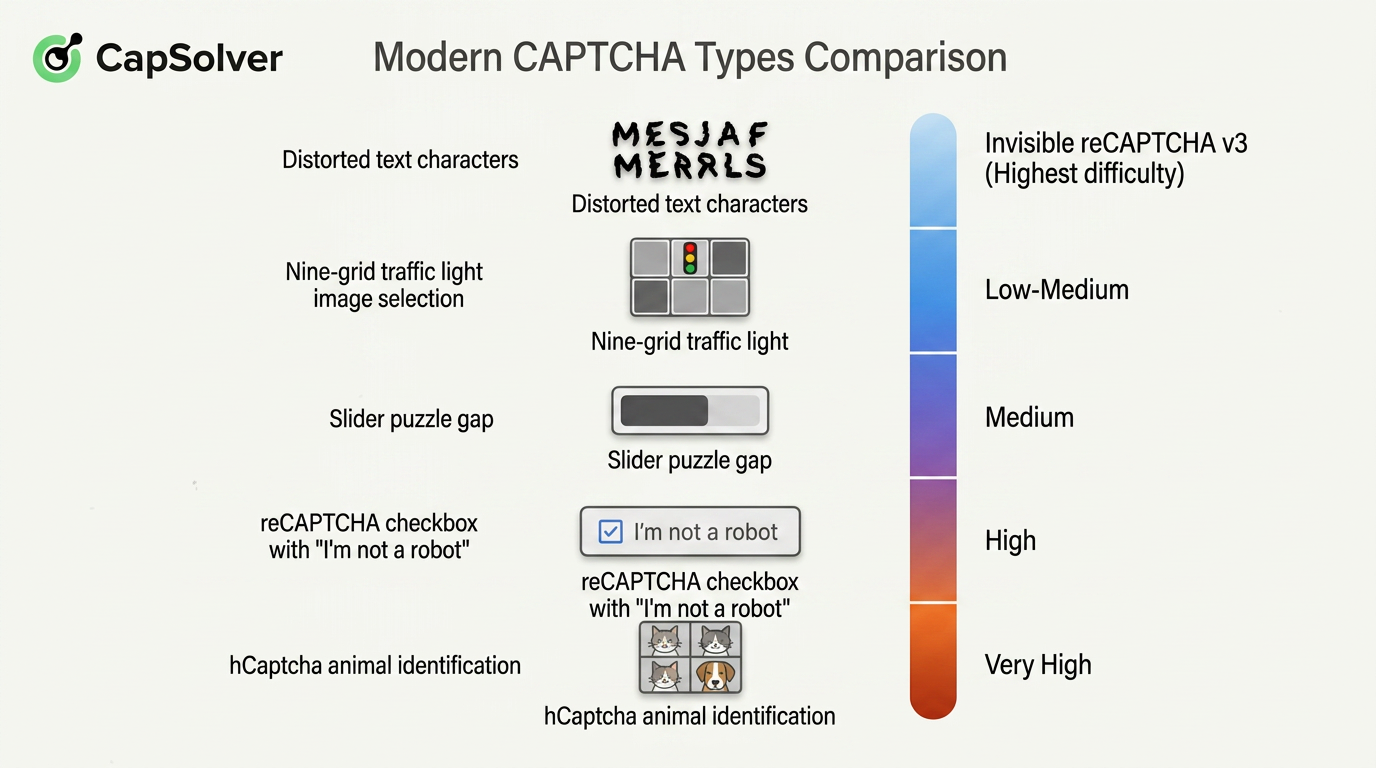
For traditional automation scripts, CAPTCHA checkpoints can stop a workflow. For Agentic Browsers, they create three main operational challenges:
A dramatic increase in perception difficulty: Even the most advanced multimodal models struggle to reliably recognize heavily distorted text, blurry image objects, or slider gaps hidden within complex backgrounds. AI can simply “see it wrong,” and a single mistake may break the entire workflow.
Layered verification signals: Modern CAPTCHAs are no longer just front-end challenges. Websites may evaluate mouse trajectories, typing rhythms, page dwell time, browser context, and other session signals. When a request does not satisfy the site's access policies, additional verification may be required.
Time sensitivity and contextual disruption: CAPTCHAs usually come with expiration limits. When an Agentic Browser remains at a CAPTCHA checkpoint for too long during a multi-step task, login sessions may expire and the task chain may need to restart.
In other words, Agentic Browsers need a controlled way to pause at CAPTCHA checkpoints, submit documented inputs, and resume only after verification succeeds. This is why CAPTCHA-handling infrastructure such as CapSolver can be part of authorized browser workflows.
CapSolver is not a tool aimed at ordinary users, but rather a “CAPTCHA engine” hidden deep within developers’ toolkits. At its core, it is an intelligent CAPTCHA-solving platform that provides API interfaces specifically designed to help automation programs and AI agents handle various types of CAPTCHAs.
We can think of it as a 24/7 on-call CAPTCHA-solving team that never gets tired and operates at extremely high speed — except that its “team members” consist not only of sophisticated AI models, but also highly optimized strategy algorithms.
To better understand its capabilities, the following comparison table illustrates the differences between traditional approaches and CapSolver when facing the same CAPTCHA challenges:
| Comparison Dimension | Local OCR / Simple Models | Human CAPTCHA-Solving Platforms | CapSolver |
|---|---|---|---|
| Supported CAPTCHA Types | Only simple text CAPTCHAs; image selection is mostly ineffective | Theoretically supports all types, but slow and expensive | Covers mainstream CAPTCHAs types |
| Recognition Speed | Milliseconds, but with low success rates | 5–15 seconds per attempt | 1–3 seconds per attempt |
| Success Rate | Low (worse on complex CAPTCHAs) | Relatively high, but affected by worker fatigue and network latency | High and stable |
| Cost Structure | One-time development cost | Pay-per-task with high labor costs | Pay-per-task with low pricing and low marginal costs |
| Browser Workflow Integration | Requires custom integration | Requires separate task coordination | Can integrate with browser environments and return documented task results |
Table 1-1 Comparison Between Traditional CAPTCHA-Solving Methods and CapSolver Capabilities
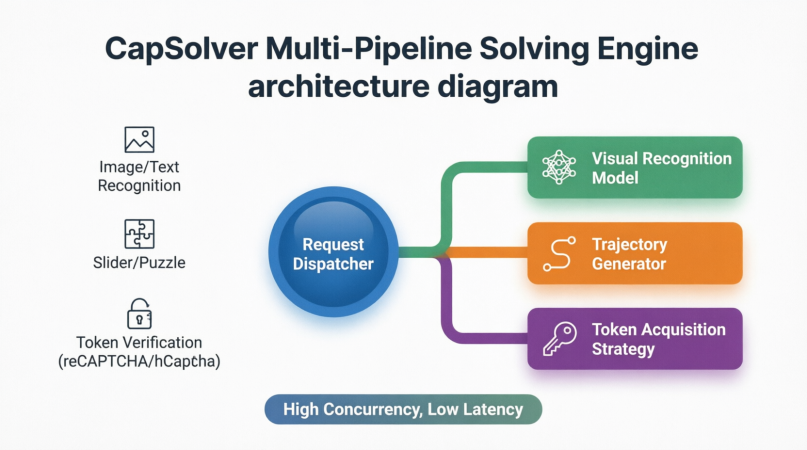
CapSolver uses specialized processing pipelines for different CAPTCHA types:
Image and text recognition CAPTCHAs: Using proprietary vision models combined with massive training datasets, CapSolver can accurately recognize heavily distorted, overlapping, or noisy text.
Slider and puzzle CAPTCHAs: CapSolver uses the documented task flow for the selected challenge type and returns the corresponding result for the authorized client workflow to apply.
Token-based verification systems (reCAPTCHA v2/v3, Cloudflare, etc.): These systems may return a one-time token after the required task parameters are submitted. CapSolver uses documented inputs such as the website URL, site key, and supported optional context, then returns the supported result for the authorized client workflow to submit.
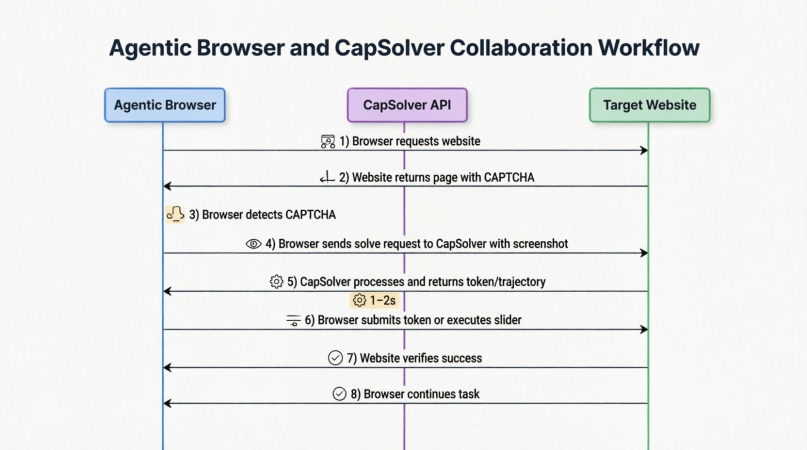
So how do CapSolver and Agentic Browsers collaborate in practice? The following diagram illustrates the complete process:
From the moment the browser encounters a CAPTCHA, collects the required task context, calls the CapSolver API, receives a supported result, submits the verification, and resumes the original task, the workflow is tightly integrated and typically completed within 1–2 seconds.
This means that for Agentic Browsers, CAPTCHAs are no longer problems that AI itself must “see” and “guess.” Instead, they become standardized tasks outsourced to specialized infrastructure providers. The browser only needs to capture the challenge, package the required context, submit it, wait for the result, and continue after verifying the page state.
Now let us connect the dynamic adaptation module of an Agentic Browser with CapSolver and examine a controlled CAPTCHA-handling workflow. Only use this process on sites you own or are explicitly authorized to automate.
While the Agentic Browser is executing tasks, its environmental perception layer continuously monitors the webpage. Once a CAPTCHA element is detected (for example, a popup containing a reCAPTCHA iframe), action execution immediately pauses and triggers a dedicated CAPTCHA-handling sub-process.
This process is highly sophisticated and generally includes the following steps:
Context Collection: The Agentic Browser captures screenshots of the CAPTCHA region and gathers contextual information such as the current URL, sitekey, browser viewport dimensions, and User-Agent.
Task Submission: The screenshots and parameters are packaged together and sent to CapSolver via API while specifying the CAPTCHA type.
Background Solving: After receiving the task, CapSolver routes it through the corresponding solving pipeline. For instance, when encountering reCAPTCHA v2, it invokes a dedicated solver to return a valid g-recaptcha-response token. The entire solving process is usually completed within 1–2 seconds.
Instruction Return: The Agentic Browser receives the result specified for the supported task type, such as a token string.
On-Site Execution: The Agentic Browser applies the returned result through the documented callback, field, or client-side handler. After the page confirms verification, the authorized task flow can resume.
State Verification: The browser verifies whether the page has successfully passed validation and whether the target elements have reappeared before continuing the interrupted workflow.
It is important to note that modern CAPTCHAs come in many forms with varying levels of complexity. The following diagram categorizes mainstream CAPTCHA types and marks their corresponding complexity levels:
For end users, the entire process remains completely transparent. In the Agentic Browser’s task log, users may only see a simple message such as:
“reCAPTCHA v2 detected. Automatically resolved in 1.2 seconds.”
A checkpoint that would previously have halted the automation workflow can be handled in the background and recorded in the task log.
This improves AI-agent workflow continuity: the agent can handle supported verification checkpoints in authorized environments while preserving page and session context. CAPTCHA-solving infrastructure functions as an “invisible engine” within a bounded, observable workflow.
Without a controlled handling path, a CAPTCHA popup can still interrupt an otherwise valid automated task.
If the previous chapters made this technology feel distant, the following examples may completely change your perspective. Agentic Browsers are not abstract concepts floating in the future — they are rapidly entering three major domains: personal productivity, enterprise automation, and data collection. In each area, they are solving practical problems at different levels.
The following diagram summarizes the core application scenarios of Agentic Browsers:
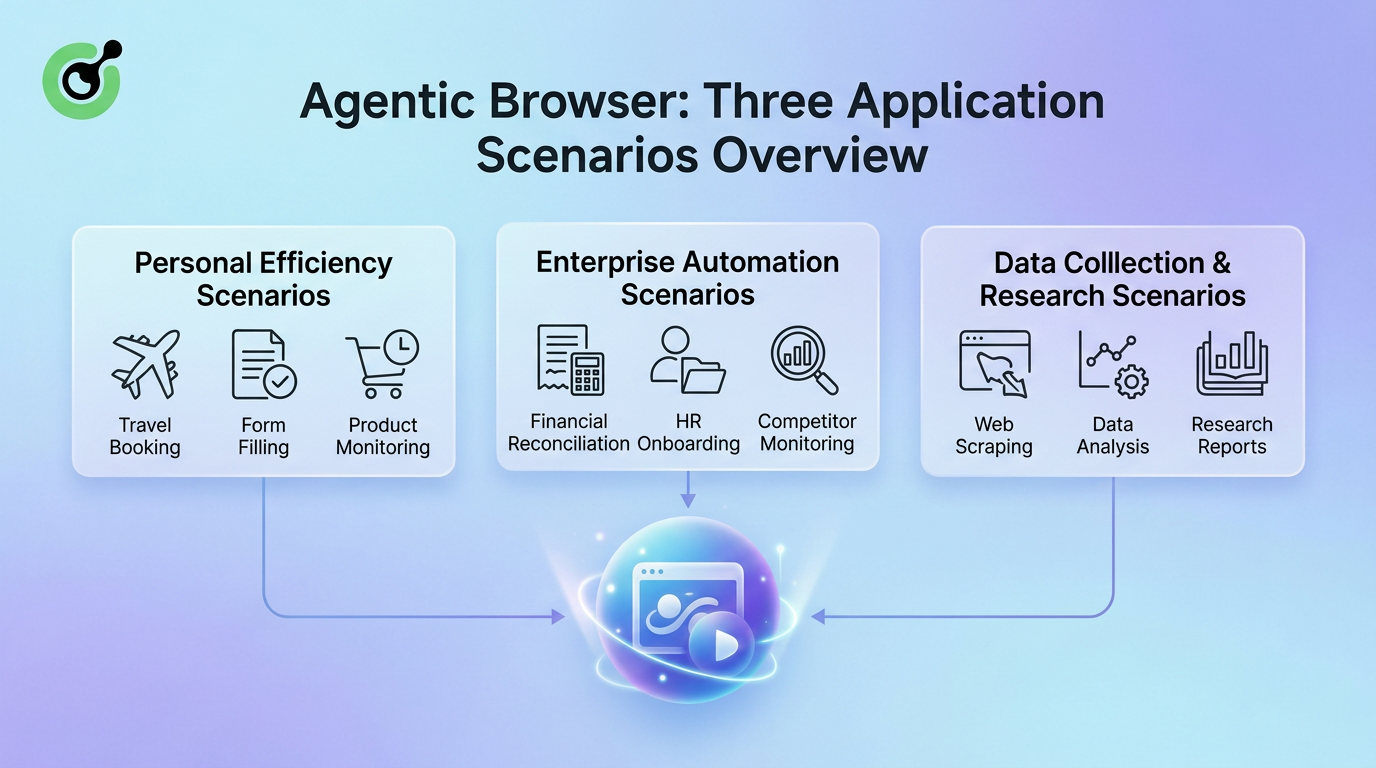
The applications of Agentic Browsers span from individual users to large enterprises, and from daily tasks to professional research workflows. In personal productivity, they help users book trips, fill repetitive forms, and monitor product price fluctuations. In enterprise automation, they handle financial reconciliation, employee onboarding, and competitor tracking. In data collection and research, they serve as tireless crawlers and intelligent analysis assistants.
Next, we will examine these three scenarios in detail to understand how Agentic Browsers actually “get work done.”
For ordinary users, the most immediate value of an Agentic Browser is simple: saving time.
Every day, people perform countless repetitive and multi-step online tasks inside browsers. These tasks usually share three characteristics:
Agentic Browsers excel at taking over exactly these kinds of tasks — situations where users know what they want done, but do not want to perform the operations manually.
In personal productivity scenarios, Agentic Browsers can assist with the following typical tasks:
For example, an Agentic Browser can compare flight or hotel options, filter results based on time, preferences, or budget, and prepare the selected details for the user to review and confirm.
Tasks such as visa applications, school applications, or expense reimbursements often require users to repeatedly enter the same information across multiple forms.
An Agentic Browser acts as an “information manager” by securely remembering user data, automatically identifying form fields, and intelligently mapping them. For example, it may split a full name into “First Name” and “Last Name” automatically.
Agentic Browsers can monitor product inventory, price changes, or new product releases in the background. Once predefined conditions are met — such as a price drop or restocking event — the browser immediately notifies the user for review.
To better illustrate the transformation in user experience, the following table compares traditional workflows with Agentic Browser workflows:
| Task Type | Traditional Workflow Time Cost | Agentic Browser Workflow | User Role Transformation |
|---|---|---|---|
| Comparing and booking a flight | 15–30 minutes (manually browsing multiple websites) | 1 minute (describe requirements and confirm recommendations) | From executor → decision maker |
| Filling out complex online forms | 20–40 minutes (repeatedly entering identical information) | 2 minutes (reviewing autofill results and correcting minor differences) | From data-entry operator → reviewer |
| Monitoring product restocks or price drops | Extremely time-consuming (manual refreshing and constant attention) | 0 minutes (background monitoring with automatic notifications) | From monitor → receiver |
| Cross-platform data organization | 1–2 hours (copy-pasting and formatting) | 5 minutes (automatic extraction and formatting) | From manual operator → analyst |
Table 2-1 Comparison Between Traditional Personal Tasks and Agentic Browser Efficiency
As shown above, the Agentic Browser effectively acts as a personal assistant. It frees users from being “operators of workflows” and transforms them into “setters of goals” and “reviewers of outcomes.”
If personal productivity improvements are about “reducing effort,” then the value of Agentic Browsers in enterprise environments is about connection.
Large organizations often rely on numerous disconnected legacy systems, SaaS platforms, and supplier portals that cannot easily integrate through APIs. Employees are forced to become “human glue,” manually transferring information between systems repeatedly.
This is precisely where Agentic Browsers demonstrate their strongest advantages.
With explicit authorization, an Agentic Browser can access organization-controlled financial or supplier portals, retrieve approved records, compare them against ERP systems, generate discrepancy reports, and prepare notification drafts for review.
Organizations can predefine onboarding task packages. Within organization-controlled systems and approved access policies, the Agentic Browser can prepare or complete authorized account-provisioning steps across HR and IT systems.
Agentic Browsers can function as “market radar” systems by visiting public pages that permit automated access, identifying relevant information changes, and storing them in structured databases within applicable terms and rate limits.
To better illustrate the unique positioning of Agentic Browsers in enterprise automation, the following table compares them with manual operations and traditional API integrations:
| Dimension | Manual Operations | API Integration Development | Agentic Browser |
|---|---|---|---|
| Applicable Systems | Any system a user is authorized to access | Only systems with open APIs | Authorized web-based systems, including organization-controlled legacy systems |
| Deployment Cycle | No development required, but time-consuming | Weeks to months (depends on development resources) | Hours to days (task configuration and testing) |
| Flexibility | High (humans adapt dynamically) | Low (interface rewrites required after changes) | High (AI dynamically adapts to page changes) |
| CAPTCHA/Login Handling | Manual handling required | Usually difficult to handle directly | Can invoke configured CAPTCHA handling within authorized workflows |
| Scalability | Poor | Extremely strong | Strong (parallel task execution possible) |
| Typical Failure Scenarios | Human fatigue and omissions | API rate limits or version incompatibility | May require human confirmation in extremely chaotic page conditions |
Table 2-2 Comparison of Enterprise Cross-System Automation Solutions
As shown above, Agentic Browsers are not designed to replace APIs. Instead, they provide a lightweight integration layer in situations where APIs are unavailable or too costly to implement.
By leveraging the flexibility and adaptability of AI, Agentic Browsers fill the gaps left by traditional automation approaches, enabling enterprises to achieve intelligent cross-system coordination without rebuilding legacy infrastructure.
Data is often described as the oil of the digital age, yet efficiently collecting clean public web data has always been difficult.
Traditional web crawlers rely on fixed parsing rules. Once target websites redesign their layouts or require additional verification, crawlers may fail entirely. Automated collection should continue only when access is authorized and consistent with applicable site terms. Academic researchers, market research firms, and investigative journalism teams frequently need to extract specific information from large numbers of public webpages, making traditional approaches expensive and time-consuming.
Agentic Browsers introduce an entirely new paradigm for data collection:
A shift from extraction based on “code rules” to extraction based on “semantic objectives.”
Their workflow generally operates as follows:
Researchers describe the required data dimensions and sample ranges using natural language. For example:
“Extract product titles, prices, ratings, and review counts from the top 100 e-commerce product pages while excluding sponsored products.”
The Agentic Browser autonomously navigates webpages, identifies relevant information blocks through environmental perception, intelligently extracts and structures the data, and handles complex interactions such as pagination, infinite scrolling, and popups.
When target websites redesign their layouts, traditional crawlers often collapse immediately. In contrast, Agentic Browsers attempt to relocate information visually and continue execution.
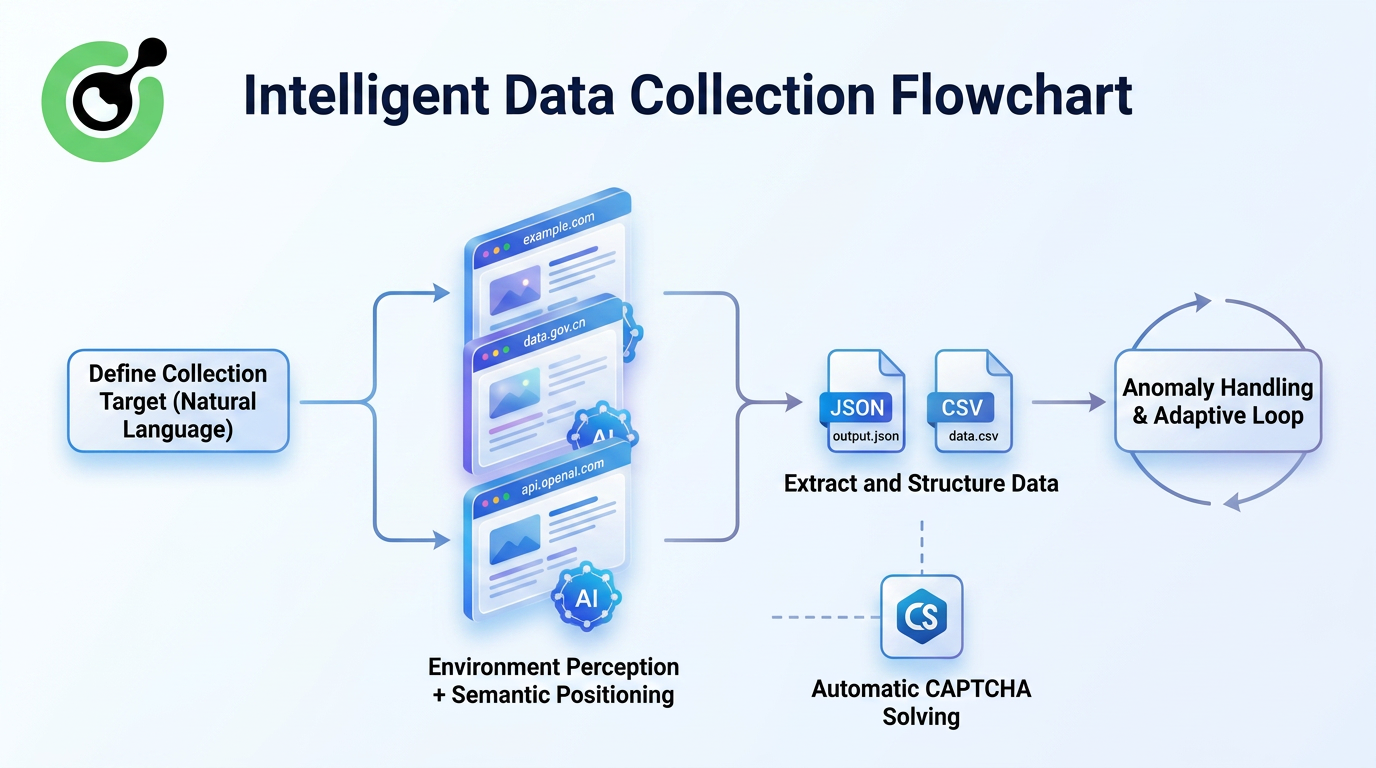
This approach introduces several fundamental improvements:
AI understands what a “price” looks like semantically rather than depending on fixed HTML class names.
Minor layout changes no longer immediately break extraction pipelines.
For authorized websites requiring login, infinite scrolling, or tab switching, Agentic Browsers can use supported browser actions and approved sessions before extracting permitted information.
Task configurations can be saved and shared, making data collection standardized and reproducible.
To better demonstrate the resilience advantages of Agentic Browsers in data collection tasks, the following figure compares traditional crawlers and Agentic Browsers after multiple website redesigns:
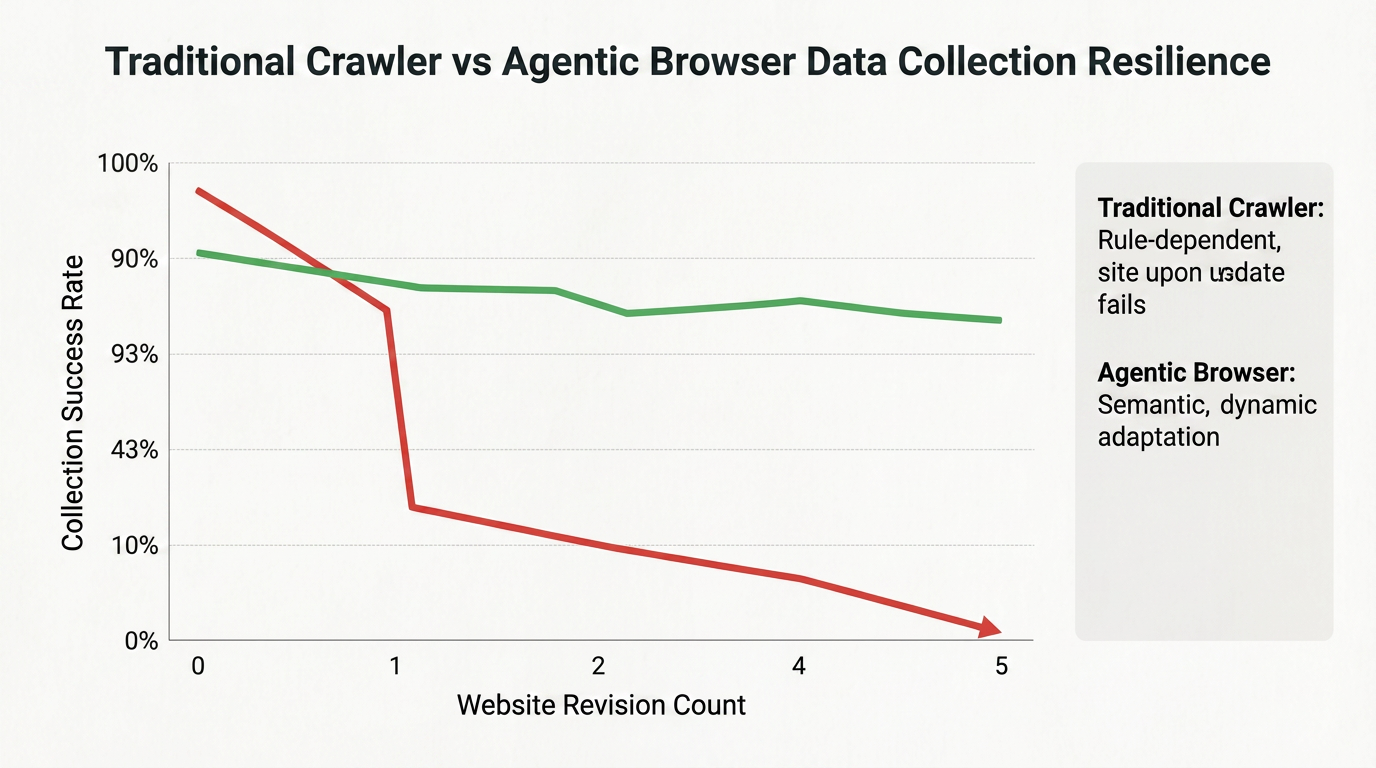
Traditional crawlers experience dramatic success-rate declines after the first website redesign, whereas Agentic Browsers maintain relatively high extraction success rates even after multiple redesigns due to their visual localization and semantic understanding capabilities.
This resilience makes them ideal for long-term, large-scale data collection projects.
For example, imagine a social-science research team that needs to compare specific policy clauses across 200 policy websites spanning 30 countries. Traditionally, this would require research assistants to spend months manually copying and organizing information.
Now, the researchers can configure an Agentic Browser task that visits public policy pages within applicable terms and rate limits, locates pages containing target keywords, extracts the relevant clauses, and categorizes them automatically.
Researchers only need to review and analyze the collected results afterward, allowing valuable human effort to focus on actual “research” rather than repetitive “manual transport work.”
The Agentic Browser represents not just a new product, but a whole new philosophy of being online. Its core logic is: the browser should not just be an interface waiting for you to click, but an intelligent agent that understands your intent and helps you complete tasks. From a technical implementation perspective, it relies on the reasoning ability of large language models to plan tasks, multi-modal perception to understand web pages, a real browser environment to execute operations, and infrastructure like CapSolver to handle supported verification checkpoints in authorized automation. The fusion of these technologies is upgrading the "information window" we have used for thirty years into a true "action platform."
Q1: Why can't general AI models solve CAPTCHAs on their own?
A1: While general AI models are powerful, CAPTCHAs are specifically designed to be adversarial and change constantly. Solving them reliably and quickly requires specialized infrastructure like CapSolver that is dedicated to this single task.
Q2: How does CapSolver help Agentic Browsers?
A2: CapSolver acts as an "invisible engine" that handles supported CAPTCHA challenges through a documented API. This allows an authorized Agentic Browser workflow to submit the required task context, apply the result, verify the page state, and continue.
Q3: Will Agentic Browsers replace human jobs?
A3: They are designed to replace "tasks," not "jobs." By handling repetitive digital labor, they free up humans to focus on higher-level creativity and strategic decision-making.
Q4: How can I start using an Agentic Browser today?
A4: Many experimental browsers and extensions are already available. For the best experience, use a reliable CAPTCHA-solving service like CapSolver only for supported checkpoints in systems you own or are authorized to automate.
Khadija Santos
AI Agent & MCP Engineer
Develops and maintains CapSolver’s MCP tooling, from implementation and package releases to AI agent integrations.
ABOUT THE AUTHOR
Estimate CAPTCHA solving costs in Browser Use by separating agent runs, challenge types, billable solves, retries, and verified outcomes from browser costs.
Set up CapSolver MCP in Claude Code, check the available CAPTCHA tools, and choose token or page solving for a supported, authorized browser task.
