ProductsIntegrationsResourcesDocumentationPricing
Start Now

© 2026 CapSolver. All rights reserved.

CONTACT US

Slack: lola@capsolver.com

Products

  • reCAPTCHA v2
  • reCAPTCHA v3
  • Cloudflare Turnstile
  • Cloudflare Challenge
  • AWS WAF
  • Browser Extension
  • Many more CAPTCHA types

Integrations

  • Selenium
  • Playwright
  • Puppeteer
  • n8n
  • Partners
  • View All Integrations

Resources

  • Referral System
  • Documentation
  • API Reference
  • Blog
  • FAQs
  • Glossary
  • Status

Legal

  • Terms & Conditions
  • Privacy Policy
  • Refund Policy
  • Don't Sell My Info
Blog/All/How to Solve CAPTCHA While Web Scraping in 2026
Jan30, 2025

How to Solve CAPTCHA While Web Scraping in 2026

Rajinder Singh

Rajinder Singh

Deep Learning Researcher

Why CAPTCHAs Still Haunt Us in 2026

(Written by Someone Who’s Clicked 10,000 Traffic Lights So You Don’t Have To)
Websites got smarter. CAPTCHAs now analyze everything:

  • Your mouse movements.
  • Your browser fingerprint.
  • How fast you solve puzzles (robots are too efficient).
    browser fingerprint
    But don’t worry – CapSolver’s API and extension evolved too.

Meet Your New Best Friend: CapSolver

Choose Your Solution:

  • API: For coders who want total control.
  • Extension: For humans who want to click “solve” and sip coffee.
    Supported CAPTCHAs:
    ✅ reCAPTCHA v2/v3
    ✅ Cloudflare Turnstile/Cloudflare Challenge
    ✅ AWS WAF
    ✅ Text-based CAPTCHAs
    ✅ Datadome Slider
    ✅ GeeTest

Method 1: Using CapSolver’s API (For Coders)

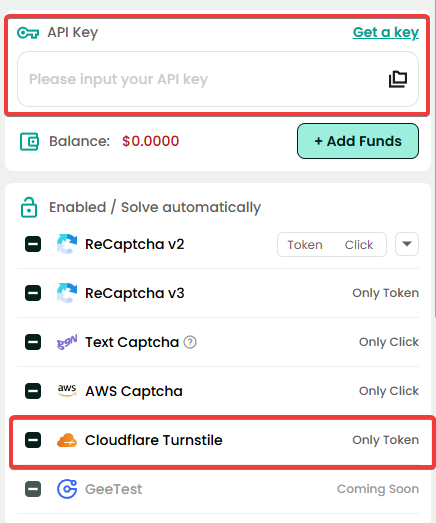
Step 1: Get Your API Key

  1. Sign up at CapSolver.
  2. Grab your clientKey from the dashboard.

Step 2: Solve reCAPTCHA in 3 API Calls

bash Copy
# Submit task  
POST https://api.capsolver.com/createTask  
{  
  "clientKey": "YOUR_API_KEY",  
  "task": {  
    "type": "ReCaptchaV2TaskProxyless",  
    "websiteURL": "https://example.com",  
    "websiteKey": "6Le-wvkSAAAAAPBMRTvw0Q4Muexq9bi0DJwx_mJ-"  
  }  
}  

# Get result (repeat until "status": "ready")  
POST https://api.capsolver.com/getTaskResult  
{  
  "clientKey": "YOUR_API_KEY",  
  "taskId": "61138bb6-19fb-11ec-a9c8-0242ac110006"  
}  

# Use the token (gRecaptchaResponse) in your scraper!  

Method 2: The Magic Browser Extension

For Normal Humans:

  • Chrome: Install here
  • Firefox: Install here

For Automation Wizards:

  1. Download from GitHub:
    • Releases: https://github.com/capsolver/capsolver-browser-extension/releases
  2. Modify config.js:
    javascript Copy
    {  
      // Your API key from Capsolver  
      apiKey: "YOUR_API_KEY",  
    
      // Toggle CAPTCHA types  
      enabledForRecaptcha: true,  
      enabledForCloudflare: true,  
      enabledForAWS: true,  
      enabledForTextCaptcha: true  
    }  
  3. Load into Puppeteer/Playwright:
    javascript Copy
    const browser = await puppeteer.launch({  
      args: ['--load-extension=./capsolver-extension']  
    });  

Config.js: The Secret Sauce

Critical Settings:

  • enabledForCloudflare: true: For Turnstile CAPTCHAs.
  • enabledForRecaptcha: true: Google’s classic.
  • enabledForAWS: true: Amazon’s sneaky CAPTCHAs.
  • enabledForTextCaptcha: true: Old-school “type these letters” puzzles.

Pro Tip: Enable all if you’re not sure which CAPTCHA a site uses.


Real-World Code Examples

Python Scraper with Capsolver API:

python Copy
import requests  

def solve_recaptcha():  
    task_url = "https://api.capsolver.com/createTask"  
    task_data = {  
        "clientKey": "YOUR_API_KEY",  
        "task": {  
            "type": "ReCaptchaV2TaskProxyless",  
            "websiteURL": "https://example.com",  
            "websiteKey": "6Le-wvkSAAAAAPBMRTvw0Q4Muexq9bi0DJwx_mJ-"  
        }  
    }  
    response = requests.post(task_url, json=task_data).json()  
    task_id = response["taskId"]  

    # Poll for result  
    while True:  
        result = requests.post("https://api.capsolver.com/getTaskResult", json={"clientKey": "YOUR_API_KEY", "taskId": task_id}).json()  
        if result["status"] == "ready":  
            return result["solution"]["gRecaptchaResponse"]  

“Why Isn’t This Working?!” Troubleshooting Guide

  • Problem: “No CAPTCHAs are being solved!”
    • Fix: Check config.js – did you enable the right CAPTCHA type?
  • Problem: “API returns ‘invalid API key’!”
    • Fix: Copy-paste your key from Capsolver’s dashboard again.
  • Problem: “Cloudflare still blocks me!”
    • Fix: Rotate proxies, rotate fingerprints + slow down your scraper.
      Happy scraping – and may the CAPTCHAs be ever in your favor! 😎

More

About CapsolverApr 20, 2026

The Evolution of Automation Infrastructure: How CapSolver's Strategic Upgrade Empowers Data-Driven Businesses

CapSolver evolves into a core automation layer with improved UI, integrations, and enterprise-grade data capabilities.

Lucas Mitchell
Lucas Mitchell
AIApr 22, 2026

Best AI for Solving Image Puzzles: Top Tools and Strategies for 2026

Discover the best AI for solving image puzzles. Learn how CapSolver's Vision Engine and ImageToText APIs automate complex visual challenges with high accuracy.

Contents

Ethan Collins
Ethan Collins
Web ScrapingApr 22, 2026

Rust Web Scraping Architecture for Scalable Data Extraction

Learn scalable Rust web scraping architecture with reqwest, scraper, async scraping, headless browser scraping, proxy rotation, and compliant CAPTCHA handling.

Lucas Mitchell
Lucas Mitchell
AIApr 22, 2026

Search API vs Knowledge Supply Chain: AI Data Infrastructure Guide

Learn how search API tools, knowledge supply chains, SERP API workflows, and AI data pipelines shape modern web data infrastructure for AI.

Anh Tuan
Anh Tuan