
🎉NEWCapSolver for AI agents-MCP, agent tools, and SDK integrations

Ethan Collins
AI Agent Workflow Engineer
Published Nov 17, 2026
Updated Nov 17, 2026 · min read
A report export can fail even after its CAPTCHA has passed. The page may reset the date range, queue the wrong report, or download an error page with a PDF filename. Testing only the verification widget misses these failures. Testing only a successful download misses the equally important case where a rejected verification still creates an export.
This guide is for QA teams testing a report-download feature they own or are authorized to test. The goal is a repeatable acceptance plan for a feature with a CAPTCHA step. It is different from a collector downloading reports from external websites: your team controls the test data, expected behavior, and release criteria. CapSolver belongs in this plan only if a supported solver is part of the workflow being tested.
A successful test must establish that the application released the intended report after the required verification succeeded.
Start with a small synthetic report that has an unmistakable identity. For example, create a test account with an April report containing a known set of records. Define its date range, output format, expected columns, and a recognizable value. These are fixture choices, not claims about a real customer's data. Use a second report with different values so the test can detect accidental reuse of a previous export.
Record the expected outcome at three checkpoints:
Avoid making the filename the sole assertion. A browser can save an HTML response under a name ending in .pdf. Likewise, a spreadsheet can be valid but contain last month's records. Your acceptance criteria should describe the content that matters to the user.
For an asynchronous export, also identify the job reference or user-visible completion state. Keep the verification result and export job result separate in the test report. This makes a failure actionable: engineers can see whether the problem occurred before job creation or after it.
Routine regression tests should exercise predictable verification outcomes in an isolated test environment.
For reCAPTCHA v2, Google's testing guidance provides test keys. For Turnstile, Cloudflare provides dummy keys for test outcomes. Use the mechanism documented for your provider and version. Do not assume one provider's keys or behavior apply to another CAPTCHA.
A provider test key helps validate the application integration. It does not measure a CAPTCHA solver's production accuracy. Conversely, repeatedly solving production challenges is a poor way to obtain deterministic coverage of every export error branch.
The widget and the server-side validation have different responsibilities. Your browser test should check whether the user can complete the expected interface flow. Your application test should establish what happens when verification succeeds, fails, or cannot be completed.
If the provider's test configuration does not expose a particular failure you need, introduce an application-controlled test double at your own verification boundary. Document that substitution in the test setup. Never describe the resulting test as a live provider verification, and make sure test-only configuration cannot be enabled in production by an ordinary request parameter.
A valid CAPTCHA response must not grant permission to another account's report. Include a test user who lacks access to the chosen report and verify that the application still denies the export. CAPTCHA is not a replacement for authorization; the CAPTCHA glossary explains the verification concept, while report permissions remain your application's responsibility.
Use synthetic records for these tests. Do not download customer reports merely to obtain realistic screenshots or example output.
The test matrix should connect each verification outcome to an observable export result.
| Test condition | Expected verification behavior | Expected report behavior |
|---|---|---|
| Verification accepted | Continue through the authorized flow | Export matches selected period, filters, and format |
| Verification rejected | Show the defined failure state | No new export and no downloadable report |
| Response missing or expired | Require a fresh verification attempt | Preserve report selection without releasing the file |
| Validation service unavailable | Show the application's temporary-failure state | Do not silently approve the export |
| Report filters change during verification | Follow a documented product rule | Export the confirmed selection or require reconfirmation |
| Export job fails after verification | Keep the failure tied to the export stage | No false success message or invalid file |
| Repeated download action | Follow the product's duplicate-request policy | No accidental duplicate work or mixed report results |
The last two rows matter because solving a CAPTCHA is only one step. A release can pass the widget test and still break the export feature.
Write the filter-change rule before automating it. Some products freeze the report selection while verification is pending; others let users edit and then request a fresh confirmation. Either design can be tested. An undocumented mixture is what makes the test unstable.
For repeated actions, do not assume all exports must be idempotent. Ask the product team whether the second action should reuse a job, create another job, or remain disabled. Assert that behavior explicitly rather than imposing a new product requirement through the test.
Redeem Your CapSolver Bonus Code
Boost your automation budget instantly!
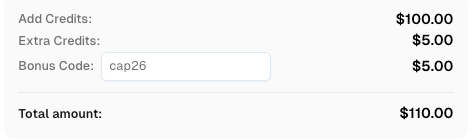
Use bonus code CAP26 when topping up your CapSolver account to get an extra 5% bonus on every recharge — with no limits.
Redeem it now in your CapSolver Dashboard
The export test should inspect the saved artifact after the application reports completion.
Use the browser framework's download event to identify the file generated by the action. For example, the official Playwright download guide describes waiting for the download and saving it before the browser context closes. This is a framework feature, not evidence that your particular report workflow has been tested.
Inspect the file at increasing levels of specificity. Check that a file was saved, that it has content, and that its type is plausible. Then open it with a parser for the expected format. Finally, compare the report-specific fields against the fixture. Passing the first checks does not excuse skipping the content comparison.
For a CSV, verify the expected header and a stable set of fixture records. For a PDF, verify that the document opens and includes the expected report identity and reporting period. For a workbook, check the relevant sheet and known cells. Avoid byte-for-byte equality when the export embeds a changing creation timestamp; compare stable business values instead.
Keep these checks in the test layer. Do not send the report to a CAPTCHA recognition API to determine whether the download succeeded. CAPTCHA image recognition and report-content extraction are separate operations. The image-recognition versus token-solving guide also distinguishes the two supported CAPTCHA result types.
A solver integration test is appropriate when the authorized automation being released actually calls a solver.
Choose a controlled page and a CAPTCHA type supported by the current API. Follow the documented task contract, such as reCAPTCHA v2 task parameters. Keep the solver account key separate from the site's public key and server verification secret. A solver response is not a replacement for the application's own validation.
Record the task outcome without exposing the returned token. If the task is asynchronous, follow the documented task-result states. Do not create a new task simply because the existing task is still processing.
After receiving a solution, continue through your application's normal, authorized verification path and perform the same report assertions used in the deterministic tests. The solver check should answer a specific integration question: can this configured environment complete the required step and deliver the expected test report?
Keep this check separate from ordinary regression results and give it a bounded execution budget. A provider error, account issue, or network interruption should not be misreported as a broken report formatter. Equally, a successful solver call should not hide an export failure.
A useful failure record tells the next engineer which checkpoint failed without exposing sensitive data.
Record the test case, environment, application build, synthetic report identifier, selected filters, and last completed checkpoint. Include an export job reference when the application provides one. Save a redacted screenshot of the relevant error state and the file-validation error if an artifact was produced.
Keep raw solver credentials, CAPTCHA tokens, private report contents, and session cookies out of routine test reports. A filename, content-type observation, and parser error often explain the problem without retaining the full document. Use the team's existing restricted artifact store when the full synthetic fixture is necessary.
When reproducing a failure, reset the report fixture and use a fresh verification attempt. Do not reuse a token from an earlier run. Google's response-verification documentation describes its token lifetime and single-use behavior; other providers have their own rules.
Keep your release criteria focused on the user's result: the right report, for the right scope, after the required verification. Predictable test outcomes cover the application logic; a separate solver check covers the supported integration when needed. CapSolver can serve that solver step without becoming the definition of export success.
Q: Should every report-download test call a live CAPTCHA solver?
No. Routine regression tests should use documented provider test modes or controlled application test doubles. Add live solving only for the integration behavior you actually need to verify.
Q: Does a successful CAPTCHA response prove that the report is correct?
No. Verify the export job and inspect the downloaded artifact against the selected report, filters, period, and expected test records.
Q: What should happen if CAPTCHA verification fails?
The application should follow its defined failure flow without releasing the protected report. Test that no export or download link becomes available through that failed attempt.
Q: Can I use a solver instead of checking report permissions?
No. A CAPTCHA solver does not grant access to a report. Your application must enforce its authorization rules independently of the CAPTCHA outcome.
Q: How is this different from downloading public reports with automation?
This guide tests a report-export feature under your team's control. External report collection has different concerns, including source availability and document provenance; it does not give your team control over the source application's verification logic.
Ethan Collins
AI Agent Workflow Engineer
Building clearer handoffs between AI agents and tools.
ABOUT THE AUTHOR
Learn what an LLM CAPTCHA solver can do, where visual reasoning falls short, and how to evaluate accepted results in authorized browser-agent workflows.

A technical preview of a native Monid connector that lets AI agents call CapSolver for reCAPTCHA v2, reCAPTCHA v3, and Cloudflare Turnstile in authorized automation workflows.