🎉NEWCapSolver for AI agents-MCP, agent tools, and SDK integrations

Khadija Santos
AI Agent & MCP Engineer
Published Sep 23, 2026
Updated Sep 23, 2026 · min read
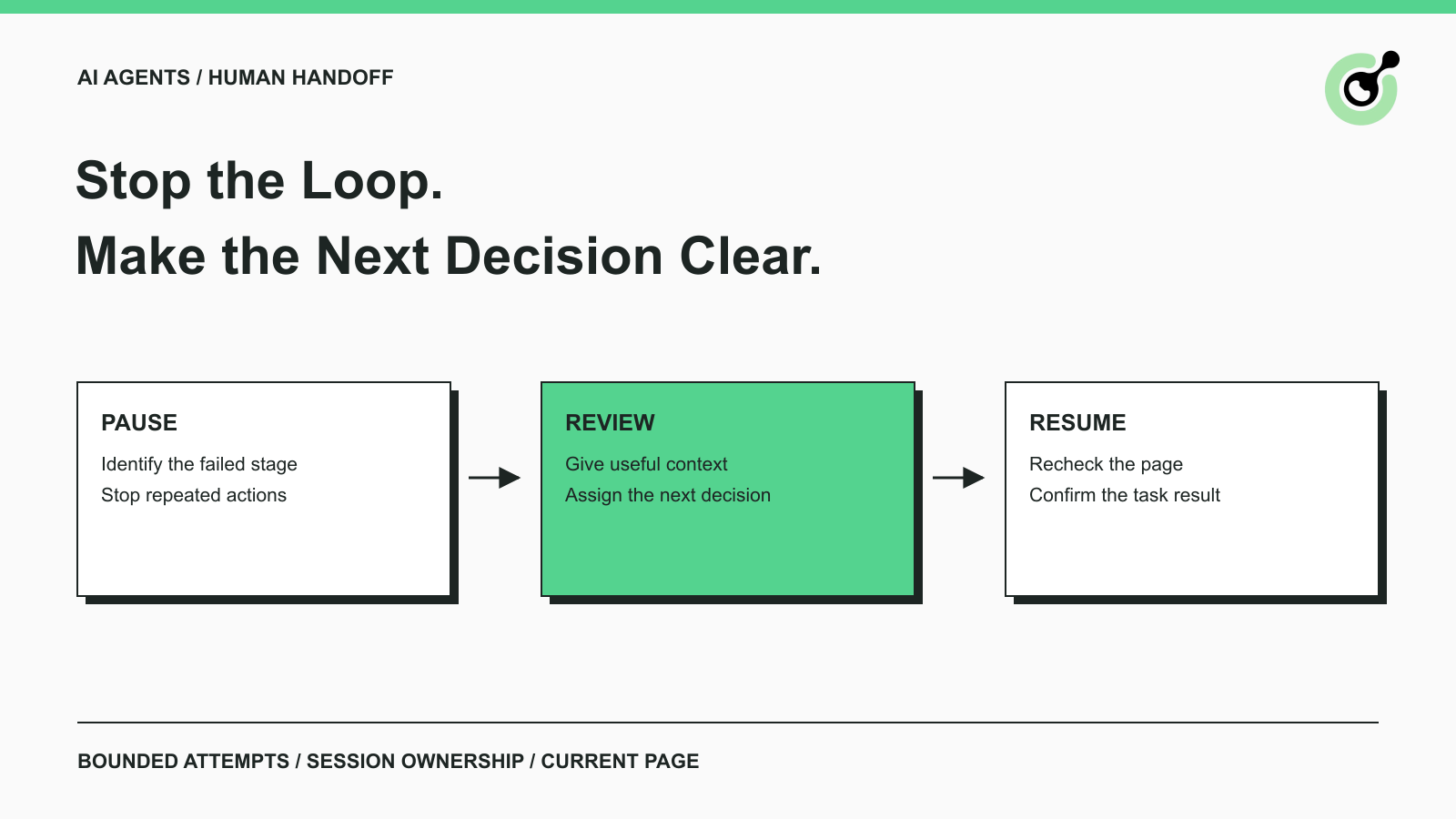
An AI agent can know that a browser task is unfinished without knowing why. A CAPTCHA may still be visible after a solver request, the application may have changed pages, or the request may never have produced a result. Repeating the same action is not a substitute for identifying which condition occurred.
CapSolver supplies documented task results and error information that can help the application make this distinction. Human handoff belongs to the surrounding workflow: the point where an operator receives enough context to decide what happens next. This guide describes that decision for approved browser tasks and owned QA workflows, without requiring a particular agent framework.
Start by identifying the last confirmed stage before asking someone to intervene.
A CAPTCHA is only one possible reason the task stopped. A missing page element, expired application session, denied operation, or network error needs its own diagnosis. The handoff should describe the observed condition rather than label every blocked page “CAPTCHA failure.”
For a solver integration, the useful stages are request creation, task completion, result handling, and application acceptance. Keep those stages separate in the job record.
CapSolver's task creation documentation explains that task types can have different completion behavior. An asynchronous task ID is evidence that a task was created, not proof that a solution is ready. The result interface provides the documented status for tasks that use that flow.
If a task is still processing, the next step may be to continue its documented result check within the existing limit. If the API rejected an input, a reviewer may need to correct configuration. If a result arrived but the page did not progress, inspect the browser and application state.
That distinction can prevent an unnecessary manual intervention. It also gives the eventual reviewer a much better starting point than a generic failure message.
Another attempt is justified when the cause is understood, the action remains permitted, and the job still has time and attempt budget.
Do not use “try again” as the default response to every error. A malformed request will usually require a configuration change, while an unsupported task needs a different decision. Read the actual response and use the CapSolver error reference to identify the category.
Set limits in the application that executes tools. A sentence in the agent's prompt can explain the intended behavior, but the executor should still enforce the limit that controls real requests.
Use a small set of clear outcomes:
| Observed condition | Appropriate next decision |
|---|---|
| Existing task is still processing | Follow its documented result flow within the remaining limit |
| Request input is rejected | Stop that request path and inspect configuration |
| Supported result returned, application still blocked | Check current page and result handling |
| Challenge is unsupported or state is unclear | Request a specific review or end the task |
| Source refuses access or task leaves approved scope | Stop; do not turn a review into repeated attempts |
The exact attempt and time limits depend on the task. A person waiting for a report may have a different deadline from a scheduled QA run. Choose limits from that requirement rather than presenting an arbitrary number as a universal best practice.
A local timeout is also incomplete evidence. It tells you that the client stopped waiting; it does not necessarily tell you whether a remote request completed. Reconcile any existing task reference before creating duplicate work.
A useful handoff asks the reviewer to make a bounded decision with enough context to understand its consequences.
Consider an approved agent that retrieves a public product specification. The agent reaches a supported challenge, receives a solver result, and still sees the verification screen. Its report should identify the intended product and the last confirmed step. The reviewer can then inspect the page, correct an integration problem, or end the attempt.
This is an illustrative workflow, not a reported deployment. The point is the quality of the question: “Inspect why the product page did not appear after the result was returned” is more actionable than “The agent failed.”
Record the original task, the permitted page or application, the time the problem occurred, the observed challenge category, and the last confirmed action. Include a safe internal job reference so the operator can find restricted diagnostics if needed.
A screenshot may help when it shows the relevant interface. Check its contents before attaching it, and avoid capturing unrelated personal or account information. Do not export a complete browser profile simply to make the handoff convenient.
State what the reviewer can choose. For example: inspect the page and continue the same task, send the issue to the integration owner, or stop the run. Avoid a generic approval button that could authorize an unspecified sequence of later actions.
The OWASP logging guidance recommends protecting sensitive operational data. Keep API keys, session cookies, and raw solution tokens out of ordinary messages and tickets.
Not every unsuccessful challenge belongs with the same operator. A missing credential or rejected task parameter normally needs the integration owner. A page that has changed may need the browser-workflow owner. A task that is no longer appropriate may need the requester to decide whether it should continue.
Routing by cause reduces the chance that a reviewer repeatedly handles a symptom while the same configuration error affects every later run.
Redeem Your CapSolver Bonus Code
Boost your automation budget instantly!
Use bonus code CAP26 when topping up your CapSolver account to get an extra 5% bonus on every recharge — with no limits.
Redeem it now in your CapSolver Dashboard
A paused task needs an identified owner for its browser state and a clear rule for who can act next.
Prevent the agent from continuing to click or submit while a human is reviewing the same page. Competing actions make it difficult to connect a result to the operation that produced it. The application should know whether the current job is running, awaiting review, being inspected, or ended.
Some agent frameworks provide pause-and-resume mechanisms. For example, the official LangGraph interrupts documentation describes persistence and later resumption with external input. That is a workflow capability, not proof that every associated browser remains open or that its page state is preserved.
Treat graph state and browser state as separate responsibilities. If the runtime closes the browser during a pause, a resumed graph may still contain references to a page that no longer exists.
Decide how long the job can wait and what happens when that time expires. A scheduled task might end with a review-needed outcome; an interactive application might tell the requester that the operation could not be completed.
A late approval should not silently restart a completed or cancelled job. Check the current job status before acting, and explain when a new attempt requires a new request.
The related article on AI agent tasks getting stuck on CAPTCHAs describes the broader interruption problem. The handoff adds an operational requirement: someone must own the next action while the automated workflow waits.
Resume from the current page and task state, not from an assumption that everything remained unchanged during review.
A reviewer may have navigated, the application may have refreshed its challenge, or the session may have ended. Inspect the current interface and confirm that the expected operation is still pending.
Do not treat a saved challenge response as indefinitely reusable. Google's reCAPTCHA verification documentation states that response tokens are valid for two minutes and can be verified only once. A token retained through a long handoff may therefore be unsuitable for a later action.
Human approval and technical readiness are different checks. A reviewer can authorize continuation of an appropriate task, but the application still needs a usable current page and valid inputs.
Check whether the original action already completed before submitting it again. A confirmation may have appeared after the agent stopped waiting, or the reviewer may have finished the allowed operation directly.
For a read-only product lookup, inspect whether the requested data is now present and matches the selected product. For an owned QA form, inspect the test application's confirmation. If the outcome is uncertain, retain that uncertainty instead of automatically repeating the submission.
A clean resume should have a clear next action and a clear completion check. “Continue the agent” is too broad when the last known action could already have succeeded.
Test the review path with controlled cases so that the first real interruption is not the first time anyone sees the interface.
Use an owned test page or an application-level test fixture to exercise pending, rejected, unsupported, and result-not-accepted outcomes. These tests can validate routing and ownership without making paid solver requests.
Include reviewer decisions to continue, reject, and let the review expire. Check that each decision leads to one predictable application outcome and that the automated worker cannot continue while another person owns the session.
Also test a changed page and a job cancelled before review. The expected behavior is to recheck or stop, not to treat an old approval as a permanent instruction.
Keep the evidence proportional: the case exercised, the observed job state, and the final outcome. A local fixture passing these checks verifies your handoff logic; it does not prove live CAPTCHA-solving performance.
A good handoff turns an unclear interruption into a specific decision.
Use CapSolver results and errors to explain the challenge-handling stage, keep retries bounded, and preserve ownership while a reviewer acts. After review, confirm the current page and the original task's outcome. The workflow is complete only when the application can state what happened.
Q: When should an AI agent hand a CAPTCHA problem to a human?
Request review when the state is unclear, the challenge is unsupported, the configured handling limit has been reached, or a returned result does not lead to the expected application outcome. Identify the specific decision the reviewer needs to make.
Q: Should the agent keep retrying while waiting for review?
No. Pause the affected action and assign ownership so the automated worker and reviewer do not operate the same session simultaneously.
Q: Does a human approval mean an old solver token can be reused?
No. Approval does not renew a token or preserve browser state. Recheck the current challenge and the provider's validity rules before continuing.
Q: What belongs in the handoff message?
Include the original task, current page, last confirmed stage, safe job reference, and requested decision. Exclude API keys, cookies, full tokens, and unnecessary private content.
Q: Can I test handoff behavior without calling a paid solver?
Yes. Controlled application fixtures can test pause, review, cancellation, and resume decisions. Keep those results separate from claims about live solving or end-to-end browser success.
Khadija Santos
AI Agent & MCP Engineer
Develops and maintains CapSolver’s MCP tooling, from implementation and package releases to AI agent integrations.
ABOUT THE AUTHOR
Say goodbye to image CAPTCHA struggles – CapSolver Vision Engine solves them fast, smart, and hassle-free!

Connect CapSolver MCP to rtrvr with qualified tool names, token-mode handling, session boundaries, tested orchestration, and final-state checks.