
🎉NEWCapSolver for AI agents-MCP, agent tools, and SDK integrations

Rajinder Singh
Deep Learning Researcher
Published May 07, 2024
Updated May 07, 2024 · min read
Cloudflare Error 1020 indicates that access has been denied. This error is triggered when a rule of the website's firewall, which is protected by Cloudflare, is violated. Various actions, such as making excessive requests to the site, can lead to this violation.
Common ways to fix this problem:
Cloudflare Error 1015 happens when your IP address is flagged and banned by Cloudflare for exceeding a website's rate limit during scraping activities. This can lead to encountering this error.
Common ways to fix this problem:
A 403 status code is a Forbidden response status, issued by a server when it acknowledges a request as valid but refuses to fulfill it. This may occur due to missing necessary headers in your request, such as CORS, JWT, or authentication headers that the server expects.
If the website is generally accessible and adding the correct headers does not resolve the issue, it is possible that the server is detecting your requests as automated.
Common ways to fix this problem:
Redeem Your CapSolver Bonus Code
Boost your automation budget instantly!
Use bonus code CAPN when topping up your CapSolver account to get an extra 5% bonus on every recharge — with no limits.
Redeem it now in your CapSolver Dashboard
.
Cloudflare challenge looks like:

Sometimes, this page could have turnstile

Verify that you need to solve Cloudflare Challenge 5s and not just turnstile, for just turnstile, please keep reading this blog.
There are some requeriments when solving this challenge using Capsolver.
POST https://api.capsolver.com/createTask
Host: api.capsolver.com
Content-Type: application/json

{
  "clientKey": "YOUR_API_KEY",
  "task": {
    "type": "AntiCloudflareTask",
    "websiteURL": "https://www.yourwebsite.com",
    "proxy": "158.120.100.23:334:user:pass"
  }
}
After submit correctly, API will return a taskId
{
    "errorId": 0,
    "taskId": "014fc55c-46c9-41c8-9de7-6cb35d984edc",
    "status": "idle"
}
Obtain this taskId value and use for retrieve the result using the getTaskResult method
POST https://api.capsolver.com/getTaskResult
Host: api.capsolver.com
Content-Type: application/json

{
  "clientKey": "YOUR_API_KEY",
  "taskId": "taskId"
}
Depending on the system load, you will get the results within the interval of 1s to 20s
If you receive ERROR_CAPTCHA_SOLVE_FAILED in the response, could be several reasons:
If you receive a success response, will look like:
{
    "errorId": 0,
    "taskId": "d8d3a8b4-30cc-4b09-802a-a476ca17fa54",
    "status": "ready",
    "solution": {
        "accept-language": "en-US,en;q=0.9",
        "cookies": {

        },
        "headers": {
            "accept": "text/html,application/xhtml+xml,application/xml;q=0.9,image/avif,image/webp,image/apng,*/*;q=0.8,application/signed-exchange;v=b3;q=0.7",
            "accept-encoding": "gzip, deflate, br",
            "accept-language": "en-US,en;q=0.9",
            "cache-control": "max-age=0",
            "content-type": "application/x-www-form-urlencoded",
            "origin": "",
            "referer": "",
            "sec-ch-ua": "\"Not_A Brand\";v=\"8\", \"Chromium\";v=\"120\", \"Google Chrome\";v=\"120\"",
            "sec-ch-ua-arch": "\"arm\"",
            "sec-ch-ua-bitness": "\"64\"",
            "sec-ch-ua-full-version": "\"120.0.6099.71\"",
            "sec-ch-ua-full-version-list": "\"Not_A Brand\";v=\"8.0.0.0\", \"Chromium\";v=\"120.0.6099.71\", \"Google Chrome\";v=\"120.0.6099.71\"",
            "sec-ch-ua-mobile": "?0",
            "sec-ch-ua-model": "\"\"",
            "sec-ch-ua-platform": "\"macOS\"",
            "sec-ch-ua-platform-version": "\"10.14.6\"",
            "sec-fetch-dest": "document",
            "sec-fetch-mode": "navigate",
            "sec-fetch-site": "same-origin",
            "sec-fetch-user": "?1",
            "upgrade-insecure-requests": "1",
            "user-agent": "Mozilla/5.0 (Macintosh; Intel Mac OS X 10_15_7) AppleWebKit/537.36 (KHTML, like Gecko) Chrome/120.0.0.0 Safari/537.36"
        },
        "proxy": "your proxy",
        "token": "cf clearance token",
        "type": "challenge",
        "userAgent": "Mozilla/5.0 (Macintosh; Intel Mac OS X 10_15_7) AppleWebKit/537.36 (KHTML, like Gecko) Chrome/120.0.0.0 Safari/537.36"
    }
}
From this response, you will need to parse the values of cookies, headers, token.
Your request will need to look like:
cf_clearance cookie value that you will need to create# -*- coding: utf-8 -*-
import requests
import time
import tls_client
# TODO: Your api key
API_KEY = ""
proxy = ""
# TODO: Your target site url:
page_url = ''
def call_capsolver():
data = {
"clientKey": API_KEY,
"task": {
"type": 'AntiCloudflareTask',
"websiteURL": page_url,
"proxy": proxy,
}
}
uri = 'https://api.capsolver.com/createTask'
res = requests.post(uri, json=data)
resp = res.json()
task_id = resp.get('taskId')
if not task_id:
print("no get taskId:", res.text)
return
print('created taskId:', task_id)
while True:
time.sleep(1)
data = {
"clientKey": API_KEY,
"taskId": task_id
}
response = requests.post('https://api.capsolver.com/getTaskResult', json=data)
resp = response.json()
status = resp.get('status', '')
if status == "ready":
print("successfully => ", response.text)
return resp.get('solution')
if status == "failed" or resp.get("errorId"):
print("failed! => ", response.text)
return
def request_site(solution):
session = tls_client.Session(
client_identifier="chrome_120",
random_tls_extension_order=True
)
return session.get(
page_url,
headers=solution.get('headers'),
cookies=solution.get('cookies'),
proxy=proxy,
)
def main():
solution = {
"headers": {
"accept": "text/html,application/xhtml+xml,application/xml;q=0.9,image/avif,image/webp,image/apng,*/*;q=0.8,application/signed-exchange;v=b3;q=0.7",
"upgrade-insecure-requests": "1",
"user-agent": "Mozilla/5.0 (Windows NT 10.0; Win64; x64) AppleWebKit/537.36 (KHTML, like Gecko) Chrome/120.0.0.0 Safari/537.36",
"sec-fetch-site": "none",
"sec-fetch-mode": "navigate",
"sec-fetch-user": "?1",
"sec-fetch-dest": "document",
"accept-encoding": "gzip, deflate, br",
"accept-language": "en-US,en;q=0.9",
}
}
# first request (check your proxy):
res = request_site(solution)
print('1. response status code:', res.status_code)
if res.status_code != 403:
print("your proxy is good and didn't get the cloudflare challenge")
return
elif 'window._cf_chl_opt' not in res.text:
print('==== proxy blocked ==== ')
return
# call capSolver:
solution = call_capsolver()
if not solution:
return
# second request (verify solution):
res = request_site(solution)
print('2. response status code:', res.status_code)
if __name__ == '__main__':
main()Cloudflare Turnstile Captcha looks like:
Managed challenge

Non-interactive challenge
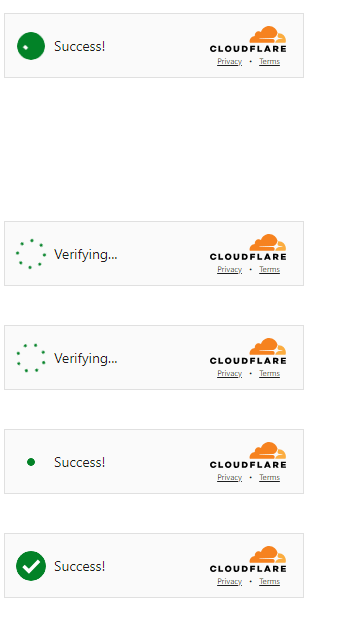
Invisible challenge
not visible, you can check on the network / scripts loaded and see if turnstile is used
Verify that you need to solve Cloudflare Turnstile Captcha and not Cloudflare Challenge 5s, for just Cloudflare Challenge, please keep reading this blog.
There are some requeriments when solving this challenge using Capsolver.
POST https://api.capsolver.com/createTask
Host: api.capsolver.com
Content-Type: application/json

{
  "clientKey": "YOUR_API_KEY",
  "task": {
    "type": "AntiTurnstileTaskProxyLess",
    "websiteURL": "https://www.yourwebsite.com",
    "websiteKey": "0x4XXXXXXXXXXXXXXXXX",
    "metadata": {
       "action": "login",  //optional
       "cdata": "0000-1111-2222-3333-example-cdata"  //optional
    }
  }
}
"action" and "cdata" is optional, sometimes will be required and sometimes not.
Depends on the configuration of the website.
action is the value of the data-action attribute of the Turnstile element if it exists.
cdata is the value of the data-cdata attribute of the Turnstile element if it exists.
After submit correctly, API will return a taskId
{
    "errorId": 0,
    "taskId": "014fc55c-46c9-41c8-9de7-6cb35d984edc",
    "status": "idle"
}
Obtain this taskId value and use for retrieve the result using the getTaskResult method
POST https://api.capsolver.com/getTaskResult
Host: api.capsolver.com
Content-Type: application/json

{
  "clientKey": "YOUR_API_KEY",
  "taskId": "taskId"
}
Depending on the system load, you will get the results within the interval of 1s to 20s
If you receive ERROR_CAPTCHA_SOLVE_FAILED in the response, could be several reasons:
If you receive a success response, will look like:
{
    "errorId": 0,
    "taskId": "d1e1487a-2cd8-4d4a-aa4d-4ba5b6c65484",
    "status": "ready",
    "solution": {
        "token": "0.cZJPqwnyDxL86HvAXSk4lUTQhjwfyXDcR3qpVwFofuzosoKr1otKj_A-utazXx_Tnp1B2V6womrltBpRw9HbY851ktpaF7sBN-gQwtoRUew4Wj5PO4-WLYPnNRpXxludXzyQ.1oHJhu7619fb8c07ab942bd1587bc76e0e3cef95c7aa75400c4f7d3",
        "type": "turnstile",
        "userAgent": "Mozilla/5.0 (Macintosh; Intel Mac OS X 10_15_7) AppleWebKit/537.36 (KHTML, like Gecko) Chrome/120.0.0.0 Safari/537.36"
    }
}
From this response, you will need to parse the values of token and this will be the captcha solution that you will need to submit to the website.
import time
from curl_cffi import requests

CAPSOLVER_API_KEY = "Your CAPSOLVER.COM API KEY"
PAGE_URL = ""
WEBSITE_KEY = ""

def solvecf(metadata_action=None, metadata_cdata=None):
    url = "https://api.capsolver.com/createTask"
    task = {
        "type": "AntiTurnstileTaskProxyLess",
        "websiteURL": PAGE_URL,
        "websiteKey": WEBSITE_KEY,
    }
    if metadata_action or metadata_cdata:
        task["metadata"] = {}
        if metadata_action:
            task["metadata"]["action"] = metadata_action
        if metadata_cdata:
            task["metadata"]["cdata"] = metadata_cdata
    data = {
        "clientKey": CAPSOLVER_API_KEY,
        "task": task
    }
    response_data = requests.post(url, json=data).json()
    print(response_data)
    return response_data['taskId']


def solutionGet(taskId):
    url = "https://api.capsolver.com/getTaskResult"
    status = ""
    while status != "ready":
        data = {"clientKey": CAPSOLVER_API_KEY, "taskId": taskId}
        response_data = requests.post(url, json=data).json()
        print(response_data)
        status = response_data.get('status', '')
        print(status)
        if status == "ready":
            return response_data['solution']

        time.sleep(2)


def main():
    start_time = time.time()

    taskId = solvecf()
    solution = solutionGet(taskId)
    if solution:
        user_agent = solution['userAgent']
        token = solution['token']

    print("User_Agent:", user_agent)
    print("Solved Turnstile Captcha, token:", token)

    end_time = time.time()
    elapsed_time = end_time - start_time
    print(f"Time to solve the captcha: {elapsed_time} seconds")

if __name__ == "__main__":
main()const axios = require('axios');
const CAPSOLVER_API_KEY = "";
const PAGE_URL = "";
const WEBSITE_KEY = "";
async function solvecf(metadata_action = null, metadata_cdata = null) {
const url = "https://api.capsolver.com/createTask";
const task = {
type: "AntiTurnstileTaskProxyLess",
websiteURL: PAGE_URL,
websiteKey: WEBSITE_KEY,
};
if (metadata_action || metadata_cdata) {
task.metadata = {};
if (metadata_action) {
task.metadata.action = metadata_action;
}
if (metadata_cdata) {
task.metadata.cdata = metadata_cdata;
}
}
const data = {
clientKey: CAPSOLVER_API_KEY,
task: task
};
const response = await axios.post(url, data);
console.log(response.data);
return response.data.taskId;
}
async function solutionGet(taskId) {
const url = "https://api.capsolver.com/getTaskResult";
let status = "";
while (status !== "ready") {
const data = { clientKey: CAPSOLVER_API_KEY, taskId: taskId };
const response = await axios.post(url, data);
console.log(response.data);
status = response.data.status;
console.log(status);
if (status === "ready") {
return response.data.solution;
}
await new Promise(resolve => setTimeout(resolve, 2000));
}
}
async function main() {
const start_time = Date.now();
const taskId = await solvecf();
const solution = await solutionGet(taskId);
if (solution) {
const user_agent = solution.userAgent;
const token = solution.token;
console.log("User_Agent:", user_agent);
console.log("Solved Turnstile Captcha, token:", token);
}
const end_time = Date.now();
const elapsed_time = (end_time - start_time) / 1000;
console.log(`Time to solve the captcha: ${elapsed_time} seconds`);
}
main().catch(console.error);Cloudflare implements multiple protection mechanisms — from standard HTTP blocks like 1020, 403, 429 (1015) to more advanced challenges such as Cloudflare Challenge 5s and Turnstile Captcha. When performing web scraping or automation, identifying which protection is active is the key first step.
This guide explained common Cloudflare status codes, how to distinguish Challenge 5s vs Turnstile Captcha, and provided working examples for solving them using Capsolver API, including Python & NodeJS implementations.
By choosing the right approach — rotating proxies, proper headers, fingerprinting protection, or programmatically solving CAPTCHA/Challenge — you can significantly improve scraping success rates and reduce blocks.
If your requests are still being flagged, audit your scraper setup: proxy quality, headers, TLS fingerprint, and request frequency often matter as much as the captcha solver itself.
Check the UI or network requests.
Possible reasons:
Yes. With good proxies, rotating fingerprints, and token reuse logic, you can scale scraping — ensure compliance with website terms and local legal requirements.
Turnstile is often easier since it usually returns a single token. Challenge 5s requires cookies, headers, and proxy consistency, making it more complex.
Rajinder Singh
Deep Learning Researcher
Making CAPTCHA solving more reliable in automated workflows.
ABOUT THE AUTHOR
Evaluate a Turnstile solver API by its documented inputs, token response, validation boundary, and controlled test cases before adding it to your workflow.

Diagnose Cloudflare Challenge flows with AntiCloudflareTask, stable proxy and user agent identity, fresh HTML, clearance handling, validation, and safe errors.


