🎉NEWCapSolver for AI agents-MCP, agent tools, and SDK integrations

Emma Foster
Machine Learning Engineer
Published Apr 21, 2026
Updated Apr 21, 2026 · min read
TL;Dr:
Cloudflare Turnstile has emerged as a user-friendly alternative to traditional CAPTCHAs, designed to verify human traffic without the friction of identifying traffic lights or crosswalks. However, encountering a failed to verify cloudflare turnstile token error can be a significant roadblock for both end-users and developers. This guide provides a comprehensive analysis of why these failures occur and offers actionable solutions to defeat cloudflare turnstile challenges effectively. Whether you are a website owner troubleshooting your implementation or a developer looking to automate verification processes, understanding the underlying mechanics of Turnstile is essential for maintaining a smooth user experience and high success rates.
Cloudflare Turnstile operates by running a series of non-interactive challenges in the background to determine if a visitor is human. Unlike older systems, it relies on browser telemetry and behavioral analysis. When the system returns a "verification failed" message, it means the token generated by the client-side widget was either rejected by Cloudflare's servers or failed to validate on your backend. This process is crucial for modern web security, as it helps distinguish legitimate users from automated bots while adhering to the W3C Web Content Accessibility Guidelines by providing a more accessible verification method.
Several factors can lead to a failed to verify cloudflare turnstile token message. Identifying the root cause is the first step toward a permanent fix.
The most frequent cause of failure is a mismatch between the websiteKey used in the frontend and the secretKey used for backend validation. If these keys do not belong to the same Cloudflare account or are configured for a different domain, the verification will always fail.
Turnstile tokens are short-lived, typically expiring within a few minutes of generation. If your application attempts to validate a token after it has expired, or tries to reuse a token that has already been verified, Cloudflare will reject the request.
Turnstile relies heavily on the browser's ability to execute JavaScript and communicate with Cloudflare's edge servers. Users on outdated browsers, or those using aggressive ad-blockers and VPNs, may find that the widget fails to load or generate a valid token. Furthermore, the lack of support for Private Access Tokens in certain environments can also trigger verification errors.
To resolve Turnstile issues, follow this structured approach to identify and fix errors in your environment.
Purpose: Ensure the Turnstile widget is correctly embedded and communicating with Cloudflare.
Operation: Check your HTML code to ensure the data-sitekey attribute matches your Cloudflare dashboard. Ensure the script https://challenges.cloudflare.com/turnstile/v0/api.js is loaded correctly.
Caution: Avoid loading the script multiple times, as this can cause conflicts and lead to verification failures.
Purpose: Confirm that your server is correctly sending the token to Cloudflare for verification.
Operation: Your backend should make a POST request to https://challenges.cloudflare.com/turnstile/v0/siteverify with the secret and response (the token) parameters.
Caution: Always check the error-codes array in the JSON response from Cloudflare to understand why a specific token was rejected.
Purpose: Rule out local network or browser-specific issues.
Operation: Try accessing the page using a different browser, disabling extensions, or switching from a VPN to a standard ISP connection.
Caution: If the failure only occurs on specific networks, it may be due to IP reputation issues or firewall restrictions.
The following table summarizes the most frequent errors encountered when dealing with Cloudflare Turnstile.
| Error Code | Likely Cause | Recommended Action |
|---|---|---|
missing-input-response |
The token was not sent to the server. | Check frontend form submission logic. |
invalid-input-response |
The token is malformed or expired. | Ensure tokens are verified immediately. |
bad-request |
The request to siteverify was malformed. |
Validate your backend POST request structure. |
invalid-widget-id |
The widget ID does not exist. | Verify the data-sitekey in your HTML. |
For developers working on web automation or large-scale data collection, manually solving Turnstile challenges is not feasible. This is where professional services like CapSolver come into play. CapSolver provides a reliable way to defeat cloudflare turnstile by providing valid tokens through their API.
Redeem Your CapSolver Bonus Code
Boost your automation budget instantly!
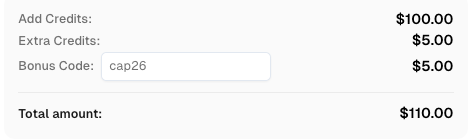
Use bonus code CAP26 when topping up your CapSolver account to get an extra 5% bonus on every recharge — with no limits.
Redeem it now in your CapSolver Dashboard
Before you begin, you need to obtain your API key from the CapSolver Dashboard. Ensure you have the necessary libraries installed, such as requests for Python.
The following code example demonstrates how to use CapSolver to solve a Turnstile challenge. This implementation follows the official CapSolver Documentation for maximum reliability.
import requests
import time

# Replace with your actual CapSolver API key
api_key = "YOUR_CAPSOLVER_API_KEY"
site_key = "0x4XXXXXXXXXXXXXXXXX"
site_url = "https://www.yourwebsite.com"

def solve_turnstile():
    payload = {
        "clientKey": api_key,
        "task": {
            "type": 'AntiTurnstileTaskProxyLess',
            "websiteKey": site_key,
            "websiteURL": site_url,
            "metadata": {
                "action": "login"  # Optional: match the data-action attribute
            }
        }
    }

    # Create the task
    res = requests.post("https://api.capsolver.com/createTask", json=payload)
    resp = res.json()
    task_id = resp.get("taskId")

    if not task_id:
        print("Failed to create task:", res.text)
        return None

    print(f"Task created: {task_id}. Waiting for result...")

    # Poll for the result
    while True:
        time.sleep(2)
        result_payload = {"clientKey": api_key, "taskId": task_id}
        result_res = requests.post("https://api.capsolver.com/getTaskResult", json=result_payload)
        result_resp = result_res.json()

        status = result_resp.get("status")
        if status == "ready":
            print("Turnstile solved successfully!")
            return result_resp.get("solution", {}).get('token')

        if status == "failed" or result_resp.get("errorId"):
            print("Solve failed:", result_res.text)
            return None

# Execute the solver
token = solve_turnstile()
if token:
print(f"Generated Token: {token}")Once you receive the token, you can include it in your target website's form submission or API request. To optimize performance, consider the following:
ProxyLess task type is convenient, using high-quality proxies can improve success rates for highly restrictive sites.To ensure a high success rate when you defeat cloudflare turnstile, it is important to maintain a clean automation environment. Using residential proxies can help mimic real user behavior, reducing the likelihood of being flagged by Cloudflare's security filters. Additionally, keeping your browser headers and fingerprints consistent with the environment where the token was generated is a best practice for advanced automation. For more insights into why automation sometimes fails, you can read about why web automation keeps failing on captcha.
When implementing automation solutions, it is vital to remain compliant with the terms of service of the platforms you interact with. Automation should be used for legitimate purposes, such as data analysis, price monitoring, or testing your own security implementations. CapSolver emphasizes the importance of ethical use and provides tools to help developers navigate the complex landscape of web security responsibly. For a deeper dive into Cloudflare's security mechanisms, refer to the official Cloudflare Turnstile Documentation.
Dealing with a failed to verify cloudflare turnstile token error can be frustrating, but with the right knowledge and tools, it is a manageable challenge. By ensuring correct configuration, understanding the common pitfalls, and leveraging powerful solutions like CapSolver, you can maintain seamless access to protected web resources. Remember that web security is an evolving field, and staying informed through resources like the CapSolver Cloudflare blog is key to long-term success.
This is often due to domain mismatch or IP reputation issues. Ensure the domain where the widget is hosted is explicitly allowed in your Cloudflare settings.
Typically, a token is valid for up to 300 seconds (5 minutes). However, it is best practice to verify it within seconds of generation to avoid expiration.
Yes, CapSolver supports various Cloudflare security measures, including Turnstile and the 5s Challenge. You can explore their Cloudflare product page for more details.
Yes, Turnstile is designed to be responsive and works on most modern mobile browsers, though older versions may encounter compatibility issues.
Yes, CapSolver offers ProxyLess task types which are easier to implement and highly effective for most use cases.
Emma Foster
Machine Learning Engineer
Where machine learning meets practical AI tooling.
ABOUT THE AUTHOR
Learn what a Cloudflare Challenge is, how Cloudflare detects bots using JavaScript and machine learning, and why challenges appear during browsing. Complete guide for 2026.

Discover the best cloudflare challenge solver tools, compare API vs. manual automation, and find optimal solutions for your web scraping and automation needs. Learn why CapSolver is a top choice.