reCAPTCHA Score Explained: Range, Meaning, and How to Improve It

Rajinder Singh
Deep Learning Researcher
TL;Dr
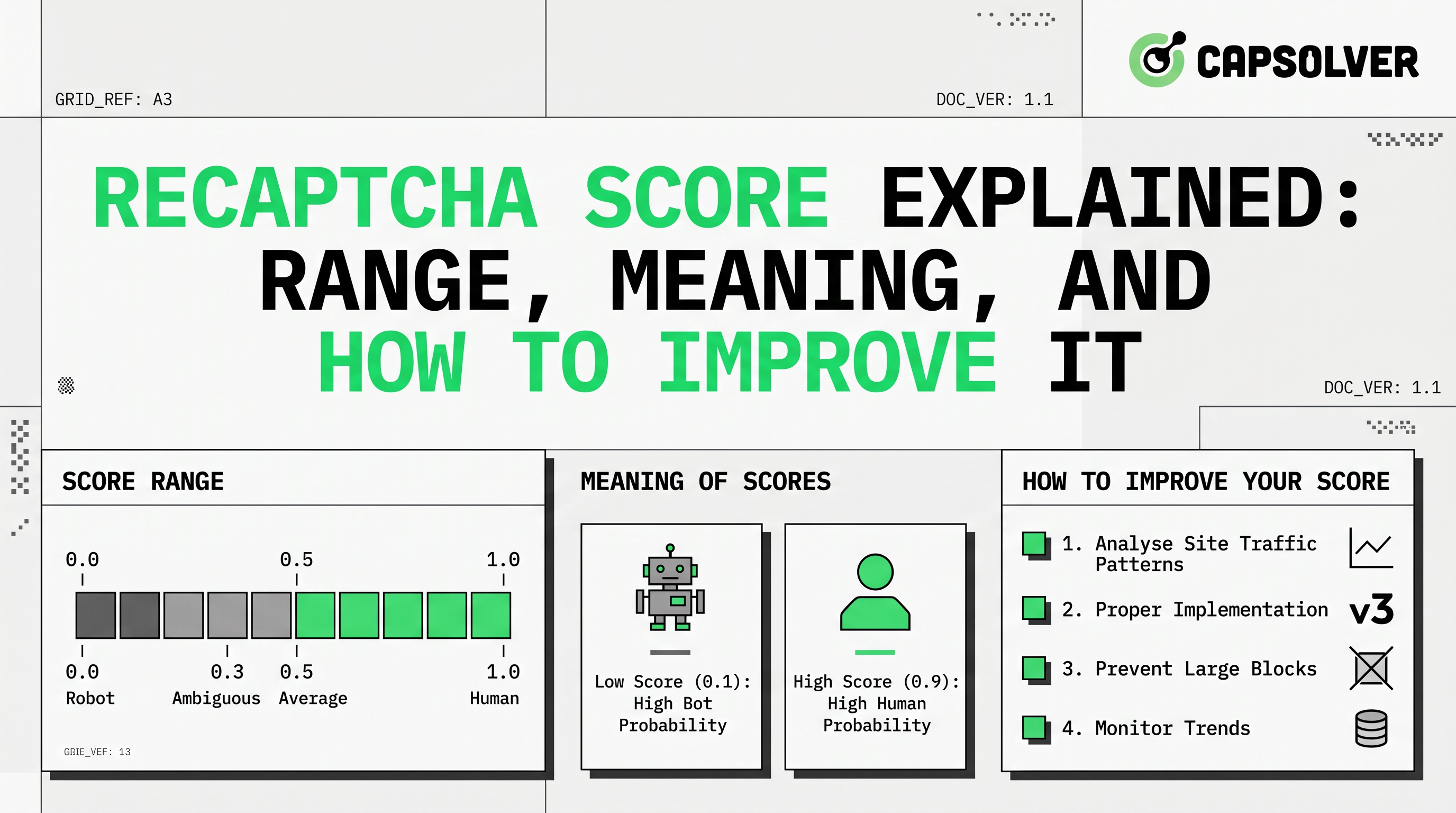
- reCAPTCHA v3 assigns a score from 0.0 to 1.0 to assess user legitimacy, with 1.0 indicating a human and 0.0 a bot.
- Scores are based on invisible behavioral analysis, not interactive challenges.
- Low scores can be caused by automation, unusual browsing patterns, or environmental factors.
- Improving your reCAPTCHA score involves optimizing website integration, user experience, and potentially using advanced CAPTCHA solving services like CapSolver for automation.
- Understanding and acting on reCAPTCHA scores is crucial for effective bot mitigation and maintaining a smooth user experience.
Introduction
In today's digital landscape, distinguishing between legitimate users and automated bots is paramount for website security and user experience. reCAPTCHA, Google's widely adopted security service, plays a critical role in this defense. Specifically, reCAPTCHA v3 operates silently in the background, assigning a reCAPTCHA score to each user interaction. This score is a powerful indicator of trustworthiness, ranging from 0.0 to 1.0. This article will delve into the intricacies of the reCAPTCHA score, explaining its range, meaning, and offering practical strategies to improve it, ensuring your website remains secure without hindering genuine users. We aim to clarify the underlying mechanisms and provide actionable insights for developers and website administrators alike.
What is reCAPTCHA v3 Score?
reCAPTCHA v3 represents a significant evolution in bot detection, moving away from explicit challenges like image puzzles to a more subtle, score-based system. Instead of asking users to prove they are human, reCAPTCHA v3 observes user behavior in the background and assigns a numerical reCAPTCHA score. This score reflects the likelihood that an interaction is legitimate (human) or fraudulent (bot). The core idea is to provide a frictionless experience for real users while still offering robust protection against automated threats. This invisible approach helps maintain website usability, a key factor in modern web design.
The Essence of reCAPTCHA v3
At its heart, reCAPTCHA v3 is a risk analysis engine. It continuously monitors interactions on your website, collecting telemetry data about how users engage with pages. This data is then fed into Google's adaptive risk analysis engine, which uses machine learning to identify patterns indicative of human or bot behavior. The output of this analysis is the reCAPTCHA score, a real-time assessment of risk. This system is designed to be dynamic, learning and adapting to new threats as they emerge, making it a powerful tool in the ongoing battle against malicious automation.
reCAPTCHA Score Range Explained (0.0 to 1.0)
The reCAPTCHA score is a floating-point number between 0.0 and 1.0, where each end of the spectrum signifies a different level of risk. Understanding this range is fundamental to effectively utilizing reCAPTCHA v3 for your website's security. The scale is intuitive: a higher score indicates a lower risk, suggesting the interaction is very likely legitimate, while a lower score points to a higher risk, indicating a potential bot or malicious activity.
- Score 1.0: This is the highest possible score, signifying that the interaction poses a very low risk and is almost certainly legitimate. Users receiving this score are highly likely to be human.
- Score 0.9: Indicates a low-risk interaction, very likely human. Many legitimate users will fall into this category.
- Score 0.7: Represents a moderately low-risk interaction. This is often a default threshold for many websites, where interactions above this score are generally considered human.
- Score 0.3: Suggests a moderately high-risk interaction. At this level, websites might consider implementing additional verification steps.
- Score 0.1: Points to a high-risk interaction, very likely a bot. Actions from users with this score often warrant strong countermeasures.
- Score 0.0: The lowest possible score, indicating that the interaction poses a very high risk and is almost certainly fraudulent or automated. This score is a clear signal for blocking or extreme scrutiny.
It's important to note that for projects without a billing account enabled, reCAPTCHA typically provides only four score levels: 0.1, 0.3, 0.7, and 0.9. Access to the full 11-level granularity requires enabling a billing account as detailed in the Google Cloud reCAPTCHA Guide. This granular reCAPTCHA score allows website owners to implement a flexible security strategy, tailoring responses based on the perceived risk level.
How reCAPTCHA v3 Works: The Invisible Shield
reCAPTCHA v3's effectiveness stems from its ability to analyze user behavior without explicit interaction. This invisible operation is powered by a sophisticated blend of machine learning and behavioral analytics. When a user visits a website integrated with reCAPTCHA v3, a JavaScript API is loaded in the background. This API then observes various user interactions and environmental factors without interrupting the user's journey.
Technical Background and Risk Analysis
The core of reCAPTCHA v3's operation lies in its continuous monitoring of user behavior. This includes, but is not limited to:
- Mouse Movements and Clicks: Analyzing the speed, trajectory, and patterns of mouse movements and clicks can reveal whether an interaction is human-like or automated.
- Typing Patterns: The rhythm, speed, and pauses in typing can differentiate between a human user and a script.
- Scrolling Behavior: How a user scrolls through a page, including speed and stops, provides valuable data.
- Browser and Device Fingerprinting: Information about the user's browser, operating system, plugins, and device characteristics can help identify anomalies.
- IP Address and Geolocation: Unusual IP addresses, rapid changes in location, or connections from known bot networks are red flags.
- Time Spent on Page: The duration of interaction with specific elements or the page as a whole can indicate automated activity.
All this telemetry data is sent to Google's reCAPTCHA backend, where it undergoes real-time analysis by a powerful machine learning engine. This engine compares the observed behavior against a vast dataset of known human and bot patterns. The result of this complex analysis is the reCAPTCHA score, which is then returned to the website's backend for further action. This continuous, adaptive learning process allows reCAPTCHA v3 to evolve with new bot techniques, providing a dynamic defense mechanism as outlined in the Google reCAPTCHA v3 Documentation.
Common Reasons for Low Scores
A low reCAPTCHA score can be a cause for concern, but it doesn't always mean the user is a malicious bot. Several factors can contribute to a low score, even for legitimate users. Understanding these reasons is crucial for diagnosing issues and implementing appropriate mitigation strategies.
- Automated Activity: The most obvious reason for a low score is indeed automated behavior. Bots are designed to mimic human interaction, but reCAPTCHA v3 is highly adept at detecting subtle differences in their patterns, leading to scores closer to 0.0.
- Unusual Browsing Patterns: Users employing VPNs, proxy servers, or Tor browsers might receive lower scores because their network characteristics deviate from typical user behavior. While legitimate, these can sometimes be associated with malicious activities.
- Browser Extensions and Settings: Certain browser extensions (e.g., ad blockers, privacy tools) or restrictive browser settings can interfere with reCAPTCHA's ability to collect telemetry data, potentially leading to lower scores.
- New or Infrequent Users: Users who are new to a website or visit infrequently might not have enough historical data for reCAPTCHA to confidently assess their legitimacy, sometimes resulting in a lower initial score.
- Device and Environment Anomalies: Using outdated browsers, unusual operating systems, or devices with non-standard configurations can sometimes trigger lower scores.
- Rapid Interactions: Performing actions too quickly, such as filling out forms at an unnatural speed, can be flagged as automated behavior.
- Lack of User Engagement: If a user lands on a page and immediately performs an action without much interaction or scrolling, it might be perceived as suspicious.
Google's reCAPTCHA documentation also lists specific reason codes that can accompany a low score, such as AUTOMATION (interaction matches automated agent behavior) or UNEXPECTED_ENVIRONMENT (event originated from an illegitimate environment). These codes provide further insights into why a particular reCAPTCHA score was assigned.
Comparison Summary: CAPTCHA Types
To fully appreciate the advancements of reCAPTCHA v3, it's helpful to compare it with its predecessors and other CAPTCHA types. This table highlights the key differences in user experience, detection methods, and overall approach to bot mitigation. For a deeper dive, you can read about the reCAPTCHA v2 vs v3 key differences.
| Feature | reCAPTCHA v2 (Checkbox) | reCAPTCHA v2 (Invisible) | reCAPTCHA v3 (Score-based) | Cloudflare Turnstile (Managed Challenge) |
|---|---|---|---|---|
| User Interaction | Requires user to click a checkbox, sometimes solve a puzzle | No initial checkbox, may present a challenge if suspicious | No user interaction, completely invisible | No user interaction, invisible challenge |
| Detection Method | Analyzes user behavior before/after checkbox, presents challenges | Analyzes user behavior, presents challenges if needed | Continuous background behavioral analysis, assigns a score | Non-intrusive JavaScript challenges, machine learning |
| Output | Pass/Fail (sometimes with challenge) | Pass/Fail (sometimes with challenge) | Score (0.0 to 1.0) | Pass/Fail (no user interaction) |
| User Experience | Can be disruptive with puzzles | Less disruptive, but challenges can interrupt | Seamless, completely frictionless | Seamless, completely frictionless |
| Primary Goal | Block bots with challenges | Block bots with challenges, improve UX | Differentiate human/bot with a score, enable adaptive actions | Verify human without challenges, privacy-focused |
| Use Case | Forms, logins where explicit verification is acceptable | Forms, logins where less friction is desired | All website interactions, adaptive risk management | Any website interaction, privacy-conscious bot mitigation |
As explained by Cloudflare: What is a CAPTCHA?, the goal of these systems is to provide a challenge-response test to determine whether or not the user is human.
How to Improve Your reCAPTCHA Score
Improving your reCAPTCHA score involves a multi-faceted approach, focusing on both your website's implementation and user experience. The goal is to ensure that legitimate human interactions are clearly distinguishable from automated ones.
For Website Owners and Developers
- Proper Implementation: Ensure reCAPTCHA v3 is correctly integrated across all relevant pages. The reCAPTCHA script should be loaded on every page where you want to receive scores, not just on forms. This allows reCAPTCHA to build a comprehensive understanding of user behavior across your site.
- Verify Actions: When calling
grecaptcha.execute(), always specify an action name (e.g.,login,signup,purchase). This helps reCAPTCHA understand the context of the user's interaction and provides more accurate scores. Always verify that theactionreturned in the assessment matches yourexpectedAction. - Adjust Thresholds: Do not rely on a single, static threshold. Monitor your traffic and adjust your reCAPTCHA score thresholds based on your specific needs and the observed distribution of scores. For instance, you might allow scores above 0.7 to proceed directly, challenge scores between 0.3 and 0.7 with additional verification (e.g., MFA, email verification), and block scores below 0.3.
- Annotate Assessments: For more advanced insights and to help reCAPTCHA learn your site's specific traffic patterns, consider annotating assessments. This involves sending feedback to Google about whether an interaction was truly legitimate or fraudulent, helping to fine-tune the reCAPTCHA model for your site.
- Optimize User Experience: A smooth and intuitive user experience can indirectly improve scores. Websites that are difficult to navigate or load slowly might lead to users exhibiting unusual behaviors that could be misinterpreted by reCAPTCHA.
- Consider reCAPTCHA Enterprise: For high-traffic websites or those with complex bot challenges, reCAPTCHA Enterprise offers more granular scores (11 levels), advanced analytics, and additional features for better bot detection and mitigation.
For Users
While users have less direct control over their reCAPTCHA score, certain browsing habits can help:
- Use a Reputable Browser: Keep your browser updated and use well-known browsers (Chrome, Firefox, Edge, Safari) as they are less likely to trigger unusual flags.
- Avoid VPNs/Proxies (if possible): If you frequently encounter CAPTCHAs, temporarily disabling VPNs or proxies on trusted sites might help improve your score.
- Clear Browser Cache and Cookies: Sometimes, corrupted cookies or excessive cached data can interfere with reCAPTCHA's analysis.
- Browse Naturally: Avoid rapid, unnatural interactions on websites. Engage with content, scroll normally, and fill out forms at a human pace.
Handling Low Scores in Automation: Introducing CapSolver
In the realm of web automation, data scraping, and bot development, encountering reCAPTCHA is a common hurdle. When automated scripts interact with websites, they often receive low reCAPTCHA scores (e.g., 0.0 to 0.3) due to their non-human behavioral patterns. This leads to blocks, challenges, or outright denial of access, hindering automated processes. This is where specialized CAPTCHA solving services become invaluable. Instead of trying to mimic human behavior perfectly, which is increasingly difficult, these services provide a reliable way to obtain high reCAPTCHA scores for automated tasks.
CapSolver is a leading solution in this domain, designed to help overcome reCAPTCHA challenges in automated workflows. It acts as an intermediary, providing tokens with high reCAPTCHA scores (typically 0.7-0.9) that allow automated scripts to proceed seamlessly. This is particularly useful for tasks such as:
- Data Scraping: Accessing public data from websites without being blocked by reCAPTCHA.
- SEO Monitoring: Regularly checking search engine rankings and website performance.
- Price Monitoring: Tracking product prices across various e-commerce platforms.
Redeem Your CapSolver Bonus Code
Boost your automation budget instantly!
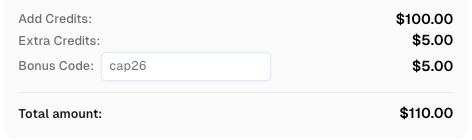
Use bonus code CAP26 when topping up your CapSolver account to get an extra 5% bonus on every recharge — with no limits.
Redeem it now in your CapSolver Dashboard
CapSolver's Application in reCAPTCHA v3
CapSolver integrates with your automation scripts, allowing you to submit reCAPTCHA v3 tasks and receive high-score tokens. The process typically involves:
- Task Creation: Your automation script sends a request to CapSolver with the necessary reCAPTCHA v3 parameters (e.g.,
websiteURL,websiteKey,pageAction). - Score Generation: CapSolver's advanced system processes the request and generates a valid reCAPTCHA v3 token with a high score (e.g., 0.7-0.9), mimicking legitimate human interaction.
- Token Submission: Your script receives this token and submits it to the target website, effectively bypassing the reCAPTCHA challenge.
This approach ensures that your automated tasks can run smoothly and efficiently, without being flagged as malicious. CapSolver emphasizes compliance and ethical use, focusing on legitimate automation needs while adhering to terms of service. For detailed implementation, refer to the CapSolver reCAPTCHA v3 documentation. You can also learn more about how to solve reCAPTCHA v3 with high score on the CapSolver blog.
Conclusion
The reCAPTCHA score is a critical component of modern web security, offering a nuanced approach to distinguishing between human users and automated threats. By understanding its range, the underlying mechanisms of reCAPTCHA v3, and the factors influencing scores, website owners and developers can implement more effective bot mitigation strategies. While legitimate users may occasionally encounter low scores due to various factors, proper implementation and continuous monitoring can significantly improve their experience. For those engaged in legitimate web automation, services like CapSolver provide a compliant and efficient means to navigate reCAPTCHA challenges, ensuring uninterrupted workflows. Ultimately, a well-managed reCAPTCHA strategy balances robust security with a seamless user experience, safeguarding your digital assets in an increasingly automated world.
FAQ
Q1: What is a good reCAPTCHA v3 score?
A good reCAPTCHA score is typically considered to be 0.7 or higher. A score of 1.0 indicates the lowest risk, while scores closer to 0.0 suggest higher risk or automated activity. Many websites set their threshold at 0.7, allowing interactions with scores above this to proceed without additional verification.
Q2: Why is my reCAPTCHA v3 score low even if I'm human?
Several factors can lead to a low reCAPTCHA score for legitimate users, including using VPNs or proxy servers, certain browser extensions, unusual browsing patterns, or interacting with a website too quickly. reCAPTCHA v3 analyzes various behavioral and environmental signals, and deviations from typical human patterns can result in a lower score.
Q3: Can I manually improve my reCAPTCHA score?
As a user, you can improve your chances of getting a higher reCAPTCHA score by using a reputable, updated browser, avoiding excessive use of VPNs/proxies on trusted sites, clearing browser data periodically, and interacting with websites at a natural, human pace. For website owners, proper implementation and continuous monitoring are key.
Q4: How does reCAPTCHA v3 differ from reCAPTCHA v2?
reCAPTCHA v3 operates entirely in the background, assigning a reCAPTCHA score without requiring any user interaction (like clicking a checkbox or solving a puzzle). reCAPTCHA v2, on the other hand, often presents a checkbox or a visual challenge to verify humanity. v3 focuses on frictionless user experience while v2 can be more intrusive.
Q5: What actions can I take based on the reCAPTCHA score?
Based on the reCAPTCHA score, you can implement adaptive actions. For high scores (e.g., 0.7-1.0), allow the interaction to proceed normally. For medium scores (e.g., 0.3-0.7), you might introduce additional verification steps like multi-factor authentication (MFA) or email verification. For low scores (e.g., 0.0-0.3), you could block the interaction, flag it for manual review, or present a more traditional CAPTCHA challenge.
More
reCAPTCHAAug 13, 2026
How to Solve reCAPTCHA v3 with Playwright: Complete Guide
The reliable way to implement playwright recaptcha v3 is to pause the permitted browser task at the verification checkpoint, recover inside the same Playwright page, and resume only after the original action passes its own assertion. CapSolver provides the official `capsolver-core` browser pipeline for detection, parameter reading, solving, and fill-back. Playwright remains responsible for navigation, form state, credentials, and test assertions. This separation avoids stale

reCAPTCHAJul 16, 2026
