How Agentic Browsers Solve CAPTCHAs: AI CAPTCHA Solving Infrastructure

Ethan Collins
Pattern Recognition Specialist
In our previous article, we explored how the Agentic Browser transforms from a passive "display tool" into an active "action agent." We examined its core architecture: intent understanding, environmental perception, and action execution. However, as these digital agents navigate the real-world web, they face a formidable gatekeeper: the CAPTCHA. This article focuses on the "invisible engine"—the CAPTCHA solving infrastructure—that ensures these agents can work proactively for you without interruption. We will delve into why CAPTCHAs are the top obstacle for AI and how specialized services like CapSolver provide the critical infrastructure needed for the next generation of web automation.
Chapter 1: The "Invisible Engine" — CAPTCHA Solving Infrastructure
Imagine this scenario: you ask an Agentic Browser to help you grab tickets for a popular concert. It accurately opens the website, locates the purchase button, and just as it is about to click “Buy Now,” a sliding puzzle or nine blurry traffic-light images suddenly pop up. Your digital assistant is instantly locked out. CAPTCHA, this “Turing Test” born in the early days of the Internet, has now become the most direct — and most troublesome — adversary of AI agents.
1.1 Why CAPTCHA Is the Number-One Obstacle for AI Agents
CAPTCHA stands for “Completely Automated Public Turing Test to Tell Computers and Humans Apart.” Its original purpose was simple: keep bots out while letting humans in. But as AI has evolved, CAPTCHAs have continuously evolved as well — from simple distorted letters to complex sliders, image-selection tasks, and behavioral analysis systems. They are no longer merely a character-recognition problem.
For traditional automation scripts, CAPTCHAs are almost a death sentence. But for Agentic Browsers, they pose an equally severe challenge for three main reasons:
-
A dramatic increase in perception difficulty: Even the most advanced multimodal models struggle to reliably recognize heavily distorted text, blurry image objects, or slider gaps hidden within complex backgrounds. AI can simply “see it wrong,” and a single mistake may break the entire workflow.
-
Layered anti-bot incentive mechanisms: Modern CAPTCHAs are no longer just front-end challenges. Websites monitor mouse trajectories, typing rhythms, page dwell time, and even browser fingerprints. If the system determines that the operator does not “behave like a human,” the CAPTCHA difficulty can instantly escalate — from simply checking a box to solving ten consecutive image-recognition tasks.
-
Time sensitivity and contextual disruption: CAPTCHAs usually come with expiration limits. When an Agentic Browser gets stuck on a CAPTCHA for too long during a multi-step task, login sessions may expire, products may sell out, and the entire task chain can collapse. It is like a sudden bridge collapse on a highway, bringing the whole automation pipeline to a halt.
In other words, without the ability to overcome CAPTCHAs, Agentic Browsers can only travel on the “unguarded backroads” of the web, rather than truly navigating the full highway system of real-world websites. This is exactly why CAPTCHA-solving infrastructures such as CapSolver exist.
1.2 How CapSolver Clears the Path for AI Agents
CapSolver is not a tool aimed at ordinary users, but rather a “CAPTCHA engine” hidden deep within developers’ toolkits. At its core, it is an intelligent CAPTCHA-solving platform that provides API interfaces specifically designed to help automation programs and AI agents handle various types of CAPTCHAs.
We can think of it as a 24/7 on-call CAPTCHA-solving team that never gets tired and operates at extremely high speed — except that its “team members” consist not only of sophisticated AI models, but also highly optimized strategy algorithms.
To better understand its capabilities, the following comparison table illustrates the differences between traditional approaches and CapSolver when facing the same CAPTCHA challenges:
| Comparison Dimension | Local OCR / Simple Models | Human CAPTCHA-Solving Platforms | CapSolver |
|---|---|---|---|
| Supported CAPTCHA Types | Only simple text CAPTCHAs; image selection is mostly ineffective | Theoretically supports all types, but slow and expensive | Covers mainstream CAPTCHAs types |
| Recognition Speed | Milliseconds, but with low success rates | 5–15 seconds per attempt | 1–3 seconds per attempt |
| Success Rate | Low (worse on complex CAPTCHAs) | Relatively high, but affected by worker fatigue and network latency | High and stable |
| Cost Structure | One-time development cost | Pay-per-task with high labor costs | Pay-per-task with low pricing and low marginal costs |
| Anti-Detection Capability | Almost none | Cannot handle behavioral analysis systems | Can integrate with browser environments and return risk-compliant tokens or instructions |
Table 1-1 Comparison Between Traditional CAPTCHA-Solving Methods and CapSolver Capabilities
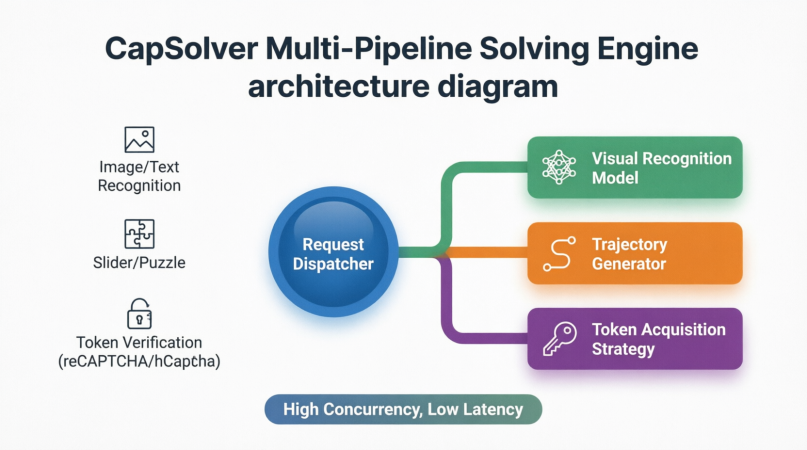
The core operating principle of CapSolver is essentially “AI against AI, strategy against strategy.” For different types of CAPTCHAs, it incorporates specialized solving pipelines:
-
Image and text recognition CAPTCHAs: Using proprietary vision models combined with massive training datasets, CapSolver can accurately recognize heavily distorted, overlapping, or noisy text.
-
Slider and puzzle CAPTCHAs: Instead of directly outputting gap coordinates, it generates smooth movement trajectories based on environmental analysis while simulating subtle hand tremors, acceleration, and deceleration patterns of human touch interactions. These behavioral parameters allow automation programs to drag sliders naturally through verification.
-
Token-based verification systems (reCAPTCHA v2/v3, Cloudflare, etc.): These CAPTCHAs do not require explicit user input. Instead, they evaluate browser behavior in the background and return a one-time token. CapSolver combines browser fingerprints, IP reputation, mouse trajectories, and other contextual data to obtain valid verification tokens through dedicated solving interfaces. The Agentic Browser simply inserts the token into the webpage to pass verification.
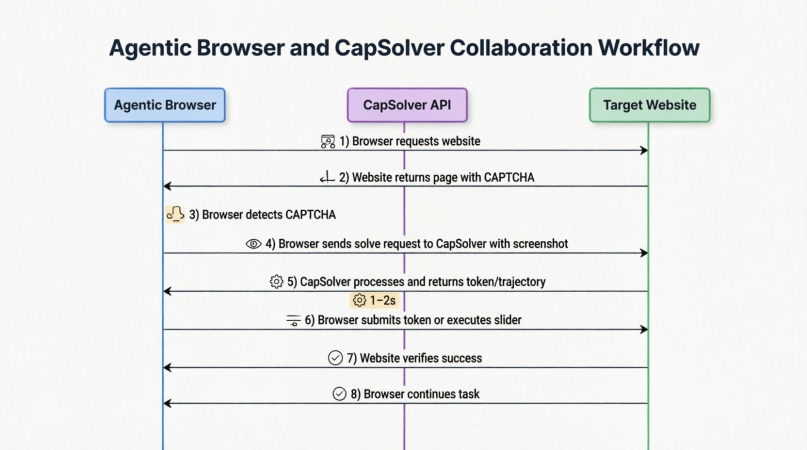
So how do CapSolver and Agentic Browsers collaborate in practice? The following diagram illustrates the complete process:
From the moment the browser sends a request to a website, encounters a CAPTCHA, captures screenshots, calls the CapSolver API, receives a token or behavioral trajectory, submits the verification, and resumes the original task — the entire workflow is tightly integrated and typically completed within 1–2 seconds.
This means that for Agentic Browsers, CAPTCHAs are no longer problems that AI itself must “see” and “guess.” Instead, they become standardized tasks outsourced to specialized infrastructure providers. The browser only needs to capture the challenge, package the context, send it away, wait for the “key,” and continue its journey.
1.3 The Collaborative Workflow Between Agentic Browsers and CapSolver
Now let us connect the dynamic adaptation module of an Agentic Browser with CapSolver and examine how they work together in a seamless “obstacle-crossing performance.”
While the Agentic Browser is executing tasks, its environmental perception layer continuously monitors the webpage. Once a CAPTCHA element is detected (for example, a popup containing a reCAPTCHA iframe), action execution immediately pauses and triggers a dedicated CAPTCHA-handling sub-process.
This process is highly sophisticated and generally includes the following steps:
-
Context Collection: The Agentic Browser captures screenshots of the CAPTCHA region and gathers contextual information such as the current URL, sitekey, browser viewport dimensions, and User-Agent.
-
Task Submission: The screenshots and parameters are packaged together and sent to CapSolver via API while specifying the CAPTCHA type.
-
Background Solving: After receiving the task, CapSolver routes it through the corresponding solving pipeline. For instance, when encountering reCAPTCHA v2, it invokes a dedicated solver to return a valid
g-recaptcha-responsetoken. The entire solving process is usually completed within 1–2 seconds. -
Instruction Return: The Agentic Browser receives the returned result — which may be a token string or a set of mouse trajectory coordinates.
-
On-Site Execution: The Agentic Browser inserts the token into hidden form fields and submits the form, or simulates human-like slider movement according to the returned trajectory data. The CAPTCHA layer disappears, and the original task flow resumes seamlessly.
-
State Verification: The browser verifies whether the page has successfully passed validation and whether the target elements have reappeared before continuing the interrupted workflow.
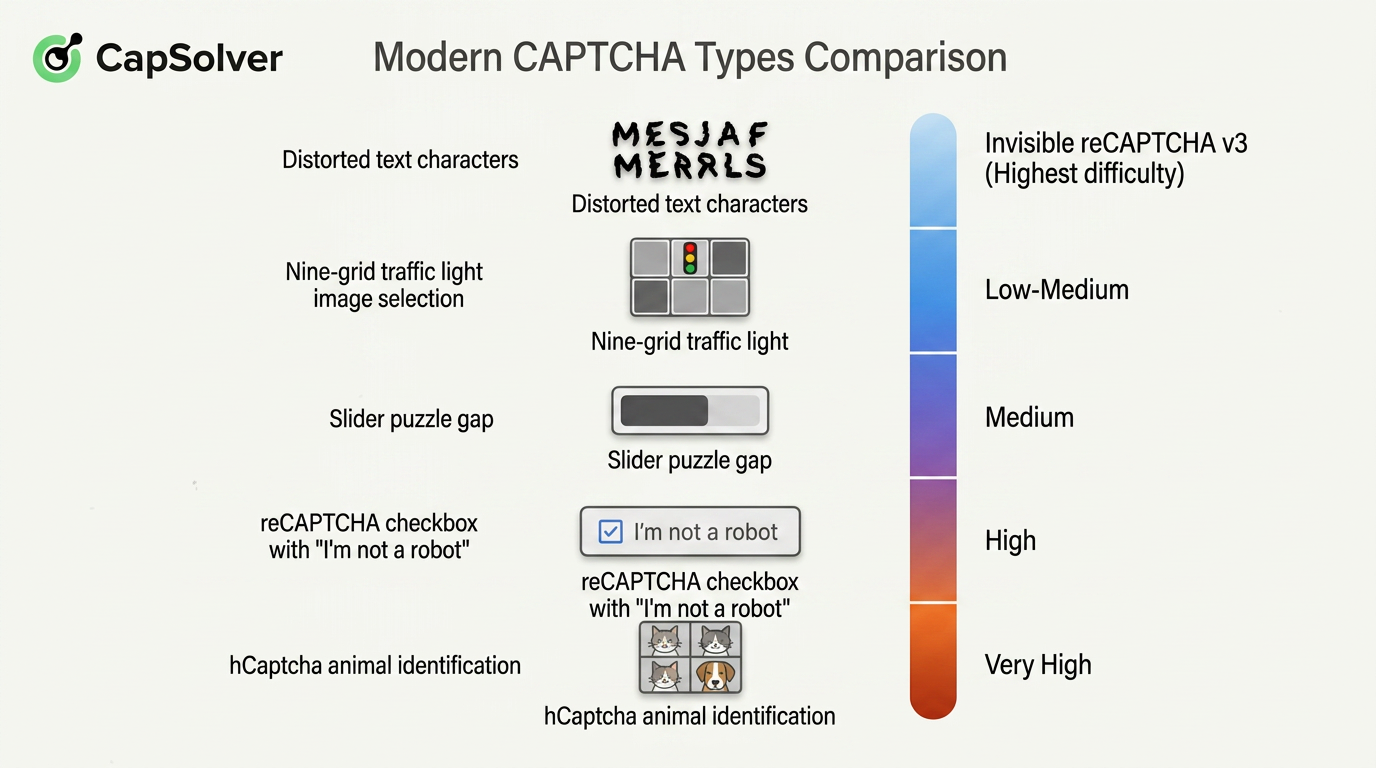
It is important to note that modern CAPTCHAs come in many forms with varying levels of complexity. The following diagram categorizes mainstream CAPTCHA types and marks their corresponding complexity levels:
For end users, the entire process remains completely transparent. In the Agentic Browser’s task log, users may only see a simple message such as:
“reCAPTCHA v2 detected. Automatically resolved in 1.2 seconds.”
An obstacle that would previously have brought the entire automation workflow to a halt is silently resolved in the background.
This also represents a critical leap in AI-agent capabilities: the agent is no longer intimidated by defensive systems specifically designed to block automation. With CAPTCHA-solving infrastructure functioning as an “invisible engine,” Agentic Browsers finally gain the operational freedom required to autonomously execute tasks across the open Internet.
Without this engine, all promises surrounding intelligent agents could easily collapse at the very first CAPTCHA popup.
Chapter 2: Where Are Agentic Browsers Being Applied Today?
If the previous chapters made this technology feel distant, the following examples may completely change your perspective. Agentic Browsers are not abstract concepts floating in the future — they are rapidly entering three major domains: personal productivity, enterprise automation, and data collection. In each area, they are solving practical problems at different levels.
The following diagram summarizes the core application scenarios of Agentic Browsers:
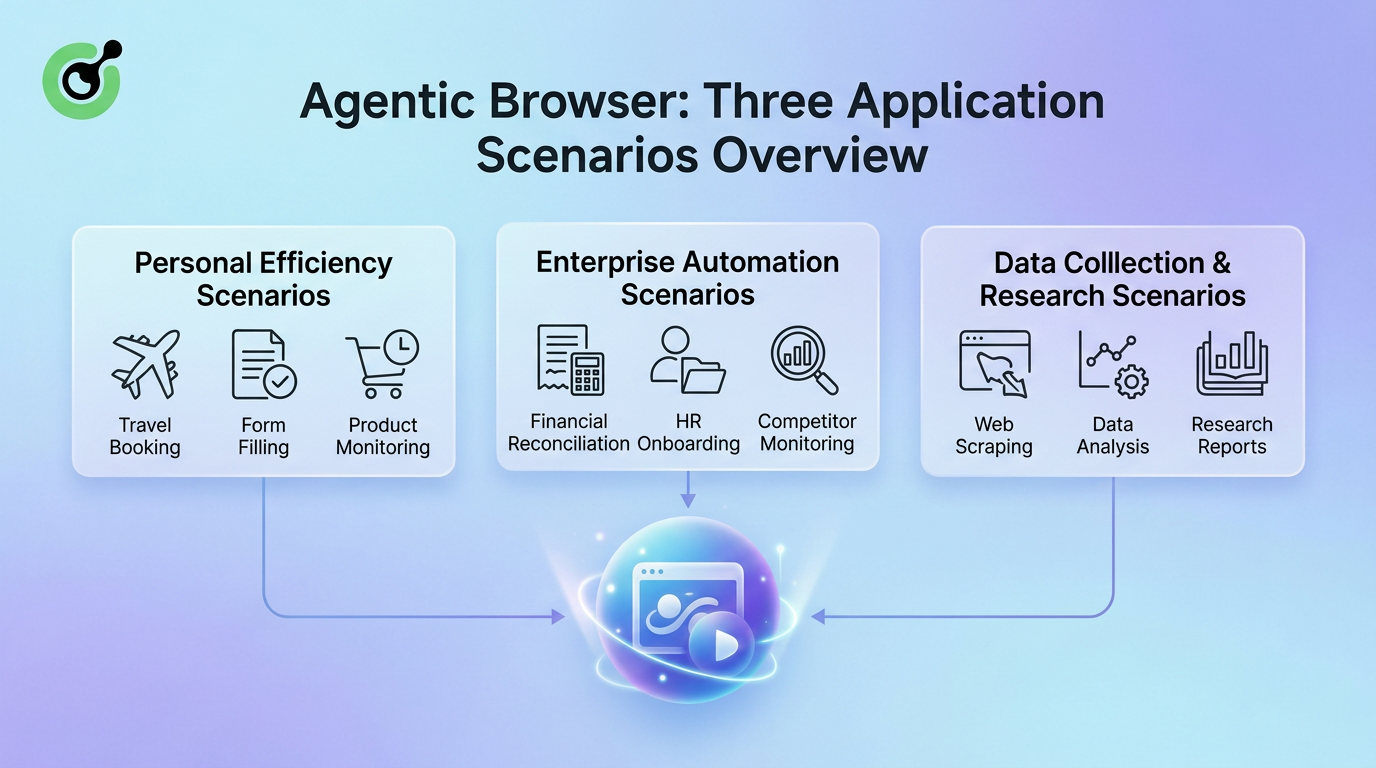
The applications of Agentic Browsers span from individual users to large enterprises, and from daily tasks to professional research workflows. In personal productivity, they help users book trips, fill repetitive forms, and monitor product price fluctuations. In enterprise automation, they handle financial reconciliation, employee onboarding, and competitor tracking. In data collection and research, they serve as tireless crawlers and intelligent analysis assistants.
Next, we will examine these three scenarios in detail to understand how Agentic Browsers actually “get work done.”
2.1 Personal Productivity: Intelligent Delegation of Daily Tasks
For ordinary users, the most immediate value of an Agentic Browser is simple: saving time.
Every day, people perform countless repetitive and multi-step online tasks inside browsers. These tasks usually share three characteristics:
- The objective is clear
- The rules are fixed
- The operations are tedious
Agentic Browsers excel at taking over exactly these kinds of tasks — situations where users know what they want done, but do not want to perform the operations manually.
In personal productivity scenarios, Agentic Browsers can assist with the following typical tasks:
Automated Booking and Purchasing
For example, booking flights, hotels, or purchasing limited-release products. Users only need to describe their requirements in natural language — such as time, preferences, or budget — and the Agentic Browser can autonomously compare prices across websites, filter options, fill out information, and present the optimal result.
Cross-Website Information Integration and Form Filling
Tasks such as visa applications, school applications, or expense reimbursements often require users to repeatedly enter the same information across multiple forms.
An Agentic Browser acts as an “information manager” by securely remembering user data, automatically identifying form fields, and intelligently mapping them. For example, it may split a full name into “First Name” and “Last Name” automatically.
Daily Information Monitoring
Agentic Browsers can monitor product inventory, price changes, or new product releases in the background. Once predefined conditions are met — such as a price drop or restocking event — the browser immediately notifies the user or even places an order automatically.
To better illustrate the transformation in user experience, the following table compares traditional workflows with Agentic Browser workflows:
| Task Type | Traditional Workflow Time Cost | Agentic Browser Workflow | User Role Transformation |
|---|---|---|---|
| Comparing and booking a flight | 15–30 minutes (manually browsing multiple websites) | 1 minute (describe requirements and confirm recommendations) | From executor → decision maker |
| Filling out complex online forms | 20–40 minutes (repeatedly entering identical information) | 2 minutes (reviewing autofill results and correcting minor differences) | From data-entry operator → reviewer |
| Monitoring product restocks or price drops | Extremely time-consuming (manual refreshing and constant attention) | 0 minutes (background monitoring with automatic notifications) | From monitor → receiver |
| Cross-platform data organization | 1–2 hours (copy-pasting and formatting) | 5 minutes (automatic extraction and formatting) | From manual operator → analyst |
Table 2-1 Comparison Between Traditional Personal Tasks and Agentic Browser Efficiency
As shown above, the Agentic Browser effectively acts as a personal assistant. It frees users from being “operators of workflows” and transforms them into “setters of goals” and “reviewers of outcomes.”
2.2 Enterprise Automation: Intelligent Coordination Across Systems
If personal productivity improvements are about “reducing effort,” then the value of Agentic Browsers in enterprise environments is about connection.
Large organizations often rely on numerous disconnected legacy systems, SaaS platforms, and supplier portals that cannot easily integrate through APIs. Employees are forced to become “human glue,” manually transferring information between systems repeatedly.
This is precisely where Agentic Browsers demonstrate their strongest advantages.
Typical Enterprise Use Cases
- Financial and Supply Chain Reconciliation
An Agentic Browser can automatically log into banking portals, download statements, compare them against ERP systems, generate discrepancy reports, and even draft notification emails.
- Full Employee Onboarding Workflows
Organizations can predefine onboarding task packages. The Agentic Browser automatically creates accounts across HR systems, IT systems, mailing lists, and access-control systems, ensuring zero omissions and zero delays.
- Competitor Monitoring and Market Intelligence
Agentic Browsers can function as “market radar” systems by automatically visiting competitor websites, e-commerce stores, and social-media pages, identifying critical information changes, and storing them in structured databases.
To better illustrate the unique positioning of Agentic Browsers in enterprise automation, the following table compares them with manual operations and traditional API integrations:
| Dimension | Manual Operations | API Integration Development | Agentic Browser |
|---|---|---|---|
| Applicable Systems | Any system | Only systems with open APIs | Any web-based system, including legacy internal systems |
| Deployment Cycle | No development required, but time-consuming | Weeks to months (depends on development resources) | Hours to days (task configuration and testing) |
| Flexibility | High (humans adapt dynamically) | Low (interface rewrites required after changes) | High (AI dynamically adapts to page changes) |
| CAPTCHA/Login Handling | Manual handling required | Usually difficult to handle directly | Automatically invokes solving engines seamlessly |
| Scalability | Poor | Extremely strong | Strong (parallel task execution possible) |
| Typical Failure Scenarios | Human fatigue and omissions | API rate limits or version incompatibility | May require human confirmation in extremely chaotic page conditions |
Table 2-2 Comparison of Enterprise Cross-System Automation Solutions
As shown above, Agentic Browsers are not designed to replace APIs. Instead, they provide a lightweight integration layer in situations where APIs are unavailable or too costly to implement.
By leveraging the flexibility and adaptability of AI, Agentic Browsers fill the gaps left by traditional automation approaches, enabling enterprises to achieve intelligent cross-system coordination without rebuilding legacy infrastructure.
2.3 Data Collection and Research: From Manual Gathering to Intelligent Extraction
Data is often described as the oil of the digital age, yet efficiently collecting clean public web data has always been difficult.
Traditional web crawlers rely on fixed parsing rules. Once target websites redesign their layouts or introduce anti-scraping measures, crawlers often fail entirely. Academic researchers, market research firms, and investigative journalism teams frequently need to extract specific information from massive numbers of heterogeneous webpages, making traditional approaches expensive and time-consuming.
Agentic Browsers introduce an entirely new paradigm for data collection:
A shift from extraction based on “code rules” to extraction based on “semantic objectives.”
Their workflow generally operates as follows:
Researchers describe the required data dimensions and sample ranges using natural language. For example:
“Extract product titles, prices, ratings, and review counts from the top 100 e-commerce product pages while excluding sponsored products.”
The Agentic Browser autonomously navigates webpages, identifies relevant information blocks through environmental perception, intelligently extracts and structures the data, and handles complex interactions such as pagination, infinite scrolling, and popups.
When target websites redesign their layouts, traditional crawlers often collapse immediately. In contrast, Agentic Browsers attempt to relocate information visually and continue execution.
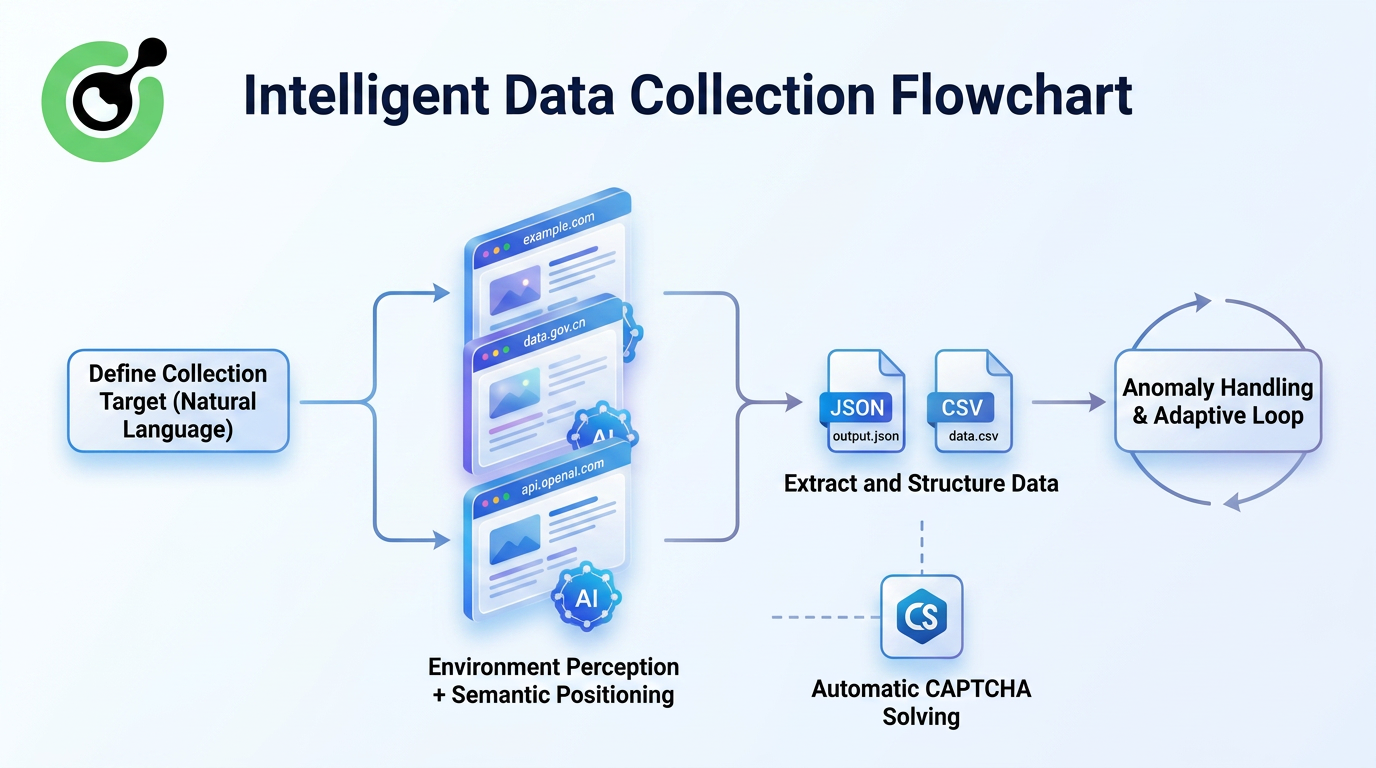
This approach introduces several fundamental improvements:
- No Need to Maintain Parsing Rules
AI understands what a “price” looks like semantically rather than depending on fixed HTML class names.
- Greater Robustness Against Website Redesigns
Minor layout changes no longer immediately break extraction pipelines.
- Ability to Handle Complex Interactions
For websites requiring login, infinite scrolling, or tab switching, Agentic Browsers can interact with the interface like real users before extracting information.
- Reproducible Research Workflows
Task configurations can be saved and shared, making data collection standardized and reproducible.
To better demonstrate the resilience advantages of Agentic Browsers in data collection tasks, the following figure compares traditional crawlers and Agentic Browsers after multiple website redesigns:
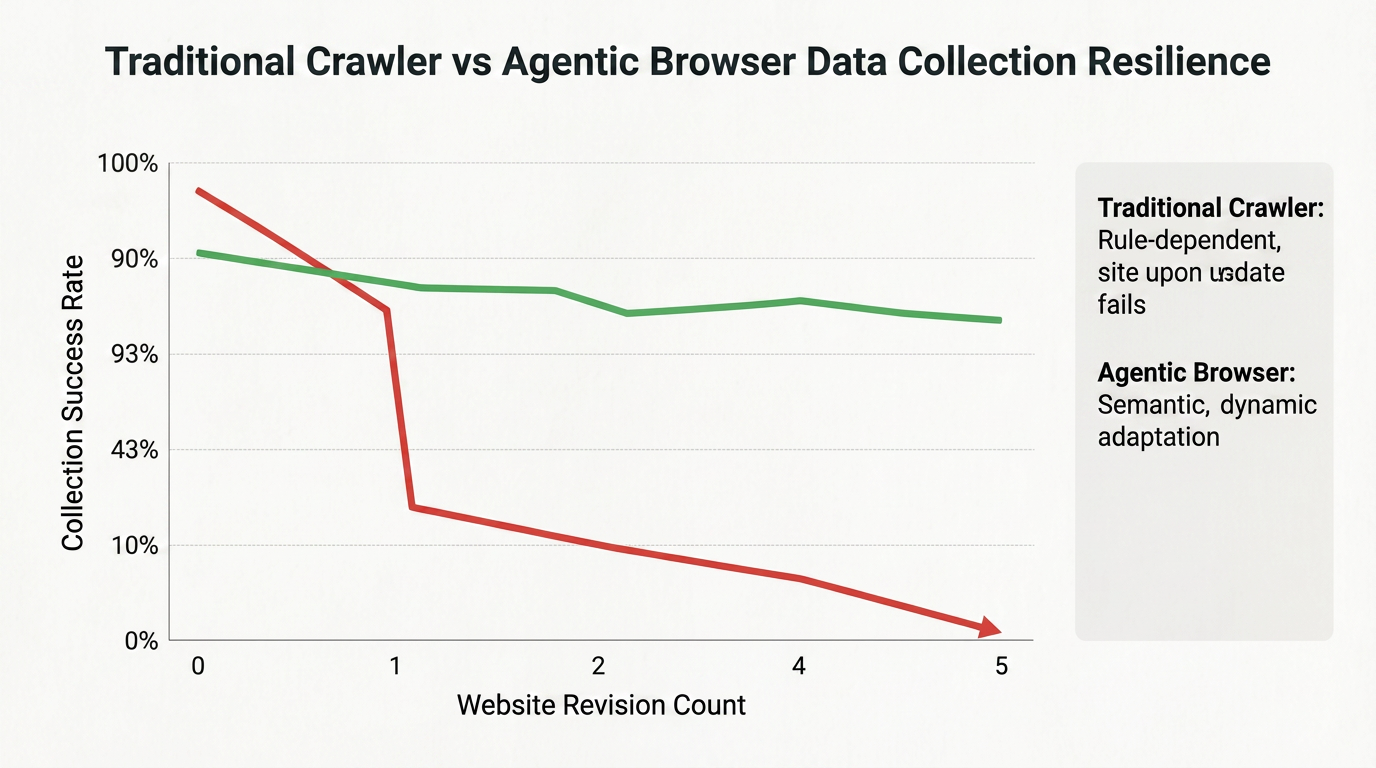
Traditional crawlers experience dramatic success-rate declines after the first website redesign, whereas Agentic Browsers maintain relatively high extraction success rates even after multiple redesigns due to their visual localization and semantic understanding capabilities.
This resilience makes them ideal for long-term, large-scale data collection projects.
For example, imagine a social-science research team that needs to compare specific policy clauses across 200 policy websites spanning 30 countries. Traditionally, this would require research assistants to spend months manually copying and organizing information.
Now, the researchers can configure an Agentic Browser task that automatically traverses these websites, locates policy pages containing target keywords, extracts the relevant clauses, and categorizes them automatically.
Researchers only need to review and analyze the collected results afterward, allowing valuable human effort to focus on actual “research” rather than repetitive “manual transport work.”
Conclusion
The Agentic Browser represents not just a new product, but a whole new philosophy of being online. Its core logic is: the browser should not just be an interface waiting for you to click, but an intelligent agent that understands your intent and helps you complete tasks. From a technical implementation perspective, it relies on the reasoning ability of large language models to plan tasks, multi-modal perception to understand web pages, a real browser environment to execute operations, and infrastructure like CapSolver to clear obstacles on the road to automation. The fusion of these technologies is upgrading the "information window" we have used for thirty years into a true "action platform."
FAQ
Q1: Why can't general AI models solve CAPTCHAs on their own?
A1: While general AI models are powerful, CAPTCHAs are specifically designed to be adversarial and change constantly. Solving them reliably and quickly requires specialized infrastructure like CapSolver that is dedicated to this single task.
Q2: How does CapSolver help Agentic Browsers?
A2: CapSolver acts as an "invisible engine" that handles CAPTCHA challenges via a simple API. This allows the Agentic Browser to bypass security hurdles seamlessly and continue its task without human intervention.
Q3: Will Agentic Browsers replace human jobs?
A3: They are designed to replace "tasks," not "jobs." By handling repetitive digital labor, they free up humans to focus on higher-level creativity and strategic decision-making.
Q4: How can I start using an Agentic Browser today?
A4: Many experimental browsers and extensions are already available. However, for the best experience, ensure you have a reliable CAPTCHA solving service like CapSolver integrated to handle the web's security hurdles.
More
AISep 01, 2026
CloakBrowser Review 2026: Features, Pricing, Pros and Cons
CloakBrowser review for 2026 covering features, pricing, licensing, deployment options, advantages, limitations, alternatives, and ideal use cases.

AISep 01, 2026
How to Solve reCAPTCHA v3 in CrewAI Agents with CapSolver
Build a CrewAI reCAPTCHA v3 solver with CapSolver, typed tools, trusted page actions, server-side token submission, score policy, and page verification.