
🎉MỚICapSolver cho AI agent-Tích hợp MCP, công cụ agent và SDK

Anh Tuan
Data Science Expert
Đã xuất bản Sep 30, 2024
Đã cập nhật Sep 27, 2024 · đọc tối thiểu
node-fetch là gì?
node-fetch là một thư viện JavaScript nhẹ giúp đưa API window.fetch vào Node.js. Nó thường được sử dụng để thực hiện các yêu cầu HTTP từ môi trường Node.js, cung cấp một cách hiện đại và linh hoạt để xử lý các hoạt động mạng không đồng bộ.
Tính năng:
Trước khi sử dụng node-fetch, hãy đảm bảo bạn đã có:
Để sử dụng node-fetch, bạn cần cài đặt nó bằng npm hoặc yarn:
npm install node-fetchhoặc
yarn add node-fetchDưới đây là cách thực hiện yêu cầu GET đơn giản bằng node-fetch:
const fetch = require('node-fetch');

fetch('https://httpbin.org/get')
  .then(response => response.json())
  .then(data => {
    console.log('Response Body:', data);
  })
  .catch(error => {
    console.error('Error:', error);
});Hãy lấy dữ liệu từ API và ghi nhật ký kết quả:
const fetch = require('node-fetch');

fetch('https://jsonplaceholder.typicode.com/posts')
  .then(response => response.json())
  .then(posts => {
    posts.forEach(post => {
      console.log(`${post.title} — ${post.body}`);
    });
  })
  .catch(error => {
    console.error('Error:', error);
});node-fetchTrong phần này, chúng ta sẽ tích hợp CapSolver với node-fetch để xử lý captcha. CapSolver cung cấp API để giải quyết các captcha như ReCaptcha V3, cho phép tự động hóa các tác vụ cần giải quyết các captcha như vậy.
node-fetchĐầu tiên, hãy cài đặt node-fetch và CapSolver:
npm install node-fetch
npm install capsolver
Bây giờ, đây là cách giải quyết ReCaptcha V3 và sử dụng giải pháp trong yêu cầu của bạn:
const fetch = require('node-fetch');
const CAPSOLVER_KEY = 'YourKey';
const PAGE_URL = 'https://antcpt.com/score_detector';
const PAGE_KEY = '6LcR_okUAAAAAPYrPe-HK_0RULO1aZM15ENyM-Mf';
const PAGE_ACTION = 'homepage';

async function createTask(url, key, pageAction) {
  try {
    const apiUrl = 'https://api.capsolver.com/createTask';
    const payload = {
      clientKey: CAPSOLVER_KEY,
      task: {
        type: 'ReCaptchaV3TaskProxyLess',
        websiteURL: url,
        websiteKey: key,
        pageAction: pageAction
      }
    };

    const response = await fetch(apiUrl, {
      method: 'POST',
      headers: { 'Content-Type': 'application/json' },
      body: JSON.stringify(payload)
    });

    const data = await response.json();
    return data.taskId;

  } catch (error) {
    console.error('Error creating CAPTCHA task:', error);
    throw error;
  }
}

async function getTaskResult(taskId) {
  try {
    const apiUrl = 'https://api.capsolver.com/getTaskResult';
    const payload = {
      clientKey: CAPSOLVER_KEY,
      taskId: taskId,
    };

    let result;
    do {
      const response = await fetch(apiUrl, {
        method: 'POST',
        headers: { 'Content-Type': 'application/json' },
        body: JSON.stringify(payload)
      });

      result = await response.json();
      if (result.status === 'ready') {
        return result.solution;
      }

      await new Promise(resolve => setTimeout(resolve, 5000)); // wait 5 seconds
    } while (true);

  } catch (error) {
    console.error('Error fetching CAPTCHA result:', error);
    throw error;
  }
}

async function main() {
  console.log('Creating CAPTCHA task...');
  const taskId = await createTask(PAGE_URL, PAGE_KEY, PAGE_ACTION);
  console.log(`Task ID: ${taskId}`);

  console.log('Retrieving CAPTCHA result...');
  const solution = await getTaskResult(taskId);
  const token = solution.gRecaptchaResponse;
  console.log(`Token Solution: ${token}`);

  const res = await fetch('https://antcpt.com/score_detector/verify.php', {
    method: 'POST',
    headers: { 'Content-Type': 'application/json' },
    body: JSON.stringify({ 'g-recaptcha-response': token })
  });

  const response = await res.json();
  console.log(`Score: ${response.score}`);
}

main().catch(err => {
  console.error(err);
});node-fetchĐể định tuyến các yêu cầu của bạn thông qua proxy với node-fetch, bạn sẽ cần một proxy agent như https-proxy-agent. Dưới đây là cách thực hiện nó:
npm install https-proxy-agentVí dụ với proxy:
const fetch = require('node-fetch');
const HttpsProxyAgent = require('https-proxy-agent');

const proxyAgent = new HttpsProxyAgent('http://username:password@proxyserver:8080');

fetch('https://httpbin.org/ip', { agent: proxyAgent })
  .then(response => response.json())
  .then(data => {
    console.log('Response Body:', data);
  })
  .catch(error => {
    console.error('Error:', error);
});node-fetchĐể xử lý cookie trong node-fetch, bạn có thể sử dụng thư viện như fetch-cookie. Dưới đây là cách sử dụng nó:
npm install fetch-cookieVí dụ:
const fetch = require('node-fetch');
const fetchCookie = require('fetch-cookie');
const cookieFetch = fetchCookie(fetch);

cookieFetch('https://httpbin.org/cookies/set?name=value')
  .then(response => response.json())
  .then(data => {
    console.log('Cookies:', data);
  })
  .catch(error => {
    console.error('Error:', error);
});Bạn có thể tùy chỉnh tiêu đề và thực hiện yêu cầu POST với node-fetch:
const fetch = require('node-fetch');

const headers = {
  'User-Agent': 'Mozilla/5.0 (compatible)',
  'Accept-Language': 'en-US,en;q=0.5',
};

const data = {
  username: 'testuser',
  password: 'testpass',
};

fetch('https://httpbin.org/post', {
  method: 'POST',
  headers: headers,
  body: JSON.stringify(data),
})
  .then(response => response.json())
  .then(data => {
    console.log('Response JSON:', data);
  })
  .catch(error => {
    console.error('Error:', error);
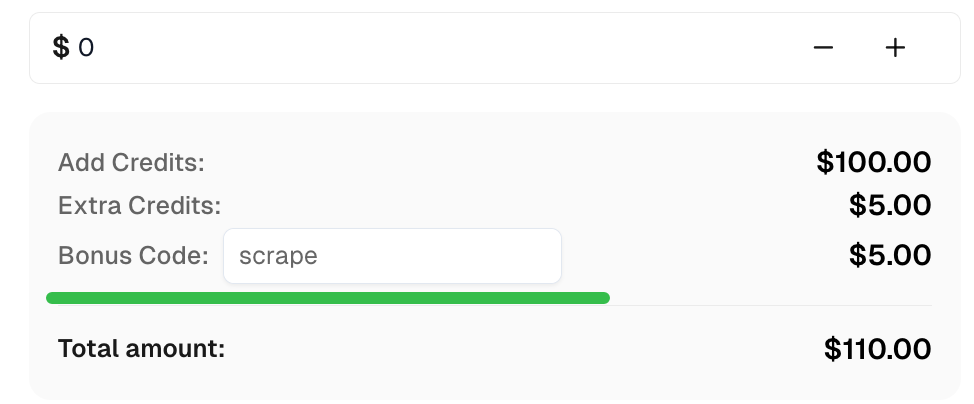
});Nhận Mã thưởng của bạn cho các giải pháp captcha hàng đầu tại CapSolver: scrape. Sau khi đổi, bạn sẽ nhận được thêm 5% tiền thưởng sau mỗi lần nạp, không giới hạn lần.
Với node-fetch, bạn có thể quản lý hiệu quả các yêu cầu HTTP trong Node.js. Bằng cách tích hợp nó với CapSolver, bạn có thể giải quyết các captcha như ReCaptcha V3 và captcha, cung cấp quyền truy cập vào nội dung bị hạn chế. Ngoài ra, node-fetch cung cấp khả năng tùy chỉnh thông qua tiêu đề, hỗ trợ proxy và quản lý cookie, làm cho nó trở thành một công cụ linh hoạt để web scraping và tự động hóa.
Anh Tuan
Data Science Expert
Turning task outcomes into actionable insights.
GIỚI THIỆU TÁC GIẢ
Sửa xử lý CAPTCHA hoạt động trên máy cục bộ nhưng bị lỗi trong tác tử AI trên đám mây. So sánh cấu hình trình duyệt, các phụ thuộc, thông tin xác thực, quyền truy cập mạng và trạng thái trang.
Khắc phục lỗi proxy CapSolver bằng cách kiểm tra tham số tác vụ, xác thực, kết nối mạng và cài đặt phiên trước khi thử gửi lại yêu cầu CAPTCHA.