
🎉नयाAI एजेंट के लिए CapSolver-MCP, एजेंट टूल और SDK एकीकरण

Rajinder Singh
Deep Learning Researcher
प्रकाशित Jul 28, 2026
अद्यतन Jul 28, 2026 · मिनट पढ़ने का समय
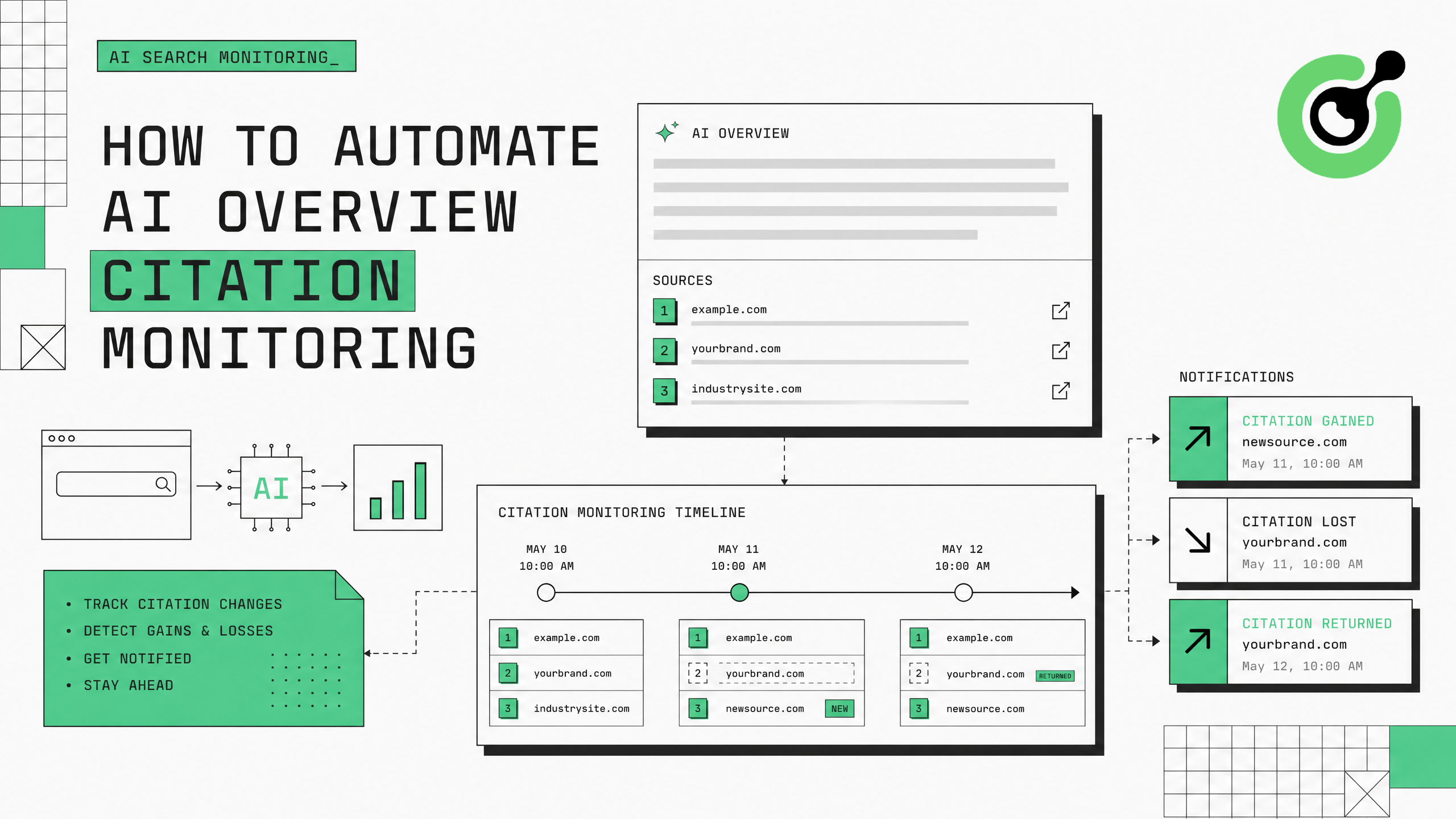
Google के AI ओवरव्यूज अब खोज प्रश्नों के बढ़ते प्रतिशत के लिए दिखाई देते हैं, विशिष्ट वेब पेज को संदर्भित करते हैं। ब्रांड और प्रकाशकों के लिए, इन एआई-जनित सारांशों में संदर्भित होना महत्वपूर्ण ट्रैफिक और प्राधिकरण लाता है। उन पृष्ठों की निगरानी करना जो संदर्भित होते हैं - और जब संदर्भ परिवर्तित होते हैं - गूगल के खोज परिणामों से स्वचालित डेटा संग्रह की आवश्यकता होती है। इस गाइड में गूगल की सत्यापन चुनौतियों को हल करने और लगातार ट्रैकिंग बनाए रखने के लिए CapSolver का उपयोग करके AI ओवरव्यू संदर्भ निगरानी प्रणाली बनाने के बारे में बताया गया है।
गूगल एआई ओवरव्यूज खोज ट्रैफिक के प्रवाह में एक मूलभूत परिवर्तन का प्रतिनिधित्व करते हैं। जब गूगल एक एआई-संचालित उत्तर बनाता है और आपके पृष्ठ को संदर्भित करता है, तो आपको एक सीधा लिंक और अंतर्निहित प्राधिकरण मिलता है। जब आपका संदर्भ खो जाता है, तो उस प्रश्न से ट्रैफिक तुरंत गिर जाता है। सर्च इंजन लैंड अनुसंधान बताता है कि एआई ओवरव्यूज अब जानकारीपूर्ण प्रश्नों के 15-30% पर दिखाई देते हैं, और प्रतिमास बढ़ रहे हैं।
निगरानी के लिए चुनौती यह है कि एआई ओवरव्यू संदर्भ गतिशील हैं - वे सामग्री के ताजगी, प्रश्न पुनर्व्यवस्थिति और गूगल के लगातार मॉडल अपडेट पर आधारित होते हैं। आज के संदर्भित पृष्ठ कल के बिना खो सकते हैं कोई अधिसूचना बिना। स्केल पर हाथ से जांच असंभव है: 200 कीवर्ड की निगरानी करने वाला ब्रांड को प्रत्येक कीवर्ड को हाथ से खोजना, एआई ओवरव्यू तक स्क्रॉल करना और उन स्रोतों को रिकॉर्ड करना पड़ता है - हर सप्ताह कई बार।
स्वचालित निगरानी इस समस्या का समाधान करती है, लेकिन गूगल के बॉट सुरक्षा नियम प्रणालीगत खोज एक्सेस को अवरुद्ध कर देते हैं। 50-100 स्वचालित प्रश्नों के बाद, गूगल एक reCAPTCHA चुनौति प्रस्तुत करता है या पूर्ण रूप से आईपी को ब्लॉक कर देता है। CapSolver आपके निगरानी पाइपलाइन को लगातार चलाए रखने के लिए सत्यापन साफ करने वाली पर слой प्रदान करता है।
आवश्यक पैकेज स्थापित करें:
pip install git+https://github.com/capsolver-ai/capsolver-core.git
pip install aiohttp beautifulsoup4 pandas
अपना API कुंजी सेट करें:
export CAPSOLVER_API_KEY="आपका-capsolver-api-key"अतिरिक्त आवश्यकताएं:
सभी प्रश्न AI ओवरव्यूज उत्पन्न नहीं करते। अपनी निगरानी के लिए उन कीवर्ड पर ध्यान केंद्रित करें जहां AI ओवरव्यूज नियमित रूप से दिखाई देते हैं:
from dataclasses import dataclass, field
from typing import List, Optional
import time

@dataclass
class AIOverviewCitation:
    """एक एआई ओवरव्यू में एक उद्धरण।"""
    position: int          # उद्धरण सूची में 1-आधारित स्थिति
    url: str               # संदर्भित पृष्ठ URL
    domain: str            # संदर्भित पृष्ठ का डोमेन
    anchor_text: str       # स्रोत के लिए उपयोग किया गया पाठ
    snippet_context: str   # एआई ओवरव्यू में आसपास का पाठ

@dataclass
class AIOverviewResult:
    """एक कीवर्ड के लिए पूर्ण एआई ओवरव्यू निगरानी परिणाम।"""
    keyword: str
    has_ai_overview: bool
    citations: List[AIOverviewCitation] = field(default_factory=list)
    overview_text: str = ""
    timestamp: float = 0.0
    your_domain_cited: bool = False
    your_citation_position: Optional[int] = None

# एआई ओवरव्यूज को ट्रिगर करने वाले कीवर्ड
PRIORITY_KEYWORDS = [
    # जानकारीपूर्ण प्रश्न (एआई ओवरव्यूज की दर सबसे अधिक है)
    "जीनरेटिव इंजन ओप्टिमाइजेशन क्या है",
    "एआई खोज के लिए ओप्टिमाइज कैसे करें",
    "एआई संदर्भ के लिए सबसे अच्छी प्रथाएं",
    # व्यावसायिक जांच प्रश्न
    "सबसे अच्छा CAPTCHA हल करने वाला API",
    "2025 में शीर्ष AI एजेंट फ्रेमवर्क",
    # तुलना प्रश्न
    "reCAPTCHA vs Cloudflare Turnstile",
]
जानकारीपूर्ण और "कैसे" प्रश्नों के लिए एआई ओवरव्यूज ट्रिगर दर सबसे अधिक है (40-60%), उसके बाद तुलना प्रश्न (20-30%) और व्यावसायिक जांच प्रश्न (15-25%) हैं।
एआई ओवरव्यूज नहीं ट्रिगर करने वाले कीवर्ड की निगरानी कैप्चा हल करने वाले क्रेडिट का बर्बाद करती है। अपने विशेषज्ञता क्षेत्र में जानकारीपूर्ण प्रश्नों, अपने उत्पाद के संबंध में जहां आपका उत्पाद संबंधित है, तुलना प्रश्नों और अपने श्रेणी में "सबसे अच्छा" प्रश्नों में अपनी सामग्री के उद्धरण के संभावना वाले प्रश्नों पर ध्यान केंद्रित करें।
गूगल खोज परिणाम पृष्ठों से एआई ओवरव्यूज उद्धरण निकालने वाले एक पार्सर बनाएं:
from bs4 import BeautifulSoup
import re

class AIOverviewExtractor:
    """गूगल SERP HTML से एआई ओवरव्यूज उद्धरण निकालें।"""

    def extract(self, html: str, keyword: str, your_domain: str = "") -> AIOverviewResult:
        """HTML को पार्स करें और एआई ओवरव्यूज उद्धरण डेटा निकालें।"""
        soup = BeautifulSoup(html, 'html.parser')

        # एआई ओवरव्यूज उपस्थिति की पहचान करें
        # गूगल विभिन्न कंटेनर वर्गों का उपयोग एआई ओवरव्यूज के लिए करता है
        ai_containers = soup.select(
            '[data-attrid*="ai"], '
            '.ai-overview, '
            '[class*="aiOverview"], '
            '.kp-wholepage [data-md-type]'
        )

        if not ai_containers:
            return AIOverviewResult(
                keyword=keyword,
                has_ai_overview=False,
                timestamp=time.time()
            )

        # एआई ओवरव्यूज पाठ निकालें
        overview_container = ai_containers[0]
        overview_text = overview_container.get_text(separator=" ", strip=True)[:2000]

        # उद्धरण (एआई ओवरव्यू में स्रोत लिंक)
        citations = []
        source_links = overview_container.select('a[href^="http"]')

        for i, link in enumerate(source_links, 1):
            url = link.get('href', '')
            if not url or 'google.com' in url:
                continue

            domain = self._extract_domain(url)
            anchor = link.get_text(strip=True)

            # आसपास के संदर्भ
            parent = link.parent
            context = parent.get_text(strip=True)[:200] if parent else ""

            citations.append(AIOverviewCitation(
                position=i,
                url=url,
                domain=domain,
                anchor_text=anchor,
                snippet_context=context
            ))

        # यह देखें कि क्या आपका डोमेन उद्धृत है
        your_cited = any(your_domain in c.domain for c in citations) if your_domain else False
        your_position = next(
            (c.position for c in citations if your_domain in c.domain), None
        ) if your_domain else None

        return AIOverviewResult(
            keyword=keyword,
            has_ai_overview=True,
            citations=citations,
            overview_text=overview_text[:500],
            timestamp=time.time(),
            your_domain_cited=your_cited,
            your_citation_position=your_position
        )

    def _extract_domain(self, url: str) -> str:
        """URL से डोमेन निकालें।"""
        match = re.search(r'https?://([^/]+)', url)
return match.group(1) if match else urlCAPTCHA हल करने के साथ एक डेटा संग्रह परत बनाएं:
import asyncio
import aiohttp
import random
from capsolver_core import create_capsolver, CaptchaType, CaptchaInfo

class CitationMonitorCollector:
    """CAPTCHA हल करने के साथ एआई ओवरव्यू डेटा एकत्र करें।"""

    def __init__(self, api_key: str, proxies: list):
        self.cap = create_capsolver(api_key=api_key)
        self.proxies = proxies
        self.proxy_idx = 0
        self.extractor = AIOverviewExtractor()
        self.stats = {"searches": 0, "captchas": 0, "overviews_found": 0}

    async def collect_citation_data(
        self, keyword: str, your_domain: str = "", location: str = "us"
    ) -> AIOverviewResult:
        """एक कीवर्ड के लिए एआई ओवरव्यू उद्धरण डेटा एकत्र करें।"""
        proxy = self.proxies[self.proxy_idx % len(self.proxies)]
        self.proxy_idx += 1

        url = f"https://www.google.com/search?q={keyword}&gl={location}&hl=en"
        headers = {
            "User-Agent": "Mozilla/5.0 (Macintosh; Intel Mac OS X 10_15_7) AppleWebKit/537.36 (KHTML, like Gecko) Chrome/125.0.0.0 Safari/537.36",
            "Accept": "text/html,application/xhtml+xml",
            "Accept-Language": "en-US,en;q=0.9"
        }

        async with aiohttp.ClientSession() as session:
            async with session.get(url, headers=headers, proxy=proxy, timeout=30) as resp:
                html = await resp.text()

            # CAPTCHA यदि चालू होती है तो निपटाएं
            if "असामान्य ट्रैफिक" in html.lower() or "g-recaptcha" in html:
                self.stats["captchas"] += 1
                html = await self._solve_and_retry(session, url, headers, proxy)

            self.stats["searches"] += 1

        # उद्धरण डेटा निकालें
        result = self.extractor.extract(html, keyword, your_domain)
        if result.has_ai_overview:
            self.stats["overviews_found"] += 1

        return result

    async def _solve_and_retry(self, session, url, headers, proxy) -> str:
        """गूगल के reCAPTCHA को हल करें और खोज को दोहराएं।"""
        info = CaptchaInfo(
            type=CaptchaType.RECAPTCHA_V2,
            website_url="https://www.google.com",
            website_key="6LfwuyUTAAAAAOAmoS0fdqijC2PbbdH4kjq62Y1b"
        )
        solution = await self.cap.solve(info)

        # हल करने के बाद एक नया प्रॉक्सी उपयोग करें
        new_proxy = self.proxies[self.proxy_idx % len(self.proxies)]
        self.proxy_idx += 1

        async with session.get(url, headers=headers, proxy=new_proxy, timeout=30) as resp:
            return await resp.text()

    async def monitor_batch(
        self, keywords: list, your_domain: str = "", delay: float = 7.0
    ) -> list:
        """दर्जनों कीवर्ड की निगरानी करें सीमित दर के साथ।"""
        results = []
        for keyword in keywords:
            result = await self.collect_citation_data(keyword, your_domain)
            results.append(result)
            await asyncio.sleep(delay + random.uniform(0, 3))
        return results

    async def close(self):
        await self.cap.aclose()
CapSolver reCAPTCHA दस्तावेज़ गूगल के विशिष्ट reCAPTCHA के उपयोग के बारे में विस्तृत जानकारी प्रदान करता है।
समय के साथ उद्धरण बदलावों की निगरानी करें और जब आपके पृष्ठ एआई ओवरव्यूज में उद्धृत होते हैं या खो जाते हैं तो चेतावनी दें:
class CitationChangeDetector:
    """समय के साथ एआई ओवरव्यूज उद्धरण में बदलाव की पहचान करें।"""

    def __init__(self, your_domain: str):
        self.your_domain = your_domain
        self.history = {}  # कीवर्ड -> AIOverviewResult की सूची

    def record_and_detect(self, results: list) -> list:
        """नए परिणामों को रिकॉर्ड करें और पिछली जांच से बदलाव की पहचान करें।"""
        changes = []

        for result in results:
            keyword = result.keyword
            previous = self.history.get(keyword, [])

            if previous:
                last = previous[-1]

                # उद्धरण जीता
                if result.your_domain_cited and not last.your_domain_cited:
                    changes.append({
                        "type": "CITATION_GAINED",
                        "keyword": keyword,
                        "position": result.your_citation_position,
                        "timestamp": result.timestamp
                    })

                # उद्धरण हारा
                elif last.your_domain_cited and not result.your_domain_cited:
                    changes.append({
                        "type": "CITATION_LOST",
                        "keyword": keyword,
                        "previous_position": last.your_citation_position,
                        "timestamp": result.timestamp
                    })

                # स्थिति बदल गई
                elif (result.your_domain_cited and last.your_domain_cited and
                      result.your_citation_position != last.your_citation_position):
                    changes.append({
                        "type": "POSITION_CHANGED",
                        "keyword": keyword,
                        "old_position": last.your_citation_position,
                        "new_position": result.your_citation_position,
                        "timestamp": result.timestamp
                    })

                # एआई ओवरव्यू दिखाई दिया/गायब हो गया
                if result.has_ai_overview and not last.has_ai_overview:
                    changes.append({
                        "type": "AI_OVERVIEW_APPEARED",
                        "keyword": keyword,
                        "timestamp": result.timestamp
                    })

            # इतिहास अपडेट करें
            if keyword not in self.history:
                self.history[keyword] = []
            self.history[keyword].append(result)
            # अंतिम 30 दिनों के इतिहास के साथ रखें
            self.history[keyword] = self.history[keyword][-60:]

        return changes

    def generate_report(self) -> dict:
        """उद्धरण स्थिति के बारे में एक सारांश रिपोर्ट जनरेट करें।"""
        total_keywords = len(self.history)
        cited_keywords = sum(
            1 for k, h in self.history.items()
            if h and h[-1].your_domain_cited
        )
        overview_keywords = sum(
            1 for k, h in self.history.items()
            if h and h[-1].has_ai_overview
        )

        return {
            "total_keywords_monitored": total_keywords,
            "keywords_with_ai_overview": overview_keywords,
            "keywords_where_cited": cited_keywords,
            "citation_rate": f"{cited_keywords/max(overview_keywords,1)*100:.1f}%",
            "average_citation_position": self._avg_position()
        }

    def _avg_position(self) -> float:
        positions = [
            h[-1].your_citation_position
            for h in self.history.values()
            if h and h[-1].your_citation_position
]
return sum(positions) / len(positions) if positions else 0पूर्ण पाइपलाइन को एक योजना के अनुसार चलाएं:
async def run_daily_monitoring():
    """दैनिक AI समीक्षा संदर्भ मॉनिटरिंग चलाएं।"""
    collector = CitationMonitorCollector(
        api_key="YOUR_CAPSOLVER_API_KEY",
        proxies=RESIDENTIAL_PROXY_LIST
    )
    detector = CitationChangeDetector(your_domain="capsolver.com")

    # सभी प्राथमिकता वाले कीवर्ड मॉनिटर करें
    results = await collector.monitor_batch(
        keywords=PRIORITY_KEYWORDS,
        your_domain="capsolver.com",
        delay=8.0
    )

    # परिवर्तन का पता लगाएं
    changes = detector.record_and_detect(results)

    # रिपोर्ट
    if changes:
        print(f"\n{'='*50}")
        print(f"संदर्भ परिवर्तन पाए गए: {len(changes)}")
        for change in changes:
            print(f"  [{change['type']}] {change['keyword']}")
        print(f"{'='*50}\n")

    report = detector.generate_report()
    print(f"सारांश: {report}")

    await collector.close()

# दिन में एक बार चलाएं
asyncio.run(run_daily_monitoring())
अपना बोनस कोड दावा करें: CapSolver डैशबोर्ड पर कोड WEBS का उपयोग करें ताकि प्रत्येक भरोसे पर 5% अतिरिक्त बोनस मिले। विस्तृत स्केल पर AI ओवरव्यू संदर्भों की ट्रैकिंग करने वाली GEO टीम के लिए आवश्यक।
मॉनिटरिंग डेटा सीधे आपकी जनरेटिव इंजन अनुकूलन रणनीति को प्रभावित करता है:
CapSolver ब्लॉग पर AI और स्वचालन के बारे में अतिरिक्त पैटर्न के बारे में जानकारी है। अलग-अलग खोज इंजनों पर अलग-अलग CAPTCHA प्रकारों के साथ निपटने के लिए, CapSolver उत्पाद पृष्ठ सभी समर्थित सत्यापन प्रणालियों की सूची प्रदान करता है।
AI ओवरव्यू संदर्भ मॉनिटरिंग के अनुकूलन के लिए CAPTCHA-जागरूक खोज संग्रह परत, एक संदर्भ निकालने पार्सर और एक परिवर्तन डिटेक्शन प्रणाली की आवश्यकता होती है। CapSolver निरंतर मॉनिटरिंग के लिए वेरिफिकेशन-स्पष्ट बुनियादी ढांचा प्रदान करता है जो Google के AI ओवरव्यू के लिए reCAPTCHA चुनौतियों को 3-8 सेकंड में हल करता है ताकि आपकी GEO रणनीति के पास हमेशा ताजा संदर्भ डेटा हो।
20-50 उच्च प्राथमिकता वाले कीवर्ड से शुरू करें जहां आप AI ओवरव्यू की उम्मीद करते हैं, अपने निकालने की सटीकता की पुष्टि करें, फिर पूर्ण कीवर्ड कवरेज तक पहुंचें। संदर्भ परिवर्तन डेटा सीधे सामग्री अनुकूलन निर्णयों को प्रभावित करता है - आपके लक्ष्य प्रश्नों के लिए Google के AI द्वारा संदर्भ-मूल्यवान क्या माना जाता है, इसकी समझ में मदद करता है।
उच्च प्राथमिकता वाले कीवर्ड (ब्रांड शब्द, मुख्य उत्पाद प्रश्न) के लिए दिन में एक बार। व्यापक मॉनिटरिंग (उद्योग शब्द, सूचनात्मक प्रश्न) के लिए 2-3 बार प्रतिदिन पर्याप्त है। AI ओवरव्यू संदर्भ जब सामग्री अपडेट होती है तो घंटों में बदल सकते हैं, इसलिए अधिक आवृत्ति वाली जांच बदलावों को जल्दी पकड़ती है।
वर्तमान में 15-30% सूचनात्मक प्रश्नों में AI ओवरव्यू दिखाई देते हैं, जो बढ़ रहा है। "कैसे करें" प्रश्न, परिभाषा प्रश्न और तुलना प्रश्न उच्च ट्रिगर दर वाले हैं। व्यावसायिक और लेनदेन प्रश्न कम बार AI ओवरव्यू दिखाते हैं।
अधिकांश AI ओवरव्यू 3-8 स्रोतों को संदर्भित करते हैं, जिनमें पहले 2-3 स्थानों को अधिकांश क्लिक-थ्रू ट्रैफिक मिलता है। संदर्भ सूची में स्थान 1 को स्थान 5+ की तुलना में लगभग 3-5 गुना अधिक क्लिक मिलते हैं। आपके संदर्भ स्थान की निगरानी करना आपके डोमेन के संदर्भ में होने की तुलना में बराबर महत्वपूर्ण है।
हां। your_domain को एक प्रतिद्वंद्वी के डोमेन पर सेट करें ताकि उनकी संदर्भ आवृत्ति और स्थिति की ट्रैकिंग हो सके। अपनी संदर्भ दर की प्रतिद्वंद्वी के साथ तुलना करें ताकि सामग्री के अंतर और अवसरों की पहचान की जा सके। उन प्रतिद्वंद्वियों की ट्रैकिंग करें जो आपकी अनुपस्थिति में कीवर्ड के लिए नियमित रूप से दिखाई देते हैं।
200 कीवर्ड के साथ 8-सेकंड के देरी और लगभग 10% CAPTCHA मुठभेड़ दर के साथ, आपको लगभग 20 CAPTCHA हल करने की आवश्यकता होती है। $2-3 प्रति 1,000 reCAPTCHA v2 हल करने पर, दैनिक लागत लगभग $0.04-0.06 होती है - व्यापक AI ओवरव्यू संदर्भ ट्रैकिंग के लिए लगभग $2 प्रति माह।
Rajinder Singh
Deep Learning Researcher
Making CAPTCHA solving more reliable in automated workflows.
लेखक के बारे में
Rust में वेब स्क्रैपिंग के स्केलेबल आर्किटेक्चर सीखें, reqwest, scraper, असिंक्रोनस स्क्रैपिंग, हेडलेस ब्राउज़र स्क्रैपिंग, प्रॉक्सी रोटेशन, और संगत CAPTCHA का निपटारा।
CapSolver के साथ RoxyBrowser के एकीकरण करें ताकि ब्राउज़र के कार्यों को स्वचालित किया जा सके और reCAPTCHA, Turnstile और अन्य CAPTCHAs को बायपास किया जा सके।