
🎉NEWCapSolver for AI agents-MCP, agent tools, and SDK integrations

Lucas Mitchell
Automation Engineer
Published Sep 19, 2023
Updated Sep 10, 2026 · min read
To identify what reCAPTCHA version is being used, start with the extension method below, then compare the visible widget and the requests associated with the form you are inspecting. This guide covers reCAPTCHA v2, v2 Enterprise, invisible v2, v3, and v3 Enterprise, keeping Charles as an optional inspection tool. CapSolver provides a detector for supported CAPTCHA parameters. If the result is ambiguous, confirm it against the application code or, for a site you manage, the configured key. The reCAPTCHA glossary explains the basic terminology.
Use the detector described in the official CapSolver extension identification guide:
isInvisible, isEnterprise, and isReCaptchaV3.The guide also documents pageAction and other parameters. Check that the result belongs to the form you are inspecting; different forms can use different integrations. If detection is incomplete, continue with the manual checks below.
Key Points:
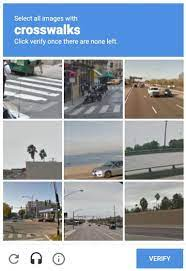
google.com or recaptcha.net.Google’s reCAPTCHA version overview explains that checkbox v2 may pass a user immediately or present a challenge. The hostname alone does not identify the version.
Key Points:
s. This parameter is not exclusive to Enterprise. More details on this can be found in the reCAPTCHA v2 Enterprise Documentation.google.com or recaptcha.net./enterprise/ are an Enterprise-family clue. Confirm the key type and the relevant widget before classifying it as v2 Enterprise.https://www.google.com/recaptcha/enterprise/anchorFor these versions, Charles Proxy can help inspect the requests behind an invisible interaction. You can also use the browser’s Network panel and the page’s integration code; Charles is optional.
If you prefer browser developer tools, skip the Charles setup and use the integration checks in each section below.
Download and install Charles Proxy.
In Charles, open the SSL Proxying settings under the Proxy menu. Follow the official SSL Proxying instructions for the installed version.
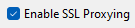
Add only the hosts you observe in the relevant requests, on port 443; common examples are www.google.com and www.recaptcha.net. Match the actual subdomain rather than assuming a bare domain covers it.
HTTPS inspection also requires the Charles root certificate to be installed and trusted in the browser or system used for your test. Follow Charles’s certificate setup instructions for that environment.
Use a dedicated, authorized debugging environment: decrypted traffic may contain tokens or account data. Stop the capture when finished and follow your environment’s procedure for removing temporary certificate trust. The original screenshot above illustrates an older Charles interface; menu labels may differ by version.
Key Points:
google.com or recaptcha.net.recaptcha, then inspect the relevant reload request if one is present.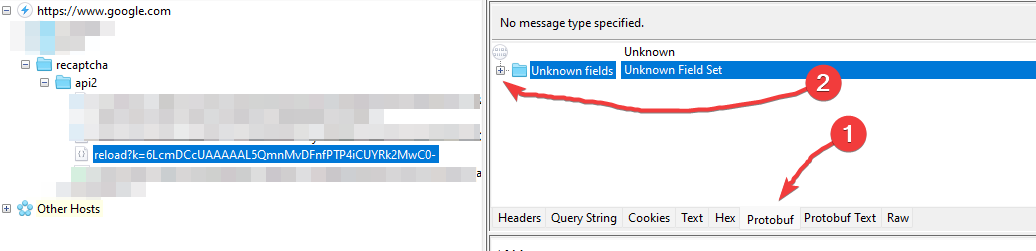
The original capture shows fi at protobuf position 6. Treat this as a historical observation from that capture, not a guaranteed detection rule: internal packet layouts are not a stable public API.
Without Charles, inspect the widget configuration and how the action invokes it. Google’s invisible reCAPTCHA guide documents button binding and programmatic rendering with data-size="invisible". Check the surrounding integration as well; an absent checkbox alone does not prove invisible v2.

Key Points:
google.com or recaptcha.net.recaptcha, then inspect the relevant reload request if one is present.
The original screenshot shows an action string at protobuf position 8. That position is a historical packet-layout detail, not sufficient proof of v3 or Enterprise. The presence of an action alone is also insufficient: CapSolver documents a pageAction field for some v2 tasks.
Without Charles, inspect the active integration. Google’s v3 guide documents action-based execution, including a site-key render parameter and an action passed to grecaptcha.execute. That method name alone is not decisive because invisible v2 also uses it. For Enterprise, check enterprise.js, the relevant invocation, and the owner’s key configuration.
Once identified, use the current CapSolver reCAPTCHA v3 task documentation to map the observed action to the supported request fields.

Start with the extension, then use widget behavior, integration code, and Charles or browser Network observations to check the result. Keep the original packet screenshots as examples, and confirm uncertain cases against the active key configuration. Use CapSolver with the documented parameters for the identified integration.
Q: Does reCAPTCHA v2 always display an image challenge?
No. Checkbox v2 can complete without an image challenge. Invisible v2 can also run without showing one on every interaction.
Q: Does a badge without a checkbox mean reCAPTCHA v3?
No. Invisible v2 can look similar. Inspect the widget configuration, active invocation, and associated key rather than relying on the badge.
Q: Does an Enterprise request prove the page uses v3 Enterprise?
No. It identifies the Enterprise API family. Confirm the active key type and behavior before selecting a task type.
Q: Do I need Charles to identify the version?
No. The CapSolver extension and browser developer tools provide alternative inspection paths. Charles is useful for permitted network debugging, but its packet-field positions are not permanent version identifiers.
Lucas Mitchell
Automation Engineer
Helping browser automation recover and continue.
ABOUT THE AUTHOR
Find a reCAPTCHA callback through widget attributes, rendering code, and browser debugging. Check token handling without relying on fragile internal paths.

Use CapSolver getToken for supported reCAPTCHA tasks with a documented JSON request, a cURL example, direct results, and clear token-validation steps.
