CAPTCHA has become an important line of defence in our daily online activities. Whether it's logging in to an account, submitting a form or making an online payment, CAPTCHA is there behind the scenes to keep us safe. However, CAPTCHAs can sometimes be a stumbling block to automation, hindering progress in automated testing, data collection and efficiency. So how do you get around these complex CAPTCHA challenges in a way that is legal and reasonable? In this article, we'll dive into how to solve reCAPTCHA using Python and Selenium, providing developers and data scientists with an efficient path to a solution.
What is reCAPTCHA?
reCAPTCHA is a security service developed by Google to protect websites from spam and abuse. It distinguishes human users from automated bots, ensuring that interactions such as form submissions, account creations, and login attempts are performed by real people. reCAPTCHA employs various challenges to verify user authenticity, ranging from simple checkboxes to complex image recognition
Struggling with the repeated failure to completely solve the irritating captcha? Discover seamless automatic captcha solving with CapSolver AI-powered Auto Web Unblock technology!
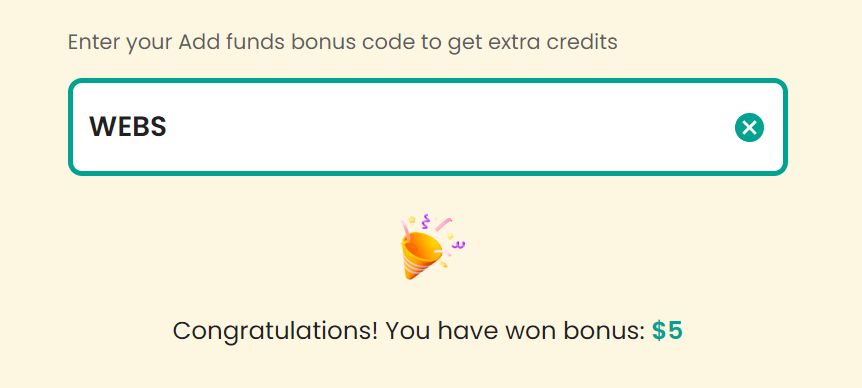
Claim Your Bonus Code for top captcha solutions; CapSolver: WEBS. After redeeming it, you will get an extra 5% bonus after each recharge, Unlimited
Types of reCAPTCHA
reCAPTCHA v2 (Checkbox): Users are presented with a checkbox labeled "I’m not a robot." Upon clicking the checkbox, users might be prompted to solve an image-based challenge if the system suspects they might be a bot.
reCAPTCHA v2 (Invisible): This version does not show a visible checkbox. It runs in the background and triggers a challenge only if it detects suspicious activity.
reCAPTCHA v3: Unlike previous versions, reCAPTCHA v3 does not interrupt the user with challenges. Instead, it assigns a score based on user behavior, allowing website administrators to determine the necessary action.
reCAPTCHA Enterprise: A more advanced version designed for large-scale businesses, providing higher security and customizability.
Why Solve reCAPTCHA?
Solving reCAPTCHA is necessary in certain legitimate scenarios:
Automated Testing: Developers and testers might need to solve reCAPTCHA to automate the testing of their web applications.
Data Scraping: When scraping your own data or performing tasks on sites where you have permission, solving reCAPTCHA can be crucial.
Accessibility: Automating repetitive tasks for users with disabilities or providing alternative access methods might require solving reCAPTCHA.
Efficiency: Automating interactions on websites that use reCAPTCHA can significantly improve productivity and efficiency.
How to solve reCAPTCHA with CapSolver
reCAPTCHA can cause many hurdles for legitimate automation tasks such as data collection, test automation, and so on. So in order to solve these problems once and for all, developers are actually recommended to use a third-party solving service such as CapSolver, which automatically solves many types of CAPTCHA problems and helps developers to solve these obstacles so that the task runs smoothly.
1. Prerequisites
Identify the target site as using reCAPTCHA
You can usually see obvious features on the page
In the request logs, you'll also see https://www.google.com/recaptcha****
Obtain the site key
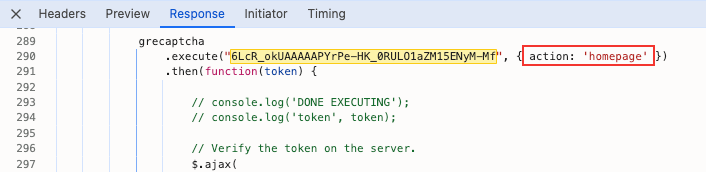
For both V2 and V3, you can search for the request /recaptcha/api2/reload?k=6LcR_okUAAAAAPYrPe-HK_0RULO1aZM15ENyM-Mf in the browser request logs, where k= is the key value we need
Differentiate between V2 and V3
V2 and V3 have different handling methods. V2 requires image recognition to select answers, while V3 is relatively unobtrusive; However, V3 requires providing an Action during verification. Based on the previously obtained key value, search the response page, and you'll find the Action value in the page
Call the CapSolver service
2. Distinguishing reCAPTCHA versions
In the browser request logs, you can see that for V2, after the /recaptcha/api2/reload request, a /recaptcha/api2/userverify request is usually needed to obtain the passage token;
For V3, the /recaptcha/api2/reloadrequest can obtain the passage token directly
3. Complete example of CapSolver API call
Python reCAPTCHA V2
pythonCopy
# pip install requests
import requests
import time

# TODO: set your config
api_key = "YOUR_API_KEY"  # your api key of capsolver
site_key = "6Le-wvkSAAAAAPBMRTvw0Q4Muexq9bi0DJwx_mJ-"  # site key of your target site
site_url = "https://www.google.com/recaptcha/api2/demo"  # page url of your target site

# site_key = "6LelzS8UAAAAAGSL60ADV5rcEtK0x0lRsHmrtm62"
# site_url = "https://mybaragar.com/index.cfm?event=page.SchoolLocatorPublic&DistrictCode=BC45"


def capsolver():
    payload = {
        "clientKey": api_key,
        "task": {
            "type": 'ReCaptchaV2TaskProxyLess',
            "websiteKey": site_key,
            "websiteURL": site_url
        }
    }
    res = requests.post("https://api.capsolver.com/createTask", json=payload)
    resp = res.json()
    task_id = resp.get("taskId")
    if not task_id:
        print("Failed to create task:", res.text)
        return
    print(f"Got taskId: {task_id} / Getting result...")

    while True:
        time.sleep(3)  # delay
        payload = {"clientKey": api_key, "taskId": task_id}
        res = requests.post("https://api.capsolver.com/getTaskResult", json=payload)
        resp = res.json()
        status = resp.get("status")
        if status == "ready":
            return resp.get("solution", {}).get('gRecaptchaResponse')
        if status == "failed" or resp.get("errorId"):
            print("Solve failed! response:", res.text)
            return


token = capsolver()
print(token)
Python reCAPTCHA V3
pythonCopy
# pip install requests
import requests
import time

# TODO: set your config
api_key = "YOUR_API_KEY"  # your api key of capsolver

site_key = "6LcR_okUAAAAAPYrPe-HK_0RULO1aZM15ENyM-Mf"  # site key of your target site
site_url = "https://antcpt.com/score_detector/"  # page url of your target site


def capsolver():
    payload = {
        "clientKey": api_key,
        "task": {
            "type": 'ReCaptchaV3TaskProxyLess',
            "websiteKey": site_key,
            "websiteURL": site_url,
            "pageAction": "homepage",
        }
    }
    res = requests.post("https://api.capsolver.com/createTask", json=payload)
    resp = res.json()
    task_id = resp.get("taskId")
    if not task_id:
        print("Failed to create task:", res.text)
        return
    print(f"Got taskId: {task_id} / Getting result...")

    while True:
        time.sleep(1)  # delay
        payload = {"clientKey": api_key, "taskId": task_id}
        res = requests.post("https://api.capsolver.com/getTaskResult", json=payload)
        resp = res.json()
        status = resp.get("status")
        if status == "ready":
            return resp.get("solution", {}).get('gRecaptchaResponse')
        if status == "failed" or resp.get("errorId"):
            print("Solve failed! response:", res.text)
            return

# verify score
def score_detector(token):
    headers = {
        "accept": "application/json, text/javascript, */*; q=0.01",
        "accept-language": "fr-CH,fr;q=0.9",
        "content-type": "application/json",
        "origin": "https://antcpt.com",
        "priority": "u=1, i",
        "referer": "https://antcpt.com/score_detector/",
        "sec-ch-ua": "\"Not/A)Brand\";v=\"8\", \"Chromium\";v=\"126\", \"Google Chrome\";v=\"126\"",
        "sec-ch-ua-mobile": "?0",
        "sec-ch-ua-platform": "\"macOS\"",
        "sec-fetch-dest": "empty",
        "sec-fetch-mode": "cors",
        "sec-fetch-site": "same-origin",
        "user-agent": "Mozilla/5.0 (Macintosh; Intel Mac OS X 10_15_7) AppleWebKit/537.36 (KHTML, like Gecko) Chrome/126.0.0.0 Safari/537.36",
        "x-requested-with": "XMLHttpRequest"
    }
    url = "https://antcpt.com/score_detector/verify.php"
    data = {
        "g-recaptcha-response": token
    }
    data = json.dumps(data, separators=(',', ':'))
    response = requests.post(url, headers=headers, data=data)

    print(response.json())
    print(response)

token = capsolver()
print(token)

...
...
{
    'success': True,
    'challenge_ts': '2024-07-19T10:50:56Z',
    'hostname': 'antcpt.com',
    'score': 0.7,
    'action': 'homepage'
}
Conclusion
Solving reCAPTCHA using Python, Selenium, and services like CapSolver offers an effective solution for legitimate automation tasks. This approach streamlines processes such as automated testing, data collection, and improving accessibility, while significantly enhancing efficiency.
Key points to remember:
Understand different reCAPTCHA types and their mechanisms.
Correctly identify reCAPTCHA versions and obtain necessary site keys.
Utilize third-party services like CapSolver to simplify the process.
Use the provided Python scripts as a starting point for your specific needs.
While powerful, always use these techniques responsibly and in compliance with website terms of service. As web security evolves, staying updated with the latest CAPTCHA-solving methods will be crucial for maintaining efficient automation processes.
Ethan Collins
AI Agent Workflow Engineer
Building clearer handoffs between AI agents and tools.