
🎉NEWCapSolver for AI agents-MCP, agent tools, and SDK integrations

Ethan Collins
AI Agent Workflow Engineer
Published Jan 27, 2025
Updated Jan 23, 2025 · min read
Ever felt like you're the only human struggling with reCAPTCHA? Let's fix that!
We've all been there - you're trying to log into a website or submit a form, and suddenly you're playing "spot the traffic lights" in a grid of blurry images. This is reCAPTCHA, Google's security system designed to separate humans from bots. But what happens when you need to automate tasks while looking human to Google?
The reCAPTCHA grid image method is a challenge mechanism used in reCAPTCHA v2 (the "I'm not a robot" checkbox) to verify human interaction by asking users to identify specific objects or patterns within a grid of images. Here's how it works:
Key Components of the Grid Image Method:
Challenge Prompt:
Users are presented with a textual instruction (e.g., "Select all squares containing traffic lights" or "Click on images with boats").
Image Grid:
A 3x3 (or similar) grid of segmented images is displayed. Each tile may contain a portion of the target object, background noise, or unrelated content.
User Interaction:
The user must click on all tiles that match the prompt. For multi-step challenges, additional grids may appear after initial selections.
Verification:
Google’s system analyzes the user’s selections to determine if they align with expected human-like recognition patterns, distinguishing bots from humans.
At its core, reCAPTCHA recognition involves two main steps:
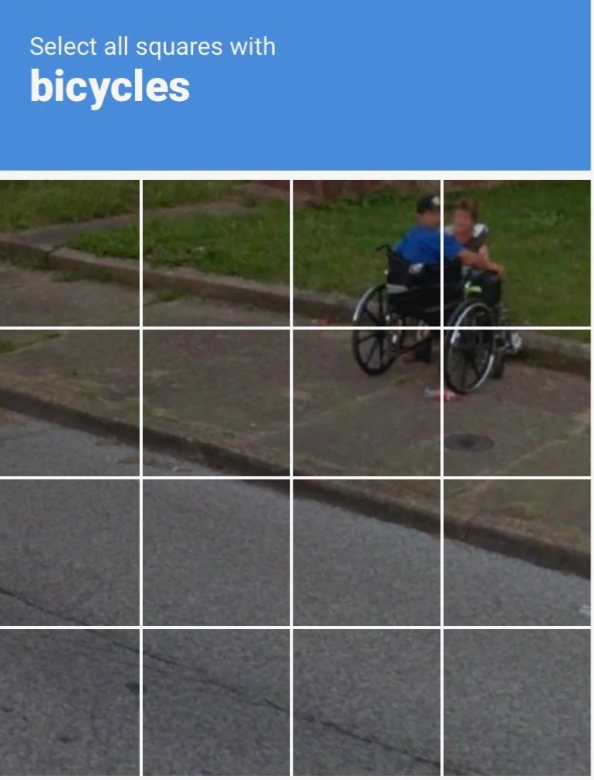
"Select all images with bicycles" - the bane of every internet user's existence
Capsolver one main tool for tackling these challenges:
ReCaptchaV2Classification - For reCaptcha v2 grid images
This task type is designed to analyze the provided image grid and associated textual prompt, enabling Capsolver to accurately determine and return the specific images that must be selected to successfully solve the challenge.
Here's what you need to know to make it work:
| Parameter | What It Does |
|---|---|
type |
Specifies which challenge type you're solving. V2 only as it's the only type that have images |
imageBody |
The actual image data you need to analyze (base64 encoded) |
question |
The challenge question (e.g., "Pick the images with motorcycles") |
Prepare Your Request
{
  "type": "ReCaptchaV2Classification",
  "imageBody": "base64_encoded_image_string",
  "question": "Please click each image containing a motorcycle"
}
Get the Answer
Capsolver returns coordinates of correct images:
{
  "solution": {
    "coordinates": [[12, 15], [120, 85], ...]
  }
}
Automate the Click
Use these coordinates to simulate human-like clicks
| Old Methods | Capsolver's Approach | |
|---|---|---|
| Speed | 2-15 seconds | Instant recognition |
| Accuracy | 60-80% | 95%+ |
| Human Verification | Yes | No |
| Cost Efficiency | High | Low |
Python Example
import base64
with open("image.jpg", "rb") as image_file:
    encoded_string = base64.b64encode(image_file.read()).decode("utf-8")
NodeJS Example
const fs = require('fs/promises');
const path = require('path');

async function convertImageToBase64() {
  try {
    const filePath = path.join(__dirname, 'image.jpg');
    const imageBuffer = await fs.readFile(filePath); // Non-blocking read
    const base64Image = imageBuffer.toString('base64');
    return base64Image; // Use this where needed
  } catch (error) {
    console.error('Error:', error.message);
    throw error; // Re-throw for handling in calling code
  }
}

// Usage
convertImageToBase64()
  .then(base64 => console.log('Conversion successful!'))
  .catch(err => console.error('Failed:', err.message));
Golang Example
package main

import (
    "encoding/base64"
    "fmt"
    "io/ioutil"
    "os"
)

func main() {
    // Read image file
    filePath := "image.jpg"
    data, err := os.ReadFile(filePath)
    if err != nil {
        fmt.Printf("Error reading file: %v\n", err)
        return
    }

    // Encode to Base64
    encoded := base64.StdEncoding.EncodeToString(data)

    // Use the encoded string (e.g., print first 100 characters)
    fmt.Printf("Base64: %s...\n", encoded[:100])
}question parameter exactly matches the challenge prompt. This is crucial for accurate results. {
"/m/0pg52": "taxis",
"/m/01bjv": "bus",
"/m/02yvhj": "school bus",
"/m/04_sv": "motorcycles",
"/m/013xlm": "tractors",
"/m/01jk_4": "chimneys",
"/m/014xcs": "crosswalks",
"/m/015qff": "traffic lights",
"/m/0199g": "bicycles",
"/m/015qbp": "parking meters",
"/m/0k4j": "cars",
"/m/015kr": "bridges",
"/m/019jd": "boats",
"/m/0cdl1": "palm trees",
"/m/09d_r": "mountains or hills",
"/m/01pns0": "fire hydrant",
"/m/01lynh": "stairs"
}# Example click simulation with human-like variance
import random
def human_click(x, y):
x_variance = x + random.randint(-2, 2)
y_variance = y + random.randint(-2, 2)
slight_delay = random.uniform(0.1, 0.3)
move_mouse(x_variance, y_variance, slight_delay)CapSolver Browser Extension is a cutting-edge solution designed to seamlessly resolve CAPTCHA challenges, including reCAPTCHA v2 image grid recognition, with unmatched speed and accuracy. Leveraging advanced AI and computer vision algorithms, it automates captcha solving directly within your browser, eliminating the need for manual intervention or coding expertise.
Download Chrome
Download Firefox
Get started with Capsolver's API and say goodbye to CAPTCHA frustration today!
Ethan Collins
AI Agent Workflow Engineer
Building clearer handoffs between AI agents and tools.
ABOUT THE AUTHOR
Understand reCAPTCHA v3 score range (0.0 to 1.0), its meaning, and how to improve your score. Learn how to handle low scores and optimize user experience.

Facing "reCAPTCHA Invalid Site Key" or "invalid reCAPTCHA token" errors? Discover common causes, step-by-step fixes, and troubleshooting tips to resolve reCAPTCHA verification failed issues. Learn how to fix reCAPTCHA verification failed please try again.


