
🎉NEWCapSolver for AI agents-MCP, agent tools, and SDK integrations

Lucas Mitchell
Automation Engineer
Published May 11, 2023
Updated Aug 28, 2023 · min read
There are several versions of reCAPTCHA:
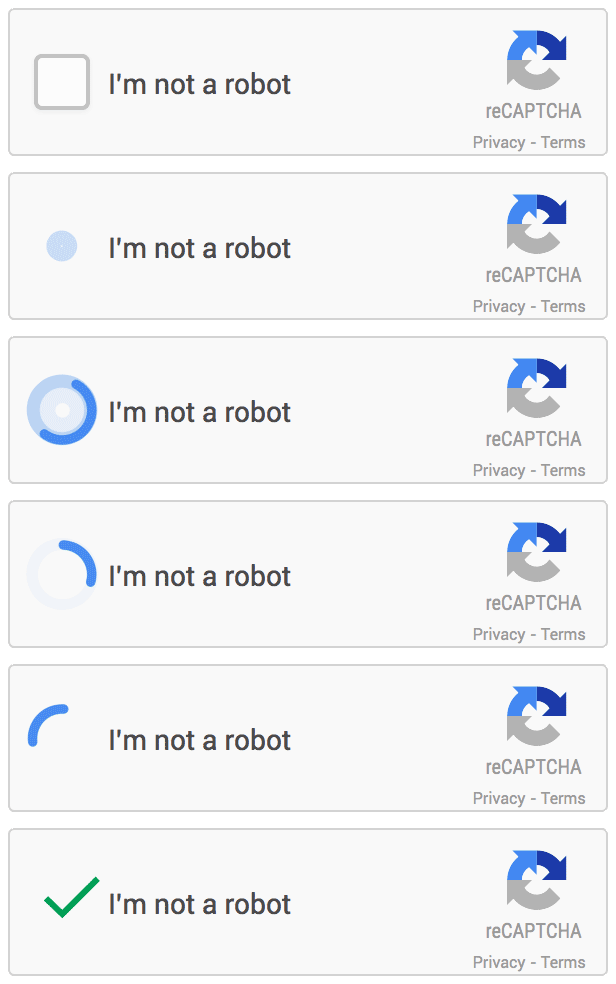
In this blog, we will focus on solving reCAPTCHA v2 and looks like:
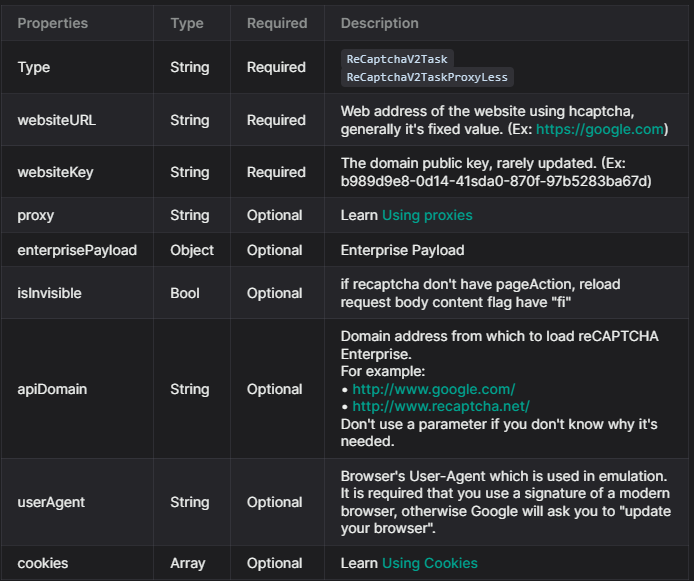
To solve reCaptcha v2, follow our documentation. Some parameters are required and some are optional. For this example, we will only use the required parameters. The task types for reCAPTCHA v2 are:
ReCaptchaV2Task: This task type requires your own proxies.ReCaptchaV2TaskProxyLess: This task type uses the server's built-in proxy.ReCaptchaV2EnterpriseTask: This task type requires your own proxies.ReCaptchaV2EnterpriseTaskProxyLess: This task type uses the server's built-in proxy.For this example, we will use ReCaptchaV2TaskProxyLess as the site uses standard reCAPTCHA v2. If the site uses Recaptcha Enterprise, you will need to send the correct task type (ReCaptchaV2EnterpriseTaskProxyLess or ReCaptchaV2EnterpriseTask) and ensure all required parameters are included.
If any parameters are missing, you will likely encounter issues with the token not being accepted by the website. You can find all the parameters in this picture:
For get the captcha solved, first you need to submit all the information needed, for this we use the method createTask:
POST https://api.capsolver.com/createTask

{
  "clientKey": "YOUR_API_KEY",
  "task": {
    "type": "ReCaptchaV2TaskProxyless",
    "websiteURL": "site url",
    "websiteKey": "site key"
  }
}To verify the results, you'll need to continuously poll the getTaskResult API endpoint until the captcha is resolved.
Here's an example request:
POST https://api.capsolver.com/getTaskResult
Host: api.capsolver.com
Content-Type: application/json

{
    "clientKey":"YOUR_API_KEY",
    "taskId": "TASKID_OF_CREATETASK" //ID created by the createTask method
}
Once the captcha is successfully resolved, you'll receive a response similar to the one depicted in the following image:
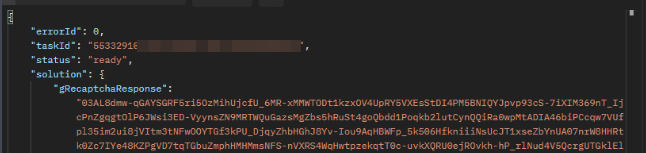
The captcha token received can be verified by submitting it to the relevant site.
⚠️ If the token is rejected, it may indicate that some information is missing or incorrect. We recommend thoroughly checking whether the reCaptcha is standard or enterprise and whether it requires additional parameters listed as optional in our documentation.
In conclusion, while solving reCAPTCHA may seem a daunting task, capsolver.com makes the process swift and efficient. By following the steps outlined above, you can easily resolve reCAPTCHA v2.
Capsolver Team 💜
Lucas Mitchell
Automation Engineer
Helping browser automation recover and continue.
ABOUT THE AUTHOR
Understand reCAPTCHA v3 score range (0.0 to 1.0), its meaning, and how to improve your score. Learn how to handle low scores and optimize user experience.

Facing "reCAPTCHA Invalid Site Key" or "invalid reCAPTCHA token" errors? Discover common causes, step-by-step fixes, and troubleshooting tips to resolve reCAPTCHA verification failed issues. Learn how to fix reCAPTCHA verification failed please try again.


